Best Apple Podcast Downloader in 2026: Top Tools Tested
 By Olivia Anderson
Apple Music Tips
Updated on 10/12/2026
By Olivia Anderson
Apple Music Tips
Updated on 10/12/2026
Apple Podcasts is one of the most popular platforms for discovering podcasts, but it does not provide a direct option to download episodes as MP3 files or save them permanently for offline use. If you want to download Apple Podcasts for offline listening, backup, or transferring to other devices, you need a reliable podcast downloader. In this guide, we tested different Apple Podcast downloaders, including desktop software and online tools, to help you find the best option in 2026.

Part 1: Quick Picks - Which Apple Podcast Downloader Is Right for You?
After testing different Apple Podcast downloaders, we selected the top options based on ease of use, features, and overall reliability to help you quickly find the right solution.
| Rank | Key Features | Recommendation |
|---|---|---|
| 🥇 TunePat Apple Podcast Converter | Download Apple Podcasts Convert to MP3, AAC, FLAC, etc. Preserve metadata Batch download support |
Best choice for users who want a stable desktop solution to save Apple Podcasts offline. |
| 🥈 TunePat Music One |
Multiple streaming platforms Music & Podcast Downloader Multiple output formats Batch processing |
Ideal for users who listen to podcasts and music across different services. |
| 🥉 PodcastToMP3 | No software installation required Browser-based access Simple download process |
Suitable for occasional downloads, but usually comes with limited features and stability. |
Part 2: Safe Desktop Apps for Downloading Apple Podcasts
1. TunePat Apple Podcast Converter - Best for Apple Music Users
TunePat Apple Podcast Converter is a powerful desktop tool for downloading Apple Podcasts and saving episodes for offline listening. It allows users to convert podcast episodes into popular audio formats, including MP3, AAC, WAV, FLAC, AIFF, and ALAC, while preserving important metadata such as titles and episode information. Besides Apple Podcasts, it also supports downloading Apple Music songs, albums, playlists, and iTunes M4P music. After conversion, you can transfer the downloaded audio files to any device or player you prefer.
Step 1 After downloading TunePat Apple Podcast Downloader on your computer, launch it. Assuming you already have iTunes or the Music App installed, you'll be greeted with a dashboard similar to the one in the screenshot below. For this hands-on test, we opted to use the iTunes App to source our podcast library. Just a quick heads-up: before you can browse or fetch any content, make sure you're properly signed in to your active Apple Music account; otherwise, the app won't be able to pull your subscription data.
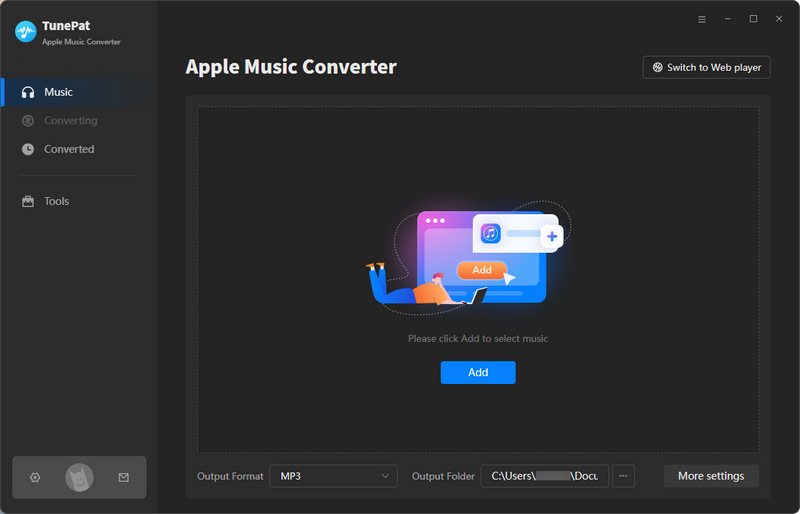
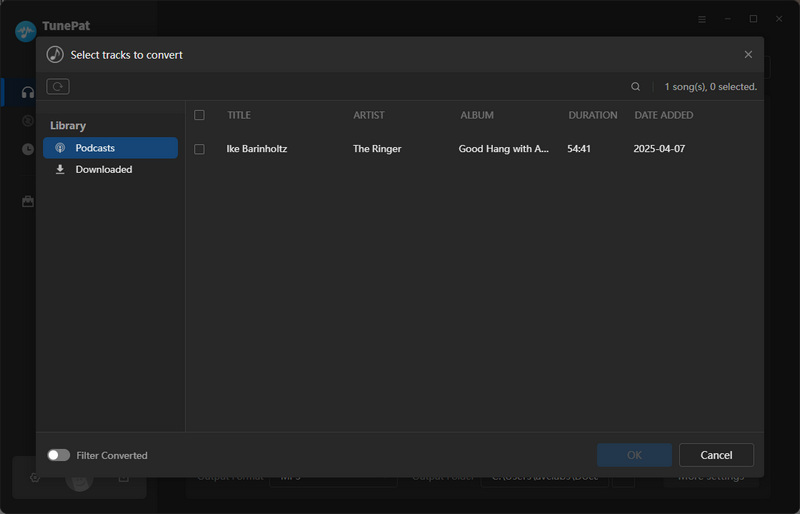
Step 2 Before converting, you can modify some basic settings, such as output format, bit rate, output folder, output file name, etc. Once you've applied your preferred settings, close the configuration panel. Next, click the central "Add" button to bring up the Apple Music window. From there, switch to the "Podcasts" tab on the left-hand sidebar, browse through your library to select the shows or individual episode you want to download, and hit "OK" to add them to TunePat.
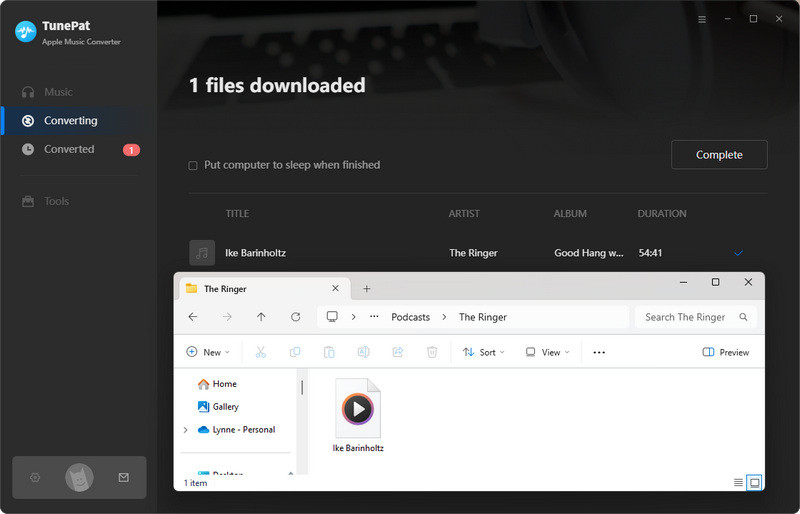
Step 3 Finally, hit the "Convert" button to start the conversion. The total processing time will naturally depend on the length of your episodes, so feel free to let it run in the background. Once the conversion wraps up, TunePat automatically pops open the designated output folder containing all your freshly downloaded MP3 files. From this point on, you can transfer these files to any portable player, sync them to your phone, or play them back without any format or platform restrictions whatsoever.
TunePat Apple Podcast Converter: Quick Pros & Cons
2. 2. TunePat Music One - Best Multi-Platform Music & Podcast Downloader
TunePat Music One is an all-in-one music and podcast downloader designed for users who enjoy content from multiple streaming platforms. Unlike TunePat Apple Podcast Converter, which focuses mainly on Apple Music and Apple Podcasts, Music One brings different music and podcast services together in a single application. With the latest updates, TunePat Music One has added support for downloading Apple Podcasts from the Apple Podcasts web player. During our testing, Music One was able to analyze individual episode links and prepare them for download, making it a convenient option for users who want to save specific podcast episodes offline.
However, the Apple Podcasts feature is still being improved. At the time of our testing, Music One supported episode links from the Apple Podcasts website, while show links were not yet supported. When a link cannot be analyzed successfully, Music One provides an option to switch to Recording Mode, although the recording process may take longer compared with direct downloading.
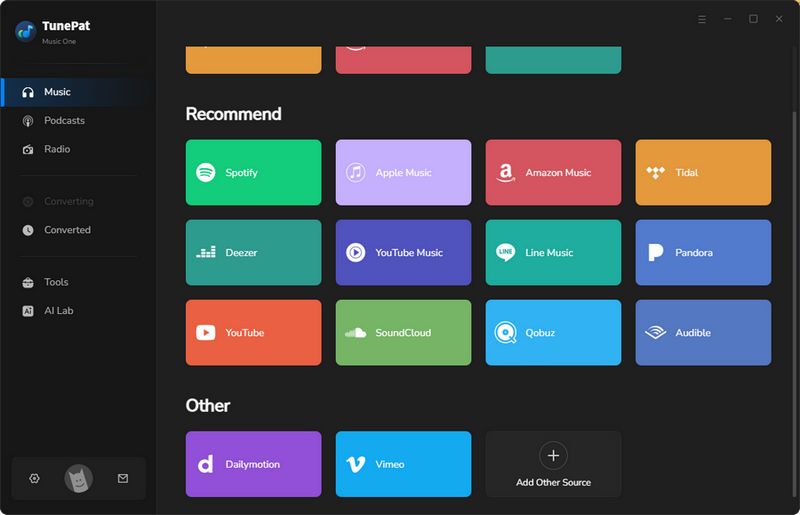
Step 1 After launching TunePat Music One, you will see the main interface. As an all-in-one downloader, TunePat Music One supports over 20 popular streaming platforms, including podcast services. From the left panel, you can select podcasts as your download source and access a large collection of over 120,000 podcast episodes. Besides Apple Podcasts, this built-in podcast library provides an additional way to discover and download your favorite shows in one place.
For the purpose of this test, Apple Podcasts was chosen. At the top of the window, two operational modes are available: Download Mode and Recording Mode. During testing, it was observed that the current version only parses direct links to individual episodes; links pointing to entire shows or multiple episodes are not yet supported. In cases where download attempts fail, switching to Recording Mode serves as a viable alternative.
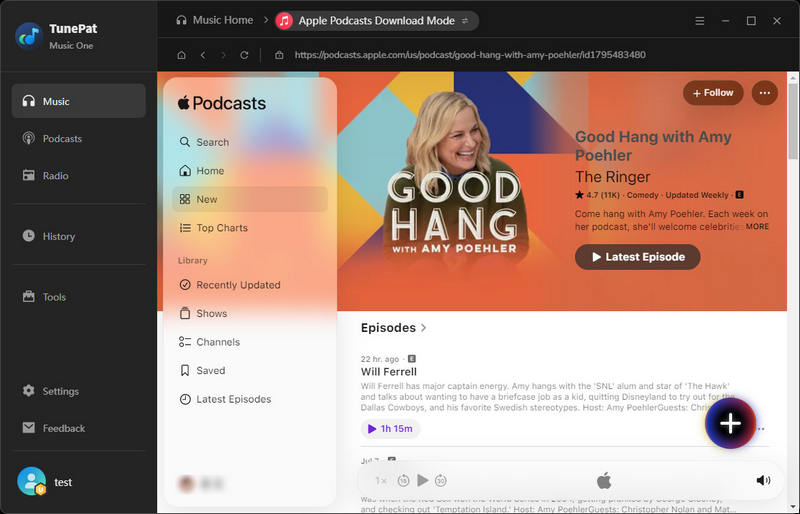
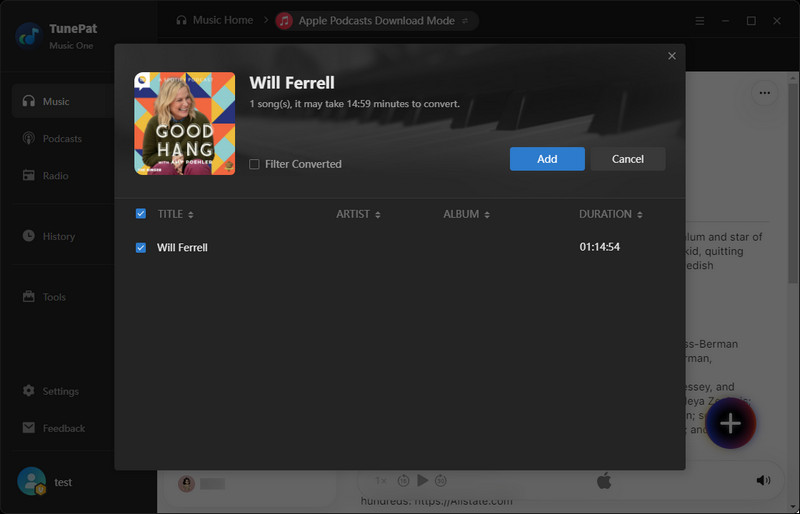
Step 2 Navigate to the Apple Podcasts webpage and browse to locate the desired episode. Once the target episode is found, click the "+" icon located in the lower-right corner. TunePat Music One will immediately begin parsing the embedded audio stream from that link. After a short processing interval, a confirmation dialog will appear; click "Add" to successfully enqueue the episode into the download list.
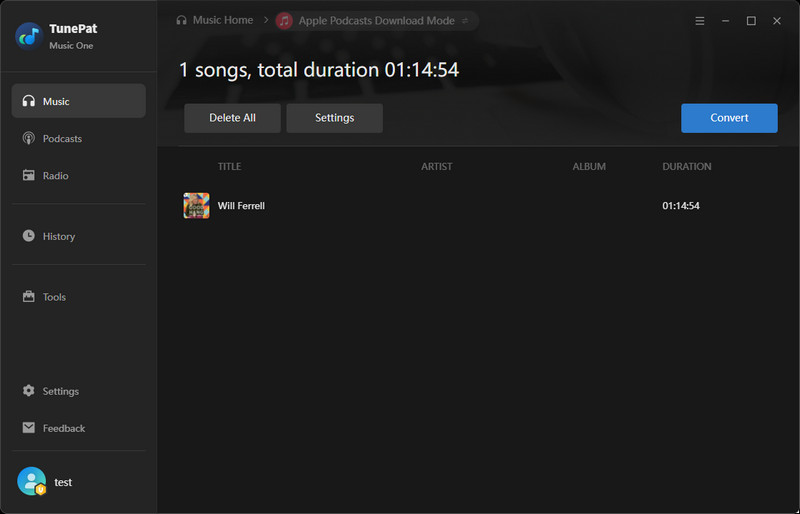
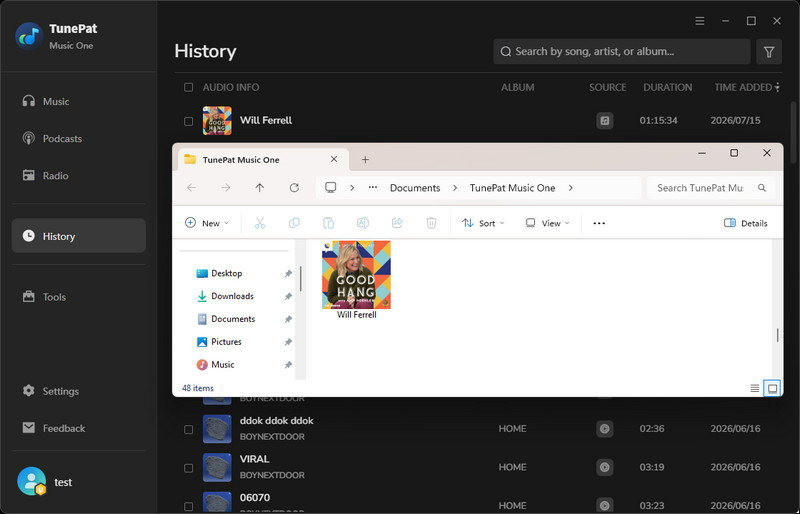
Step 3 Prior to initiating the conversion, users may adjust a range of basic output parameters, including output format, bitrate, destination folder, and file naming conventions, in a manner similar to the settings described earlier for TunePat Apple Podcast Downloader. Once the desired configurations have been applied, click the "Convert" button to start the conversion process. Depending on the length of the episode, the operation will take a few minutes to complete. Upon finishing, the converted MP3 files will be automatically saved to the designated local folder, where they can be accessed, transferred, or played offline without any restrictions.
TunePat Music One: Quick Pros & Cons
TunePat Apple Podcast Converter vs. TunePat Music One: Which One Should You Choose?
| Feature | TunePat Apple Podcast Converter | TunePat Music One |
|---|---|---|
| Best For | Users who mainly use Apple services and want a stable dedicated downloader | Apple Podcasts users who need offline downloads, plus listeners who prefer an all-in-one solution for music and podcasts across multiple platforms |
| Supported Platforms | Apple Music, Apple Podcasts, iTunes | Apple Podcasts, Apple Music, iTunes, plus multiple popular music and podcast platforms |
| Podcast Library | Apple Podcasts only | Access to Apple Podcasts and 120,000+ additional free podcasts across supported platforms |
| Output Formats | MP3, AAC, WAV, FLAC, AIFF, ALAC | MP3, AAC, WAV, FLAC, AIFF, ALAC |
| Batch Download | ✅ | ✅ |
| Apple Podcasts Link Support | Supports multiple Apple Podcasts link types, including Episodes and Shows | Currently supports only Episode link parsing |
| Metadata Preservation | ✅ | ✅ Includes cover artwork preservation |
| Ease of Use | Simple and focused, designed for Apple users | Flexible and comprehensive with more platform options |
Part 3: Free Online Tools to Download Apple Podcasts
In this section, we'll take a look at two online Apple Podcast downloaders and evaluate their key features and performance.
3.1 PodcastToMP3
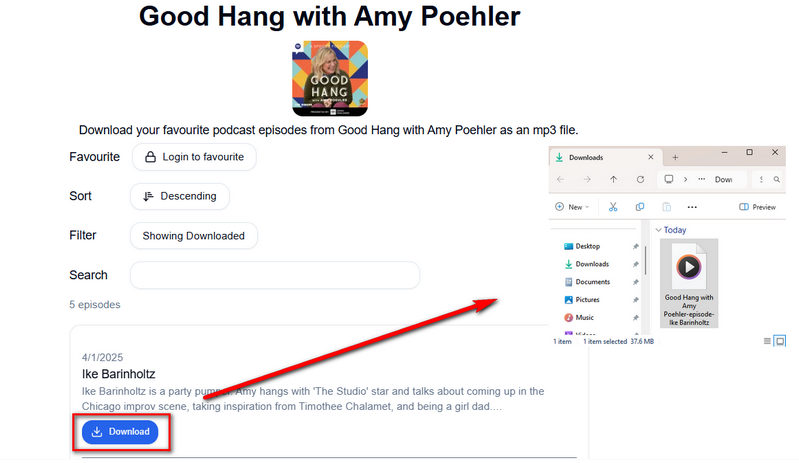
As its name suggests, PodcastToMP3 is a simple online downloader designed specifically for converting podcasts to MP3 format. It's incredibly easy to use: open the website in your browser, enter the podcast name in the search bar, and select the desired episodes. The tool also supports batch downloads, allowing up to 100 episodes at a time, which is very convenient for listeners who want to save an entire season or multiple episodes of a podcast all at once. However, compared to professional desktop podcast downloaders, PodcastToMP3 offers fewer customization options, as it primarily focuses on providing a simple and convenient MP3 download experience rather than advanced customization features.
Step 1 Open PodcastToMp3.com in your browser and enter the name of the Apple Podcast you want to download in the search bar. Once the podcast cover appears, click on it to access the episode list page, where you can select the specific episode you want to download.
Step 2 You can download episodes individually or use the "Bulk Download" option to save multiple episodes at once. However, during our testing, we found that the page continued loading after clicking the "Bulk Download" button, and the download process did not start immediately. Since the website is maintained by a single developer, its performance and stability may vary. In general, individual episode downloads worked smoothly, and the downloaded files were saved to your computer's Downloads folder.
PodcastToMP3: Quick Pros & Cons
3.2 Swell AI
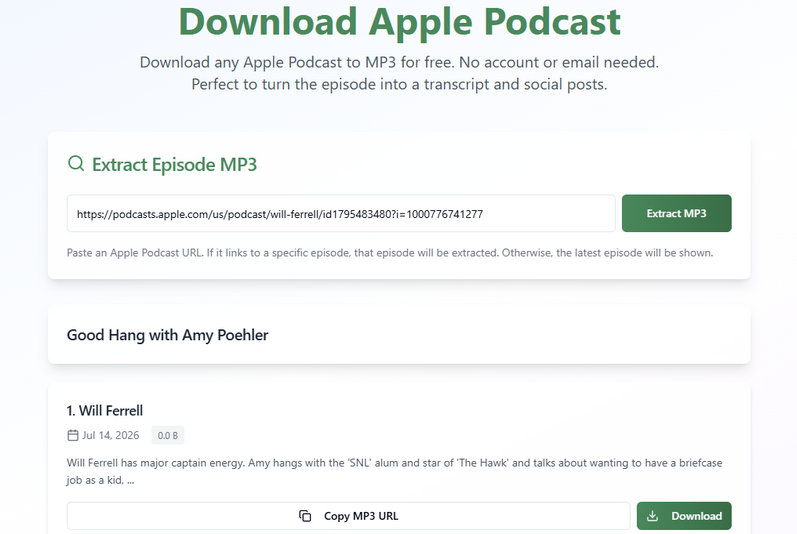
Swell AI Apple Podcast Downloader is an online tool that allows users to download Apple Podcast episodes directly from the web. After entering an Apple Podcast episode link, we were able to save the episode as a local audio file without installing any additional software. It provides a convenient way for users who want to keep Apple Podcasts as local audio files. However, we also found some limitations during the test. It currently supports only single-episode downloads, meaning we need to download each episode separately rather than in batches. This makes it more suitable for occasional downloads instead of managing large podcast libraries.
Step 1 Open the Swell AI Apple Podcast Downloader page and paste the Apple Podcast episode link into the input box.
Step 2 Click the "Extract MP3" button and wait for the tool to process the podcast episode. Once the episode is ready, click the download option. A new page will appear; click the three vertical dots on the new page and then click "Download" to download the episode.
Swell AI Apple Podcast Downloader: Quick Pros & Cons
Part 4: Apple Podcast Downloader Comparison: Online Tools vs Desktop Software
| Feature | Online Tools | Desktop Software (TunePat) | Better Choice |
|---|---|---|---|
| Installation | No installation; works directly in a browser | Requires software installation before use | Online Tools |
| Ease of Use | Copy and paste → Download directly | Add podcast → Choose settings → Download (A few more steps, but it is still simple to follow) |
Online Tools |
| Batch Downloads | ❌ Often limited or unavailable |
✅ | Desktop Software |
| Output Format | MP3 | MP3, AAC, WAV, FLAC, AIFF, and ALAC | Desktop Software |
| Download Stability | Depends on website performance and maintenance | More stable and reliable | Desktop Software |
| Metadata Retention | The downloaded file title may contain garbled characters | Keep complete ID3 tag information | Desktop Software |
| Best For | Users who occasionally download a few podcast episodes quickly | Users who frequently download podcasts or manage large collections | Depends on user needs |
FAQs about Apple Podcast Download
1. Can I download Apple Podcasts for offline listening?
Yes. However, please note that episodes saved directly through Apple Podcasts may only remain accessible within the app and could become unavailable if your subscription ends. To keep permanent local copies, it is recommended to use a professional and safe Apple Podcast downloader. Downloaded files can be stored on your device and played anytime with your preferred media player.
2. What audio formats are available for downloaded Apple Podcasts?
Unlike many online podcast downloaders that are limited to MP3 output, professional tools like TunePat provide greater flexibility by supporting multiple formats, including MP3, AAC, WAV, FLAC, AIFF, and ALAC.
Conclusion:
After testing several Apple Podcast downloaders, we found that online tools like PodcastToMP3 and Swell AI are convenient for quickly saving single podcast episodes, but they have some limitations that can cause inconvenience during use.
For users who frequently download Apple Podcasts, desktop software provides a more stable experience. In our tests, both TunePat tools offered a more complete workflow with features such as multiple output formats, batch downloads, and metadata preservation. Overall, if you only need to save a few podcast episodes occasionally, a free online downloader can be a practical choice. However, for a reliable long-term solution, a professional desktop Apple Podcast downloader is the better option.
Try These Apple Podcast Downloaders
TunePat Apple Music Converter
Download Apple Music for offline listening
TunePat Music One
Free podcast downloads from multiple sources


Olivia Anderson
Senior Writer