Deezer ARL Guide: How It Works, Common Issues & Safety
 By Olivia Anderson
Deezer Music Tips
Updated on 7/30/2026
By Olivia Anderson
Deezer Music Tips
Updated on 7/30/2026
Are you a music lover looking to unlock Deezer's full potential without breaking the bank? You've come to the right place! Here we'll introduce how to use Deezer ARL to get the music you want. Your ticket to premium features without the premium price tag. Whether you're a casual listener or a die-hard audiophile, now get started on this musical journey!
Part 1: What Is Deezer ARL?
Many users come across Deezer ARL when exploring Deezer-related tools. Unlike a regular password, ARL is part of browser cookie data and is connected to an active Deezer login session.
How Does Deezer ARL Work?
When you log in to Deezer through a browser, cookies store information that helps keep your account signed in. ARL is part of this session data and can be recognized by certain tools that work with Deezer accounts.
Because ARL is linked to an account session, it may stop working when the session expires or the account information changes. This is why many users encounter issues with expired or invalid ARL codes.
Part 2: Does Deezer ARL Still Work? Common Issues and Limitations
Whether Deezer ARL works depends on the account session and the tool that uses it. Since ARL is connected to browser cookies, it may become invalid when the session changes or the stored data is removed.
Common Reasons Why Deezer ARL Stops Working
- Expired session: The ARL code may no longer be valid after the Deezer login session expires.
- Account changes: Password updates or security-related changes may affect existing session data.
- Cookie changes: Clearing browser cookies can remove the information linked to an ARL code.
- Tool updates: Some tools may stop supporting older ARL methods after updates.
Prefer a simpler way? Deezer ARL may stop working when sessions expire or account information changes. If you want to avoid manually managing ARL codes, TunePat Deezer Music Converter provides a more convenient way to download and manage your Deezer music.
Because ARL depends on account session information, it is not as stable as an official Deezer login method. Users should also be careful when using tools that request account authentication data.
Part 3: Where to Find Your Deezer ARL?
If you want to check your Deezer ARL, you can find it from your browser cookies after logging into your Deezer account. The steps are slightly different depending on the browser you use.
*Note: Deezer ARL is stored as part of your browser cookie data and is linked to your active Deezer session. Avoid sharing your ARL code with others, as it contains account-related authentication information.
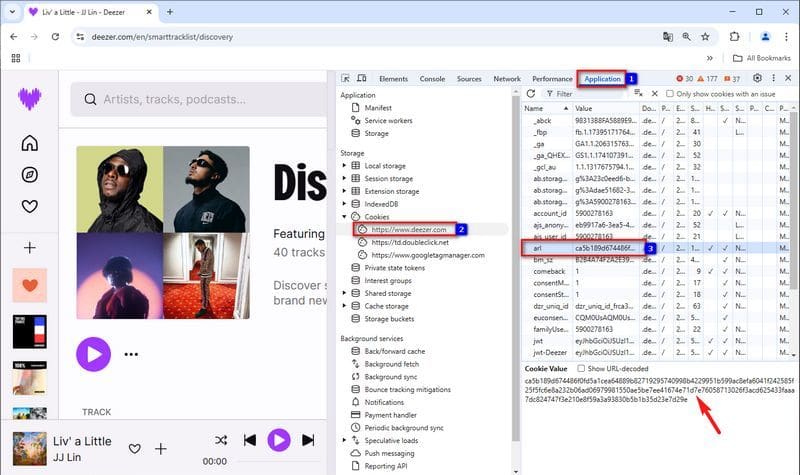
3.1 Using Google Chrome
Step 1 Open Google Chrome and log in to your Deezer account.
Step 2 Press F12 or right-click on a blank area of the page and select "Inspect" to open Developer Tools.
Step 3 Click the "Application" tab.
Step 4 Expand "Cookies" in the left sidebar and select https://www.deezer.com.
Step 5 Find the cookie named arl.
Step 6 Copy the value of the arl cookie.
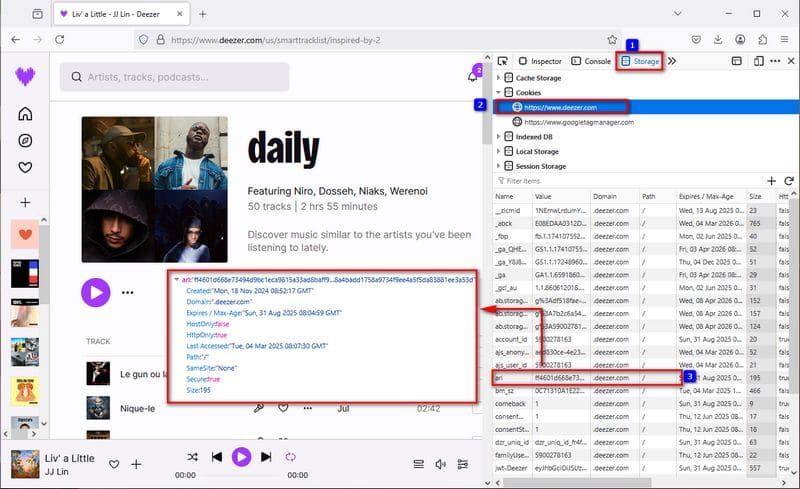
3.2 Using Mozilla Firefox
Step 1 Open Firefox and log in to your Deezer account.
Step 2 Press F12 or right-click on the page and select "Inspect" to open Developer Tools.
Step 3 Click the "Storage" tab.
Step 4 Expand "Cookies" in the left sidebar and select https://www.deezer.com.
Step 5 Find the cookie named arl.
Step 6 Copy the value of the arl cookie.
3.3 Using Safari
Step 1 Open Safari and sign in to your Deezer account.
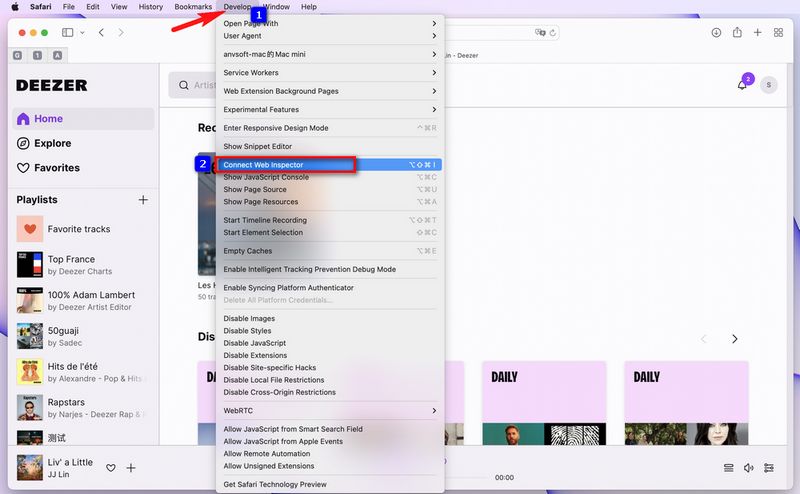
Step 2 Go to Safari > Settings > Advanced and enable "Show Develop menu in menu bar".
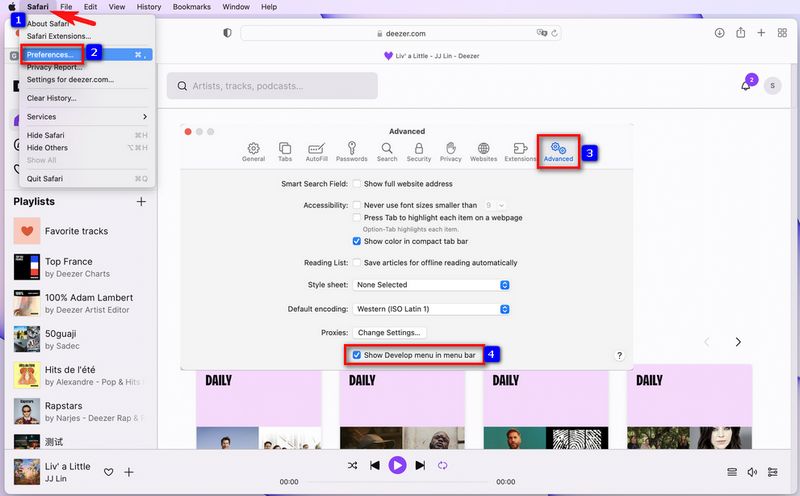
Step 3 Open Develop > Connect Web Inspector.
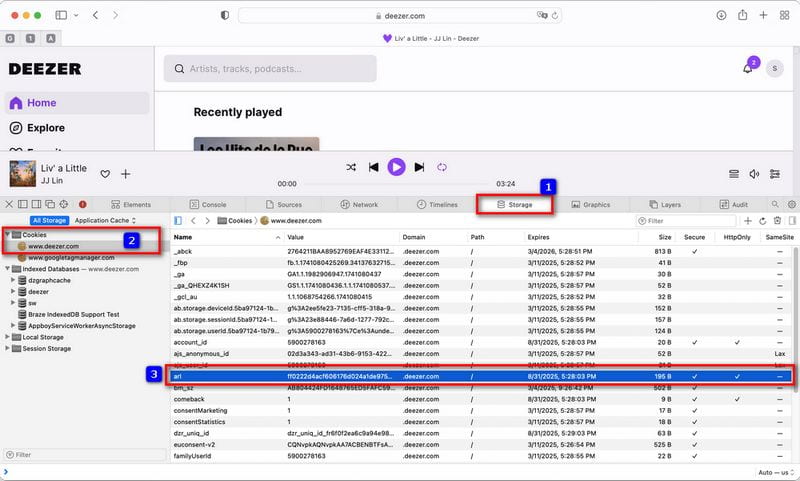
Step 4 Open the "Storage" tab in Web Inspector.
Step 5 Expand "Cookies" and select www.deezer.com.
Step 6 Find the arl cookie and copy its value.
Extra Tips: Some users may look for Deezer ARL codes through online communities, forums, or code-sharing websites when they cannot find their own ARL. These sources may include platforms such as Reddit, Telegram, Discord, GitHub, or other specialized websites.
However, ARL is linked to an active Deezer account session, and codes from unknown sources may stop working at any time or create account security risks. It is always safer to understand how ARL works and only use trusted tools or sources.
Part 4: How to Use Deezer ARL with Deezer Tools?
After finding your Deezer ARL, you may wonder how it works with different Deezer-related tools. The setup process is usually similar, although available features may vary between applications.
Deezer ARL Tools at a Glance
| Tool | Platform | Status | Best For |
|---|---|---|---|
| Deemix | Windows / macOS / Linux | Community project | Users who prefer desktop tools |
| Deezloader | Windows / macOS / Linux | Legacy project | Users familiar with older Deezer tools |
| Freezer | Android | Community project | Android users |
| ReFreezer | Android | Freezer alternative | Users looking for a similar mobile experience |
| Murglar | Android | Community project | Mobile music management |
How to Use Deezer ARL with Compatible Tools?
Step 1 Choose and install a compatible tool that matches your device.
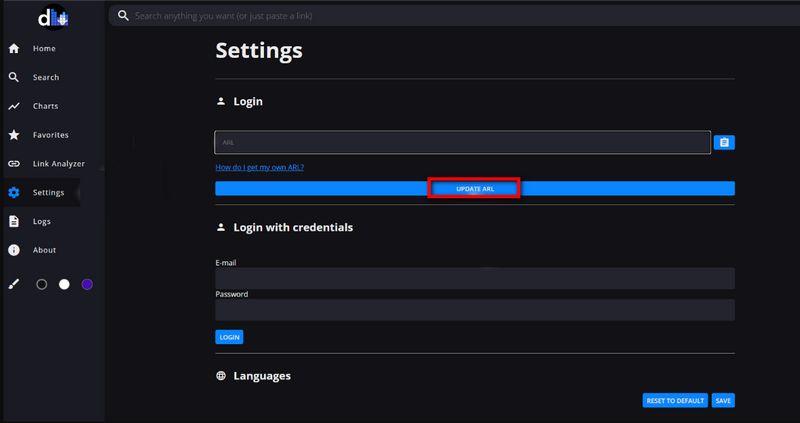
Step 2 Enter your ARL information in the app settings or login section.
Step 3 Check whether the tool connects with your Deezer account session successfully.
Part 5: A Better Alternative to Deezer ARL
If you're hesitant about using Deezer ARL or have encountered issues with ARL-based tools, you can also consider other ways to access music, such as free-tier streaming services or trial plans. However, these options usually come with limitations and may not provide a convenient way to manage your favorite tracks. If you prefer a simpler workflow without dealing with ARL codes, a dedicated Deezer music converter can be a practical option.
TunePat Deezer Music Converter provides an easier way to save songs, albums, playlists, and podcasts from Deezer while preserving important metadata such as ID3 tags. It supports multiple output formats, including MP3, AAC, WAV, FLAC, ALAC, and AIFF, allowing you to choose the right format for different devices and audio preferences.
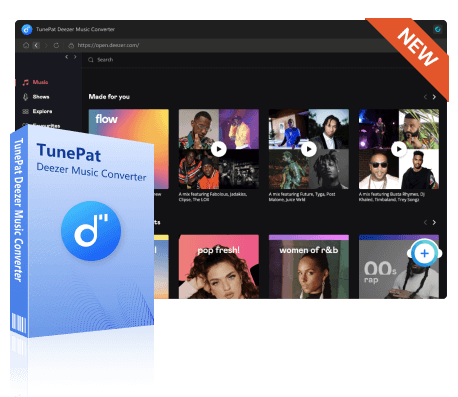
TunePat Deezer Music Converter
Save Deezer songs, albums, playlists, and podcasts with flexible settings for building and managing your local music library.
- Support MP3, AAC, WAV, FLAC, AIFF, and ALAC output formats.
- Convert Deezer music at up to 10X faster speed.
- Preserve Deezer music in HiFi quality with ID3 tags.
- Customize file names and sort downloads by artist, album, and playlist.
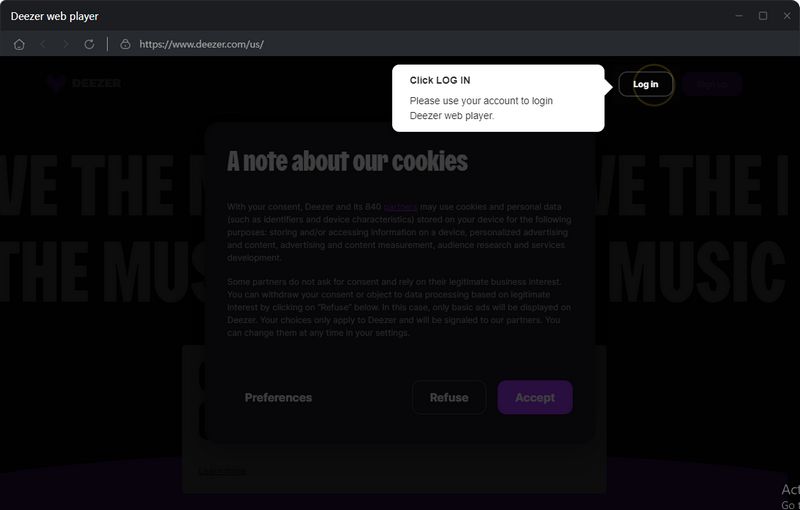
Step 1 Download TunePat Deezer Music Converter on your Windows or Mac computer and log in to your Deezer account. The Deezer web player is embedded by default. You can also click the "Pop out Player" button to open it in a separate window.
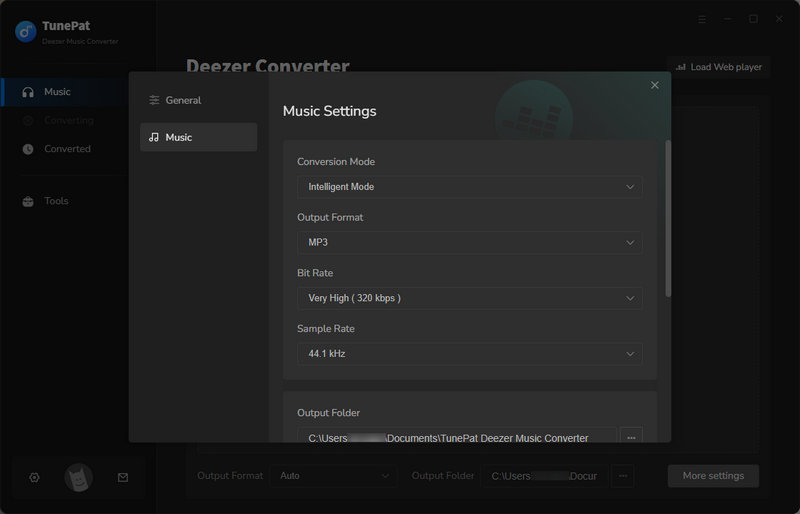
Step 2 Open "Settings" and customize the output format, output folder, and file naming options according to your needs.
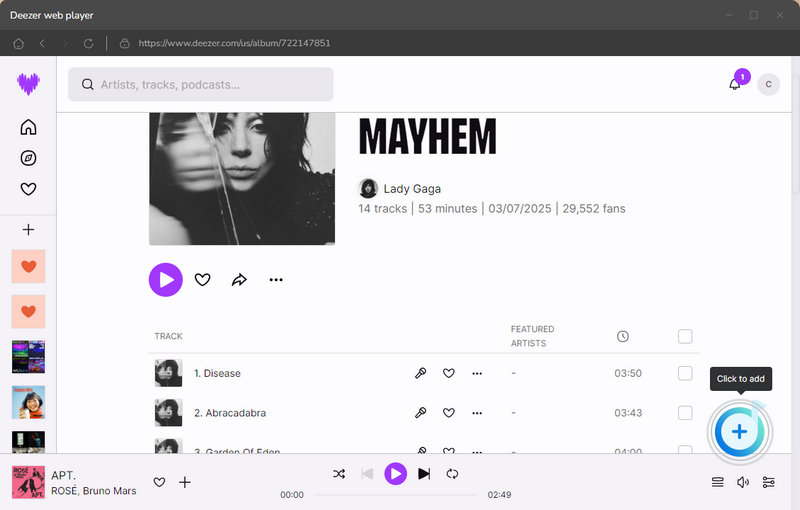
Step 3 Open the Deezer web player and select the Deezer music tracks you want to save. Click the "+" button, select the songs you need, and click "Add" to continue.
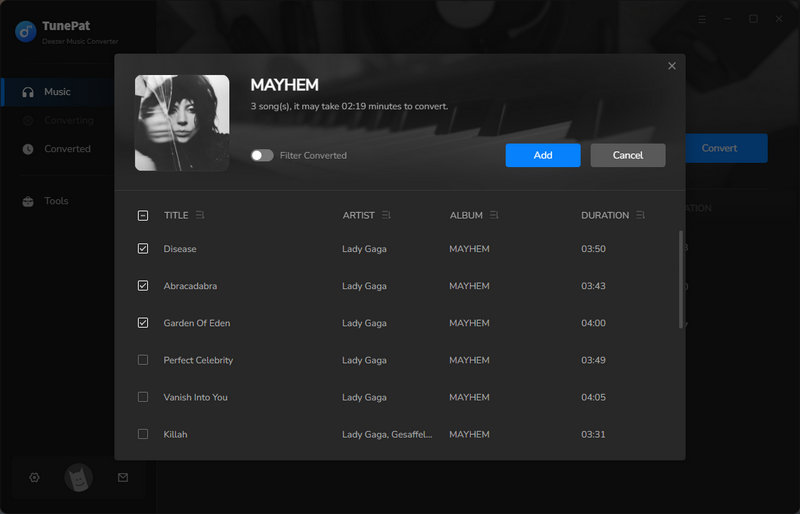
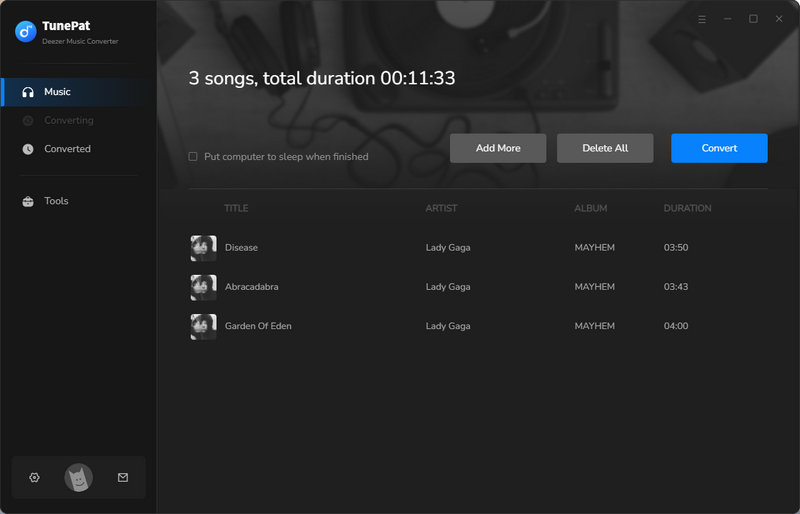
Step 4 Click "Add More" if you want to include additional songs. Once everything is ready, click "Convert" to start the process.
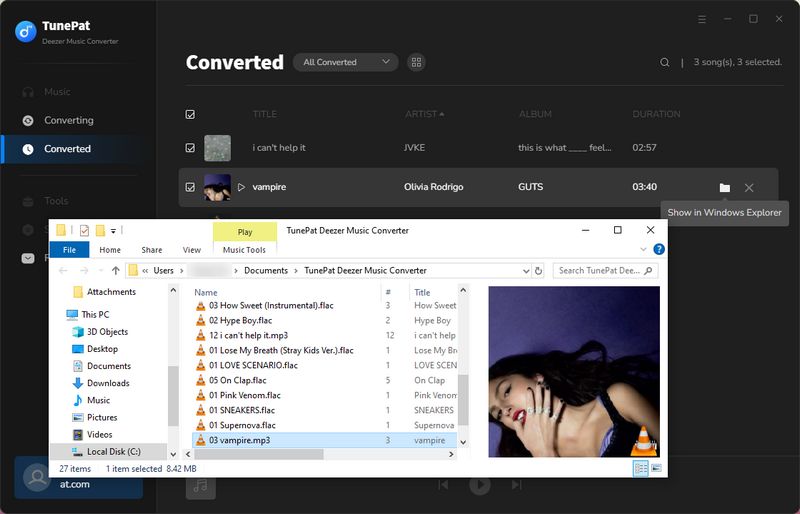
Step 5 After conversion, open the output folder or click "History" in the left menu to view your converted files. The saved tracks will keep their original metadata for easier organization.
Part 6: Frequently Asked Questions About Deezer ARL
Q1: What Does Deezer ARL Do?
A: Deezer ARL works as a session authentication value that helps certain Deezer-related tools recognize an existing Deezer account session. It allows these tools to connect with Deezer without requiring users to enter their account credentials directly.
Q2: How Long Does a Deezer ARL Last?
A: There is no fixed expiration time for a Deezer ARL. It may continue working while the related Deezer session remains active, but it can become invalid after account changes, session updates, browser changes, or other security-related actions.
Q3: Is Deezer ARL Safe to Use?
A: Deezer ARL is a session-related value, so its safety depends on how it is obtained and used. Using ARL codes from unknown sources may create account security risks. It is recommended to understand how ARL works and only use trusted tools and sources.
Q4: Can Deezer ARL Be Used Without a Deezer Account?
A: No. A Deezer ARL is linked to an existing Deezer account session and cannot work independently without an associated account. If the account session changes or expires, the ARL may no longer be valid.
Conclusion:
Deezer ARL can be useful for users who want to understand how Deezer-related tools work, but it also comes with certain limitations. ARL codes are linked to account sessions, which means they may stop working after session changes, account updates, or other factors. In addition, finding reliable sources and managing ARL codes can be inconvenient for many users.
If you prefer a simpler way to manage your Deezer music collection without dealing with ARL codes, TunePat Deezer Music Converter offers a more convenient solution. It allows you to save Deezer songs, albums, playlists, and podcasts to your computer while keeping important metadata and choosing the output format that fits your needs.

Olivia Anderson
Senior Writer