You need a music membership to download music from: Amazon Music, Apple Music, Deezer, and Line Music.
Free account is supported to download music from: Spotify, YouTube Music, Pandora Music.
You need a music membership to download music from: Amazon Music, Apple Music, Deezer, and Line Music.
Free account is supported to download music from: Spotify, YouTube Music, Pandora Music.
TunePat Music One is an all-in-one music converter tool which allows you to download music from: Spotify, Apple Music, Amazon Music, Tidal, Deezer... etc. It enables users to effortlessly download songs, albums, playlists, and podcasts to a variety of audio formats such as MP3, AAC, WAV, FLAC, AIFF, or ALAC.
Please click on the Menu icon in the upper right corner of the program and select the "Clear cache" option from the drop-down menu. Restart the program and log in again.
TunePat supports online music playback, so please ensure you have downloaded the program's latest version.
TunePat allows you to select multiple songs, albums, or playlists for batch conversion. You can see a page like the following screenshot shown. Select the "Add More" button to choose songs from other albums or playlists. After adding all songs you need, click the "Convert" button to convert all these songs at once in this list.
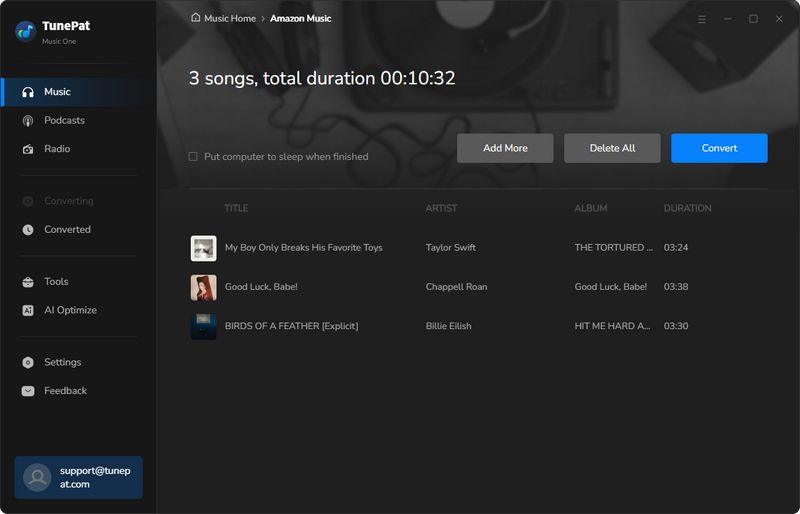
You can use TunePat Music One to convert any playlist you want.
No. Currently there are only two versions of the TunePat program for Windows and Mac. No mobile app is available yet.
If TunePat cannot convert or download songs, try the following troubleshooting steps in order:
C:\Users\USERNAME\AppData\Roaming\, find the corresponding TunePat program folder (for example, TunePat Music One), delete it, and restart the program.~/Library/Application Support/, find the corresponding TunePat program folder, delete it, and restart the program.A new update window will automatically pop up when you open the program. You can choose to update now, skip the version, or prompt again next time. You can also find the "Check for updates" option in the menu bar of the TunePat program. Click to detect new versions.
This may be caused by the network. You can try re-upgrading or go directly to our Download Center to find the corresponding program and download the latest version directly.
If you want to save the converted songs in the order of the original playlist, Output Organized is changed to "Playlist" option. In addition, please add "Playlist Index" in the Output File Name column.
If you can't read the music, it's because you have both iTunes and Store version of Music app installed on your computer.Please uninstall the Store version of Music app and restart it to convert the songs again.
If the audio quality of your download is poor and does not match the source file, it may be because you selected "Intelligent Mode". When this mode is enabled and your network connection is poor, the program will automatically search for and download the corresponding song from YouTube. To download only from the original audio source, switch to "Record Mode" in Settings.
Lossless formats don't use bit rate! That setting is only for compressed formats like MP3. With lossless files (FLAC, WAV, etc.), you can adjust Bit Depth and Sample Rate.
This software requires macOS 11 or later (including the latest macOS Tahoe).
If your system is older than macOS 11 and no compatible version is available, we recommend the following options:
If you are a paid user who is unable to upgrade your Mac, we can help you switch to the Windows version. Please contact our support team at [email protected] for assistance.
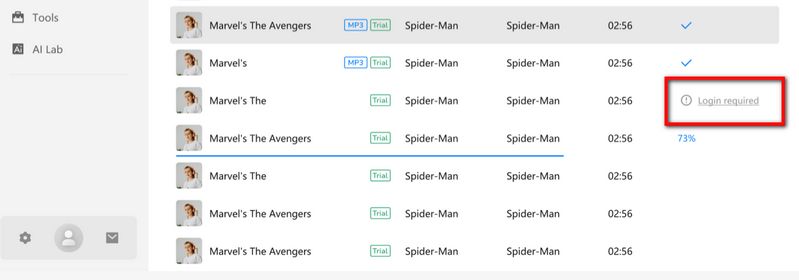
When you see this prompt, it indicates that the song requires logging into the corresponding platform account for conversion. Please return to the source you selected in TunePat.
For example, if you selected Spotify, go back to the Spotify web player window, click the "Login" button in the upper-right corner, complete the login process for your Spotify account, and then proceed to add and convert the song. The same applies to other platforms, such as YouTube, YouTube Music, Amazon Music, Apple Music, and Tidal.
TunePat enables you to download music from Spotify in lossless quality. Please follow these steps:
If you are experiencing technical issues with your software, contact the developer's customer support team for assistance ([email protected]). We will help troubleshoot and resolve any issues you may be having. We will reply to your message within 24 hours on weekdays and 48 hours on weekends. Please describe the problem you encountered and provide the following information when you contact us.
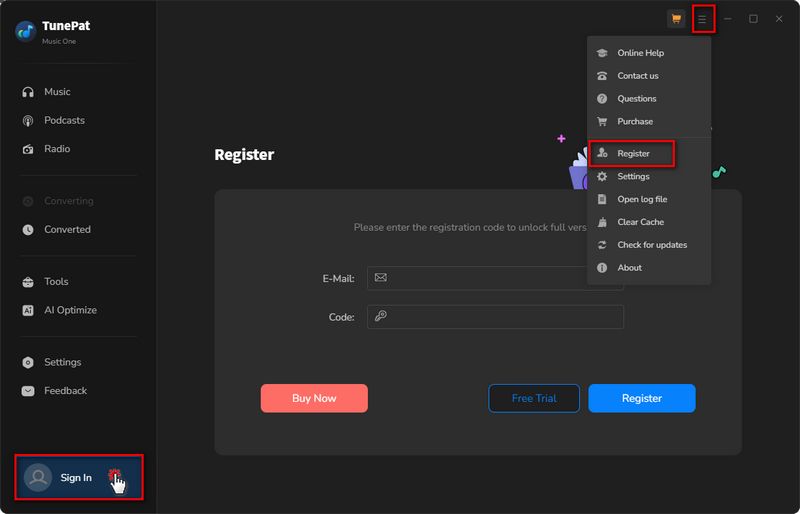
You need a valid email address and license key to register for the program. And you will receive an email from the TunePat official after purchasing a license successfully. Then you can follow the steps to register TunePat Music One.
1. Launch TunePat Music One on PC and click the "Menu > Register" option in the upper right menu bar to jump to the registration interface to register the program. Copy and paste the registration Email and Code into the registration pop up dialog.
2. Fill the two blanks with your registration Email and license code that you have received from the email. Then click "Register" button.
According to our licensing agreement, each license code is specific to one platform, either Windows or Mac. Therefore, it is not permitted to transfer the license code from Windows to Mac or vice versa after purchasing the software.
In the event that you accidentally purchase a license for the wrong operating system, please contact us within five days to arrange for a replacement or a refund. To acquire a license for the correct platform, please visit our official website and then contact us for a refund of the incorrect order.
If you have replaced your computer and need to reinstall the program on the new machine, you can contact our support team to obtain a new license at a discounted rate.
TunePat offers a free trial of TunePat Music One. You can directly download it from our Download Center. But the trial version has certain limitations, it only allows trial users to convert the first 1 minute of each song for sample testing. Of course, you have the following two ways to get a free license:
1. Share your experience with TunePat on selected review sites and get a free license. For details, read "Write a Review to Get a Free TunePat License".
2. In order for TunePat users to enjoy the localization software, we warmly welcome volunteers from all over the world to translate the TunePat program into their native language. In return, we will provide a free license. If you are interested in participating in this event, please visit the "Translate TunePat to Get Reward" page for more details.
1. Ensure that you have registered for the appropriate program version, as the Windows and Mac versions do not share registration codes.
2. The registration code is case sensitive. Additionally, please refrain from adding any spaces before or after the code. You may also copy and paste the email and code into the registration window.
3. Each license is limited to one computer only. Any attempt to use the registration code on more than one computer will result in an invalid status.
If you encounter any error messages, please contact our support team via [email protected] for further assistance.
1. Please ensure that your license is still valid. If it is still within the validity period, kindly register it again.
2. Please note that each license is valid for a single computer only. If you use your code on more than one computer, it will appear as a trial version.
3. If you have recently updated your computer system, the registration information may have been erased. Therefore, please register with your license once again.
If the error message persists, kindly contact our support team at [email protected] for further assistance.
Please note that according to our purchase page, a TunePat license is restricted to a single computer. Using the license on more than one device simultaneously will render the license invalid.
In the event of extenuating circumstances, such as the failure of your old computer and the need to transfer your registration information to a new device, please contact our customer service team via email ([email protected]) for assistance. If you require use of TunePat on multiple devices simultaneously, we recommend purchasing an additional license. We also offer exclusive discounts to returning customers, so feel free to contact us for further information.
Please contact our support team([email protected]) and provide your order info, such as email, receipt, order number and other information you can remember.
We have a responsibility to keep your information secure. TunePat has a privacy policy in place and does not share your information with third-party advertisers without your consent.
Languages currently supported by the TunePat family of programs include: Arabic, Armenian, Azerbaijani, Basque, Bosnian, Bulgarian, Brazilian Portuguese, Catalan, Chinese, Croatian, Czech, Danish, Dutch, English, Filipino, Finnish, French, Galician, Georgian, German, Greek, Hebrew, Hindi, Hungarian, Indonesian, Italian, Japanese, Javanese, Korean, Macedonian, Malay, Maltese, Norwegian, Persian, Polish, Portuguese, Romanian, Russian, Slovak, Spanish, Swedish, Tamil, Thai, Turkish, Ukrainian, Vietnamese, and Zulu. More languages will be supported in the future.
TunePat commits a 100% money-back guarantee within 5 days for TunePat Music One 3-month/12-month plan, and 30 days for the lifetime plan. For more details, please visit Refund Policy.
We will process the refund request in sequence after receiving the refund request that meets our refund conditions. After we process the refund, your refund will generally arrive within 3-10 working days.
All subscription plans (except for the lifetime plan) we provided are automatically renewed by default. If you want to cancel the renewal subscription, you can cancel it at any time before the renewal date. (Please rest assured that you will receive a notification before renewal.)
Method 1: You can view and manage your subscription order by yourself. Once you've successfully subscribed to TunePat, you'll receive an email titled "Thank you for subscribing to TP xxx". At the bottom of the email, you'll find a "View your subscription" button. Click on it to go to the order management interface, where you can cancel your order if necessary.
Method 2: If you encounter any difficulties managing your subscription, you can contact our customer service support team via email, and we'll assist you in the background. Our email address is [email protected].
After the cancellation, you will not be charged starting from the next subscription period.
If you would like to change your subscription type, please email our customer service team for assistance.
We use Verifone as our payment service provider. Depending on your region, available payment methods may include major credit and debit cards, digital wallets, and other local payment options. The payment methods available to you will be displayed on the checkout page.
In order to meet people's needs and provide a better service, TunePat offers 4 subscription plans. Below are something should be informed:
1. There are 3 types of subscription plans for your choice (3 month/1 year/ Lifetime).
2. If you purchase a 3-month, or 1-year subscription, to ensure the service, the two license types will auto-renew after 1 quarter or 1 year. If you don't need it anymore, you can cancel the next subscription at any time.
3. Each license can be used on one PC only.
4. TunePat commits a 100% money-back guarantee within 5 days for TunePat 3-month & 12-month plan, and 30 days for the lifetime plan. For more details, please visit Refund Policy.
If you have other questions about the subscription, please read TunePat Subscription FAQ.
Once your order has been successfully processed, you can expect to receive a confirmation email from the payment platform. Shortly after, you will receive another email that contains the registration code information.
If you do not receive this email promptly, please check your spam folder, as it may have been rejected by your email system. Alternatively, it is possible that you entered the wrong email address during your TunePat purchase, which could prevent you from receiving the email. If so, please contact our support team directly for assistance.
