
If you want to read more books but just don't have the time, audiobooks are a lifesaver. You can "read" while driving to work, doing the dishes, or walking the dog.
But if you look up which app to buy online, you will find a lot of old news. Most reviews say: "Buy books one by one on Audible, or get unlimited reading on Scribd (now called Everand)." Well, everything changed recently. Audible now has a cheap $8.99 plan, and Everand stopped offering unlimited books, and now they limit you to 1, 3, or 5 books a month.
If you don't want to waste your cash on a subscription you barely use, you need to look at how the math works out now in this Everand vs Audible showdown. Let's skip the marketing talk and look at the real costs side-by-side. By the end of this audiobook subscription battle, you'll know exactly which app gets you the most books for your money based on how much you actually read every month.
- Part 1. The 60-Second Verdict: Which App Wins Your Budget?
- Part 2. The Biggest Difference: Do You Want to Borrow or Own?
- Part 3. Price Comparison: Matching Your Reading Habits to the Best Plan
- Part 4. Catalog Wars: 1 Million Audiobooks vs. The Multi-Format Universe
- Part 5. App Features: Amazon Integration vs. Easy Browsing
- Part 6. Watch Out: Expiration Dates and Cancellations
- Extra Tips: How to Keep Your Audible Books in MP3 Forever
- The Verdict: Which One Should You Download?
- FAQs About Audible & Everand
Part 1. The 60-Second Verdict: Which App Wins Your Budget?
If you are in a rush, here is the quick breakdown based on your reading habits:
| Feature | Audible Standard | Audible Premium Plus | Everand (All Plans) |
|---|---|---|---|
| Starting Price | $8.99 / month | $14.95 (1 Credit) or $22.95 (2 Credits) / mo (Annual discounts available) | From $11.99 to $28.99 / month |
| How it Works | Select 1 book/month from 1M+ titles | Get 1 Credit/month for any title | 1, 3, or 5 Premium Unlocks/month |
| Ownership | Rental (Access lost if you cancel) | Ownership (Keep forever even if you cancel) | Rental (Locked if you cancel, but restores if you resubscribe) |
| Rollover Rules | No Rollover (Use it or lose it each month) | 12-Month Rollover (Credits last for up to a year) | 6-Month Rollover (Unused unlocks carry over for 6 months) |
| Catalog Scope | Full 1M+ Catalog | Full 1M+ Catalog | 1.5M+ Audiobooks & Ebooks |
| Bonus Content | Unlimited Podcasts | 150K+ streaming titles & Podcasts | 20K+ free books, magazines, & podcasts |
| Best For | Light budget listeners (1 book/mo) | Book collectors & Kindle users | Avid readers & Multi-format users |
Part 2. The Biggest Difference: Do You Want to Borrow or Own?
Before looking at prices, you need to understand how these two apps handle your bookshelf. It comes down to one simple question: Do you want to own your books, or just borrow them?
The Audible Way
Audible Standard: This is a rental model. You get 1 book a month from their giant catalog, but you can only listen to it as long as you keep paying for the membership.
Audible Premium Plus: This is an ownership model. You get 1 credit every month. When you spend that credit on a book, that book is yours to keep forever. Even if you cancel Audible next month, you can still open the app and listen to your purchased books for free.
💡 Quick Tip: Keep in mind that audiobooks bought with credits are locked in a special format that only plays inside the Audible app. But don't worry! If you want to download your audiobooks into a universal format like MP3, you can use the simple audiobook Converter below to keep your library safe forever. 👇👇
The Everand Way
Everand (All Plans): This is purely a rental model, just like Netflix or Spotify. You pay a monthly fee to get a set number of "Premium Unlocks." You can listen to your unlocked books as much as you want while subscribed, but the moment you cancel, your bookshelf locks up.
Part 3. Price Comparison: Matching Your Reading Habits to the Best Plan
Both platforms have different tiers depending on how many books you finish every month. Let's do the math to see which one saves you the most money.
Situation 1. If you read exactly 1 book a month
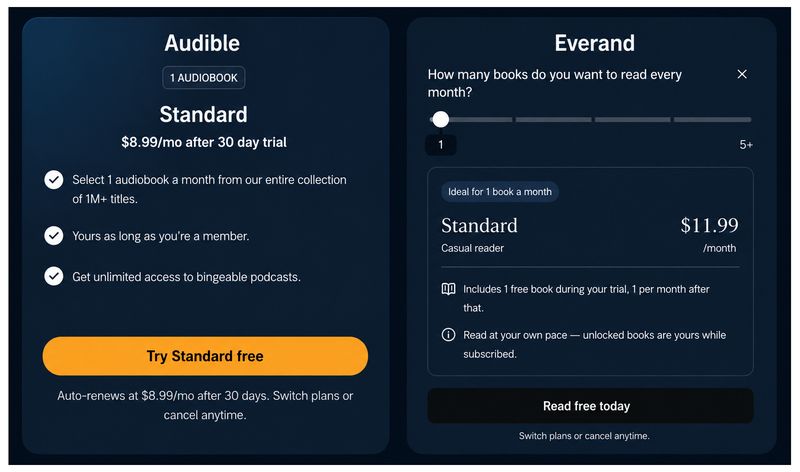
Audible Standard ($8.99/mo): You get 1 book a month from their full catalog of over 1 million titles, plus free podcasts.
Everand Standard ($11.99/mo): You get 1 premium unlock a month, plus unlimited access to their 20,000+ title free library.
👑 The Winner: Audible Standard. It gives you access to the biggest book catalog in the world for $3 less than Everand.
Situation 2. If you read 2 to 3 books a month
This is where the direct battle happens, and your decision depends entirely on whether you value saving cash or owning files.
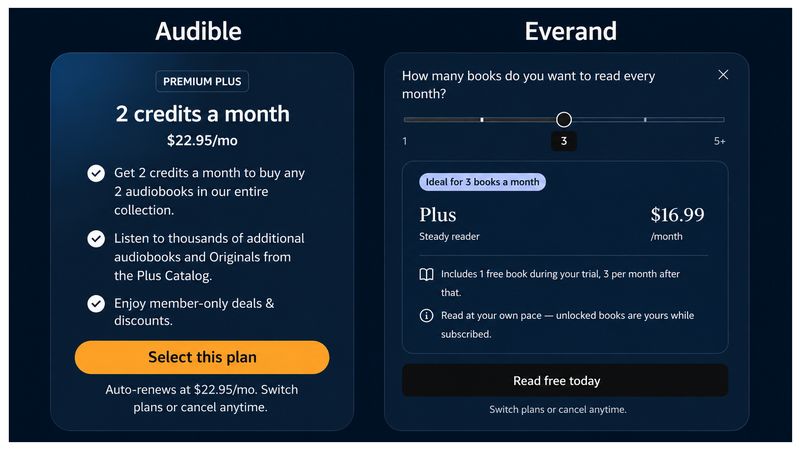
Audible Premium Plus - 2 Credits ($22.95/mo): You get 2 credits every month to spend on any two books you want. This breaks down to about $11.47 per book, and you own both books forever. If you need a 3rd book, you'll have to rely on their free Plus Catalog or buy extra credit bundles.
Everand Plus ($16.99/mo): For $6 less than Audible's 2-credit plan, Everand actually gives you 3 premium unlocks to use on any bestseller or new release, bringing your cost down to a stunning $5.66 per book.
👑 The Winner: It's a tie based on your goals.
- Go with Everand Plus if you want the absolute best value for your money. You pay less and get 3 premium books instead of 2.
- Go with Audible (2 Credits) if you are a book collector. While it costs more and gives you one less book, those audiobooks are yours to keep for life, whereas Everand's books are strictly rentals that disappear if you cancel.
Situation 3. If you read 24+ books a year (Heavy Readers)
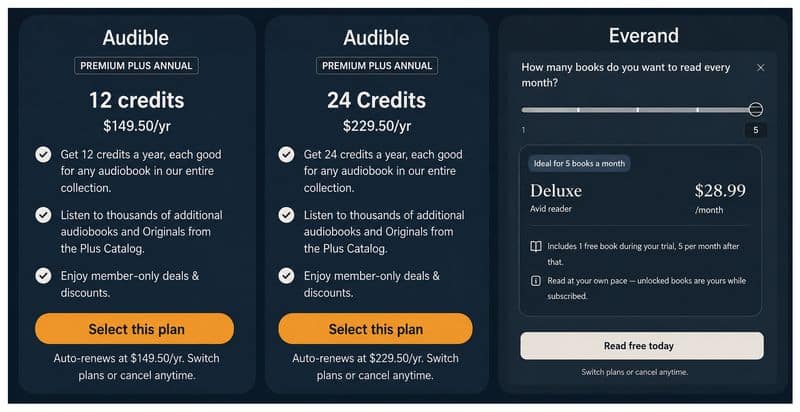
Everand Deluxe ($28.99/mo): You get 5 premium unlocks right away each month, bringing your rental cost down to about $5.80 per premium book.
Audible Premium Plus Annual: If you pay upfront, Audible offers massive bulk discounts. You can get 12 credits for $149.50/yr ($12.45/book) or 24 credits for $229.50/yr ($9.56/book), plus full access to the streaming Plus Catalog.
👑 The Winner: Audible Premium Plus Annual. If you can afford the upfront payment, getting 24 credits brings your cost under $10 per book, and unlike Everand, you own all 24 of those books forever.
💡 Don't Lose Your Favorites: Audible Plus streaming titles disappear instantly if you cancel or if they leave the platform. Want to save them permanently to your computer before they go? Download this simple backup tool to save your favorite audiobooks for anytime playback. 👇👇
Part 4. Catalog Wars: 1 Million Audiobooks vs. The Multi-Format Universe
When it comes to what you can actually listen to, these two apps are built entirely differently. One doubles down on being the ultimate audio powerhouse, while the other gives you a mixed-media playground. Let's look at what you get inside each library.
Audible: The Audio King
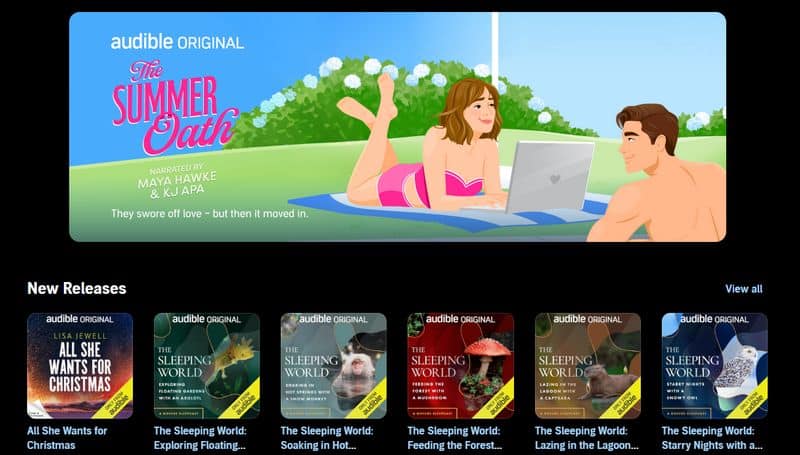
Because Amazon owns Audible, its library is unmatched. It has over 1 million titles, including every brand-new release and obscure indie book. They also make Audible Originals, which are exclusive audio dramas with celebrity actors that you can't find anywhere else.
Everand: The All-in-One App
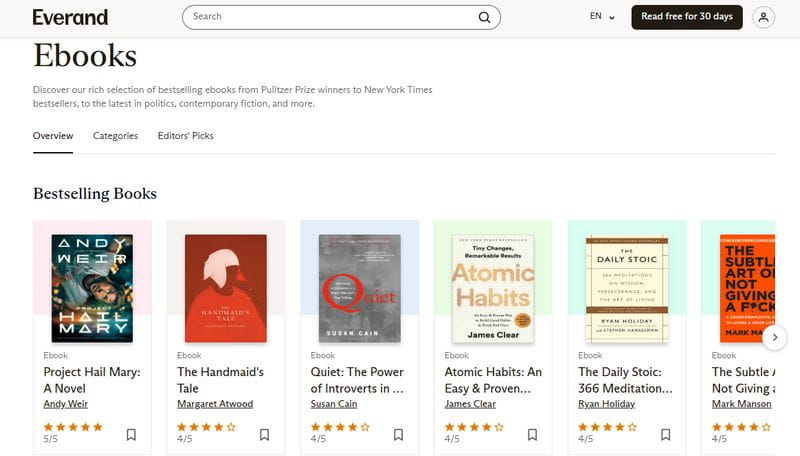
Everand has a massive benefit if you like to read with your eyes too. Your premium unlocks can be used for either an audiobook or an ebook. If you like listening to a story while driving but want to read the text version in bed, Everand lets you do both in the same app. They also throw in popular magazines and sheet music for free.
Part 5. App Features: Amazon Integration vs. Easy Browsing
Both apps let you download books for offline use, change narration speeds, and work perfectly with Apple CarPlay and Android Auto.
However, Audible has a major ecosystem feature called Whispersync. If you buy a Kindle ebook and the Audible audiobook, the app automatically syncs your page. You can stop reading on your Kindle and pick up at the exact same sentence in your car on Audible without losing your place.
Everand, on the other hand, excels at visual browsing. Its interface feels colorful, modern, and highly responsive when juggling between text and audio formats. It makes tracking your remaining monthly unlocks super clear right at the top of the menu.
Part 6. Watch Out: Expiration Dates and Cancellations
Before putting in your credit card info, make sure you know the rules regarding how these apps handle left-over credits and cancellations:
On Audible Standard: Your 1-book selection follows a strict "use it or lose it" rule and resets every month. If you cancel, your selected books are immediately locked.
On Audible Premium Plus (Monthly & Annual): Your credits roll over to the next month and last for up to a year. If you cancel your membership, you lose unspent credits, but you keep all the books you already bought forever. (Want to save your favorite audiobooks from your Audible Plus library as MP3s? Give this method a try.)
On Everand: Thanks to a massive recent update, your unused premium unlocks now automatically roll over for up to 6 months! You no longer have to scramble to use them before the month ends. However, if you cancel your subscription, your unlocked books will be locked at the end of your billing cycle (but they will instantly unlock for free if you resubscribe with the same email later).
Extra Tips: How to Keep Your Audible Books in MP3 Forever
If you decide to use Audible but don't like the idea of your audiobooks being locked inside a single app, there's actually an easy and affordable way around it. This is especially useful if you've found audiobooks you love in the Audible Plus Library. Those titles are only available while your membership is active, and once your subscription ends, you lose access to them, even if they were downloaded for offline listening. On top of that, the Plus Catalog changes regularly, so your favorite audiobooks may disappear at any time.
Even audiobooks purchased with credits are still saved in .aax or .aa format. In other words, they are limited to the official Audible ecosystem and can't be used freely like normal audio files.
That's why many users choose to fully save their favorite audiobooks instead. TunePat Any Audiobook Converter makes this simple by letting you batch convert AAX audiobooks to MP3, M4A, or M4B at speeds up to 300X faster. It also keeps the original ID3 tags, making it much easier to organize and manage your audiobook collection. Next, we'll show you how to use it step by step.
TunePat Any Audiobook Converter
TunePat Any Audiobook Converter is specially designed to convert AA/AAX audiobooks to MP3/M4A/M4B format.
Step 1 Open TunePat on your computer. Once it launches, you'll see the main interface. Sign in to your Audible account first so you can access your audiobook library. For a better viewing experience, you can resize the TunePat window until the Audible page is fully visible, or simply click "Pop out Player" to open the Audible site in a separate window.
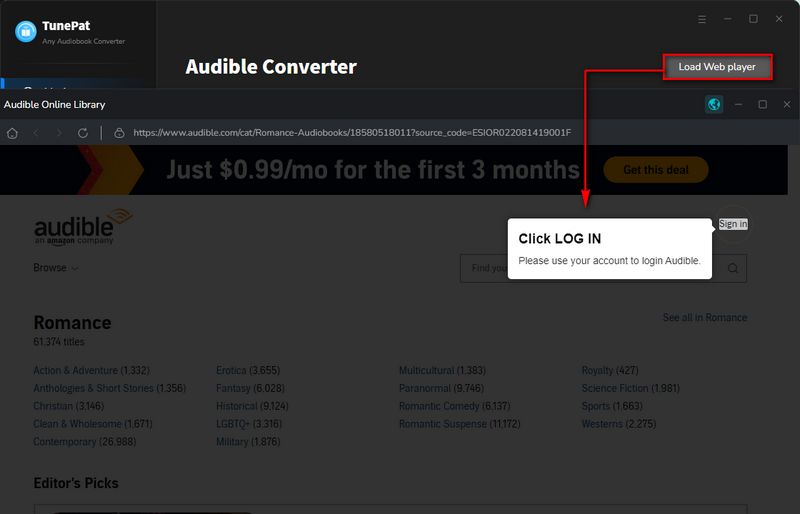
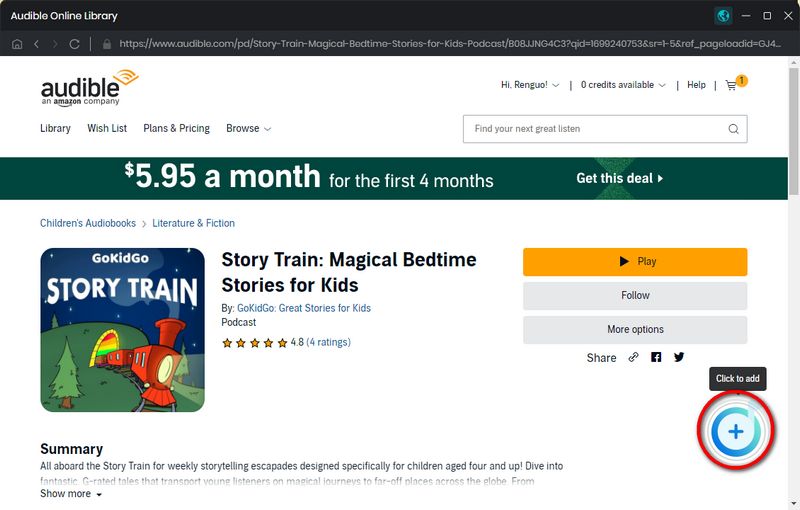
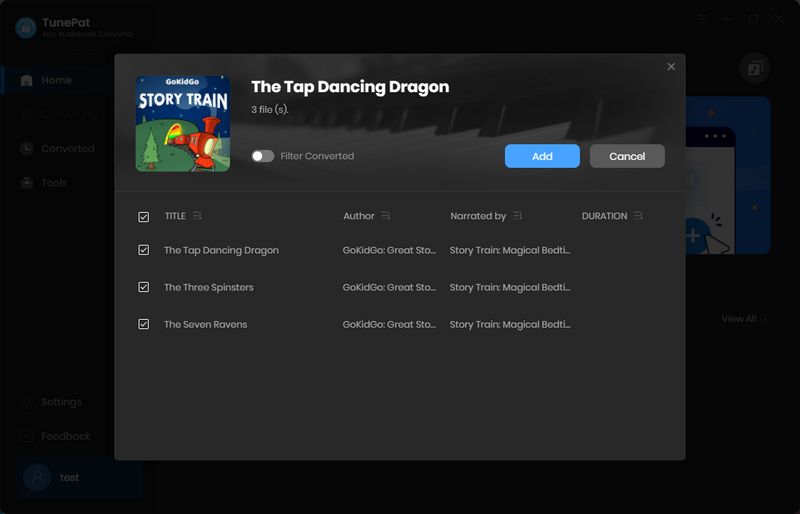
Step 2 Go to your Audible Library and find the audiobook you want. Click on its title, and you'll notice an "+" button in the bottom-right corner. Click that button, and TunePat will open a new window where you can confirm your selection. Then click "Add" to proceed.
Step 3 After that, several options will appear. Click "Settings" to adjust the basic preferences. Here you can choose the output format (MP3, M4A, or M4B), set the output folder, and decide how to split the audiobook. You can split by chapter, divide evenly, or split by duration. Once everything is set, close the settings window.

Step 4 You can click "Add More" to include additional audiobooks, or simply press "Convert" to start the process. The conversion runs at speeds up to 300X, so you can leave it running in the background. When it's finished, the output folder will open automatically, and you can also find your files in the "History" section.


The Verdict: Which One Should You Download?
Go with Audible Standard if:
● You want the absolute cheapest option for 1 book a month ($8.99).
● You want access to the absolute largest catalog for the lowest starting price.
Go with Audible Premium Plus (Monthly or Annual) if:
● You want to own your books forever and build a permanent digital library.
● You read 2 books a month and want a seamless subscription (2 Credits for $22.95/mo).
● You are a heavy reader who wants to buy credits in bulk (24 credits for $229.50) to bring ownership costs down to under $10 a book.
● You are already a big Kindle user and want your audiobooks to sync with your Kindle app via Whispersync.
Go with Everand (Plus or Deluxe) if:
● You go through 3 to 5 books a month on a monthly rolling budget and love switching between listening to audiobooks and reading ebooks inside the same app.
● You want to enjoy a large mix of premium releases and free streaming catalog options without feeling the need to own the files forever.
🔈: Want to permanently save your Audible audiobooks in M4A, M4B, or MP3 format? Try this 100% safe and professional TunePat Any Audiobook Converter! 👇
FAQs About Audible & Everand
Q1: Can I listen to free books without using my monthly credits or unlocks?
A: Yes. Audible Premium Plus offers over 150,000 streaming titles via its Plus Catalog, while Everand provides a separate "Unlimited Catalog" with 20,000+ free ebooks and audiobooks you can stream anytime without spending your monthly unlocks.
Q2: What happens to my books if I cancel my subscription?
A: Books purchased with Audible Premium Plus credits are yours forever (inside Audible), while Everand rentals lock at the end of your billing cycle. If you want to secure your Audible library permanently outside the app, you can use a converter like TunePat to turn all Audible audiobooks into standard MP3 files before canceling.
Q3: Do my unused books or unlocks roll over?
A: Audible Premium Plus credits roll over and last for a year. Everand is also flexible, rolling over your unused premium for up to 6 months. However, Audible Standard offers a fixed one-book selection per billing cycle, meaning if you don't choose a book this month, that specific shopping opportunity does not roll over to the next.
Q4: Does Everand still offer an unlimited plan?
A: No, Everand has officially discontinued its legacy unlimited model. To ensure stable access to hot bestsellers, they now use a transparent tier system of 1, 3, or 5 premium unlocks per month, combined with a smaller, 20,000+ title curated catalog that remains fully unlimited to stream.
Delilah Rene
Senior Writer