Libation Review 2026: Is This Free Audible Downloader Worth It?
 By Olivia Anderson
Audiobook Tips
Updated on 11/4/2026
Looking for a free way to download Audible audiobooks as MP3 or M4B files? Libation is an open-source tool that lets you download, decrypt, and back up your Audible collection for offline listening. But how well does it actually work?
To find out, we tested four Audible audiobooks in both formats, checked playback and chapter splitting, and tried batch downloading on a Windows 10 PC. In this Libation review, we'll share our real-world results, walk you through the downloading process, and explore whether a paid alternative is worth considering.
What Is Libation?
Libation is a free, open-source Audible audiobook downloader and library manager for Windows, Mac, and Linux. It lets users download and decrypt supported Audible audiobooks, saving them as DRM-free files for offline listening and personal backups.
Libation supports downloading audiobooks in their original audio format, usually M4B, as well as converting them to MP3. It also includes tools for managing large Audible collections, downloading multiple books, and splitting audiobooks into separate chapters.
Here's a quick look at what Libation offers:
| Feature | Details |
|---|---|
| Pricing | 100% Free and Open-Source |
| Compatibility | Windows, macOS, Linux |
| Output Formats | MP3, M4B |
| Audible DRM Removal | Save DRM-free copies of supported audiobooks |
| Batch Downloading | Download multiple books simultaneously |
| Chapter Splitting | Save audiobooks as separate chapter files |
| Library Management | Scan, search, and organize Audible books |
| Metadata Preservation | Retain covers, titles, authors, and other metadata |
For a free tool, Libation offers plenty of useful features. The main question is whether its downloading process and interface are easy enough for everyday users.
How to Use Libation to Download Audible Books
Getting started with Libation takes a few steps, especially if you're using it for the first time. Here's how to download Audible audiobooks with Libation on Windows.
Step 1 Download and Install Libation
Visit the official Libation website or its GitHub Releases page to download the software. Libation offers two versions, Chardonnay and Classic. We used Chardonnay on a Windows 10 Pro 64-bit PC. When downloading, make sure you select the installer that matches your system, such as x64 for most Intel and AMD computers. Once downloaded, open the installer and follow the instructions to complete the installation.
Step 2 Add Your Audible Account and Scan Your Library
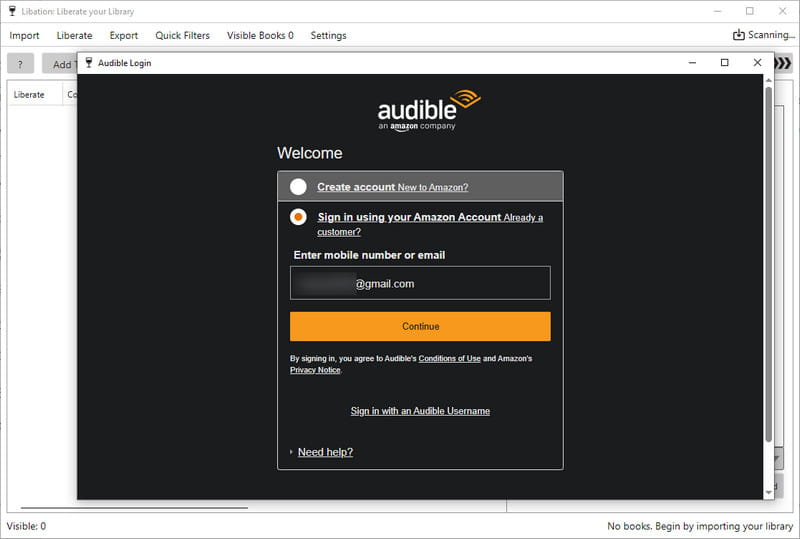
Launch Libation and follow the setup instructions to add your Audible account. Enter your email address, select the appropriate Audible marketplace, and complete any required sign-in steps. Then, click "Scan Library" in the center of the main interface to import your Audible audiobooks.
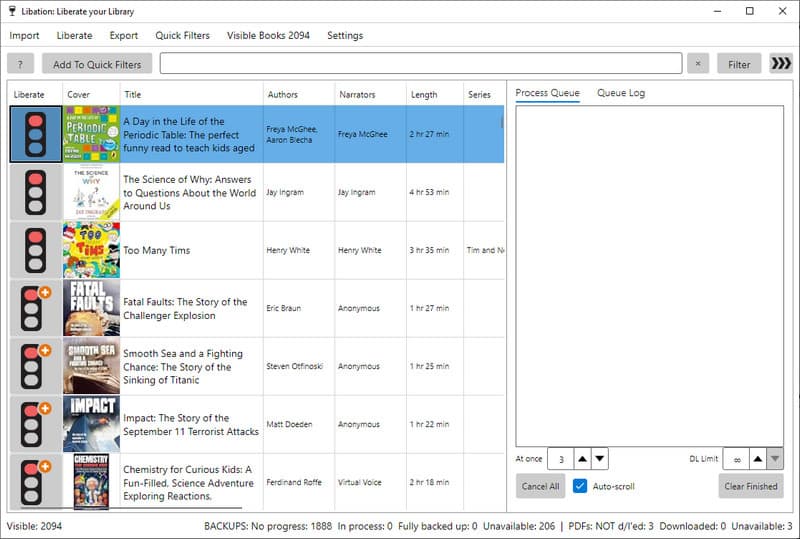
Once the scan is complete, your books will appear with their covers, titles, authors, and download status. A red indicator means the audiobook hasn't been downloaded yet, while a green indicator means it has been successfully backed up.
Step 3 Choose the Output Format and Download Audiobooks
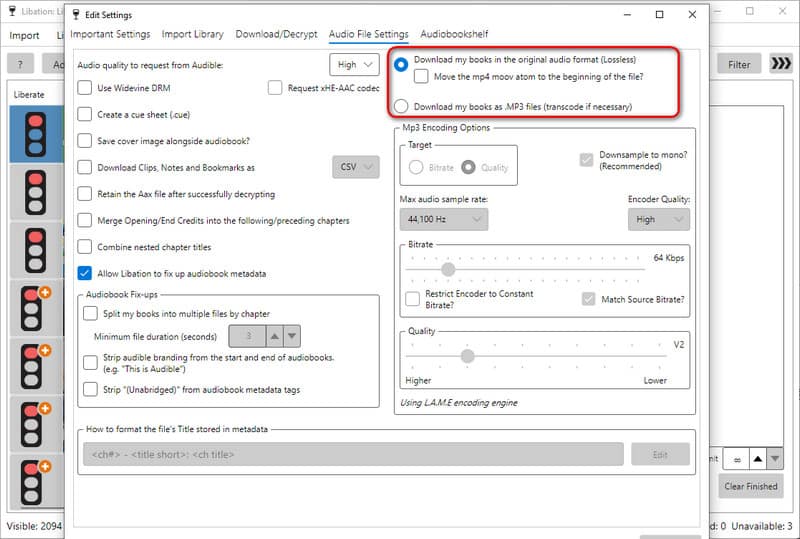
Before downloading, go to Settings and find the "Audio File Settings" tab to choose your preferred output format. Select Download my books in the original audio format (Lossless) to save audiobooks in their original format, usually M4B, or Download my books as .MP3 files (Transcode if necessary) for wider device compatibility.
Once you've selected your preferred format, return to the library and click the red download icon next to the audiobook you want to save. Libation will download and decrypt the book automatically. When the process is complete, the icon turns green, and you can find the audio file in your output folder.
If Libation's output settings feel a bit complicated, try TunePat Any Audiobook Converter. It lets you convert multiple Audible books to MP3, M4B, or M4A with just a few clicks.
Libation Hands-on Test: How Well Does It Work?
To see how Libation performs in everyday use, we tested its download speed, playback compatibility, chapter splitting, and batch downloading on a Windows 10 Pro PC using the Chardonnay version. We tested both M4B and MP3, with a greater focus on MP3 because it works with more devices and media players.
How Fast Is Libation at Downloading Audiobooks?
We selected four Audible audiobooks of different lengths, ranging from 1 hour and 27 minutes to over 18 hours. Each book was downloaded separately in M4B and MP3 formats, and we recorded the total processing time and output bitrate.
Here are our results:
| Audiobook | Duration | M4B Time | MP3 Time | M4B Bitrate | MP3 Bitrate |
|---|---|---|---|---|---|
| Fatal Faults | 1h 27m | 8s | 35s | 125 kbps | 106 kbps |
| The Ogre of Oglefort | 5h 03m | 19s | 1m | 62 kbps | 66 kbps |
| The Final Feast | 5h 09m | 35s | 2m | 125 kbps | 102 kbps |
| Silverborn | 18h 13m | 19m 52s | 11m 03s | 125 kbps | 99 kbps |
All eight downloads completed successfully, giving Libation a 100% success rate in our single-book tests. For MP3 output, Libation achieved an overall processing speed of approximately 122×, based on the combined audiobook duration and total processing time. However, speeds varied between books. For example, The Ogre of Oglefort took just one minute to process, while the similarly long The Final Feast needed two minutes.
M4B was faster for the first three books, likely because it avoided additional transcoding. However, the longest audiobook, Silverborn: The Mystery of Morrigan Crow, showed the opposite result, taking almost 20 minutes for M4B compared with about 11 minutes for MP3. MP3 bitrates ranged from 66 to 106 kbps, although bitrate alone doesn't determine sound quality. Overall, Libation performed reliably in our tests, but processing times varied depending on the audiobook and download conditions.
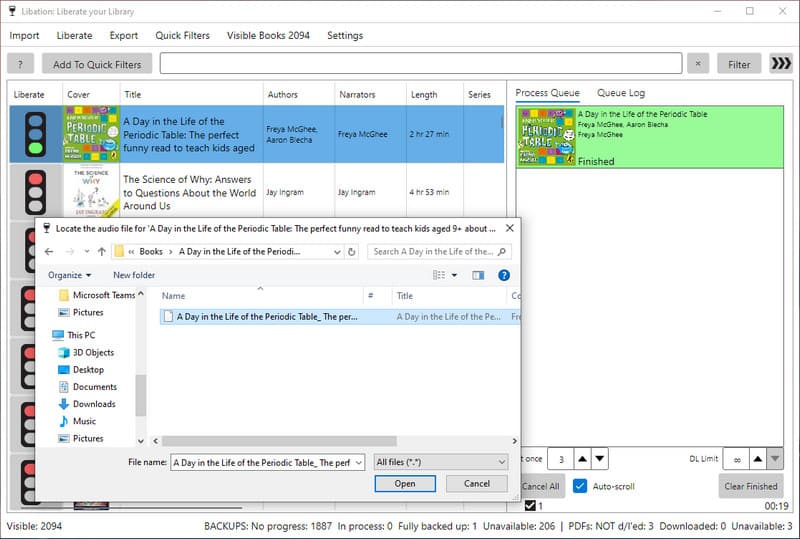
How Well Does Libation Handle Audio and Chapters?
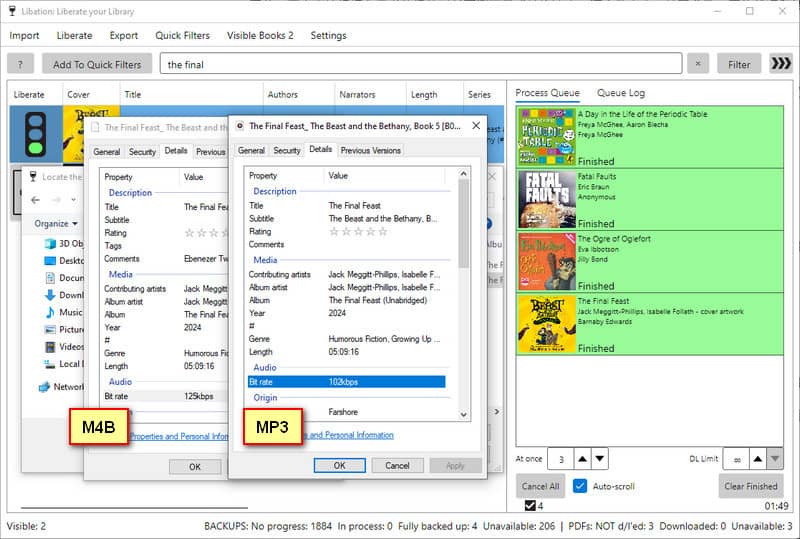
Next, we tested playback, chapter splitting, and metadata using The Final Feast: The Beast and the Bethany, Book 5. Both M4B and MP3 files played normally in Windows Media Player (WMP). We also tried Libation's chapter-splitting feature by right-clicking the audiobook and selecting "Download split by chapters". This worked with both formats, allowing us to save the audiobook as separate chapter files instead of one long file.
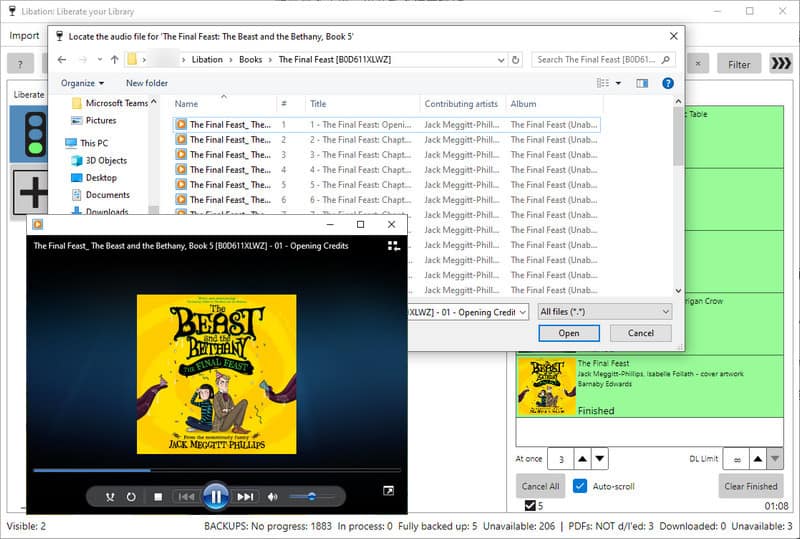
The downloaded files also kept important metadata, including cover art, title, subtitle, artist, and year. All our playback, chapter-splitting, and metadata checks passed, so we had no problems listening to or organizing the downloaded files.
Can Libation Handle Batch Downloads Easily?
We tested batch downloading by selecting three audiobooks using Ctrl + Click, as we couldn't find a dedicated multi-select button. Libation started processing all three books at the same time instead of one by one, although individual downloads appeared to progress more slowly when several tasks were running together.
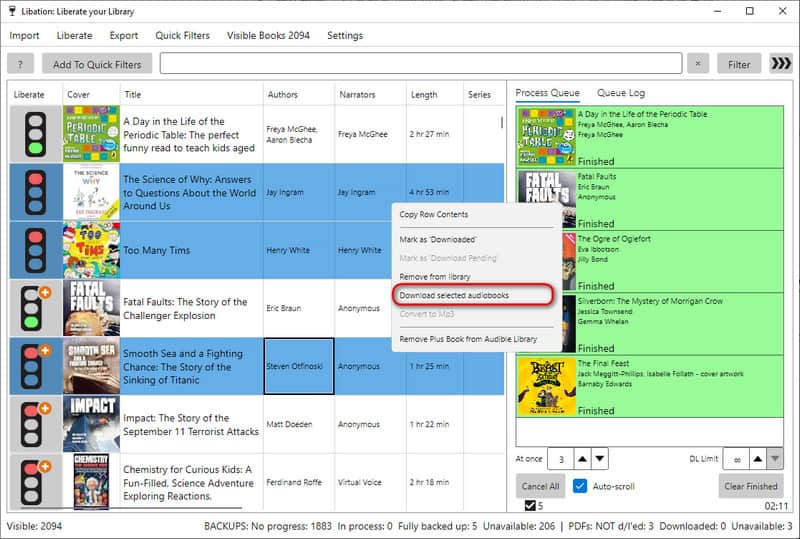
Our first attempt didn't go smoothly. An error prompt appeared while one of the books was being processed, so we canceled all three tasks and restarted the downloads individually. Fortunately, all three audiobooks downloaded successfully after restarting, although resolving the issue required some manual work.
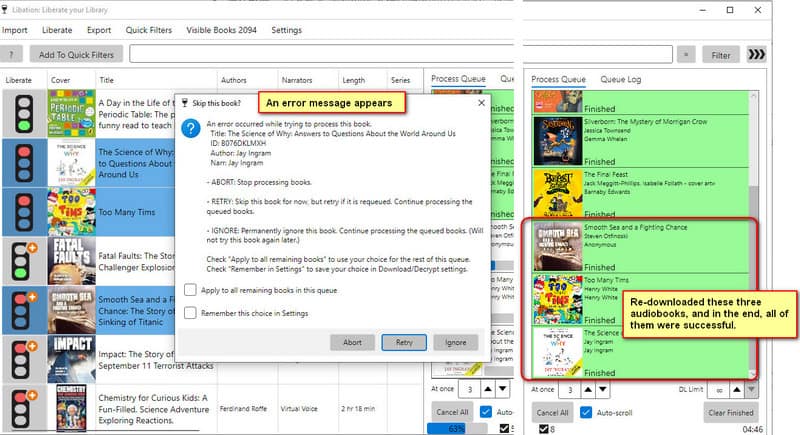
We also ran into a few minor issues during setup and everyday use. Windows SmartScreen displayed a security warning, and we initially selected an ARM64 installer before switching to the correct x64 version. Libation successfully scanned our Audible library of over 1,000 books, but some covers took several minutes to appear. We also needed some time to find the MP3 and M4B settings under the Settings page. These details didn't prevent us from using Libation, but they made the overall experience less straightforward than we expected.
Best Libation Alternative for Audible Downloads
Libation is a great free tool for downloading Audible audiobooks, but its interface and settings can take some time to figure out. If you prefer a simpler way to convert audiobooks, TunePat Any Audiobook Converter is worth trying.
TunePat works on Windows and Mac and lets you browse your Audible or Audible Plus library directly within the program. You can select the audiobooks you want and add multiple titles for batch conversion without scanning your entire library first. It also supports importing local AA and AAX files (select AA/AAX Converter from Tools module), which is handy if you've already downloaded Audible books to your computer.
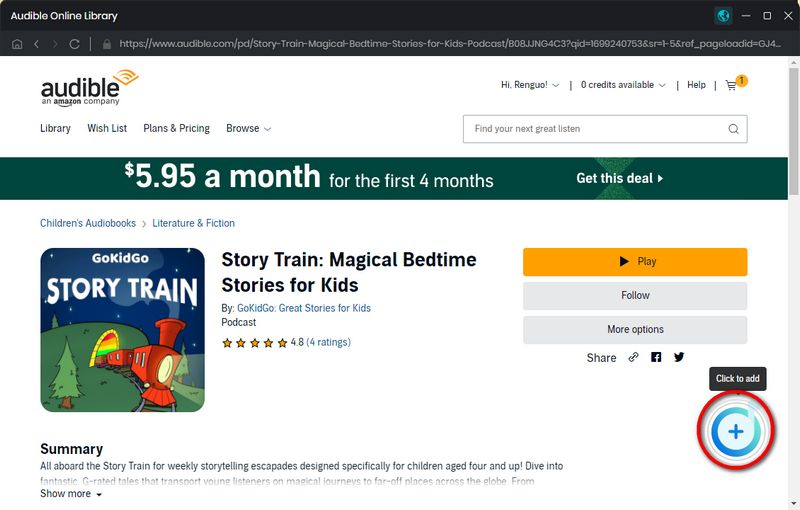
In our tests, TunePat achieved MP3 processing speeds of around 200× to 300×, with longer audiobooks generally processing at higher speeds. By comparison, Libation reached approximately 122× overall in our four-book MP3 test. While these results weren't measured under identical test conditions, TunePat showed promising performance for users who regularly convert long audiobooks.
Libation vs. TunePat: Quick Comparison
| Feature | Libation | TunePat |
|---|---|---|
| Price | Free | Paid (Free Trial) |
| MP3 Processing Speed | ~122× (Our Tests) | 200× to 300× (Our Tests) |
| Output Formats | MP3, M4B | MP3, M4A, M4B |
| Audiobook Access | Scan Audible library | Browse directly or import AA/AAX files |
| Batch Conversion | Supported | Supported |
| Chapter Splitting & Settings | Separate options and settings | Easy to configure before conversion |
Another thing we liked about TunePat is how easy it is to adjust the output settings. You can choose MP3, M4A, or M4B, set the output folder, select the audio quality, and decide whether to split audiobooks by chapter before starting. In our tests, TunePat produced MP3 files at 128 kbps, compared with the 66 to 106 kbps we got from Libation. This gave TunePat an advantage in output bitrate, although bitrate alone doesn't determine how good the audio sounds. Batch conversion is just as simple. After adding an audiobook to the conversion list, click "Add More" to select additional titles, then convert them all at once.
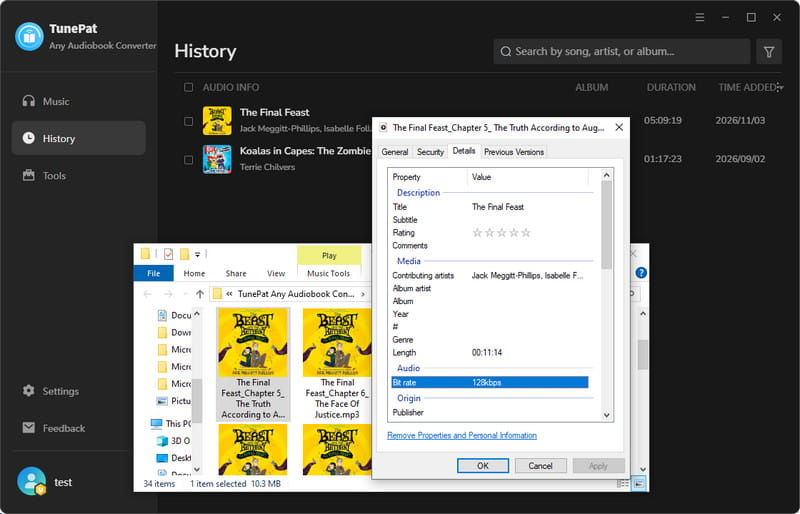
TunePat isn't free, but it takes much of the extra work out of converting Audible audiobooks. If you regularly download long books or have several titles to convert, the time saved and easier setup can make the price worth paying.
FAQs About Libation
Q1: Is Libation Free and Safe to Use?
A: Libation is completely free and open-source, with no subscription or license fees. Its source code is available on GitHub, but that doesn't automatically guarantee safety. We recommend downloading it from the official website or GitHub. During our installation, Windows SmartScreen displayed a security warning because Libation's Windows builds are not code-signed. Make sure to verify the download source before proceeding.
Q2: Can Libation Convert Audible Audiobooks to MP3?
A: Yes. Libation supports both MP3 and M4B output. To download an audiobook as MP3, go to Settings > Audio File Settings and select "Download my books as .MP3 files (transcode if necessary)". In our tests, all four audiobooks were successfully converted to MP3. If you prefer a simpler conversion process with more output format options, TunePat Any Audiobook Converter is another option worth considering.
Q3: Does Libation Work on Mac?
A: Yes. Libation Chardonnay works on macOS, Windows, and Linux, while the Classic version is available only for Windows. Mac users should download the appropriate version for their processor. Libation supports macOS 13 or later.
Q4: Can Libation Download Audible Plus Audiobooks?
A: Yes. Libation supports downloading eligible Audible Plus audiobooks while they are accessible through your active subscription. However, if your membership ends or a title leaves the Plus Catalog, Audible may deny the download license. You can learn more in Libation's official documentation.
Q5: Why Is Libation Not Downloading My Audiobooks?
A: Libation downloads may fail because of account authorization issues, temporary errors, or Audible download restrictions. Some titles may also be unavailable if you no longer have access to them. First, check your Audible account connection and download settings, then try restarting the download. If the problem continues, check Libation's official troubleshooting guide for more help.
Final Verdict: Is Libation Worth Using?
Yes, Libation is worth trying if you want a free way to download Audible audiobooks. It worked well in most of our tests and offers useful features like MP3 conversion, chapter splitting, and batch downloads. However, some settings can be hard to find, and we ran into an error during our batch test. It may take a little time to get used to.
If you want something easier to use, TunePat Any Audiobook Converter is a good alternative. You can find and select audiobooks without scanning your whole library, change the output settings in one place, and convert multiple books at once. In our tests, TunePat processed MP3 files much faster, and we also noticed slightly better audio quality. TunePat isn't free, but it can save you time and hassle, especially if you download audiobooks often.
Olivia Anderson
Senior Writer