How to Download Bandcamp Music as WAV (3 Easy Methods)
 By Olivia Anderson
Music Tips
Updated on 7/27/2026
By Olivia Anderson
Music Tips
Updated on 7/27/2026
If you're looking for a way to download Bandcamp music as WAV, you're in the right place. WAV is one of the most widely supported lossless audio formats, making it a popular choice for DJs, music producers, and audiophiles who need high-quality files for mixing, editing, or offline listening.
Bandcamp provides official WAV downloads for many purchased releases, allowing listeners to get original-quality files directly from artists. However, users with larger music collections may need additional features such as batch processing, file organization, or multiple output formats.
In this guide, we'll compare 3 practical ways to download Bandcamp music as WAV, including the official Bandcamp download option, TunePat Music One, and online Bandcamp download tools, helping you choose the best solution for your needs.
- Part 1: Can You Download Bandcamp Music as WAV?
- Part 2: Download Bandcamp Albums in WAV Officially
- Part 3: Download Bandcamp Music as WAV (Purchased & Streaming) 🔥🔥
- Part 4: Download Bandcamp Music to WAV Online (Pros & Cons)
- Part 5: Which Bandcamp WAV Download Method Is Best?
- Part 6: WAV vs FLAC: Which Format Is Best for Bandcamp Downloads?
- Part 7: FAQs About Bandcamp WAV Downloads
Quick Comparison: Bandcamp WAV Download Methods
| Method | Best For | Advantages | Limitations |
|---|---|---|---|
| Official Bandcamp Download | Users who purchased music | Original WAV quality, official source, no extra software | Requires prior purchase, no batch downloads |
| TunePat Bandcamp Converter | Large music collections | Direct conversion (no prior purchase required), album batching, high-speed WAV export | Requires software installation, some features depend on the supported platform |
| Online Tool | Occasional downloads | Quick and browser-based | Unstable access; the domain name may be invalid; poor sound quality. |
Part 1: Can You Download Bandcamp Music as WAV?
Yes, you can download many Bandcamp releases as WAV.
Bandcamp supports several download formats depending on the artist's settings. After purchasing an album or track, or accessing a free download provided by the artist, you may be able to choose from formats such as:
| Format | Lossless | Best For |
|---|---|---|
| MP3 | ❌ | Everyday listening and wide compatibility |
| AAC | ❌ | Mobile devices and Apple ecosystem |
| OGG | ❌ | Open-source audio playback and smaller files |
| FLAC | ✅ | Lossless storage with smaller file sizes |
| WAV | ✅ | DJs, audio editing, and studio workflows |
| AIFF | ✅ | Music production on macOS |
| ALAC | ✅ | Apple lossless libraries |
If you only need a few purchased albums, Bandcamp's official download option is usually the simplest choice. However, users managing larger libraries may prefer solutions that provide batch processing, automatic organization, and additional format options.
Part 2: Download Bandcamp Albums in WAV Officially
Bandcamp's official download option is the easiest way to get WAV files from purchased releases. It provides original-quality audio files directly from artists, making it a reliable choice for users who want high-quality downloads without installing extra software.
Bandcamp supports multiple download formats, including WAV, AIFF, FLAC, ALAC, AAC, MP3, etc. However, you need to purchase the release first, and Bandcamp does not provide features like batch downloads, automatic file organization, or tools for managing music from different platforms.
Official Bandcamp WAV Download: Quick Pros & Cons
How to Download Bandcamp Music as WAV:
Step 1 Purchase the album or track on Bandcamp.
Step 2 Open your Collection or purchase history.
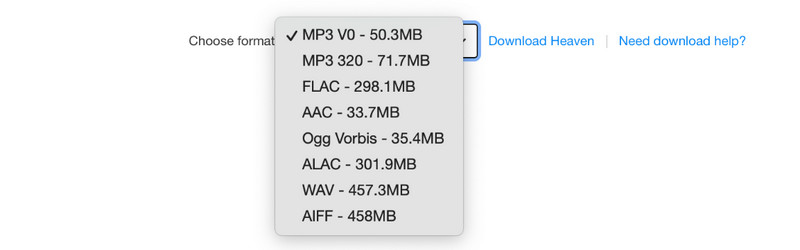
Step 3 Click "Download" and choose "WAV" as the download format.
Part 3: Download Bandcamp Music as WAV (Purchased & Streaming)
Bandcamp's official download option is great, but it has one major catch: it only works for music you already own. While some independent artists do offer free downloads or a "Name Your Price" choice, these are rare. The vast majority of official or high-quality albums strictly require a paid purchase before you can download them. This is where a desktop tool becomes a perfect solution for music collectors. Even if an album costs money, you can still stream it on the website. A good downloader can directly analyze that live audio stream and safely save it as a lossless WAV file on your computer, without requiring a prior purchase.
We recommend TunePat Music One. It is a powerful, all-in-one music converter for Bandcamp and other major platforms. By converting and downloading the Bandcamp music directly from the web player, TunePat bypasses the need for a prior purchase. You can easily batch download entire albums into local formats like WAV, FLAC, or MP3. It also preserves all ID3 metadata and album artwork automatically. Let's look at the simple steps to download Bandcamp music as WAV.
Desktop Tool (TunePat Music One): Quick Pros & Cons
Key Features of TunePat Music One
Note: Some features are platform-specific. The table below summarizes the overall capabilities of TunePat Music One across supported music services.
| Feature | Details |
|---|---|
| Supported Audio Sources | Bandcamp, Spotify, Apple Music, Amazon Music, TIDAL, YouTube Music, Deezer, SoundCloud, Qobuz, YouTube, Vimeo, Dailymotion, Mixcloud, Monstercat, Eggs, hearthis.at, Last.fm, and more. |
| Output Formats | WAV, FLAC, MP3, AAC, AIFF, ALAC, EAC3, AC4 |
| Audio Quality | Preserve original audio quality after conversion |
| Batch Conversion | Batch process supported songs, albums, playlists, podcasts, and more |
| Conversion Speed | Up to 10X faster processing |
| Metadata Preservation | Preserve available metadata, including title, artist, album, track number, and more |
| Free Built-in Tools | AI vocal remover, CD burner, format converter, tag editor, podcast downloader, and more |
| Compatibility | Windows & macOS |
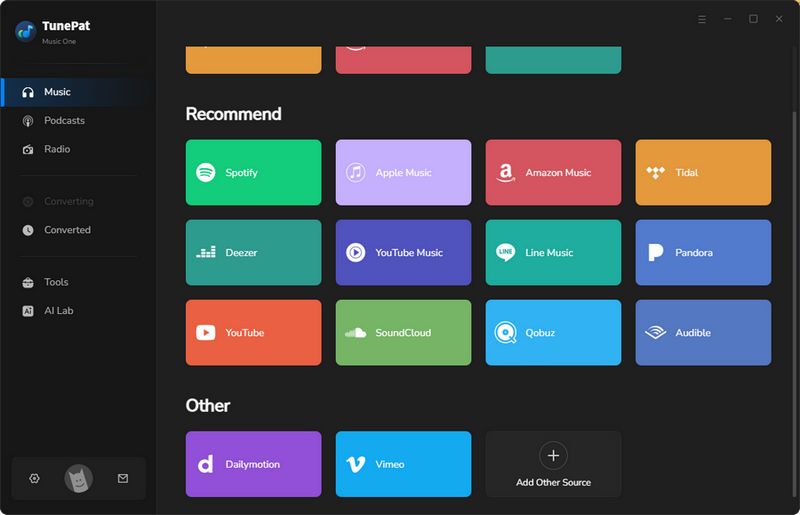
Step 1 Launch TunePat Music One and Choose Bandcamp
Download and run TunePat Music One on your computer. On the main interface, you will see many supported music services like Spotify, YouTube, and Apple Music. Click on the "Bandcamp" tab to continue.
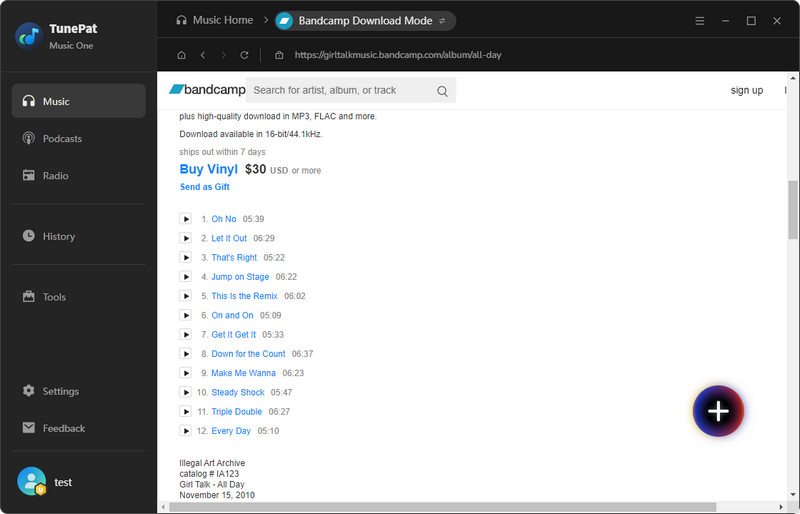
Step 2 Parse Your Target Bandcamp Songs
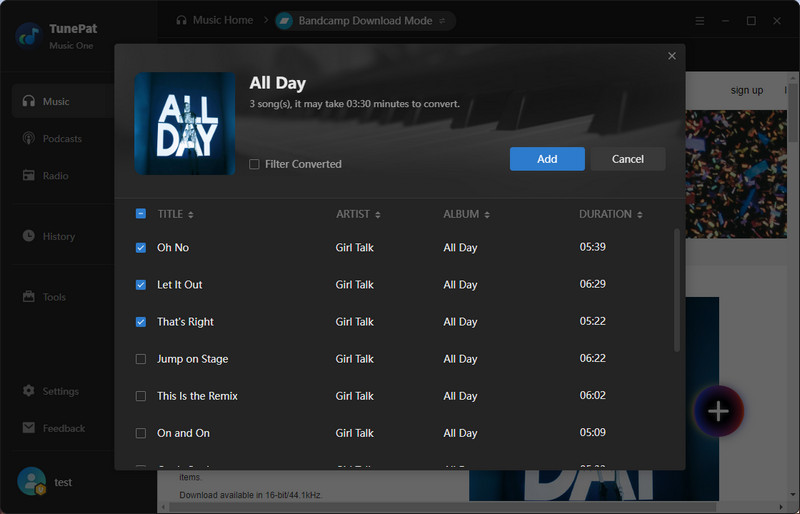
Open or search for the Bandcamp songs you want to download. Then, click the "+" button in the bottom right corner to analyze the music. After that, a pop-up window will appear. Check the songs you want to convert and click "Add" to go to the next step.
Step 3 Convert Bandcamp Music to WAV Format
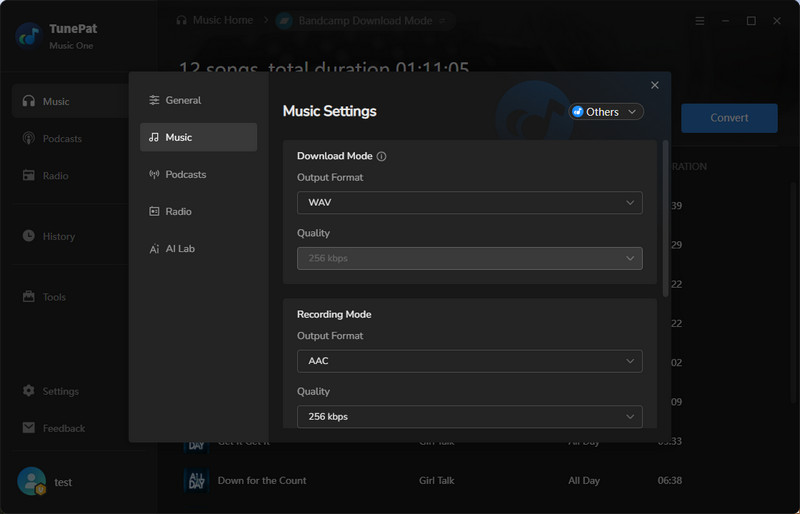
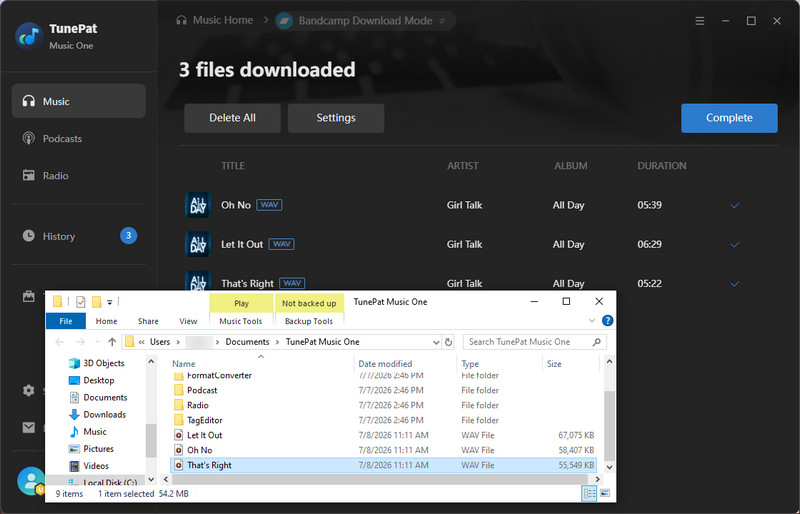
On this interface, click the "Settings" button and change the output format to WAV. Close the settings window, and click "Convert" to start the download process.
🎯 Our Real Test of TunePat Music One: Is It True Lossless Quality?
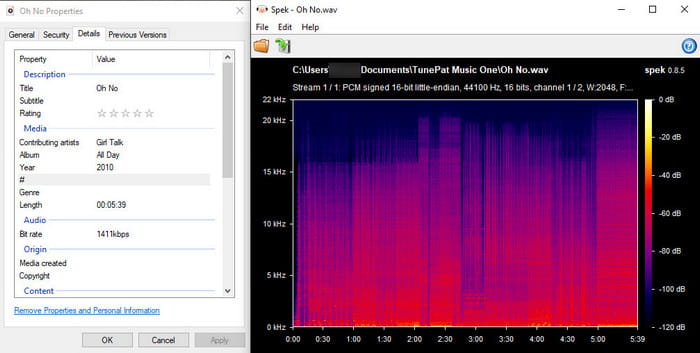
We tested the WAV file downloaded by TunePat Music One to see how it performs under closer analysis.
- Keep Song Info: TunePat automatically fills in all the details. The song title, artist, album, and year are all perfectly saved. You can drop the file straight into your music library without renaming anything.
- Genuine WAV Quality: The spectrum chart shows the actual audio details. The audio frequencies smoothly hit the top at 22 kHz with no cutoff. This is genuine CD quality sound instead of a low resolution MP3 saved in a large file container.
Best For
Not Ideal For
Part 4: Download Bandcamp Music to WAV Online (Pros & Cons)
If you prefer not to install desktop software, online tools offer a quick, browser-based option. These tools are convenient for occasional downloads since they do not require installation. However, based on our actual testing, most online downloaders fail to work or have extreme limits. Only one online tool successfully parsed and converted Bandcamp music to the WAV format.
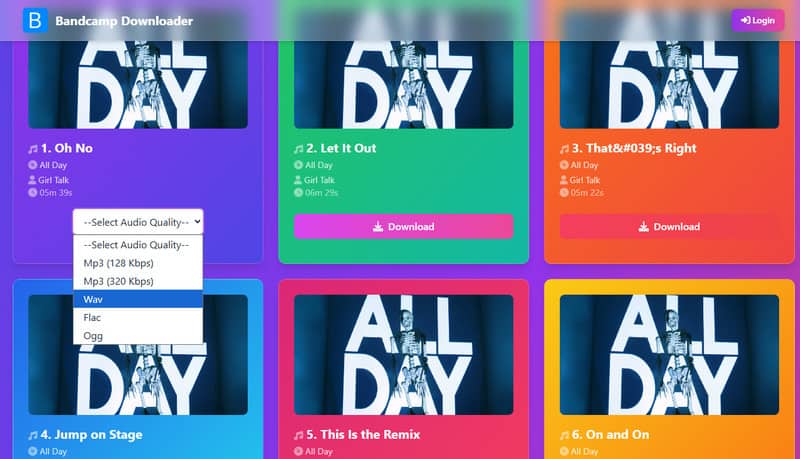
Bandcamp Album Downloader works by analyzing an album link and generating download files for you. It allows users to download tracks individually or grab the whole album at once as a ZIP file. It supports multiple formats like MP3, WAV, and FLAC, and features an ad-free interface. However, its free tier is very limited.
Bandcamp Album Downloader: Quick Pros & Cons
How to Download Bandcamp Music to WAV with Bandcamp Album Downloader?
Step 1 Copy the Bandcamp track or album URL, and paste it into the input box on the website.
Step 1 Once the parsing is complete, choose "Wav" as your audio format.
Step 1 Once you select the format, the download will start automatically; simply wait for it to complete.
🎯 Our Real Test of Bandcamp Album Downloader: Is It True Lossless Quality?
We tested a downloaded track using Windows details and Spek (a sound analyzer), and found two major problems:
- Zero Song Details: The artist, album, and year fields are completely blank. It saves nothing but the raw file name, making music organization a hassle.
- Fake WAV Quality: While the file claims to be a high-quality 1411kbps WAV, the sound strictly cuts off at 16 kHz. A real WAV reaches 22 kHz. This tool simply upscales a poor 128kbps MP3 into a huge WAV file, wasting your disk space.
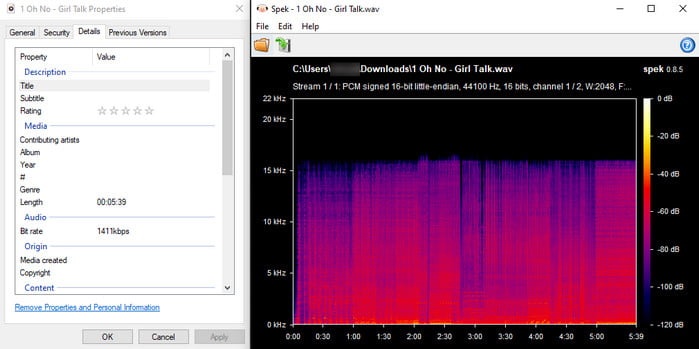
Bottom line: It works for casual listening. But for real WAV quality and proper song tags, a professional tool like TunePat is a much better choice.
Part 5: Which Bandcamp WAV Download Method Is Best?
| Comparison Factor | Official Bandcamp Download | Desktop Tool (TunePat Music One) | Online Downloader (Bandcamp Album Downloader) |
|---|---|---|---|
| 🎵 Audio Quality | 🟢 Genuine Lossless | 🟢 True Lossless (22 kHz) | 🔴 Fake WAV (16 kHz cutoff) |
| 🏷️ ID3 Tags | ✅ Fully Preserved | ✅ Fully Preserved | ❌ None (Blank) |
| ⚡ Batch Download | ⚠️ Paid Only | ✅ Yes (One-click) | ⚠️ Paid Only |
| 💻 Software Needed | 🚫 No | Yes (Desktop App) | 🚫 No |
| 💰 Cost & Limits | 🛒 Purchase Required | ⏳ Free trial with limitations | 💵 2 Free Songs (Then $7.99/mo) |
| 🎯 Best For | Downloading owned music officially | Audiophiles, DJs, and producers wanting top sound for less. | Quick downloads when quality doesn't matter |
Part 6: WAV vs FLAC: Which Format Is Best for Bandcamp Downloads?
Both WAV and FLAC are lossless audio formats, meaning they preserve the original sound quality. The main difference is how the audio is stored. WAV uses uncompressed audio, while FLAC compresses the file without sacrificing quality, resulting in significantly smaller file sizes.
| WAV | FLAC |
|---|---|
| Uncompressed lossless format | Compressed lossless format |
| Larger file size | Smaller file size |
| Excellent compatibility with DJ and production software | Better for saving storage space |
| Ideal for editing and studio workflows | Ideal for building a large lossless library |
Bottom line: For most DJs, producers, and audio professionals, downloading Bandcamp music as WAV offers the best compatibility. If storage space matters more, FLAC delivers the same lossless quality in a smaller file size.
Part 7: FAQs About Bandcamp WAV Downloads
Q1: Can I download Bandcamp music as WAV?
A: Yes. Many Bandcamp releases can be downloaded in WAV format after purchase. The available download formats depend on the options selected by the artist, and some artists also offer certain releases as free downloads.
Q2: What audio formats does Bandcamp support?
A: Bandcamp supports multiple download formats, including MP3 V0, MP3 320, AAC, Ogg Vorbis, FLAC, ALAC, WAV, and AIFF. Once you've purchased a release (or claimed a free download offered by the artist), you can usually choose your preferred format before downloading.
Q3: Can I batch download Bandcamp albums?
A: Bandcamp's official download option is mainly designed for downloading purchased releases individually. If you regularly save multiple albums or want features like batch processing, desktop tools such as TunePat Music One can provide a more convenient solution.
Q4: Can I download Bandcamp music without buying it?
A: It depends on the release. Some artists offer free downloads on Bandcamp, but most music must be purchased before it can be downloaded through the official Bandcamp download option.
Q5: Is it legal to download Bandcamp music as WAV?
A: Yes, as long as you download music through Bandcamp's official download option or have permission from the copyright holder. Always respect artists' rights and follow the terms of the platform or tool you use.
Conclusion
There is no single best way to download Bandcamp music as WAV. If you only need a few albums you have purchased, Bandcamp's official download option is the easiest and safest choice because it provides original-quality files directly from artists.
If you want more flexibility when managing Bandcamp music, TunePat Music One can be a more convenient option. Unlike the official download option, which focuses on individual purchased releases, TunePat Music One offers features such as batch processing, multiple output formats, and metadata preservation to help you handle your music files more easily. Online tools can also be useful for quick downloads, but their audio quality, features, and reliability may vary, making them better suited for occasional use.
Olivia Anderson
Senior Writer