
Instagram offers a wealth of catchy background music, trending audio clips, and creative sound effects, particularly within its Reels feature. Sometimes, you might want more than just to watch a video. You may wish to save the audio as an MP3 file for offline listening, use it as a ringtone, or keep it for creative projects. That’s where the Instagram to MP3 converter comes in.
On this page, we’ve gathered some of the most effective tools available for downloading Instagram Reels to MP3, including both powerful desktop software and convenient online downloaders. Whether you prioritize audio quality, download stability, or security, you will find a suitable option here. To aid your decision, we provide a comparison of these tools, highlighting their key differences, so you can choose the tool that works best for you.
Part 1: Desktop Instagram MP3 Downloaders [Best & Safest]
For users seeking faster download speeds and enhanced privacy protection, desktop software typically offers the most reliable method for converting Instagram Reels to MP3. In contrast to many online alternatives, dedicated desktop downloaders deliver a more stable and consistent experience, which is particularly essential for those who download frequently or in batches. Furthermore, they generally support a wider range of output formats, providing users with superior flexibility. In this section, we will explore two powerful Instagram to MP3 downloaders, TunePat Music One and TunePat VideoGo All-In-One.
1.1 TunePat Music One
TunePat Music One is a desktop music downloader positioned as a one-stop solution. It enables users to extract audio from a variety of leading streaming platforms and save it as local files. It supports converting music and videos from Instagram, Spotify, Apple Music, Amazon Music, Tidal, YouTube, and more. To accommodate diverse user preferences for sound quality and compatibility, it supports multiple output formats, including MP3, AAC, WAV, FLAC, AIFF, and ALAC. It achieves download speeds of up to ten times faster than standard rates and preserves essential ID3 tag information for organized media libraries. The program also has built-in functions for streaming and downloading podcasts and radio stations, making it a truly one-stop tool.
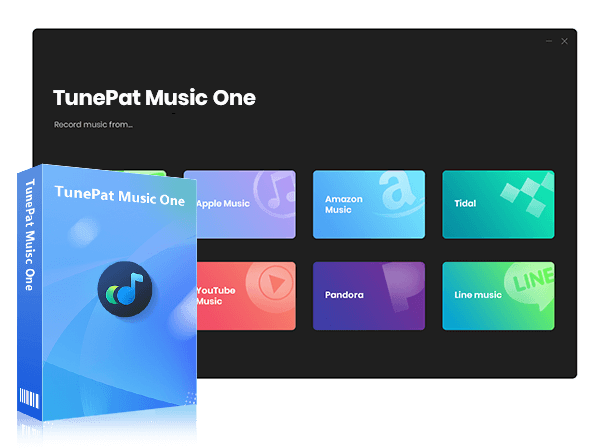
TunePat Music One
TunePat Music One is an all-in-one converter that can support any music streaming platform.
Step 1 First, open TunePat Music One on your computer. On the TunePat home page, you’ll see that it supports downloading music from more than a dozen popular streaming platforms. To convert Instagram Reels to MP3, click the "Add Other Source" button and enter the URL for Instagram. This allows you to add websites that are not displayed on the main interface.
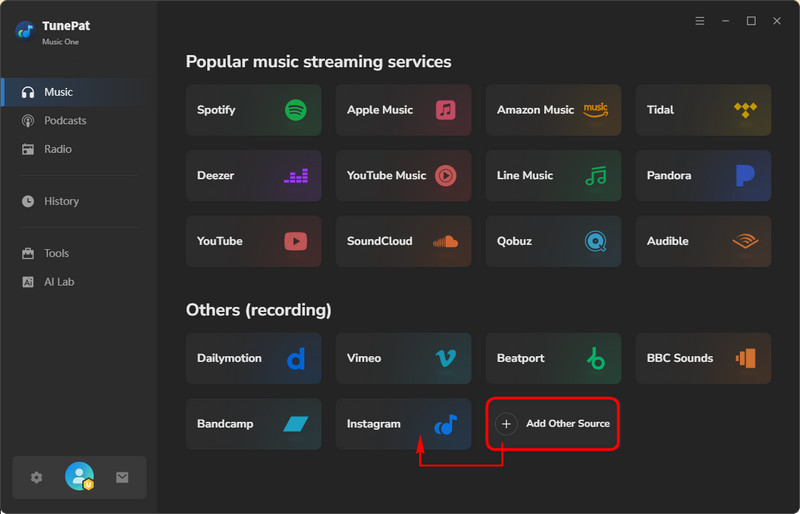
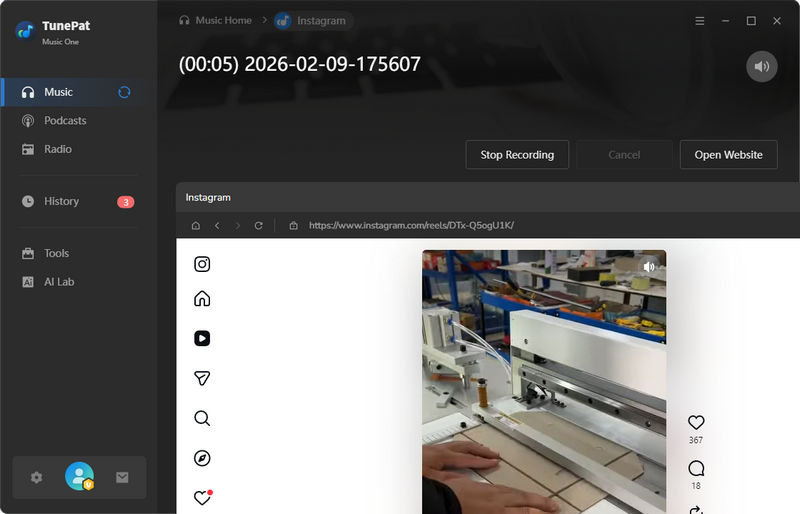
Step 2 Click "Instagram", and the Instagram webpage will open automatically. If it doesn’t, simply click "Open Website" to launch it manually. At this stage, you can also adjust basic settings such as the output format, audio quality, output folder, and when the recording should stop. These options give you plenty of control over the recording process.
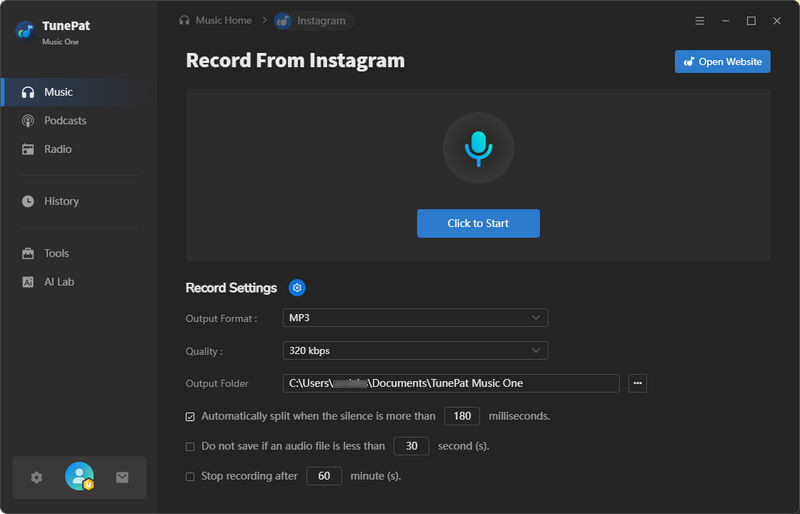
Step 3 Click "Click to Start" then start playing the Reels on Instagram. TunePat will automatically detect the audio and begin recording. Once you feel the recording is complete, click "Stop Recording". TunePat will stop recording and open the output folder you selected earlier, where you can view your saved MP3 file.
1.2 TunePat VideoGo All-In-One
TunePat VideoGo All-In-One is designed to help users download videos from an extensive array of popular websites and save them in MP4 or MKV format. It also allows users to extract and save audio in MP3 format. The program supports downloading videos from Instagram, Netflix, Amazon Prime Video, and Disney+. With its integrated browser and intuitive interface, you can quickly access video pages and download HD videos with ease. Moreover, it provides highly flexible output settings, enabling you to customize video resolution, audio quality, subtitle selection, and the output folder to suit your specific requirements. In this guide, we will use TunePat VideoGo All-In-One to download Instagram Reels videos step by step.

TunePat VideoGo All-In-One
TunePat VideoGo All-In-One is a comprehensive tool designed for downloading online videos from a wide range of platforms.
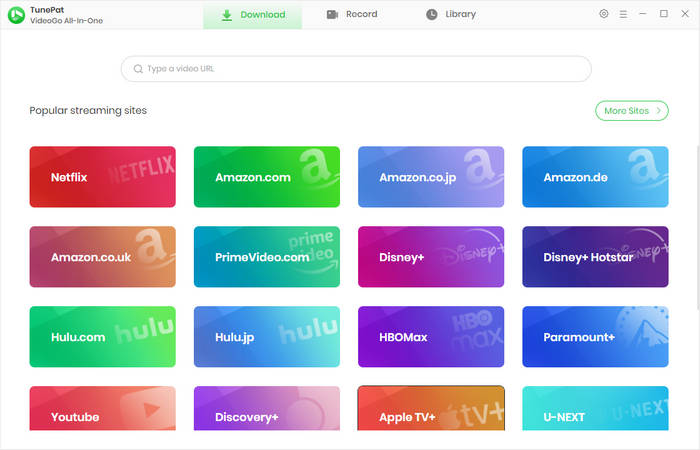
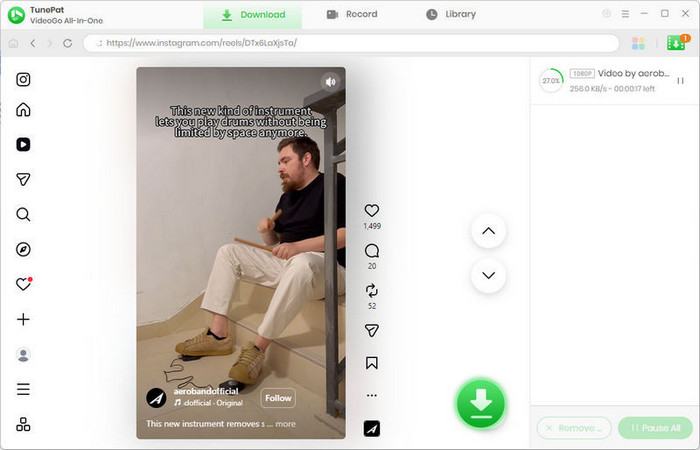
Step 1 Launch TunePat VideoGo All-In-One. The TunePat homepage supports downloads from over 1,000 video websites. Simply type "Instagram" into the search bar at the top and open the Instagram website.
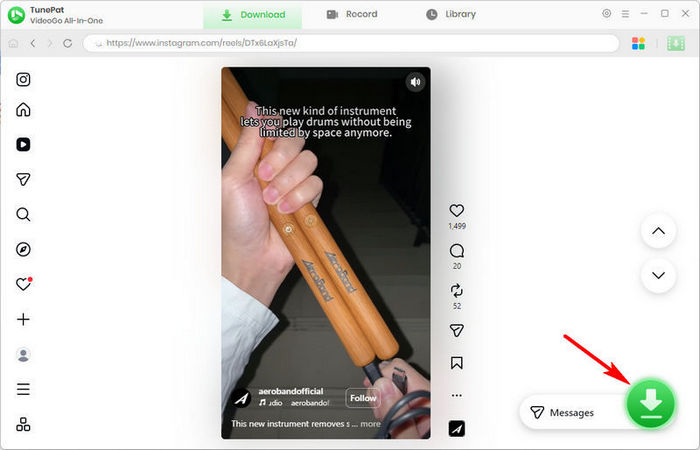
Step 2 Find the Instagram video you want to download and click the "↓" button on the right side. If the download button is grayed out or unclickable, check whether the video is muted in the upper-right corner. If it is, unmute the video. When the settings window appears, select "Audio" and then click "Download".
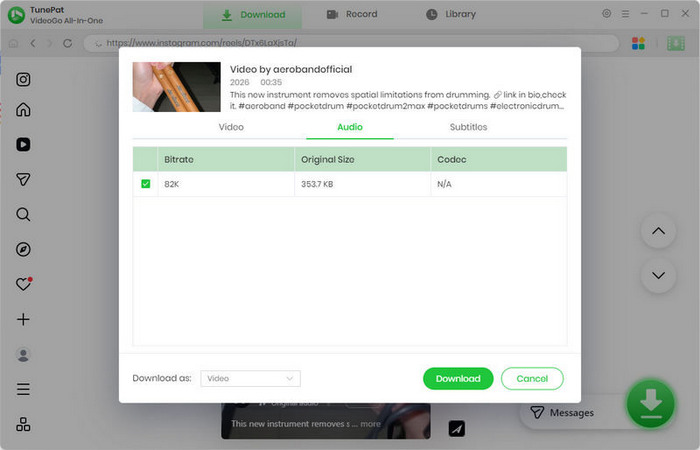
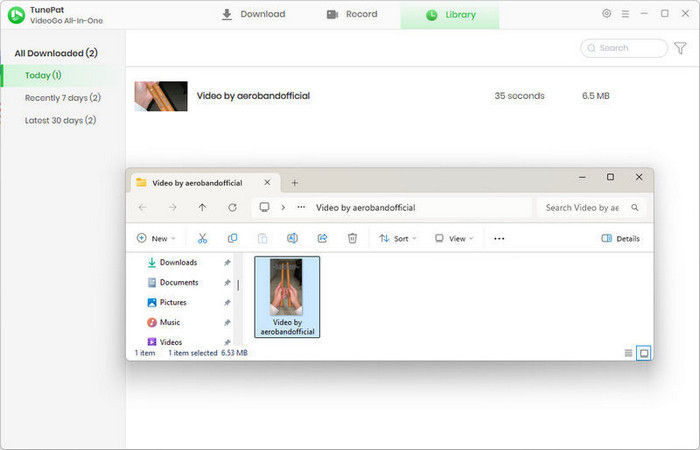
Step 3 TunePat will start downloading MP3 files to your computer. The process is usually fast and should finish shortly. You can monitor the download progress in the "Library" section.
Part 2: Free Online Instagram MP3 Download Tools
1. ReelSave.App
🔗 https://reelsave.app/
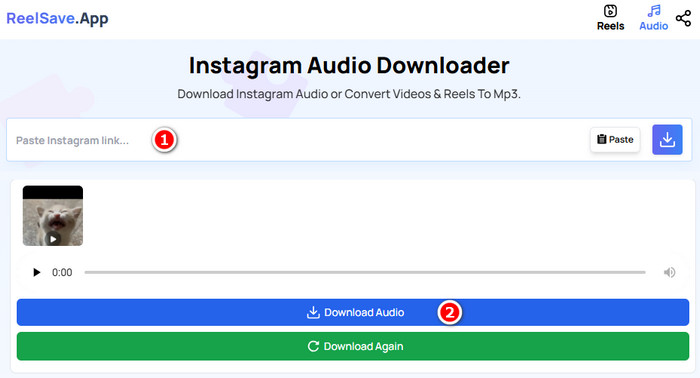
ReelSave.App is a free online tool that converts Instagram reels to MP3. Its use requires neither an Instagram account nor a separate registration for the tool itself. Simply paste the desired Instagram URL, click the "Download Audio" button, and the audio file will be quickly saved to your device. It is important to note, however, that as a free service, the website sustains itself through substantial advertising. This can sometimes lead to accidental clicks on ads, potentially redirecting users to unknown web pages. In addition, the downloaded files do not include cover art, which can make organizing your audio files less convenient.
Pros
-
 Free to use: No payment is required to convert Instagram Reels to MP3.
-
Web-based: No software installation is required; works directly in a browser.
-
Quick and simple: Just paste the URL and you can download, which is fast and straightforward.
Cons
-
 Ad-heavy and security risk: The website contains frequent ads, which can be distracting and may accidentally redirect users to unknown or unsafe websites.
-
No cover art: Downloaded MP3 files lack cover images, which can make organization harder.
2. FastVideoSave.Net
https://fastvideosave.net/
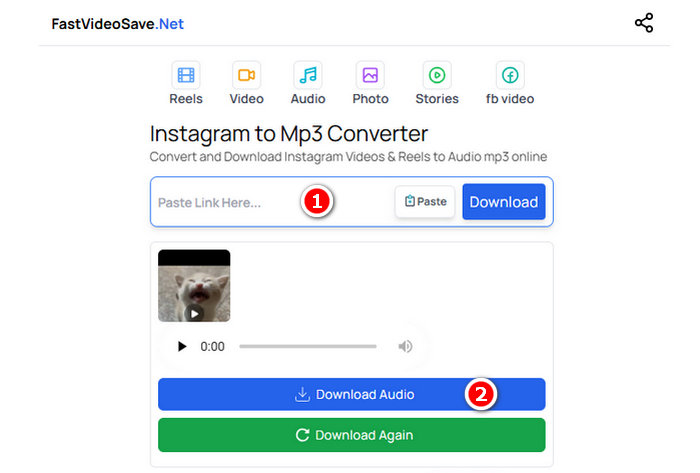
Much like the previously mentioned tool, FastVideoSave.Net is a minimalist Instagram to MP3 converter. It enables users to download Reels directly to their computers or mobile devices without the need to install any additional software. However, features a substantial number of ads. Users are advised to navigate carefully to avoid accidental exposure to potentially harmful ads or security risks. A distinct advantage over the prior tool is that FastVideoSave.Net supports downloading not only Instagram Reels but also videos, stories, and photos, making it more feature-rich. The operation steps are similar, and you can refer to the screenshots for guidance.
Pros
-
Free and web-based: No software installation is required; it works directly on computers and mobile devices.
-
Supports multiple Instagram content types: Users can download Instagram reels, videos, stories, and photos.
-
Minimalist interface: Simple and easy to use, and users can save files directly without complicated steps.
Cons
-
Ad-heavy and security risk: Frequent ads may redirect users to unsafe or malicious websites.
-
No cover art: Downloaded files lack cover images, making organization harder.
-
Dependent on internet connection: As a web-based tool, downloads require a stable internet connection.
Part 3: Instagram MP3 Downloaders Comparison
| TunePat Music One | TunePat VideoGo All-In-One | ReelSave.App | FastVideoSave.Net | |
|---|---|---|---|---|
| Security & Privacy | ⭐⭐⭐⭐⭐ | ⭐⭐⭐⭐⭐ | ⭐ | ⭐ |
| Input Streaming Sources | Instagram, YouTube, YouTube Music, Spotify, Apple Music, SoundCloud, Amazon Music, Tidal, and more | Instagram, Netflix, YouTube, Amazon Prime Video, Disney+, Paramount+, and more | ||
| Supported Devices | Windows & Mac | Windows & Mac | Desktop & Mobile | Desktop & Mobile |
| Output Format | MP3, MP4, AAC, WAV, FLAC, AIFF, or ALAC | MP3, MP4, or MKV | MP3 | MP3 |
| Download Stability | Stable | Stable | Occasionally failure | Occasionally failure |
Part 4: FAQs About Converting Instagram Reels to MP3
Q1: Do I need an Instagram account to download Reels?
A: Most online tools do not require one. However, desktop programs like TunePat Music One and TunePat VideoGo All-In-One do require you to log in. The login process is simple; just open the Instagram webpage within the program and sign in as you normally would, with no extra complicated steps.
Q2: Can I convert Instagram Reels to MP3 on both computers and mobile devices?
A: Yes, for users on mobile devices, the conversion process can indeed be completed directly using free online tools for convenience. However, if your primary workflow is on a computer, we strongly advise opting for dedicated desktop software such as TunePat. This recommendation is based on the superior security measures and significantly more stable download performance that such applications provide.
Q3: Do the downloaded MP3 files include cover art or metadata?
A: Most common Instagram to MP3 converters do not include cover art when saving audio files. TunePat VideoGo All-In-One stands out as one of the few solutions capable of downloading the cover image together with the Reels audios. This feature not only enhances the visual appeal of your media files but also significantly aids in later organization and identification within your library.
Q4: Is it safe to use free online Instagram to MP3 converters?
A: Not always. Free websites often contain ads that may redirect you to unknown or unsafe pages. For users who prioritize security and a safer experience, desktop software like TunePat is usually the better choice.
Conclusion
You have now explored the most effective methods for converting Instagram Reels to MP3, ranging from reliable desktop software to convenient online tools. For users who prioritize enhanced security and a stable experience, TunePat Music One and TunePat VideoGo All-In-One stand out as the most dependable recommendations. Conversely, for occasional downloads where convenience is key and you wish to avoid software installation, free online converters remain a viable option.
We encourage you to select the solution that best aligns with your specific requirements and begin transforming your favorite Reels into MP3 audio today. Enjoy offline listening anytime, use the audio in your creative projects, or keep trending sounds in your personal collection with ease.
Download TunePat Music One 👇
Download TunePat VideoGo All-In-One 👇

Olivia Anderson
Senior Writer