
Looking for the best Beatport downloader? You've come to the right place. While Beatport officially lets you download purchased tracks, upgrading to WAV, AIFF, and FLAC usually requires paying an additional fee, which can quickly add up if you're buying music regularly.
That's why many DJs and electronic music fans turn to a third-party Beatport downloader for a more flexible and cost-effective solution. In this article, we'll first show you how to download tracks from Beatport officially, then review and compare the Beatport downloaders available today. Based on our hands-on testing, we'll highlight each tool's strengths, weaknesses, and ideal use cases to help you choose the one that fits your workflow.
Part 1: How to Download Purchased Tracks from Beatport
Downloading music from Beatport officially is a simple process, but you'll need to purchase each track before you can save it to your computer.
Step 1 Sign in to your Beatport account and browse for the track you want to download.
Step 2Click the price button next to the track. The track will be added to your shopping cart automatically.
Step 3Click the cart icon in the upper-right corner of the page to review your order.
Step 4Choose the download format. MP3 is included at the standard track price, while lossless formats such as WAV, AIFF, or FLAC require an additional fee.
Step 5Click "Checkout", complete the payment, and Beatport will make the track available for download.
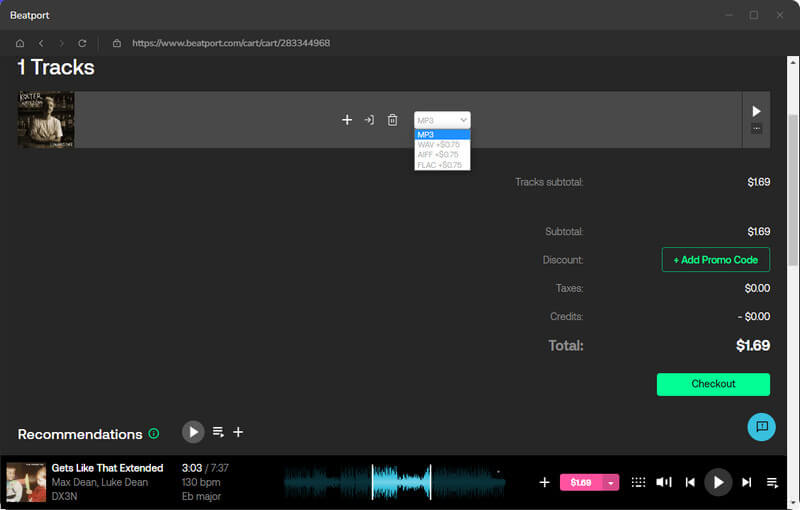
The official download process shows that lossless formats such as WAV and AIFF usually cost more than MP3. For users who download large music libraries on a regular basis, these extra costs can add up to a considerable amount.
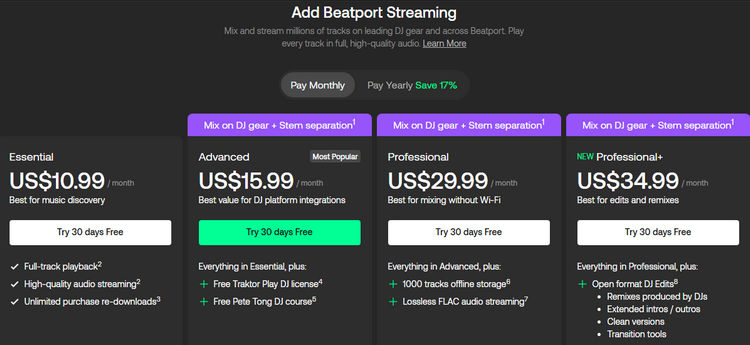
At this point, some users may wonder whether a Beatport subscription can help reduce these costs. However, Beatport works differently from services such as Spotify or Apple Music. A subscription does not allow unlimited downloadable music files, nor does it replace purchasing tracks individually.
The entry-level Essential plan starts at $10.99/month, unlocking full-track playback, higher-quality audio, and unlimited re-downloads of your purchased music. The Professional plan ($29.99/month) adds features such as FLAC-quality streaming and the 1,000-track Offline Locker, but offline storage is designed for streaming playback rather than permanent file ownership. In other words, even with a streaming subscription, you'll still need to purchase tracks separately if you want permanent audio files stored on your device.
For this reason, many users turn to third-party Beatport downloaders. These tools allow users to save tracks in various formats, including MP3, WAV, FLAC, AIFF, AAC, and ALAC. Below, we introduce several tools that are frequently mentioned in current discussions.
Part 2: Download Beatport Tracks to MP3, FLAC, WAV & More Formats
For users seeking to save Beatport tracks locally without purchasing each format separately, a third-party downloader can serve as an alternative.
The official method requires extra fees for certain download formats. In contrast, some third-party tools allow conversion from a single source into multiple audio formats. This feature is particularly relevant for DJs, who often need to create mixes or use the same track in different file types.
To assess the performance of third-party tools, we tested TunePat Music One, a desktop downloader that has received positive user feedback. During our hands-on evaluation, we focused on several key factors: supported formats, audio quality, download stability, and ease of use.
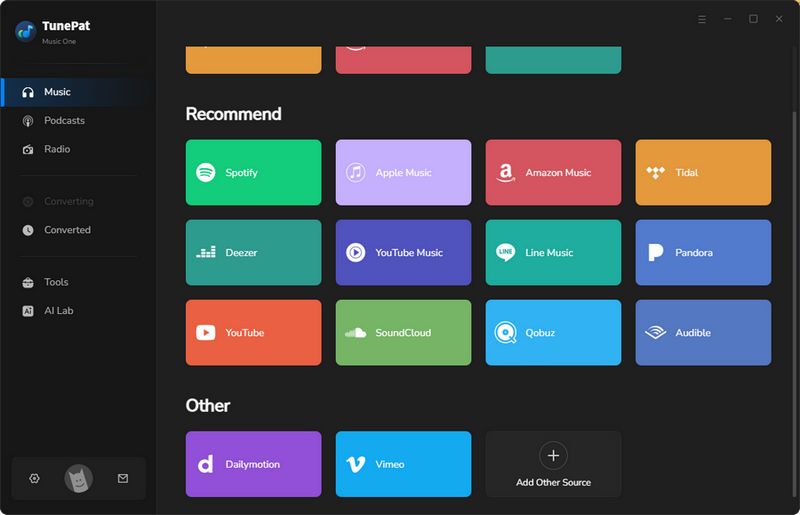
Step 1 After installing and launching TunePat Music One, we selected "Beatport" from the list of supported services. The program then opened its built-in Beatport web player. We logged into our account and accessed our music library as usual. During testing, the embedded player allowed us to browse tracks directly, without the need to switch between different applications.
Step 2 Before recording, we opened the output settings and selected the audio format. TunePat Music One supports MP3, AAC, WAV, FLAC, AIFF, and ALAC. For this test, we chose MP3 and adjusted the quality settings accordingly. Bitrate options range from 128 kbps to 320 kbps, offering a balance between file size and audio quality. After completing the setup, we returned to the Beatport web player.
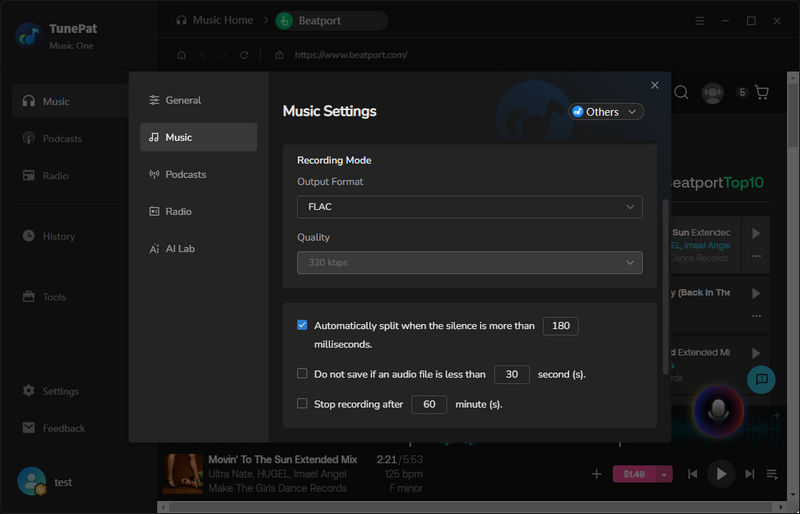
Step 3 After selecting a track, click the microphone icon on the right and select "Start Recording". The software begins recording automatically when it detects audio playback. You can add more tracks to the playback queue, and each one will be recorded in sequence. To stop, click the same icon again. During testing, the recording continued uninterrupted with a stable network connection. Since the process runs in real time, it is best to schedule it at a time when the computer is not heavily in use.
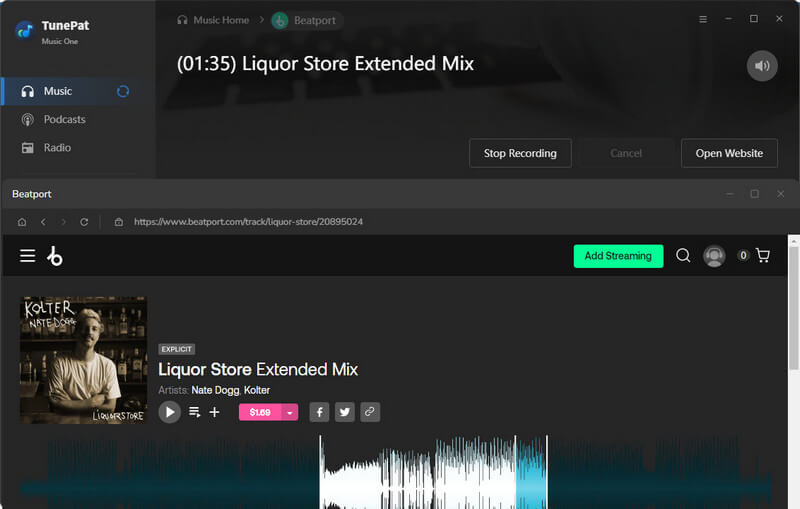
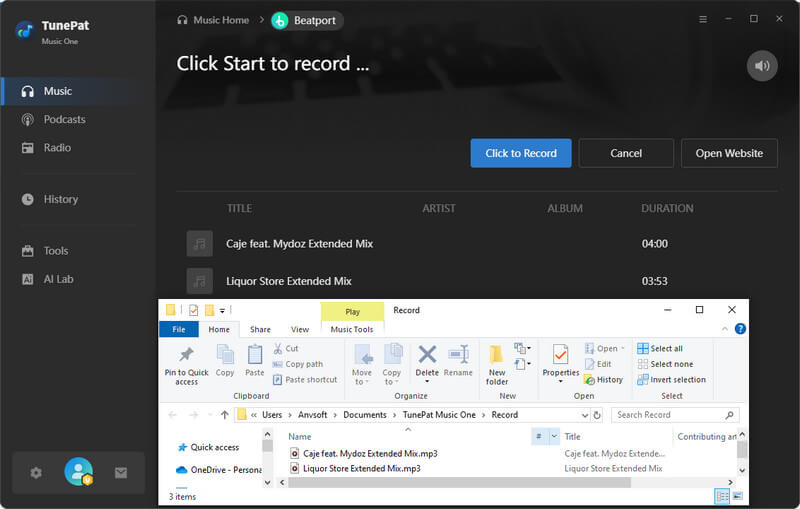
Step 4 After recording, TunePat Music One processes the audio and creates separate files according to the selected settings. The software can detect silent gaps between tracks and split the recording into individual files. Once processing finishes, the output folder opens automatically. The saved files are stored in the chosen format and can be accessed directly from your computer. The software also retains song titles and album artwork, which helps keep your local music library organized.
Editor's Real Test (July 2026) | Rating: ★★★★☆
During our testing, TunePat successfully recorded Beatport tracks through its built-in web player, allowing us to browse, play, and record in one interface. We also verified its support for multiple output formats, including MP3, AAC, WAV, FLAC, AIFF, and ALAC, with metadata such as track titles and album artwork preserved after export. In addition, TunePat supports other streaming platforms like Spotify, Apple Music, Amazon Music, YouTube, and SoundCloud. However, recording is performed in real time, so processing speed depends on track length, and a stable internet connection is required.
Pros
-
 Supports multiple streaming platforms: Spotify, Apple Music, YouTube, SoundCloud and more.
-
Flexible output format options: MP3, AAC, WAV, FLAC, AIFF, and ALAC.
-
Use an intuitive interface without ads or complicated steps.
-
Keeps important track information, such as song titles and album artwork.
Cons
-
 Real-time recording only.
Part 3: Tested Online Beatport Downloaders
YT2Save
🔗 https://yt2save.com/beatport/
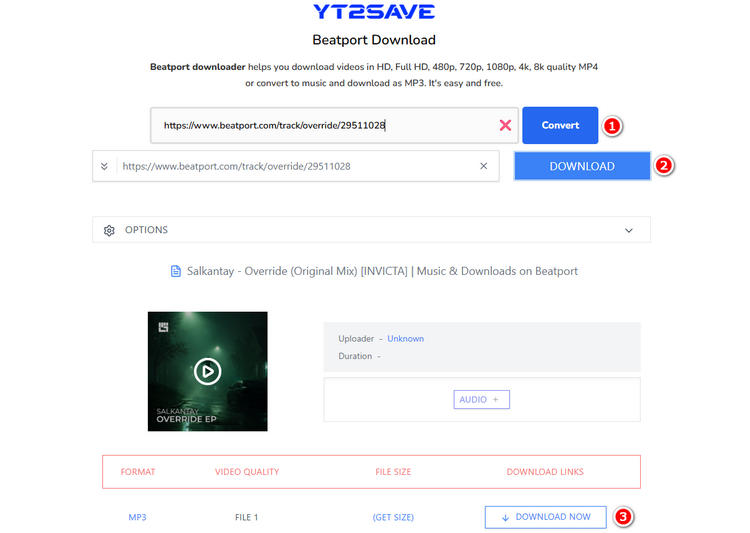
YT2Save Beatport Downloader is a free online tool that runs directly in a web browser. It does not require installation. To use the service, paste a Beatport track URL into the input field and click the "Convert" button. The tool then redirects to another website called 9XBUDDY, where the track is processed. After a short wait, the downloadable files become available for saving to your local device. This workflow is straightforward and does not involve additional software setup, but it does rely on an external site to complete the conversion.
Editor's Real Test (July 2026) | Rating: ★★☆☆☆
During our testing, this online Beatport downloader worked without requiring software installation, and the website itself had relatively few intrusive ads. However, the overall experience was limited. We encountered occasional prompts to install its desktop application and were redirected to another downloader service during the conversion process. In our tests, it captured only around two minutes of audio, and the exported file did not include basic metadata such as track information.
Pros
-
No software installation required.
-
Minimal intrusive ads on the website.
Cons
-
Downloads incomplete audio tracks.
-
Redirects to third-party downloader services.
-
Lacks metadata preservation.
-
Promotes desktop app installation.
TubeNinja
🔗 https://www.tubeninja.net/welcome
TubeNinja is a browser-based downloader that supports a variety of media websites. Like many online downloaders, it doesn't require software installation. Users simply paste a supported URL into the website and wait for the service to generate a downloadable file. However, actual performance depends heavily on whether the service is currently able to process links from the target platform. During our testing, TubeNinja produced inconsistent results. We tested more than ten different Beatport track URLs, but none of them were successfully processed. In most cases, the website returned an unsupported result.

Editor's Real Test (July 2026) | Rating: ★☆☆☆☆
During our testing, this online downloader claimed support for multiple websites. However, the overall experience was disappointing. The website displayed multiple advertisements, and the success rate was inconsistent. Most importantly, it failed to process Beatport URLs during our tests, making it unreliable for Beatport downloads.
Pros
-
Supports multiple websites beyond Beatport.
-
No software installation required.
Cons
-
Contains intrusive advertisements.
-
Unreliable download success rate.
-
Failed to process Beatport URLs.
Part 4: Beatport Downloader Comparison: Desktop Software vs Online Tools
| Feature | Online Beatport Downloaders | Desktop Software (TunePat Music One) | Better Choice |
|---|---|---|---|
| Installation | No installation required | Requires software installation before use | Online Tools |
| Ease of Use | Paste a Beatport URL and start downloading | Log in to Beatport and configure output settings before recording | Online Tools |
| Success Rate (Our Test) | Varied significantly; some tools failed to process Beatport links consistently | Stable performance throughout testing | Desktop Software |
| Output Formats | Usually limited to MP3 | MP3, AAC, WAV, FLAC, AIFF, and ALAC | Desktop Software |
| Metadata Preservation | ❌ Often missing track titles and artwork |
✅ Preserves song information and album artwork |
Desktop Software |
| Ad-free | ❌ Often contain pop-ups and redirects |
✅ Clean desktop interface |
Desktop Software |
| Long-Term Reliability | Can become unavailable after website or policy changes | Actively maintained with regular updates, feature improvements, and ongoing compatibility support | Desktop Software |
| Best For | Users who only need occasional downloads and prefer not to install software | DJs, producers, and music collectors who regularly manage Beatport libraries | Depends on User Needs |
FAQs About Beatport Downloaders
Q1: Can I download Beatport tracks in FLAC format?
A: Yes. Beatport officially supports FLAC downloads. In the Beatport Store, however, the FLAC version is usually priced higher than the MP3 version. For users who do not wish to pay the additional cost, third-party downloaders offer an alternative. Desktop tools such as TunePat can save Beatport tracks in FLAC format, as well as in other formats including WAV, AIFF, ALAC, AAC, and MP3.
Q2: Is it legal to convert Beatport tracks to MP3?
A: The legality of converting Beatport tracks to MP3 depends on how the files are used and on the copyright laws of your country. In many cases, converting music for personal listening may be allowed. However, distributing, sharing, or selling copyrighted content without proper authorization is likely to violate both copyright law and Beatport's terms of service. The same applies to public use or any commercial activity. If you decide to use a Beatport downloader, it is advisable to confirm that you have the necessary rights to access the content. You should also ensure that any converted files are used only in ways that comply with applicable legal and licensing requirements.
Q3: Are online Beatport downloaders safe?
A: Some online Beatport downloaders are relatively safe to use, while others may contain excessive advertisements, redirects, pop-ups, or unreliable download links. In our testing, we found that the reliability of online Beatport downloaders varied significantly. Some tools redirected us to other websites during the conversion process, while others failed to process Beatport URLs consistently.
Another factor to consider is long-term availability. Many browser-based downloaders rely on third-party technologies and may stop working when Beatport updates its website, streaming infrastructure, or access policies. As a result, a downloader that works today may become unavailable in the future. For users who prioritize stability and safety, desktop-based Beatport downloaders generally provide a more reliable experience than most online alternatives.
Summary
Beatport provides an official way to purchase and download tracks, but the costs can add up quickly. In our testing, online Beatport downloaders offered the advantage of convenience, but their reliability varied considerably. Their long-term availability can also be affected by platform updates and policy changes. For users who need more stable performance, flexible output formats, and better music library management, a desktop Beatport downloader remains the more practical option. Among the tools we tested, TunePat Music One delivered the most consistent experience, supporting multiple output formats, metadata preservation, and an easy-to-use workflow.
Dereck Martin
Staff Writer