4 Vimeo to MP3 Converters That Work in 2026 (Online & Desktop)
 By Dereck Martin
Music Tips
Updated on 9/10/2026
By Dereck Martin
Music Tips
Updated on 9/10/2026
Finding a reliable Vimeo to MP3 converter can be challenging. Although Google returns plenty of options, many no longer work properly. Some fail to recognize Vimeo links, while others may require authorization. To find the tools that still work, we tested popular Vimeo to MP3 converters with real Vimeo links in 2026. Based on the results, we narrowed the list to four converters that still processed Vimeo links in our tests, though their reliability varied. Below, we'll compare these four Vimeo-to-MP3 converters by features, audio quality, and ease of use.
Quick Comparison of the Vimeo to MP3 Converters
| Tool | Type | Free | MP3 Bitrate | Best For |
|---|---|---|---|---|
| TunePat Music One | Desktop | Free Trial | Up to 320 kbps | Stable, high-quality audio recording |
| Vimeo-Downloader.com | Online | ✓ Yes | 247 kbps | Quick Vimeo to MP3 conversion |
| OFA Downloader | Online | ✓ Yes | Up to 320 kbps (actual quality lower) | Free, ad-free online conversion |
| SaveTheVideo.com | Online | ✓ Yes | Up to 320 kbps (actual quality lower) | Occasional browser-based conversion |
For consistency, we tested the converters with the same public Vimeo video and checked the resulting MP3 files for bitrate, conversion reliability, and frequency response using Spek.
1. TunePat Music One
TunePat Music One is a desktop audio converter for Windows and Mac that can record audio from Vimeo and save it as MP3, FLAC, WAV, AAC, AIFF, or ALAC. It also supports other popular platforms, including Spotify, Amazon Music, Apple Music, YouTube Music, TIDAL, Deezer, and SoundCloud.
Unlike browser-based converters that rely on online URL parsing, TunePat Music One handles Vimeo playback and recording inside its desktop app. You can choose the output format and adjust recording settings directly in the app. Beyond Vimeo recording, TunePat also supports batch conversion and ID3 tag preservation on compatible music streaming services, making it a more practical choice for users who regularly save audio from multiple platforms rather than converting an occasional Vimeo video.
How to Convert Vimeo to MP3 with TunePat Music One
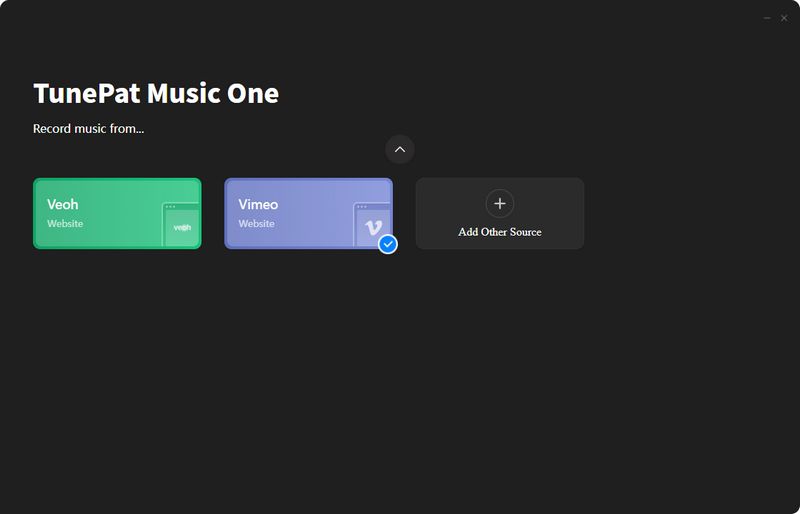
Step 1 To begin, we selected Vimeo under More music services. TunePat Music One then loaded Vimeo in its built-in web player. We signed in to our Vimeo account and opened the Vimeo video we wanted to convert. The top of TunePat offers two options: Recording Mode and Download Mode. According to TunePat, Download Mode is currently limited to Vimeo track links, while other content can be handled through Recording Mode.
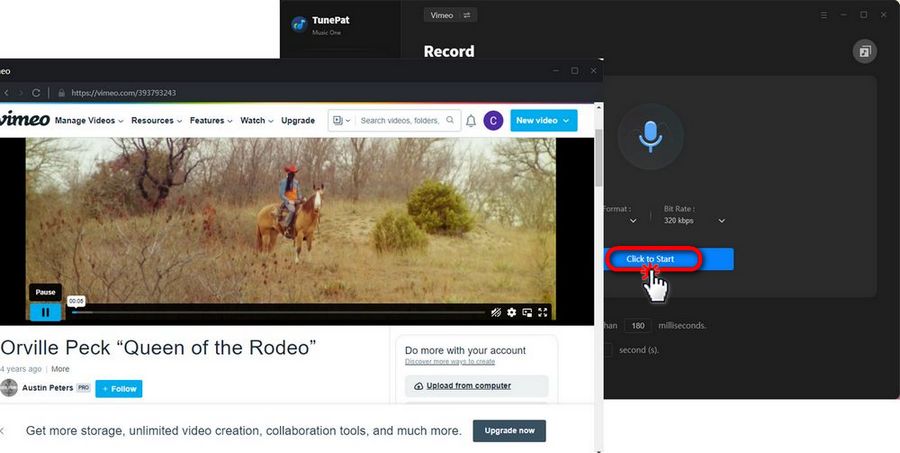
Step 2 After opening the Vimeo video we wanted to convert, we clicked the microphone icon to start recording. A settings window then appeared, where we could select MP3 as the output format and change other recording options. We started playing the Vimeo video in the built-in web player, and TunePat automatically detected and recorded the audio as it played.
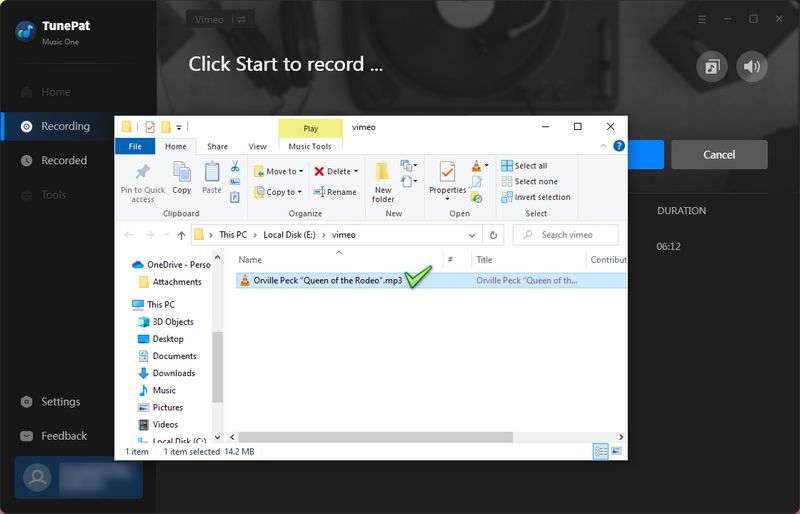
Step 3 Once playback finished, we clicked the microphone icon again to stop the recording. TunePat then automatically opened the output folder, where we could find the recorded Vimeo audio saved as an MP3 file.
Our Vimeo to MP3 Test Result: ★★★★☆
In our September 2026 test, TunePat successfully recorded the audio from the Vimeo video and saved it as an MP3 file. The main trade-off is speed: Recording Mode works in real time, so a 5-minute video takes roughly 5 minutes to capture.
Pros
-
 No need to paste Vimeo URLs into third-party websites.
-
Supports MP3, FLAC, WAV, AAC, AIFF, and ALAC.
-
Supports Vimeo, Spotify, Amazon Music, Apple Music, YouTube Music, TIDAL, Deezer, and more.
Cons
-
 Recording Mode captures Vimeo audio in real time, so longer videos take longer to process.
-
Requires installing desktop software.
2. Vimeo-Downloader.com
🔗 https://vimeo-downloader.com/
Vimeo-Downloader.com is a free web-based tool that lets users download Vimeo videos as MP4 files or convert them to MP3 by simply pasting a Vimeo video URL. It requires no software installation and focuses on providing a simple, straightforward downloading experience. Open the website and paste the Vimeo URL. Once the video information loads on the page, click the "convert to mp3" button, wait for the progress bar to turn green, and then you can download the file.
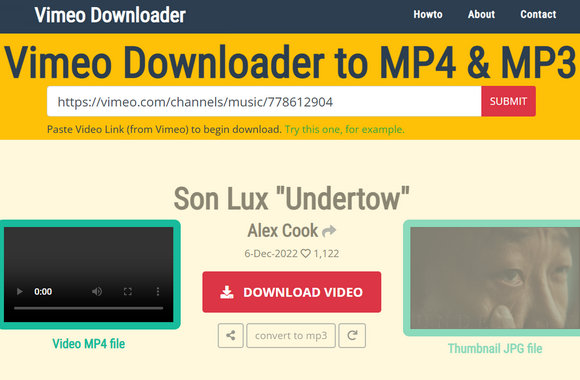
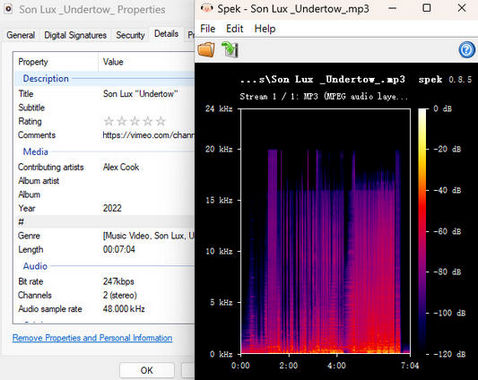
Our Vimeo-Downloader Test Result: ★★★☆☆
In our September 2026 test, Vimeo-Downloader successfully downloaded the tested Vimeo audio as a 247 kbps MP3 with cover art and basic ID3 tags, but we encountered repeated parsing errors and slow, unstable download speeds during testing.
Pros
-
No software installation is required.
-
Downloads MP3 files with cover art and basic ID3 tags.
-
Provides a simple browser-based downloading process.
Cons
-
Parsing errors may require repeated attempts.
-
Download speeds are slow and unstable.
-
Ads may appear asking users to support the website.
3. OFA Downloader
🔗 https://oneforalldownloader.com/
OFA Downloader is a free web-based downloader designed to handle videos and audio from a wide range of platforms. It supports Vimeo along with services such as YouTube, TikTok, Instagram, Facebook, X, SoundCloud, and more. Users can simply paste a media URL into the website, preview the available download options, and choose their preferred format and quality without installing desktop software or creating an account. The site also offers multiple audio formats, including MP3, M4A, OPUS, WAV, and FLAC, making it a more versatile option than Vimeo-only online downloaders.
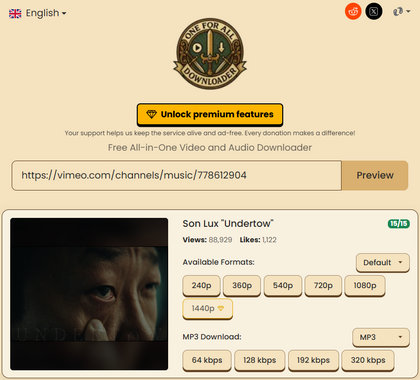
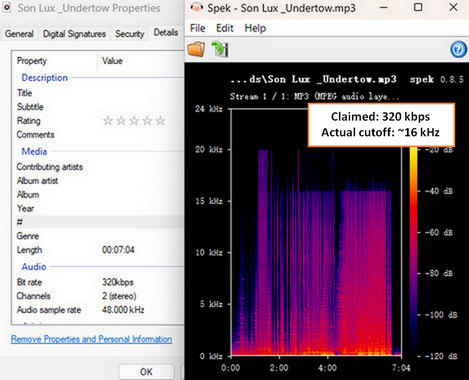
Our OFA Vimeo to MP3 Downloader Test Result: ★★☆☆☆
In our September 2026 test, OFA Downloader proved relatively unstable, with frequent parsing failures and conversion errors despite repeated attempts. Although the output was labeled as 320 kbps, spectral analysis showed limited high-frequency content, suggesting that the reported bitrate does not necessarily reflect the actual audio quality.
Pros
-
No ads or software installation required.
-
Offers multiple bitrate options.
Cons
-
Frequent parsing failures and conversion errors.
-
The reported 320 kbps bitrate does not necessarily reflect the actual audio quality.
4. SaveTheVideo.com
🔗 https://www.savethevideo.com/vimeo-downloader
SaveTheVideo is a web-based tool for downloading and converting Vimeo videos, allowing users to save video and audio content directly through their browsers. Users simply need to paste a Vimeo link into the input box and click "Start" to have the site automatically retrieve available download links. Requiring no software installation, the tool is ideal for users who only need to download content occasionally. Beyond Vimeo, SaveTheVideo offers tools for downloading and converting media from other popular sites and supports various formats, including MP4, AAC, and MP3.
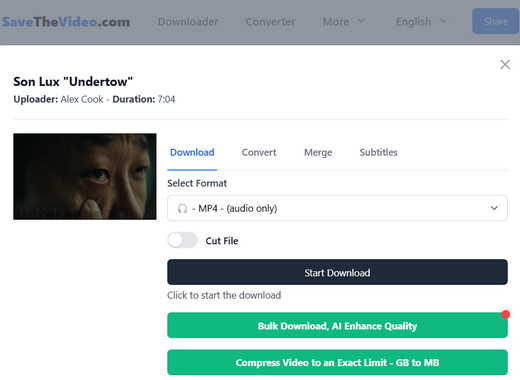
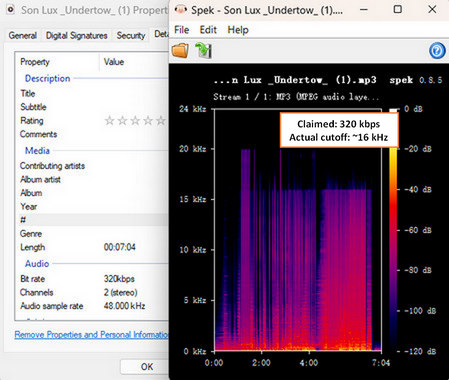
Our SaveTheVideo Test Result: ★★☆☆☆
In our September 2026 test, SaveTheVideo offered a wide range of output formats and audio quality options from 32 to 320 kbps. Although the file was encoded at 320 kbps, its spectrum showed limited high-frequency content, so the 320 kbps label did not translate into a clear fidelity advantage in our test. Also, the site processes links very slowly, operating at near real-time speeds, meaning it takes a significant amount of time to process even a video lasting just a few minutes.
Pros
-
Supports multiple video and audio output formats.
-
Offers audio quality options from 32 to 320 kbps.
-
Works directly in a web browser without desktop software.
Cons
-
Download processing can be very slow.
-
The 320 kbps output does not necessarily indicate high-quality source audio.
-
Advertisements are displayed on the page.
FAQs About Vimeo to MP3 Converters
Q1: Can I convert Vimeo videos to MP3 online for free?
A: Yes. Many online Vimeo to MP3 converters offer free conversion without requiring you to install software. Typically, you just paste the Vimeo video URL, select MP3 as the output format, and start the conversion. However, free services may come with limitations such as slower processing, ads, download limits, or restricted audio quality.
Q2: Is it safe to use an online Vimeo to MP3 converter?
A: It depends on the website you use. Some online converters may contain intrusive ads, misleading download buttons, or potentially unwanted files. To reduce risks, choose a reputable Vimeo to MP3 converter, avoid downloading unknown programs, and do not provide your Vimeo account credentials to third-party sites.
Q3: Which Vimeo to MP3 converter offers the best audio quality?
A: Based on our testing, TunePat Music One delivered more reliable audio quality than the other Vimeo to MP3 converters we tested. We compared the downloaded files not only by their reported bitrate but also by examining their frequency spectra with Spek. Some converters labeled their output as 320 kbps, but the files showed limited high-frequency content, suggesting that the higher bitrate did not necessarily reflect better source audio quality. TunePat Music One, by comparison, produced files with a more consistent audio spectrum.
Q4: Can I convert private Vimeo videos to MP3?
A: Usually not with standard URL-based Vimeo converters. Private or restricted videos require authorized access, so whether they can be processed depends on the video's privacy settings and the converter's access method. Only convert Vimeo content that you own or have permission to use.
Summary
After testing four Vimeo to MP3 converters with real Vimeo video URLs, we found that each tool is suited to different needs. For users who regularly convert Vimeo videos and prioritize stability, audio quality, and format flexibility, TunePat Music One delivered the best overall experience in our testing. For occasional conversions of public Vimeo videos, Vimeo-Downloader.com is a convenient option, although its parsing process can be unreliable. OFA Downloader stands out for its clean, ad-free interface and multiple bitrate options, but frequent parsing and conversion errors can make the process frustrating. SaveTheVideo.com provides a wider range of formats and bitrate choices, but its slow processing speed and on-page ads may be drawbacks.
Overall, a free online converter may be sufficient for occasional Vimeo-to-MP3 conversion. TunePat Music One is a better fit for users who prefer a desktop workflow, want more control over output settings, or also need to save audio from multiple supported music streaming services.


Dereck Martin
Staff Writer