11 Best Bandcamp Downloaders with 320kbps MP3 Support
 By Olivia Anderson
Music Tips
Updated on 10/09/2026
By Olivia Anderson
Music Tips
Updated on 10/09/2026
Bandcamp is one of the most popular platforms for discovering independent artists and supporting musicians directly. Unlike many streaming services, it allows users to purchase and download music in various high-quality formats, including MP3 320kbps, FLAC, AAC, WAV, and AIFF. However, users who want to organize their music library, convert audio formats, or manage downloads more efficiently may look for a reliable 320kbps Bandcamp downloader.
In this guide, we will review the 11 best Bandcamp downloaders, including desktop software, online tools, open-source solutions, and browser extensions. These tools are compared based on output quality, supported formats, ease of use, metadata support, and additional features to help you find the right Bandcamp downloader for 320kbps MP3 downloads and offline listening.
Part 1: Top Bandcamp Downloaders for MP3 Downloads (320kbps Options Included)
Finding a reliable Bandcamp downloader can be challenging, especially when you need 320kbps MP3 output, high-quality audio, or support for multiple formats. Whether you are a casual listener saving a few favorite tracks or a music collector downloading full albums, choosing the right tool can help you get the best experience.
In this section, we review some of the best Bandcamp downloaders for MP3 downloads, including desktop software and online tools. Each tool is evaluated based on supported formats, output quality, ease of use, metadata support, and other key features, helping you find the option that best fits your needs.
Quick Comparison of Top Bandcamp Downloaders Supporting 320kbps MP3:
| Tool | Output Quality | Formats | Type | ID3 Tags | Best For |
|---|---|---|---|---|---|
| TunePat Music One | Up to 320 kbps | MP3, AAC, FLAC, WAV, AIFF, ALAC | Desktop | ✓ Yes | High-quality batch conversion |
| BandcampDownloader.app | Up to 320 kbps | MP3 | Online | ✓ Yes | Quick single-track downloads |
| BandChamp Album Downloader | Up to 320 kbps | MP3, WAV, FLAC, OGG | Online | ✓ Yes | Album downloads |
| TTOK Bandcamp MP3 Downloader | Up to 320 kbps | MP3, WAV | Online | ✕ No | Simple online conversion |
Now let's explore these Bandcamp downloaders in detail.
#1 TunePat Music One – Best Bandcamp Downloader for 320kbps Audio
Security & Privacy: ⭐⭐⭐⭐⭐ 5/5
Ease of Use: ⭐⭐⭐⭐☆ 4/5
TunePat Music One is an all‑in‑one music converter and a top choice for a Bandcamp downloader 320kbps, designed to download and convert music from multiple streaming platforms, including Spotify, Apple Music, Amazon Music, YouTube, Tidal, SoundCloud, and more. While Bandcamp already allows users to officially download music they've purchased, TunePat Music One offers a convenient way to download Bandcamp music to WAV, MP3, FLAC, and more.
In addition to downloading and converting songs to 320kbps MP3 in batches at up to 10X speed, this tool can also record music like Bandcamp intelligently. You can set it to stop recording automatically after a certain amount of time, which makes the process very convenient. The interface is modern and easy to use, with clearly labeled buttons. Now, let’s take a look at how to download Bandcamp to MP3 in 320 kbps.
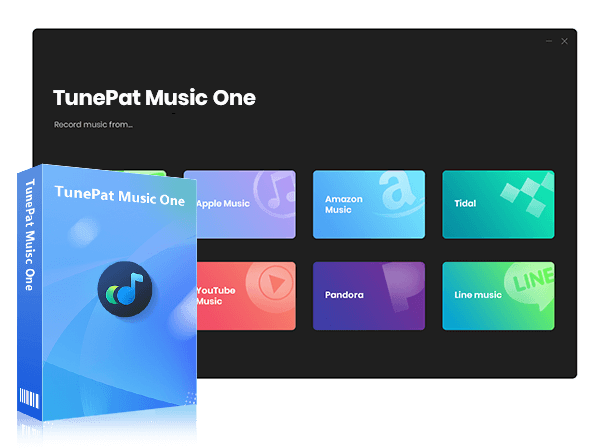
TunePat Music One
TunePat Music One is an all-in-one converter that can support any music streaming platform.
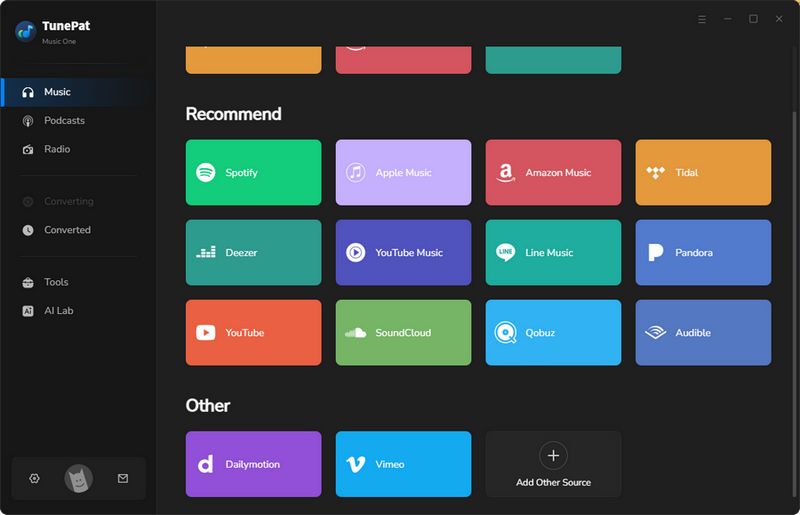
Step 1 Launch TunePat Music One and Select Bandcamp
Install and open TunePat Music One on your computer. On the main interface, you’ll see several supported streaming services such as Spotify, YouTube, and Apple Music. Please select the "Bandcamp" tab to continue.
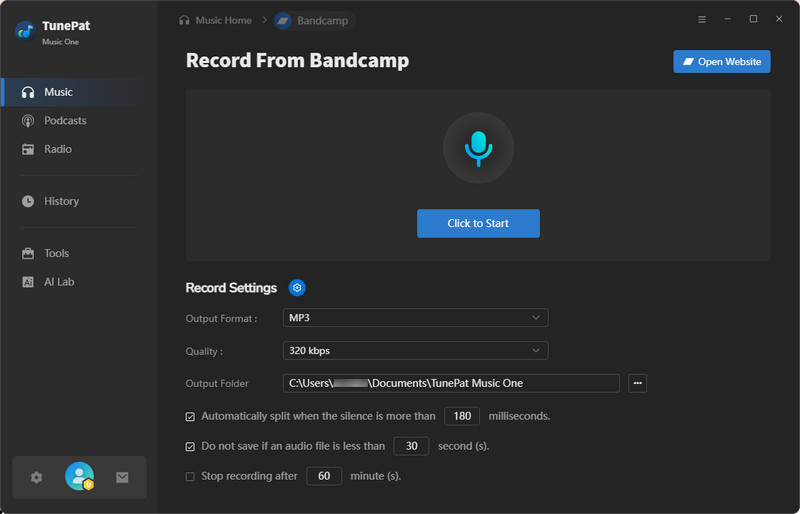
Step 2 Adjust Output Settings and Start Recording
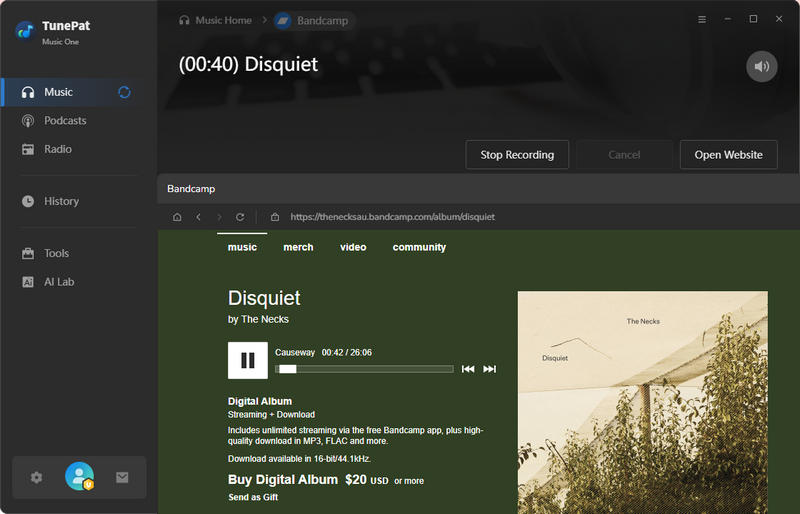
The Bandcamp web player should open automatically. If it doesn't, click "Open Website" to load it manually. Before recording, adjust the basic settings: set the Output Format to "MP3" and the Quality to "320 kbps". You can also choose whether the recording should be split automatically. When everything is ready, choose "Click to Start".
Step 3 Play Music on Bandcamp and Record
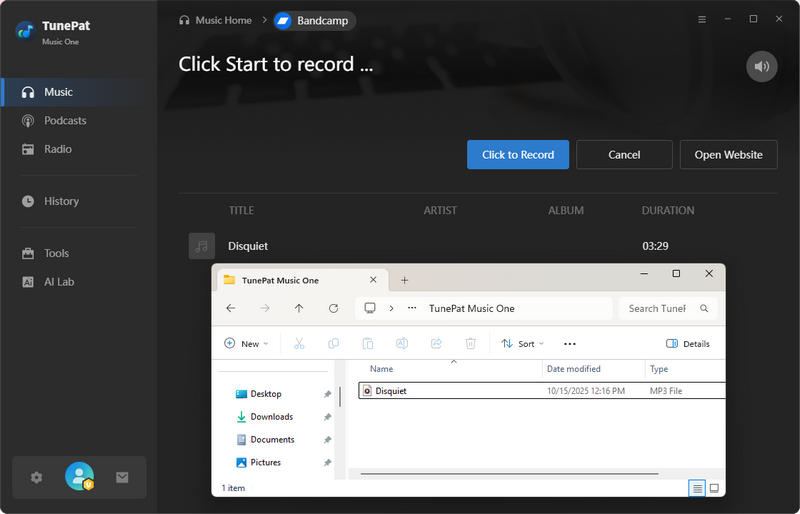
Start playing any song on Bandcamp, and TunePat will begin recording automatically. For the best recording quality, keep the environment quiet during playback. When the song finishes, click "Stop Recording". TunePat will stop recording and save the file to your computer, which you can find in the "History" module.
Pros
-
 Support all major streaming services, including Bandcamp, Spotify, Apple Music, Amazon Music, YouTube, SoundCloud, Tidal, Deezer, etc.
-
Convert music to MP3, AAC, WAV, FLAC, AIFF, ALAC formats.
-
Preserve original audio quality and complete ID3 metadata.
-
Additional features, such as tag editing, CD burning, AI vocal/instrument separation, and podcast downloads.
Cons
-
 Only compatible with Windows and Mac.
#2 BandcampDownloader.app – Free Bandcamp Downloader
🔗: https://bandcampdownloader.app/
Security & Privacy: ⭐⭐☆☆☆ 2/5
Ease of Use: ⭐⭐⭐⭐☆ 4/5
BandcampDownloader.app is a web‑based Bandcamp downloader 320kbps tool specifically designed for downloading music from Bandcamp. Unlike some generic media downloaders, this service focuses only on Bandcamp links, which makes the process smoother. It is compatible with desktop computers, tablets, and smartphones.
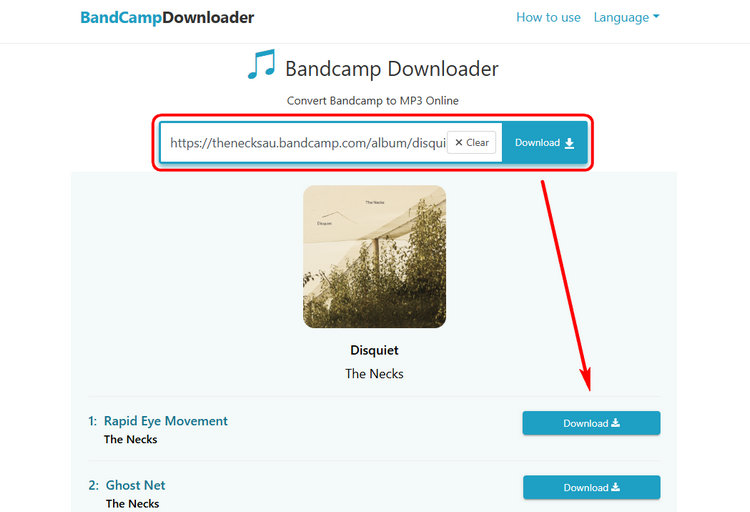
Step 1 Copy and paste the link into the box, then click Download.
Step 2 From the parsed list, choose a song and click Download on the right. Two options will appear: MP3 (128kbps) and MP3 (320kbps).
Step 3 Select MP3 (320kbps), and you will get the MP3 file.
Pros
-
Can download Bandcamp music at up to 320 kbps.
-
Keeps the file name in "website – song title – artist name".mp3.
-
Preserves ID3 tags, including artist name, title, album title, and artwork.
Cons
-
Does not support downloading a full album at once.
-
The interface contains many ads and pop‑ups.
#3 BandChamp Album Downloader - Download BandChamp 320kbps Album in 1 Click
🔗: https://bandchampalbumdownloadermp3.com/ ; https://ssbandcampdownloader.com/
Security & Privacy: ⭐⭐⭐☆☆ 3/5
Ease of Use: ⭐⭐⭐⭐⭐ 5/5
BandChamp Album Downloader works by analyzing a Bandcamp album link and generating downloadable files for the tracks in that album. Once the link is processed, users can download Bandcamp music in MP3 320kbps for offline listening individually or grab the whole album at once, depending on their preference.
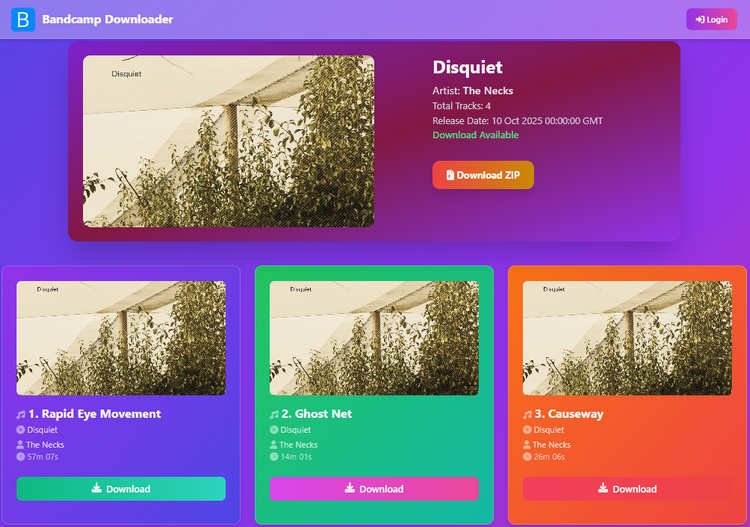
Step 1 Find the Bandcamp track or album you want, copy its URL, and paste it into the input box on this website.
Step 2 Once parsing is complete, click Download. If it's an album link, you can click Download ZIP to get the whole album.
*Note: Downloading full Bandcamp albums at once requires a subscription; without it, only part of the album can be downloaded.
Step 3 Choose your audio format and bit rate. Select MP3 (320kbps) to get the highest quality file.
Pros
-
Supports multiple output formats, including MP3 (128kbps), MP3 (320kbps), WAV, FLAC, and OGG.
-
User-friendly interface with no ads.
-
Supports one-click ZIP album download (requires a subscription).
-
Preserves ID3 tags, including cover artwork, song title, artist name, and other metadata.
Cons
-
Free users can only download a limited number of albums per day. In our testing, downloads were restricted after two songs and required a subscription ($7.99/month).
#4. TTOK Bandcamp MP3 Downloader - Bandcamp to MP3 Online
🔗: https://ttok.com/bandcamp-mp3-downloader
Security & Privacy: ⭐⭐⭐☆☆ 3/5
Ease of Use: ⭐⭐⭐⭐☆ 4/5
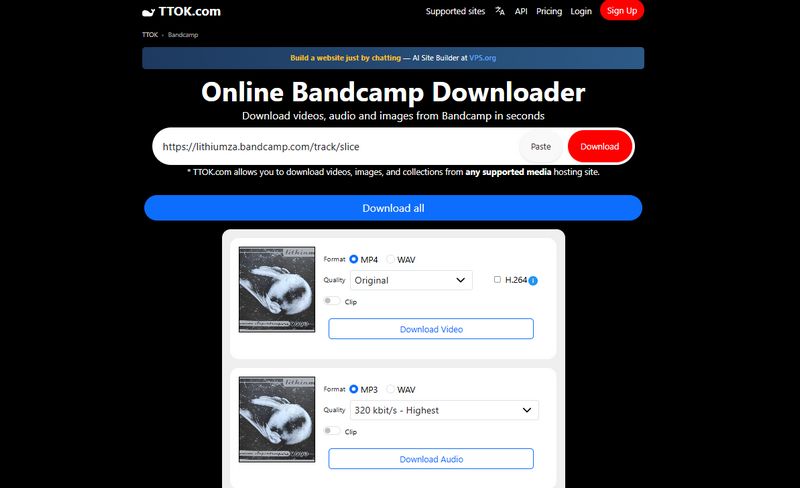
TTOK offers an online Bandcamp MP3 downloader that allows users to convert and save Bandcamp tracks quickly. The interface is fairly simple and works on both desktop and mobile browsers. Users only need to paste the Bandcamp track URL and click the download button.
Step 1 Copy and paste the Bandcamp link into the input box to start parsing.Step 2 Once the link is successfully processed, you will see three sections: Download Video, Download Audio, and Download Image.
Step 3 In the Download Audio section, select MP3, then choose 320 kbit/s – Highest under the Quality option (free users can only select the default Original quality). Finally, click the Download Audio button.
Pros
-
Supports MP3 and WAV formats, with up to 320 kbps available when exporting to MP3.
-
Ad-free interface.
Cons
-
320 kbps high-quality downloads require a paid upgrade ($8.99 per year). The default download quality is 128 kbps.
-
Free users can only parse and download one URL per day.
-
ID3 tag information cannot be preserved.
While the tools above support Bandcamp downloads at up to 320kbps, the following Bandcamp downloaders are more suitable for users who only need quick MP3 downloads. However, they generally provide lower audio quality, usually around 128kbps.
#5 Locoloader – Simple Online Bandcamp Downloader
🔗: https://www.locoloader.com/bandcamp-downloader/
Security & Privacy: ⭐⭐⭐☆☆ 3/5
Ease of Use: ⭐⭐⭐⭐☆ 4/5
Locoloader is a popular online Bandcamp downloader designed for users who prefer not to install software. One of the main advantages of Locoloader is its simplicity. The interface is minimal and straightforward, which makes it easy for beginners to use. Users only need to copy the Bandcamp track link and paste it into the downloader to generate a downloadable file.
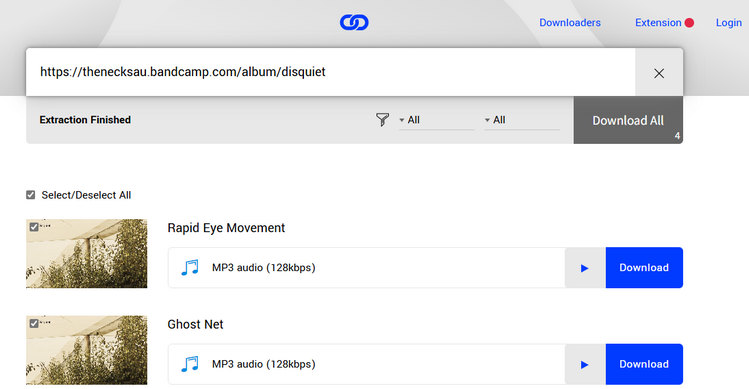
Step 1 Copy the Bandcamp track URL and paste it into the input box on the Locoloader page. The site will automatically analyze the link.
Step 2 When the tracks appear, click Download All to download the entire album (requires installing a browser extension). Without the extension, you'll need to download each track one by one.
Step 3 To save a track, right-click the Download button and select Save Link As… to download the MP3 file to your device.
Pros
-
Clean and simple interface with no ads.
-
Supports one-click download of full Bandcamp albums.
-
Works with multiple platforms, including Bandcamp, YouTube, Vimeo, TikTok, SoundCloud, Audiomack, OnlyFans, etc.
Cons
-
Only supports MP3 format, with relatively low quality (128 kbps).
-
Installing a browser extension is required to download full albums with one click.
-
Free users are limited to 2 downloads every 6 hours; additional downloads require a $15/month subscription.
#6 TubeNinja – Multi‑Site Media Downloader for Bandcamp
🔗: https://www.tubeninja.net/how-to-download/bandcamp
Security & Privacy: ⭐⭐☆☆☆ 2/5
Ease of Use: ⭐⭐⭐⭐☆ 4/5
TubeNinja is a well‑known online downloader that supports multiple platforms, including Bandcamp, YouTube, Vimeo, SoundCloud, and more. It allows users to download audio or video files by pasting the link into the search bar. For Bandcamp downloads, TubeNinja can generate MP3 download links that can then be saved locally.
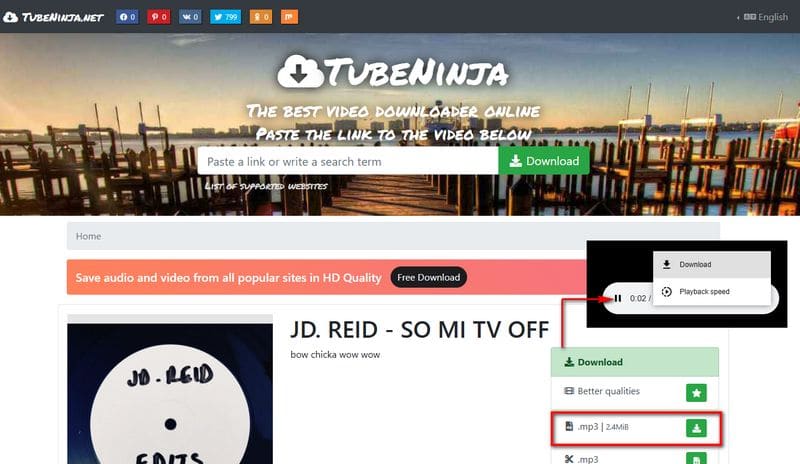
Step 1 Copy and paste the Bandcamp link into the input box, then click Download.
Step 2 After the link is processed, find the song you want and click → Fetch on the right side. Then click the Download icon next to MP3.
Step 3 A new window will open. Click the More options icon, then select Download to save the MP3 file.
Pros
-
Completely free to use.
Cons
-
The interface contains a few ad buttons.
-
Only supports exporting to MP3 at 128 kbps.
-
Does not preserve song tag information.
-
Album downloads must be done track by track.
#7 BandcampToMP3 – Quick Bandcamp Converter
Security & Privacy: ⭐⭐⭐☆☆ 3/5
Ease of Use: ⭐⭐⭐⭐☆ 4/5
BandcampToMP3 is a lightweight Bandcamp downloader designed specifically for converting Bandcamp tracks into MP3 files. The website provides a simple interface where users can paste a music link and generate a download. The tool works quickly and is compatible with most modern browsers. Users can download tracks directly without installing software.
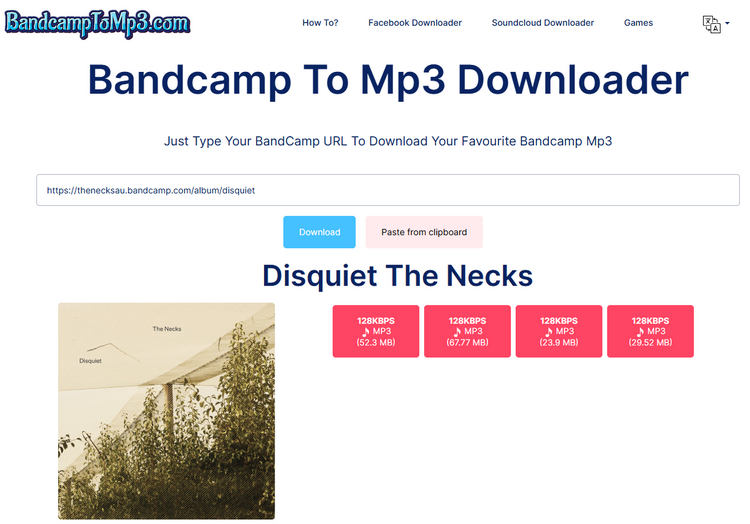
Step 1 Copy the Bandcamp track or album link and paste it into the input box on the page.
Step 2 Click Download to start parsing the link.
Step 3 Once the results appear, click 128KBPS MP3 to download the file.
Pros
-
Clean interface with no ads.
Cons
-
After parsing, the results do not show song titles, only file sizes, making it hard to identify the track you want.
-
Low output audio quality.
-
Does not preserve ID3 tags.
-
Cannot download full albums in one click.
#8 StepToDown – Simple Bandcamp MP3 Downloader
🔗: https://steptodown.com/bandcamp-music-downloader/
Security & Privacy: ⭐⭐☆☆☆ 2/5
Ease of Use: ⭐⭐⭐⭐☆ 4/5
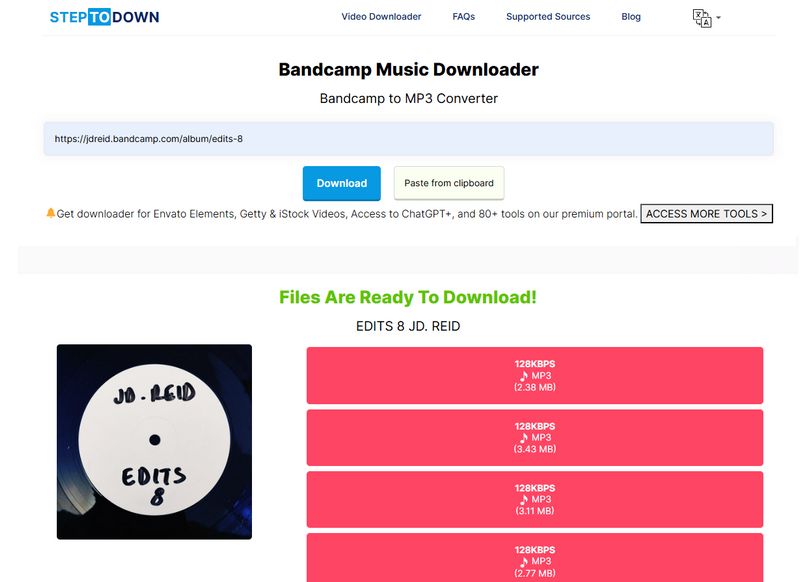
StepToDown is another Bandcamp downloader that allows users to download songs quickly from Bandcamp. It also supports multiple devices, including Windows, macOS, Android, and iOS. This flexibility makes it convenient for users who want to download Bandcamp music on both desktop and mobile devices. It also supports other streaming services like SoundCloud and TikTok.
Step 1 Go to Bandcamp, copy the song URL, and paste it into the input box on StepToDown.com.
Step 2 Click Download and wait while the site processes the link until you see Files Are Ready To Download! on the page.
Step 3 Click the song to download it. The file will be saved as an MP3 (128 kbps).
Pros
-
Free to use, with no registration required.
Cons
-
The interface has many large ads, which can easily lead to accidental clicks.
-
Low audio quality.
-
Track titles are not shown before downloading, which is inconvenient for users who want to download full albums.
-
Does not support downloading an entire album at once.
#9 AnyDownloader - Fast Bandcamp to MP3 Downloader
🔗: https://anydownloader.com/en/bandcamp-music-downloader/
Security & Privacy: ⭐⭐☆☆☆ 2/5
Ease of Use: ⭐⭐⭐⭐☆ 4/5
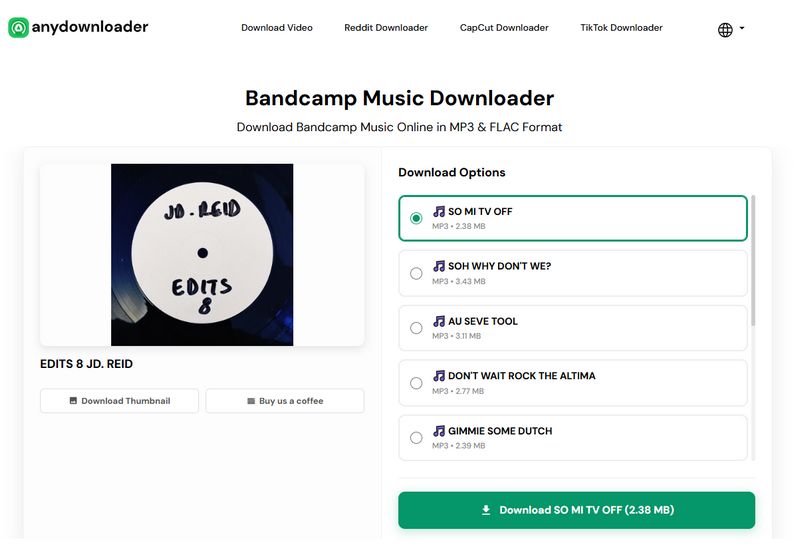
AnyDownloader is a multi-platform online downloader that supports music downloads from Bandcamp and other websites. It provides a simple way to convert Bandcamp tracks into MP3 for offline playback. However, since the service is free and web‑based, users may see advertisements on the page.
Step 1 Copy the Bandcamp music URL and paste it into the input box on the AnyDownloader Bandcamp Music Downloader homepage.
Step 2 Click Download and wait while the site parses the link.
Step 3 When the results appear, select the track you want and click Download.
Pros
-
Free to use.
-
Allows you to download the cover artwork separately.
Cons
-
Ads appear above the input box, which can easily lead to misclicks.
-
Only supports exporting music at 128 kbps.
-
Does not support downloading a full album at once.
Part 2: Best Open‑Source Bandcamp Downloader on GitHub
For users who prefer free and open‑source solutions, several Bandcamp downloaders are available on GitHub. Compared with typical online tools, these programs provide greater control over downloads, including batch downloading, metadata preservation, and support for high-quality audio formats. Many open-source tools can download MP3 320kbps and FLAC files, depending on what the artist provides, making them reliable Bandcamp downloader 320kbps options for offline listening. Below is the most popular GitHub Bandcamp downloader.
bandcamp‑dl - Most Popular GitHub Bandcamp Downloader
🔗: https://github.com/Evolution0/bandcamp-dl
Security & Privacy: ⭐⭐⭐⭐⭐ 5/5
Ease of Use: ⭐☆☆☆☆ 1/5
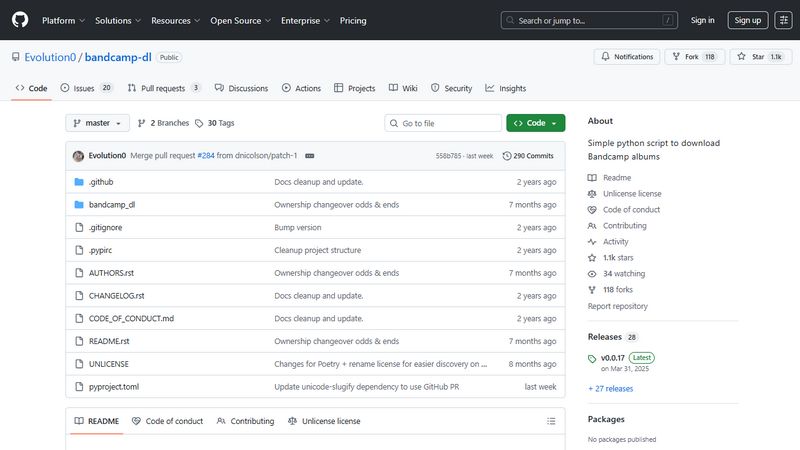
bandcamp‑dl is a widely used GitHub tool for downloading Bandcamp music at high quality, such as MP3 320 kbps. It allows users to download tracks, full albums, or entire artist discographies.
Step 1 Install Python and download bandcamp‑dl from GitHub.
Step 2 Open a terminal and run bandcamp-dl <album_or_artist_URL>.
Step 3 Files are downloaded automatically in high-quality MP3 or FLAC to your specified folder.
Pros
-
Free and open‑source
-
Supports MP3 320kbps and original audio formats
-
Can download albums, tracks, or full artist pages
Cons
-
Requires command‑line usage.
-
Setup may be difficult for beginners.
Part 3: Chrome Extensions to Download Bandcamp Music in 320kbps
For casual users, Chrome extensions allow quick downloads of Bandcamp music. Some extensions can even save high-quality MP3 320kbps, especially for purchased albums. We will now use KeepTune as an example.
KeepTune - Simple Bandcamp & SoundCloud Downloader
🔗: https://brands.jaymoulin.me/me/keeptune/
Security & Privacy: ⭐⭐⭐☆☆ 3/5
Ease of Use: ⭐⭐⭐☆☆ 3/5
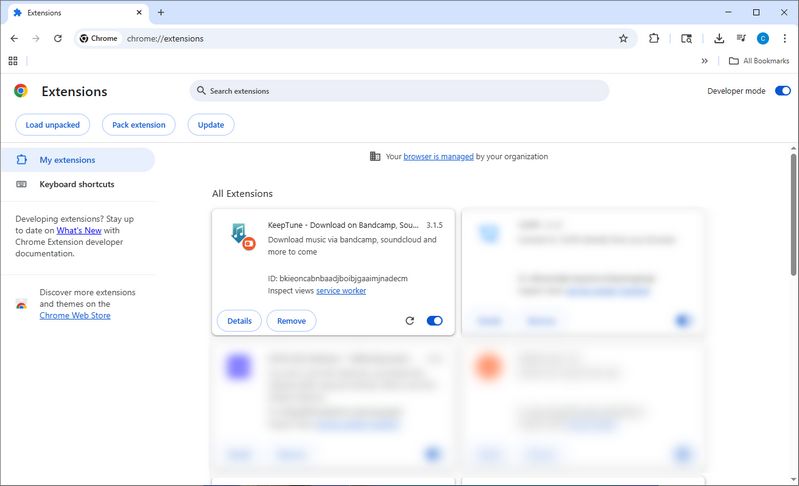
KeepTune is a lightweight browser extension for downloading playable Bandcamp tracks. It can capture MP3 320kbps streams when available, making it a simple Bandcamp downloader 320kbps for casual offline listening.
Step 1 Install KeepTune in Chrome (You need to download the ZIP file and manually load the extension; detailed instructions are available on the official website.) and open a Bandcamp album page.
Step 2 Click the KeepTune extension icon when the track is playing.
Step 3 Save the MP3 to your device, which will download in the best available quality (MP3 320kbps if offered).
Pros
-
Easy to use for beginners
-
Quick downloads directly from Bandcamp pages
Cons
-
Limited format options (mainly MP3).
-
May download stream quality instead of original files.
Part 4: FAQs About Downloading Bandcamp Music in 320kbps
Q1: How do I download music from Bandcamp?
A: You can download music from Bandcamp by purchasing tracks or albums directly from the artist. After purchase, Bandcamp allows you to download your music in various formats, including MP3 320kbps, FLAC, WAV, AAC, and ALAC. If you need to organize your music library or convert audio formats, tools like TunePat Music One can help manage and convert your legally obtained Bandcamp music.
Q2: Can I download full albums or entire artist collections from Bandcamp?
A: Yes. When you purchase an album on Bandcamp, you can download the complete album at once instead of saving each track individually. For users managing larger music collections, some Bandcamp downloader tools also provide batch processing features that make it easier to organize and convert multiple tracks or albums.
Q3: What audio quality does Bandcamp support, and which downloaders offer 320kbps MP3?
A: Bandcamp supports several download formats, including MP3 320kbps, FLAC, WAV, AAC, ALAC, and Ogg Vorbis for purchased music. However, not every third-party downloader provides 320kbps output. In our comparison, TunePat Music One, BandcampDownloader.app, BandChamp Album Downloader, and TTOK Bandcamp MP3 Downloader support up to 320kbps MP3 output.
Q4: Are Bandcamp downloaders safe and legal to use?
A: The safety of Bandcamp downloaders depends on the service you choose. It is recommended to use trusted software and only download music that you have permission to access. Reliable tools can help organize or convert legally obtained Bandcamp music while preserving audio quality and metadata.
Q5: Can I download Bandcamp music for free?
A: Some artists on Bandcamp offer free or "name your price" releases that allow downloads without payment. Most albums and tracks require a purchase. Once purchased, you can download them in formats like MP3 320kbps, FLAC, WAV, AAC, or ALAC. Some users also use music management tools to organize or convert their legally obtained downloads for offline listening.
Conclusion
Choosing the right Bandcamp downloader depends on your needs. If you only want to save a few tracks, a simple online tool may be enough. However, if you need batch processing, better file organization, or support for higher-quality formats such as MP3 320kbps or FLAC, desktop software can provide a more convenient experience.
For users who want more control over their music library, TunePat Music One is a useful option. It supports multiple output formats, preserves audio quality and ID3 tags, and helps organize legally obtained Bandcamp music for offline listening. Whether you choose an online downloader or desktop software, selecting a tool that matches your audio quality and music management needs is important.
Olivia Anderson
Senior Writer