
JioSaavn is a popular music streaming platform with millions of songs, but it does not provide a direct way to save music as regular MP3 files. If you want to listen to JioSaavn songs on different devices or manage your music collection more flexibly, you need an alternative solution. In this guide, we will show you two ways to convert JioSaavn to MP3, including a desktop recording method and online downloaders. We will compare their features, output formats, and limitations based on real testing.
Can I Download JioSaavn to MP3?
JioSaavn allows users to download songs for offline listening with a Pro subscription, but these downloads are only available inside the JioSaavn app. You cannot export the downloaded songs as regular MP3 files or play them with other music players.
If you want to save JioSaavn songs as MP3 files, you will need another solution. Some tools can record and convert JioSaavn music with more control over output formats, while online downloaders offer a quicker way to process individual songs. Below, we will introduce both methods and explain their differences.
Quick Comparison of JioSaavn MP3 Conversion Methods
| Method | Best For | Output Format | Key Advantages | Main Limitations |
|---|---|---|---|---|
| TunePat Music One | Users who need MP3 files and better music management | MP3, AAC, WAV, FLAC, and more | True MP3 output, multiple formats, batch recording, tag editing support | JioSaavn requires recording mode |
| Saavn Squid JioSaavn Downloader | Users who want quick online song and album downloads | M4A (AAC LC) | No installation, supports albums, ZIP downloads, flexible quality options | No direct MP3 output |
| TTOK JioSaavn Downloader | Users who occasionally download songs online | AAC LC (MP3 extension) | No installation, simple browser-based operation | Not a true MP3 file, limited free features |
Method 1: Record JioSaavn Music and Save Songs as MP3
If you want to save multiple JioSaavn songs or playlists with more control over output formats, a desktop music tool can be a practical option. Compared with online downloaders that usually process songs one by one, desktop solutions can handle multiple tracks and provide more flexibility for managing saved music files.
TunePat Music One is an all-in-one music converter that supports popular platforms including Spotify, Amazon Music, Apple Music, YouTube Music, YouTube, SoundCloud, TIDAL, Deezer, and more. For these supported services, it provides features such as batch conversion, high-quality audio output, and ID3 tag preservation.
For JioSaavn, however, Music One currently works through recording mode. Instead of directly downloading songs from JioSaavn, it records the playback and saves the audio as common formats including MP3, AAC, WAV, FLAC, AIFF, and ALAC.
How to Record JioSaavn Songs with Music One
Step 1 Add JioSaavn as the Recording Source
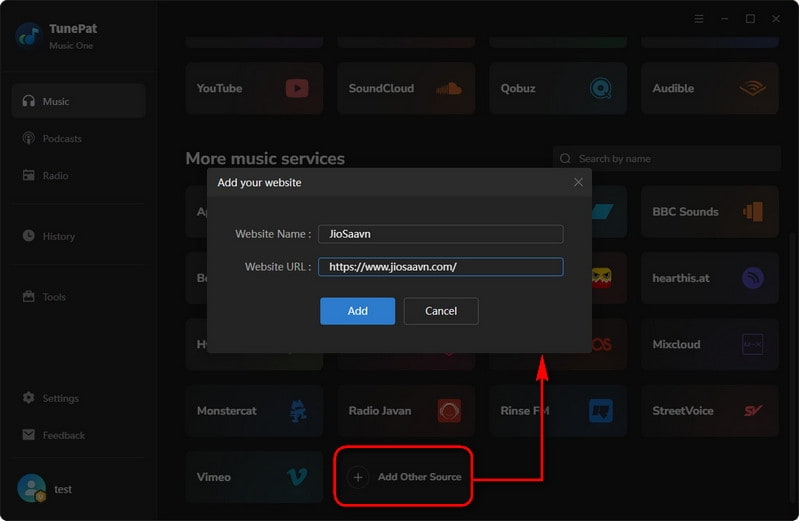
Install and launch TunePat Music One. Click the "Add Other Source" button, add JioSaavn, and enter the JioSaavn website URL. Then click "Add" to open the JioSaavn source page inside the program.
Step 2 Select Songs and Start Recording
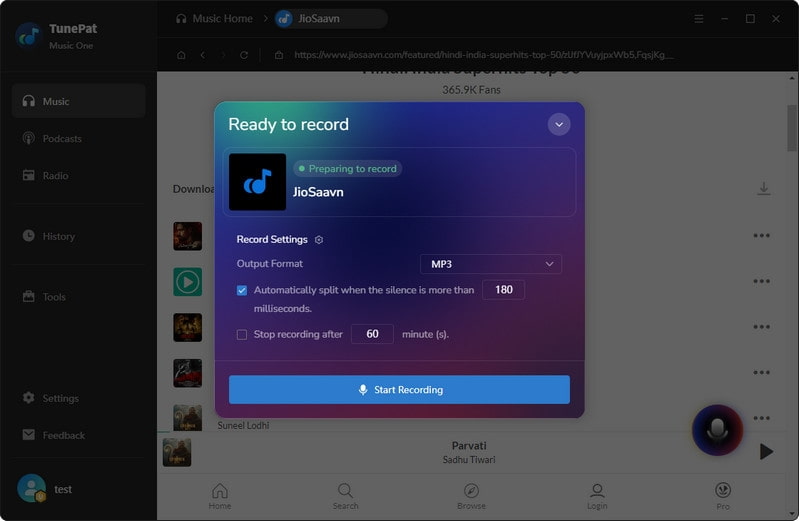
Open the songs or playlists you want to save from JioSaavn. Click the recording icon in the bottom-right corner and select your preferred output format. Choose "MP3" as the output format, then click "Start Recording".
Step 3 Export JioSaavn Songs as MP3 Files
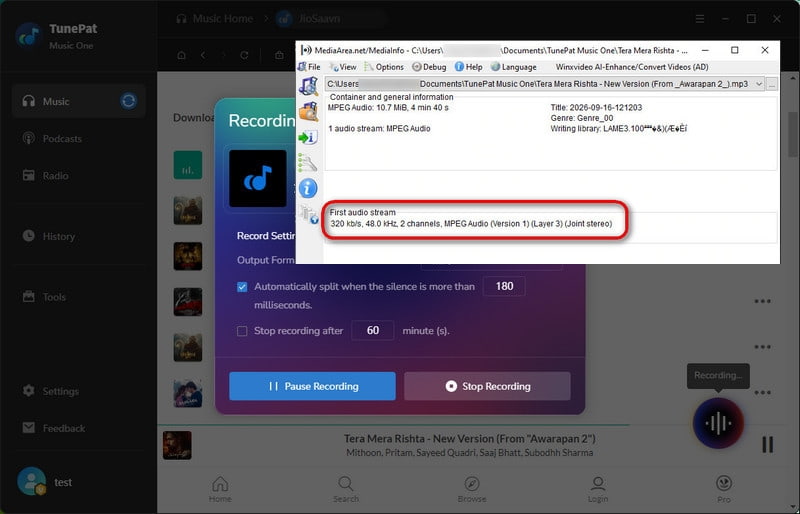
TunePat Music One will start recording the JioSaavn playback. After recording all the songs you need, click the recording icon again and select "Stop Recording" to export the recorded JioSaavn songs as MP3 files.
Test Results: Audio Quality and Metadata | Overall Experience: ⭐⭐⭐⭐☆
We tested the recorded JioSaavn files to check their actual audio format, quality, and metadata information.
The exported files were genuine MP3 files, and the audio quality was good. Music One supports output quality up to 320 kbps and allows users to save JioSaavn recordings in multiple formats, including MP3, AAC, WAV, FLAC, AIFF, and ALAC.
However, because JioSaavn works through recording mode, original ID3 tags such as artist, album, and artwork are not automatically preserved during the recording process. To help users organize their music files, Music One provides a built-in tag editor that allows manual editing of song information after recording. This adds some extra steps, but it gives users more flexibility when managing their saved music.
Pros
-
 Supports recording multiple JioSaavn songs or playlists.
-
Exports music to MP3, AAC, WAV, FLAC, AIFF, and ALAC.
-
Export genuine MP3 files with up to 320 kbps quality.
-
Allows users to manually edit music tags after recording.
-
More suitable for saving a larger music collection compared with single-link online tools.
Cons
-
 JioSaavn currently works through recording mode instead of direct conversion.
-
Songs need to play during the recording process.
-
Original ID3 tags are not automatically retained.
Is Music One Suitable for Converting JioSaavn to MP3?
Music One is a practical option for users who want to save JioSaavn songs as MP3 files, especially when downloading multiple songs or playlists. In our test, it successfully exported genuine MP3 files with quality up to 320 kbps and provided more control over output formats.
However, JioSaavn currently works through recording mode, which means songs need to play during the recording process and original ID3 tags are not automatically preserved. For users who want direct MP3 output and better music file management, Music One offers a more flexible solution.
Method 2: Use Online JioSaavn Downloaders and Convert Files to MP3
If you do not want to install desktop software, online JioSaavn downloaders provide another way to save songs directly from your browser. These tools usually work by analyzing JioSaavn song or album links and generating downloadable audio files.
However, an important thing to consider is that not all online downloaders provide standard MP3 files, even if they display MP3-related options. To understand their actual performance, we tested two online JioSaavn downloaders, TTOK and Saavn Squid, and checked their download features, actual audio formats, and metadata information.
#1: TTOK JioSaavn Downloader
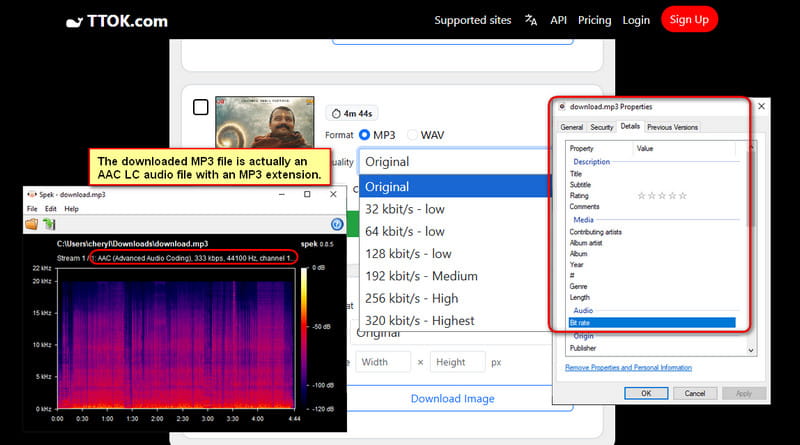
TTOK JioSaavn Downloader is an online tool that supports downloading JioSaavn songs and albums directly through a browser. It provides multiple output options, including MP3, MP4, and WAV, with quality settings displayed from low quality to 320 kbps. During our test, individual song downloads were available through the free option, while downloading a complete album required payment. Although the tool provides different quality options, they could not be selected directly without upgrading, and only the MP3 Original option was available for free download. We also tested the downloaded files to check the actual audio format, quality, and metadata information.
Audio Quality and Metadata Analysis | Overall Experience: ⭐⭐⭐☆☆
Although TTOK provides an MP3 download option, the downloaded file was not encoded as a traditional MP3 file. We checked the file using MediaInfo and found that the actual audio codec was AAC LC with a bitrate of 333 kbps and a 44.1 kHz sample rate.
This means the file is an AAC audio stream saved with an MP3 extension. The audio quality itself is high, but users who need a true MP3 file will need an additional audio conversion step.
We also checked the metadata information of the downloaded files. The songs did not retain original details such as artist, album, or cover artwork. Since TTOK does not provide a built-in tag editor, users need additional tools if they want to edit metadata or organize their music files manually.
Pros
-
Simple browser-based operation.
-
Supports both individual songs and album links.
-
Provides high-quality AAC audio through the Original option.
Cons
-
Full album downloads require payment.
-
Free users cannot manually select audio quality.
-
The downloaded file is AAC LC saved with an MP3 extension, so an additional conversion step is required to get a true MP3 file.
-
Original metadata and cover artwork are not preserved.
#2: Saavn Squid JioSaavn Downloader
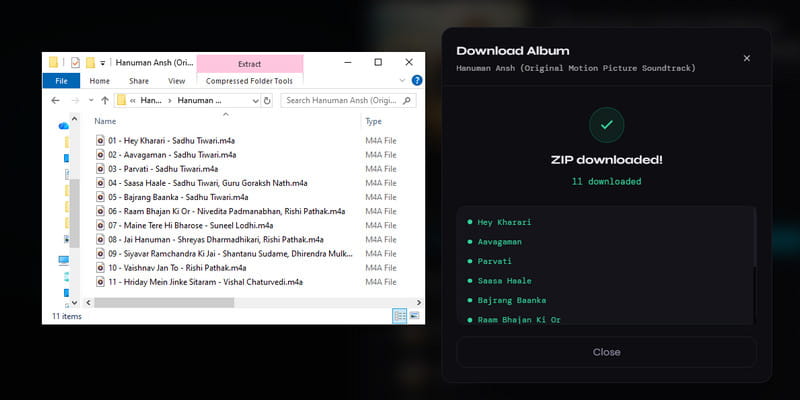
Saavn Squid JioSaavn Downloader is another online tool designed to download songs and albums from JioSaavn. Compared with simple link-based downloaders, it provides more flexible download options, allowing users to download individual songs or multiple tracks together as a ZIP file. During our test, both individual downloads and complete album ZIP downloads worked successfully. The tool also provides several quality options, including 12 kbps, 48 kbps, 96 kbps, 160 kbps, and 320 kbps, allowing users to choose the preferred audio quality before downloading. We also tested the downloaded files to check the actual audio format, quality, and metadata information.
Audio Quality and Metadata Analysis | Overall Experience: ⭐⭐⭐⭐☆
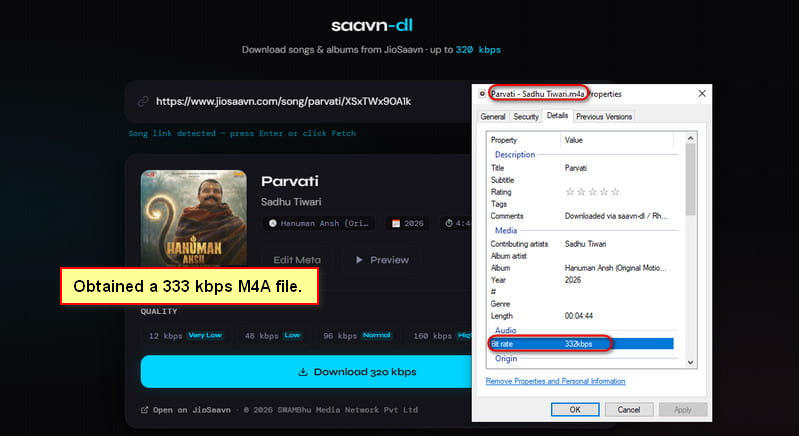
Although Saavn Squid does not clearly display the output format information, we checked the downloaded files and found that they were M4A files encoded with AAC LC. The downloaded files had a bitrate of over 330 kbps, which was similar to the TTOK output. Unlike TTOK, which saves AAC audio with an MP3 extension, Saavn Squid uses the M4A container, which matches the actual AAC audio format.
The downloaded files also provided better organization, with filenames following the format "Song Name - Artist Name". We found that some song information was preserved in the files, but cover art was not retained.
Pros
-
Supports both individual songs and album downloads.
-
Allows multiple songs to be downloaded together as a ZIP file.
-
Provides multiple quality options up to 320 kbps.
-
Creates readable filenames with song and artist information.
Cons
-
Does not provide MP3 output.
-
Output format information is not clearly displayed before downloading.
-
The cover artwork are not preserved.
Can Online JioSaavn Downloaders Provide MP3 Files?
Online JioSaavn downloaders can be useful for quickly saving songs, but they may not always provide standard MP3 files directly. During our tests, TTOK saved AAC LC audio with an MP3 extension, while Saavn Squid provided M4A files using the AAC LC codec. Both tools delivered high-quality AAC audio with a bitrate of around 330 kbps, but neither one generated a standard MP3 file directly.
If you need MP3 files that work with more devices and players, you can convert the downloaded AAC or M4A files using an online audio converter such as CloudConvert. However, if you prefer to get MP3 files directly without an additional conversion step, a method that supports MP3 recording or export may be more convenient.
FAQs About JioSaavn to MP3
Q1: How to Download JioSaavn Songs Without Premium?
A: JioSaavn Pro is the official way to download songs for offline listening, but these downloads remain inside the app. If you want to save JioSaavn songs as regular audio files without a Premium subscription, you need an alternative method such as a recording tool like TunePat Music One or an online downloader.
Q2: Why Is My JioSaavn MP3 File Actually AAC?
A: Some JioSaavn downloaders may use the MP3 extension even when the actual audio codec is different. In our test, TTOK provided AAC LC audio with an MP3 extension instead of a traditional MP3 file. The audio can still play on many devices, but an additional conversion step is needed if you specifically need a standard MP3 file.
Q3: What Is the Audio Quality of JioSaavn Downloads?
A: The audio quality depends on the download method and output format. In our tests, online JioSaavn downloaders provided AAC LC files with a bitrate of around 330 kbps, while the recording method could export MP3 files with quality up to 320 kbps. The final quality also depends on your selected settings.
Q4: Can I Transfer JioSaavn Downloads to an MP3 Player?
A: No, JioSaavn offline downloads cannot be transferred directly to an MP3 player or other music devices because they are stored inside the app. To play JioSaavn songs on other devices, you need to save them as common audio files such as MP3 or M4A first.
Summary
JioSaavn does not provide a direct way to export songs as standard MP3 files, so the right method depends on how you plan to use the music. In our tests, TunePat Music One successfully saved JioSaavn songs as genuine MP3 files with up to 320 kbps quality, making it a suitable choice for users who want more control over output formats and music management.
Online JioSaavn downloaders can be useful when you only need to save a few songs quickly, but the tested tools provided AAC audio instead of standard MP3 files, meaning an additional conversion step may be required. If you want a more flexible way to create and organize an offline music collection, Music One offers a more complete solution with MP3 export and additional format options.


Dereck Martin
Staff Writer