KlickAud SoundCloud Downloader: Review & Best Alternative
 By Olivia Anderson
Music Tips
Updated on 7/27/2026
By Olivia Anderson
Music Tips
Updated on 7/27/2026
KlickAud is a popular free SoundCloud downloader that many users find when searching for a quick way to save tracks offline. It's been around for years and is often recommended as a simple, no-installation option to download SoundCloud music.
At the same time, tools like KlickAud often raise questions: Is it safe? Does it still work reliably? How good is the audio quality? And if it falls short, what better alternative exists?
This KlickAud SoundCloud Downloader review comes from hands-on testing with various public tracks. Here, you'll get a straightforward look at what KlickAud can do, where it falls short, who it suits best, and when it might be time to explore more dependable alternatives.
Part 1: What Is KlickAud SoundCloud Downloader?
🔗: https://www.klickaud.org/en13
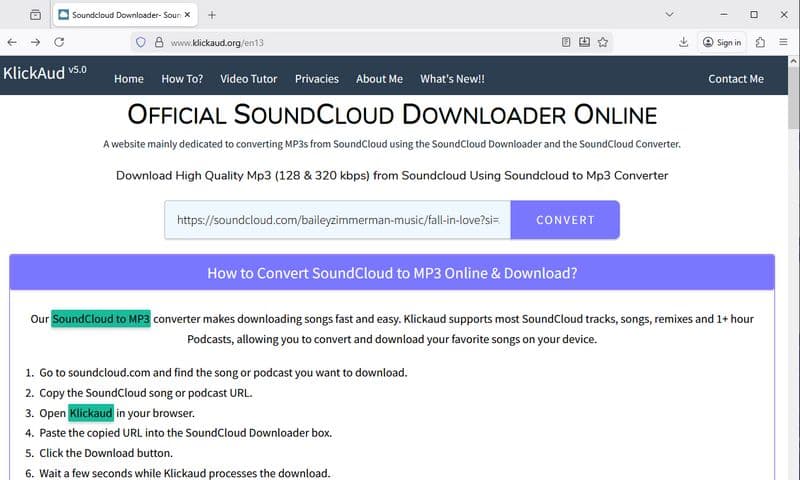
KlickAud is a free online SoundCloud downloader that allows users to save SoundCloud tracks as MP3 files by pasting a track link into the website. It works directly in the browser and does not require users to install any software or create an account. This makes it appealing to people who only want to download a song occasionally and prefer not to deal with extra setup.
The basic workflow is simple. You copy the link of a public SoundCloud track, paste it into the input box on KlickAud's website, and wait for the conversion to finish. After that, the MP3 file becomes available for download. There are no advanced settings for output format, bitrate, or metadata. The tool is designed around speed and simplicity rather than control or customization.
Because KlickAud is an online service, it depends entirely on the website's availability and its ability to keep up with changes on SoundCloud's platform. This is a common limitation shared by most browser-based download tools.
*Note: Want to download SoundCloud playlists in batches to FLAC, AAC, and other high-quality formats? Need to customize output filenames for easier local song management? Give this powerful KlickAud alternative a try! 👇
Part 2: Is KlickAud Safe and Does It Still Work?
When using any online downloader, safety is naturally one of the first questions on users' minds. In the case of KlickAud, the current website experience is relatively clean. There are no intrusive pop-up ads or unexpected redirects, and no software installation or account creation is required. This helps reduce common risks like malware or unwanted software. That said, as a third-party online service, the site's behavior can change over time, and there's always the possibility that ads or promotional content could be added later.
On the functionality side, KlickAud continues to work for many public SoundCloud tracks. By simply pasting a track link, you can often download the MP3 file quickly. However, its performance isn't always consistent. Some tracks process smoothly, but others may fail without clear reasons. There are cases where the tool shows a successful conversion but results in empty or corrupted files.
Like many browser-based SoundCloud downloaders, KlickAud can be inconsistent due to platform changes. While it works well for occasional downloads and is reasonably safe to use, it may not always be reliable for frequent or bulk downloading.
Part 3: Who Is KlickAud Best For? Pros and Cons
KlickAud is best suited for casual users who only need to download a few public SoundCloud tracks occasionally. It appeals to those who prefer not to install any software and want a fast, no-fuss way to save single tracks for offline listening. If you value speed and simplicity more than advanced features or bulk downloads, KlickAud can be a convenient choice.
Now that we understand the types of users KlickAud serves best, let's explore its key strengths and potential shortcomings to help you decide if it's the right tool for you.
Pros
-
 Free and easy to use with no registration needed.
-
Works in most modern browsers on desktop and mobile.
-
No software installation or account required.
Cons
-
 No batch or playlist download support.
-
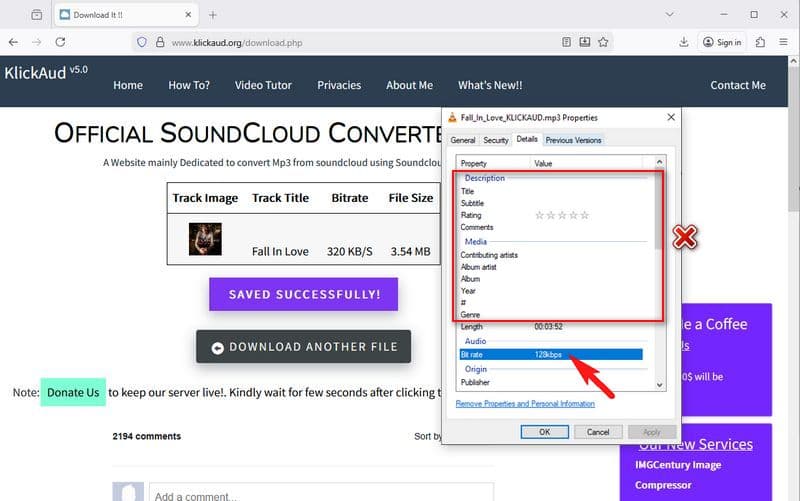
Only supports MP3 output with inconsistent audio quality (often 128 kbps despite claims 320 kbps)
-
Does not preserve ID3 tags in downloaded files.
-
Conversion success rate can be unstable, sometimes producing empty or failed downloads.
-
As an online tool, long-term reliability and safety cannot be guaranteed.
*Note: Not satisfied with KlickAud's features? Want to batch download SoundCloud to local audio files while preserving important ID3 tags, such as artist name, album title, cover art, and more? Try this safe and efficient KlickAud alternative now! 👇
Part 4: KlickAud vs Desktop SoundCloud Downloaders
KlickAud is a handy tool if you only need to download a few tracks quickly and occasionally. However, desktop SoundCloud downloaders offer more stability and useful features. They allow you to download entire playlists at once, support better audio quality, including lossless formats, and preserve important song details like artist names and album information. This makes desktop downloaders a better choice for people who download music regularly or manage large SoundCloud libraries.
Many users come across KlickAud when searching for a KlickAud SoundCloud Downloader review and start using it because it is simple and requires no installation. But as their downloading needs increase, they often switch to desktop software for a more reliable and flexible experience. To help you understand the differences better, here is a quick comparison between KlickAud and typical desktop SoundCloud downloaders.
| Feature | KlickAud (Online) | SoundCloud Desktop Downloaders |
|---|---|---|
| Installation Required | No | Yes, one-time installation |
| Batch/Playlist Downloads | No | Yes |
| Audio Quality Options | Limited (MP3 only, ~128 kbps) | Supports lossless formats (FLAC, WAV) |
| Metadata Preservation | No | Yes |
| Stability & Reliability | Variable, depends on website | More stable and consistent |
| Ease of Use | Very simple (one-off) | Designed for long-term use |
If you want a smoother and more reliable way to download SoundCloud tracks, desktop tools are a great option to consider. The next section will present the best KlickAud alternative with a step-by-step guide on how to use it. This will help you enjoy a better downloading experience with more features and less hassle.
Part 5: The Best Alternative to KlickAud
As shown in the comparison above, desktop SoundCloud downloaders offer more stability, flexibility, and advanced features than simple online tools like KlickAud. When KlickAud fails to process certain links or becomes unreliable, many users turn to dedicated desktop solutions for a smoother, faster, and more consistent experience.
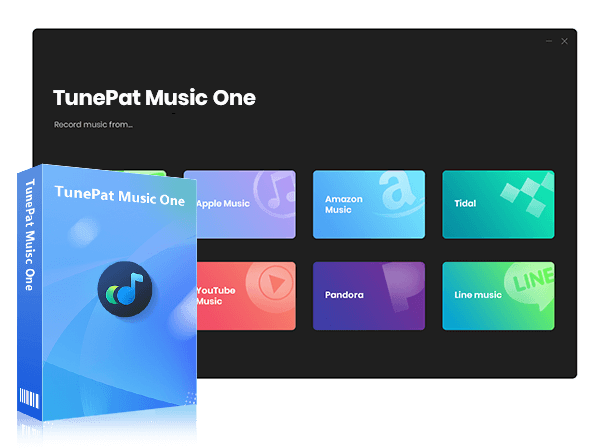
One such solution is TunePat Music One, a versatile music downloader designed to help users easily download and convert music from multiple streaming platforms, including SoundCloud, Spotify, YouTube, Apple Music, Amazon Music, Tidal, etc. It supports batch downloads, preserves original audio quality including lossless formats, and keeps all ID3 tags and album artwork intact. With customizable output options and fast conversion speeds, TunePat Music One aims to simplify music management for users across devices.
This tool is best suited for users who frequently download entire playlists or large music libraries, want to enjoy offline music with original sound quality, and prefer their music files to be well-organized with complete metadata. For example, if you like to build and maintain a personal music collection from various streaming services, or if you often listen offline during travel or workouts without worrying about internet access, a desktop downloader like TunePat Music One can save you time and provide a hassle-free experience. Below, we'll take a look at how to quickly download SoundCloud songs.
TunePat Music One
TunePat Music One is an all-in-one converter that can support any music streaming platform.
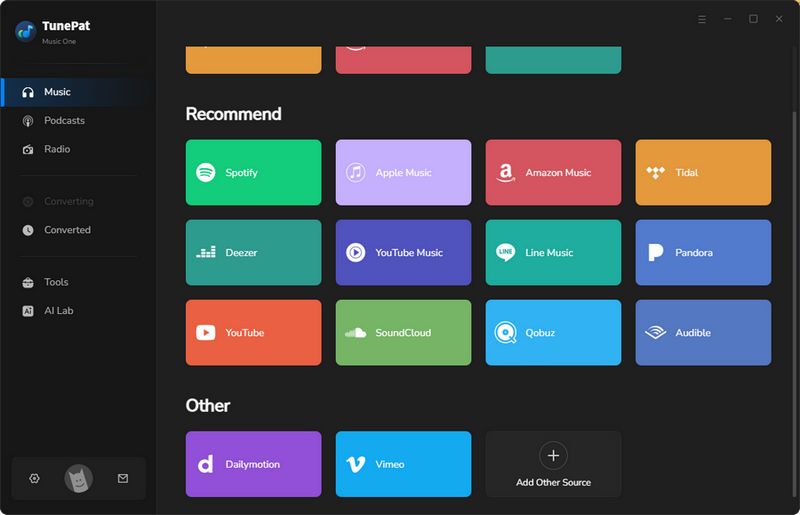
Step 1 Open TunePat Music One and choose "SoundCloud" from the list of supported streaming platforms. Follow the prompts to sign in to your SoundCloud account.
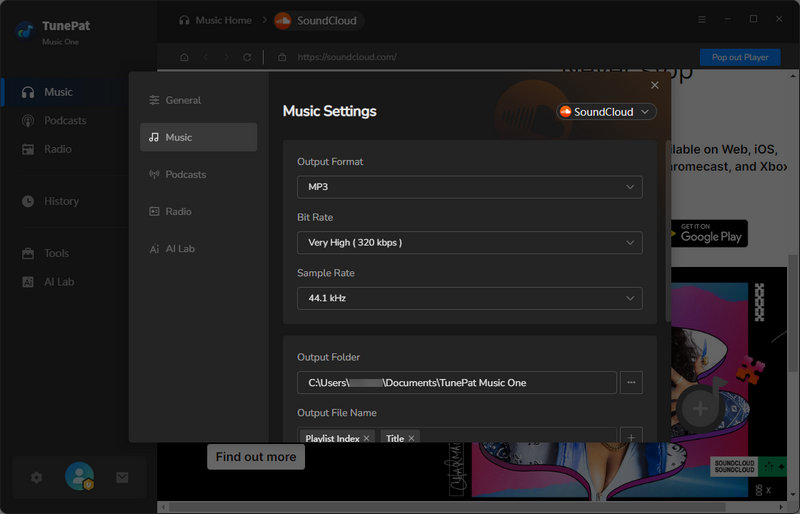
Step 2 Go to the "Settings" section to adjust options such as output format, output quality, output file name, and more.
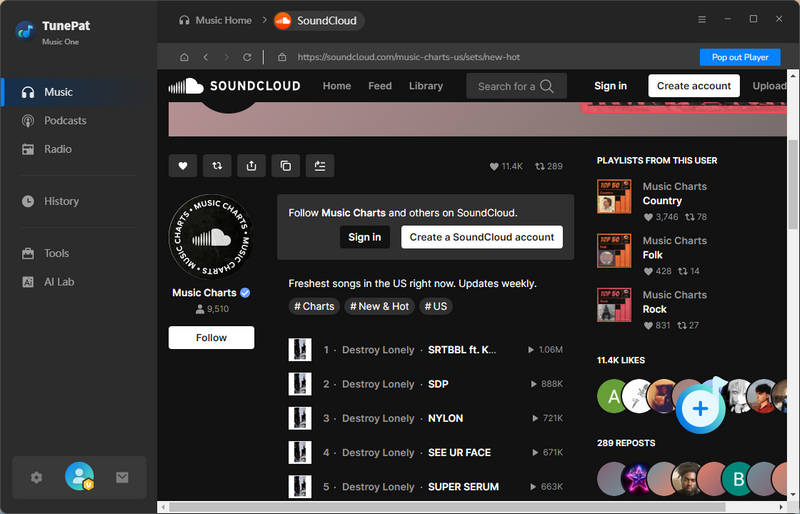
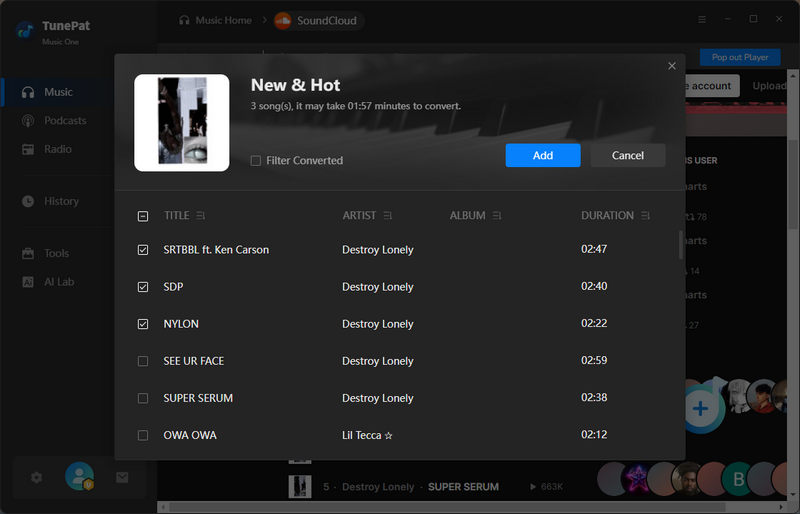
Step 3 Head to the SoundCloud web player inside TunePat, find the tracks or playlists you want, and click the "+" button in the bottom right corner. The selected items will be imported automatically. Click "Add" to confirm and place them in the download queue.
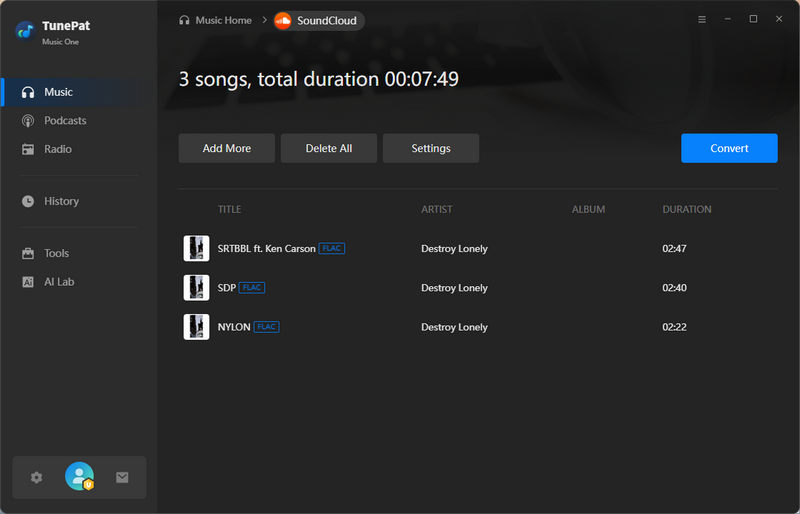
Step 4 To download more playlists or tracks at once, use the "Add More" option and repeat the process until everything is selected. When ready, click "Convert" to start downloading and converting your music.
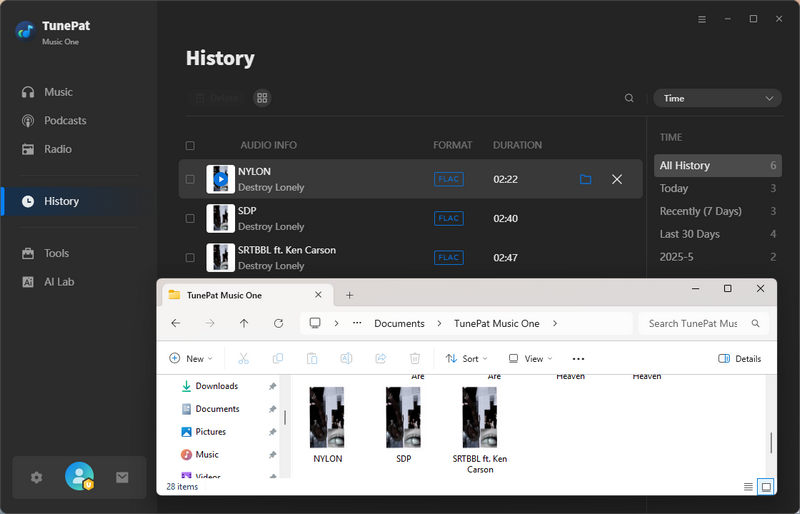
Step 5 Once the process is complete, the output folder will open with your downloaded SoundCloud files. You can also find and play all converted tracks in the "History" section within TunePat.
Pros
-
Supports multiple platforms, including SoundCloud, Spotify, YouTube, Apple Music, etc.
-
Batch downloads for saving playlists and libraries efficiently.
-
Maintains original and lossless audio quality.
-
Preserves full metadata and album artwork for organized music libraries.
-
Faster conversion speeds than most online tools.
-
Offers various output formats for multiple devices.
Cons
-
Currently available only for Windows and macOS desktops, with no mobile app yet.
Part 6: FAQs About KlickAud SoundCloud Downloader
Q1: Is KlickAud legal to use?
A: Downloading content from SoundCloud may be restricted by copyright laws and SoundCloud's terms of service. In general, it is safer to only download tracks that the creator has explicitly made available for free download, or content you have permission to use. For copyrighted music, personal offline use may still fall into a legal grey area depending on your region.
Q2: Can KlickAud download playlists?
A: No. KlickAud does not support playlist or batch downloads. Each SoundCloud track has to be processed one at a time, which can be time-consuming if you want to save multiple songs. Or you can try this KlickAud alternative.
Q3: Does KlickAud support high-quality audio?
A: KlickAud only outputs MP3 files. The actual audio quality may not always match what is shown on the website interface. In real use, downloaded files often come with lower bitrates than expected, which can affect sound quality.
Q4: Why does KlickAud sometimes fail to download tracks?
A: Download failures can happen due to SoundCloud platform updates, server instability, or temporary website issues. Like many online SoundCloud downloaders, KlickAud is more sensitive to these changes, so links that worked before may stop working later.
Q5: Can KlickAud be used on mobile devices?
A: Yes. KlickAud can be accessed through mobile browsers on both Android and iOS. However, the experience may vary by device and browser. In some cases, downloading and managing files on mobile can be inconvenient due to system restrictions or limited file management options.
Conclusion
KlickAud SoundCloud Downloader is a simple and free option for downloading individual public SoundCloud tracks. It can be useful for occasional offline listening when convenience is the main priority. However, potential security risks, inconsistent audio quality, missing ID3 tags, and limited advanced features make it less suitable for frequent use or for users who want to build and manage a proper music library.
For those who download SoundCloud music more often and care about stable results, audio quality, and proper metadata, TunePat Music One is a more practical choice. It supports batch downloads, lossless formats like FLAC, WAV, AIFF, and keeps ID3 tags and album artwork intact, making it much easier to manage a growing music collection. If reliability and long-term usability matter to you, TunePat Music One is worth a try.
Olivia Anderson
Senior Writer