
If you often search for "SoundCloud playlist downloader" online, you may have come across a tool called SoundCloudMe. Its clean interface and simple steps have made it one of users' top choices. But sometimes you may find that SoundCloudMe is gone and the website is inaccessible. What's going on? Is SoundCloudMe still available now? Is SoundCloudMe safe? Are there any safer alternatives to SoundCloudMe? If you want to know the answers, then read on. This article will bring you the most detailed review of SoundCloudMe and its alternatives on the web.
Part 1. What is SoundCloudMe?
SoundCloudMe is an online SoundCloud downloading tool. Users can download SoundCloud tracks as MP3 files without registering for an account or purchasing a subscription, so many DJs and music enthusiasts use it to save SoundCloud tracks. Recently, if you search for SoundCloudMe on search engines, you may not be able to directly access it, since SoundCloudMe has officially rebranded to DownCloudMe. Some old links may currently be invalid, and it is not clear whether the domain name will change again in the future.
Part 2. How to Use SoundCloudMe?
🔗 https://downcloudme.com/enTc/
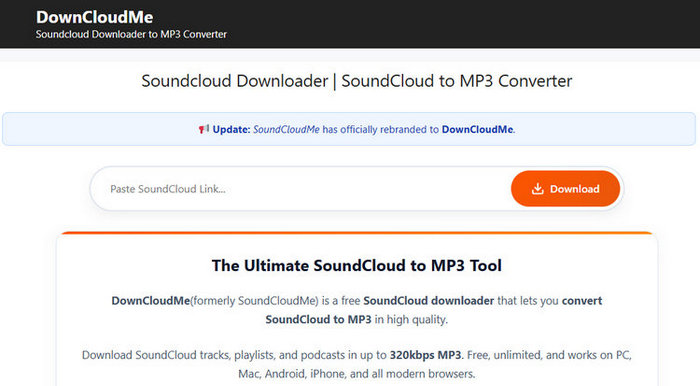
Step 1 Since SoundCloudMe recently changed its domain to DownCloudMe, old links may no longer work. To download a track, please use the new link provided above. Copy that link, open the DownCloudMe homepage, and then proceed with your download.
Step 2 Now, paste the SoundCloud URL into the input box. However, tests show that playlist and album URLs are not recognized reliably. Specifically, not all tracks are parsed; only some of them appear. Therefore, we recommend using SoundCloudMe to download individual tracks instead of playlists or albums.
Step 3 Click "Download" and wait for the parsing to complete. Then click "Fast Download". A new page will open. Ignore it and stay on the current page. The song will then be automatically downloaded to your folder.

⚡Note: Planning to download an entire SoundCloud playlist or album from SoundCloudMe but struggling to do it quickly and completely? Try this tool for a more reliable bulk download experience. With just one click, you can save the whole playlist or album at once while preserving ID3 tags and album art. 👇
Hands-On Test Results
In addition to the previously mentioned issue of unstable parsing for different types of SoundCloud links, we also tested the tool in other aspects. Below are our actual operations and test results.
1. Download Speed
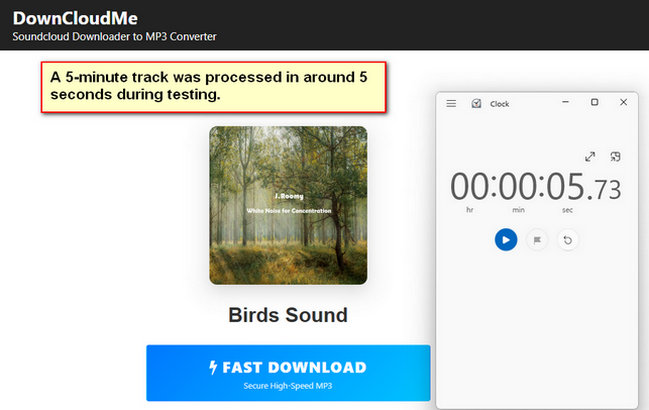
A 5-minute SoundCloud track was processed in around 4–6 seconds during testing, while longer DJ mixes required noticeably more loading time before the download started.
2. Sound Quality
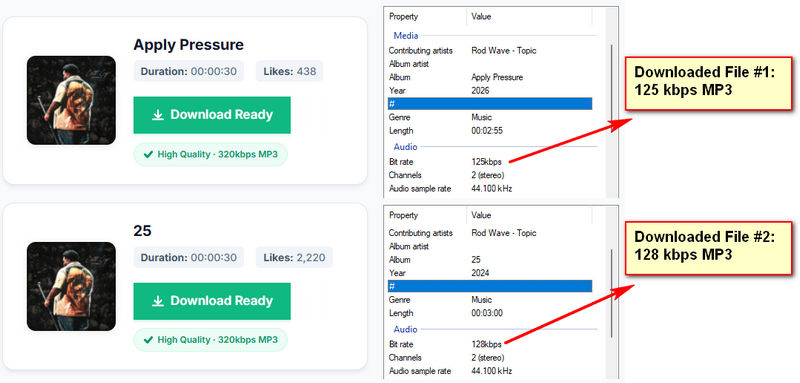
Our tests showed that the downloaded MP3 files typically had bit rates between 80 and 128 kbps, not the advertised 320 kbps. Although the bit rate varied from song to song, none of them actually reached 320 kbps.
3. Ads & Redirects
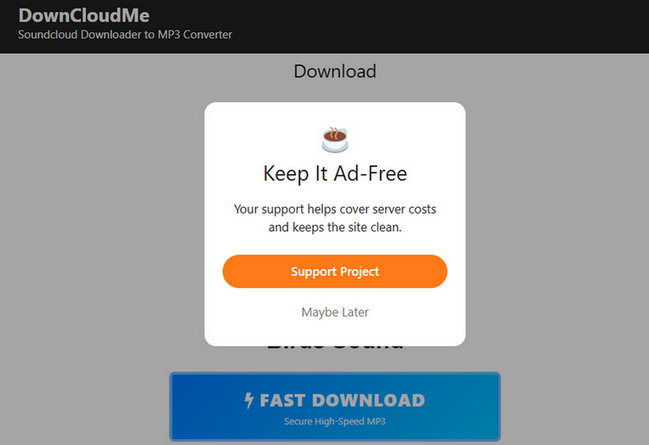
Although there are no ads on the page, a new webpage will open when the download starts. Users might mistakenly think that this new webpage is still an official page, but it is actually an ad page. The download process continues on the original page. Additionally, a pop-up prompt will appear, encouraging users to pay for a subscription to remove ad restrictions.
4. Metadata Support
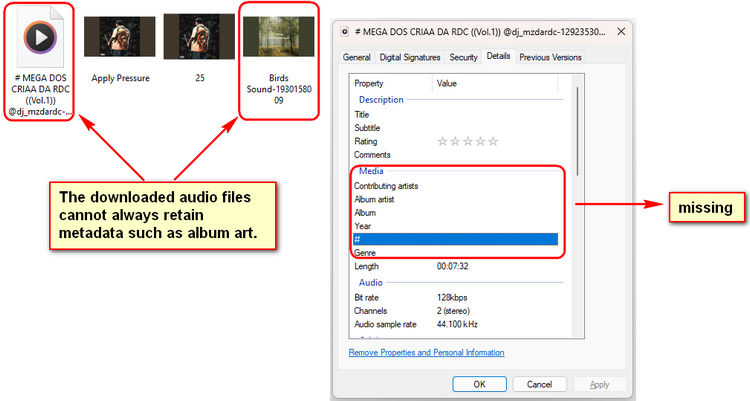
While some audio files downloaded from SoundCloudMe do retain album art and track information, the service appears quite unreliable overall. Sometimes, downloaded files lose important metadata. Therefore, you can't expect this tool to satisfy you every time you download.
Part 3. Is SoundCloudMe Safe and Legit?
3.1 Is SoundCloudMe Safe?
Throughout the entire download process, SoundCloudMe does not contain any malicious pop-ups or suspicious files. However, there is one redirect during the download, which may be misleading. At the same time, an ad pop-up prompting a subscription will appear after the download completes. But overall, this is a relatively safe website that contains some marketing information.
3.2 Is SoundCloudMe Legit?
SoundCloudMe operates independently and is not affiliated with SoundCloud. While downloading your own tracks for personal use is generally low-risk, downloading copyrighted music without permission may violate SoundCloud's Terms of Service.
Part 4. Best SoundCloudMe Alternatives in 2026
Below, we introduce some alternatives to SoundCloudMe, ranging from easy-to-use online tools to fully featured professional desktop applications. You can take a look at each tool and choose the one that suits you best.
1. TunePat Music One
As a fully-featured desktop tool, TunePat Music One supports over a dozen major streaming platforms, including SoundCloud, Spotify, Apple Music, YouTube Music, Tidal, and more. Users can batch download entire playlists or albums at speeds up to ten times faster. Additionally, TunePat supports multiple output formats such as MP3, AAC, WAV, FLAC, AIFF, or ALAC to suit different needs. TunePat automatically preserves ID3 tags and album artwork, making it easy to manage your music library.
Compared to simple online tools, TunePat Music One offers faster download speeds and retains original audio quality. It also runs stably, with no pop-up ads or redirects during the download process. Whether you're downloading individual tracks or handling large batches, the overall experience is smooth and reliable, making it an excellent choice for users who need long-term use or high-quality music preservation.
TunePat Music One
TunePat Music One is an all-in-one audio converter, ideal for fans of any music streaming platform.
Step 1 Launch TunePat Music One. On the main interface, click the "SoundCloud" tab. When prompted, log in to your SoundCloud account to access your library.
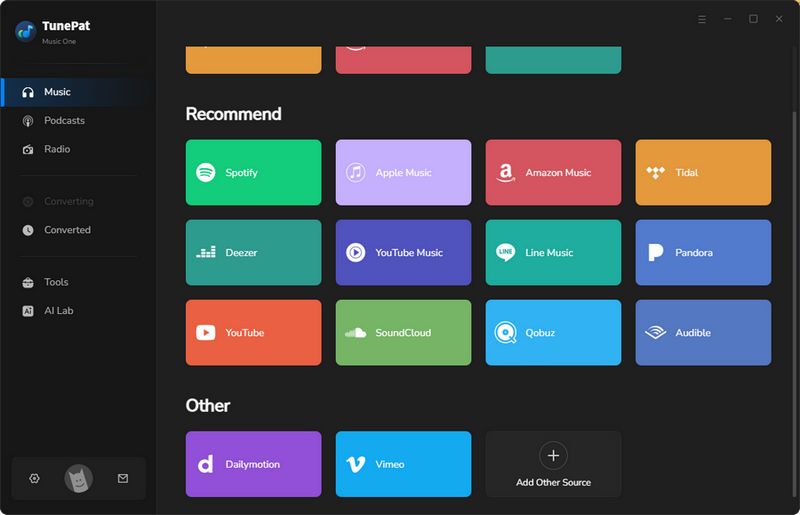
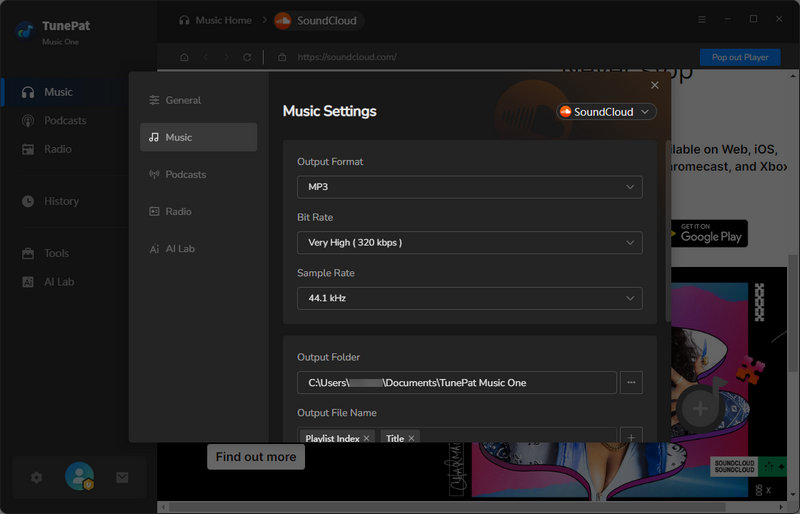
Step 2 Go to the settings window and customize your output preferences, such as output format, bit rate, sample rate, and output path.
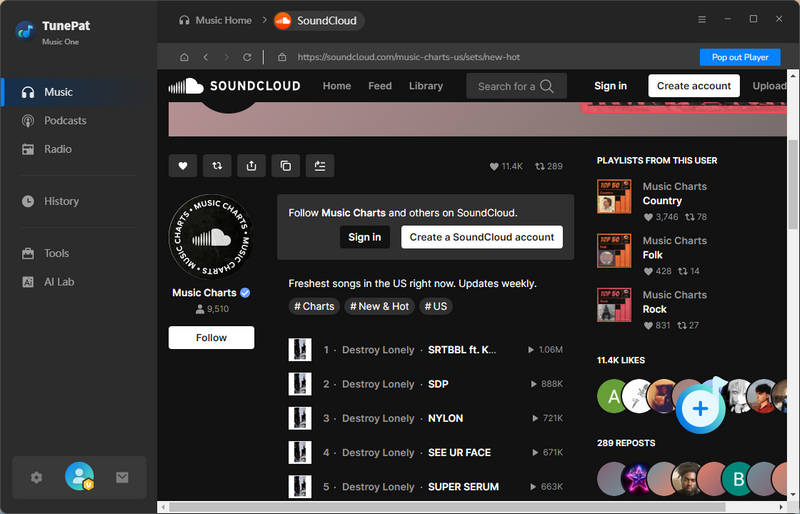
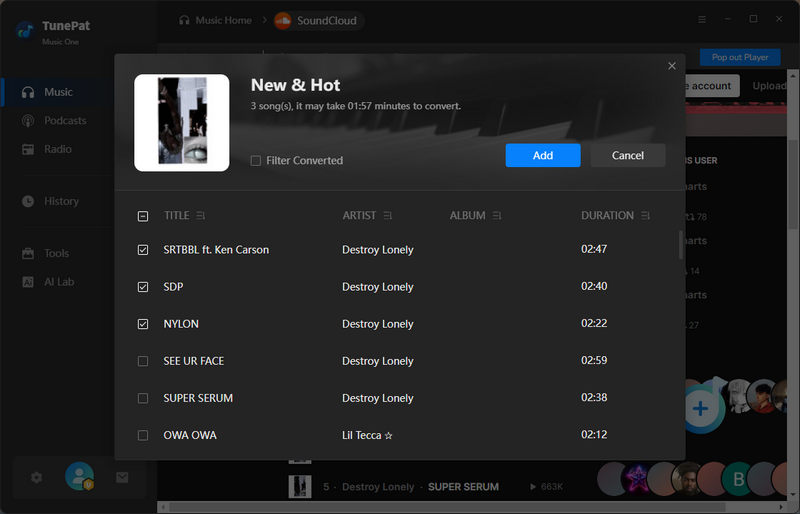
Step 3 Open the SoundCloud web player and find the playlist you want to download. Click the "+" button in the lower right corner. TunePat will automatically detect and load all tracks in the playlist. Click the "Add" button to confirm and add the songs to your download list.
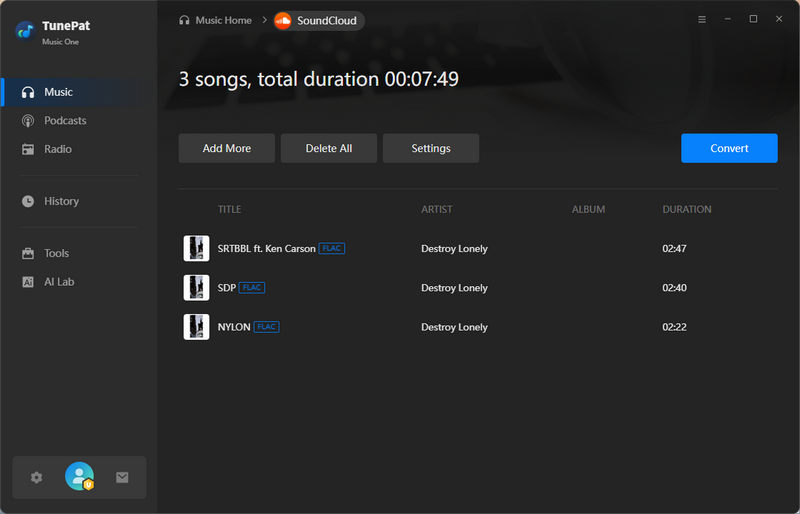
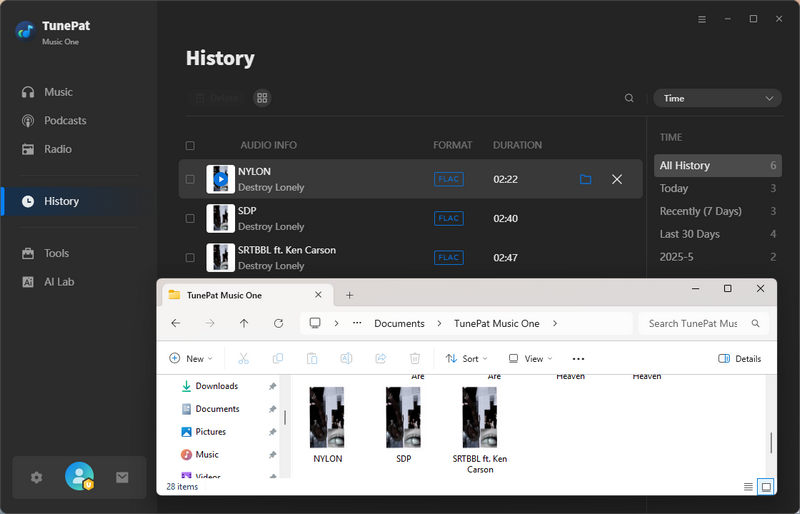
Step 4 Click "Convert". TunePat will begin downloading and converting the playlist. After a short wait, all SoundCloud playlists will be automatically saved to your computer. Once complete, the output folder you previously set will open, and your SoundCloud playlists can be played offline. You can view the downloaded songs in the "History" module.
2. KlickAud
🔗 https://www.klickaud.org/en14
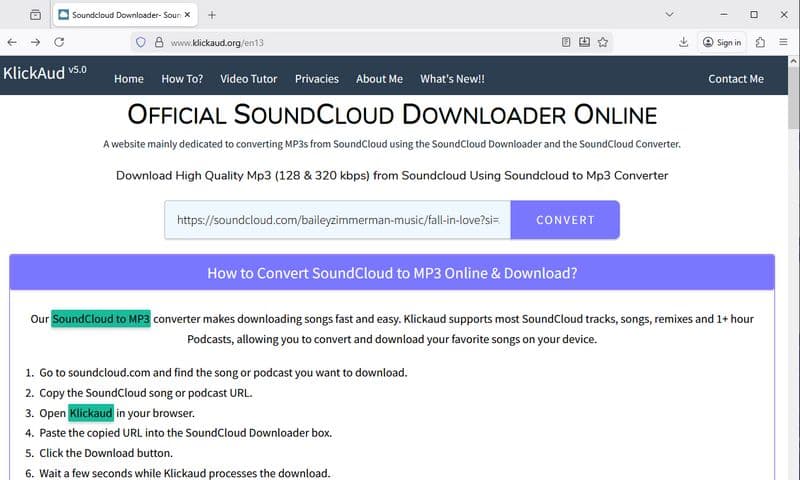
KlickAud is an online tool that lets you download music from SoundCloud. You can save individual tracks and convert them to MP3 format. However, the site has frequent ads, and you need to watch a short ad before each download. On the positive side, the download speed is fast, and the saved audio files retain fairly complete metadata. Additionally, KlickAud provides an update log, so users can easily see the latest changes and news. Despite the ads, for anyone looking to save online music to their own device, KlickAud remains a convenient option.
📕 You might also be interested in: KlickAud SoundCloud Downloader: Review & Best Alternative
3. ScloudMe
🔗 https://www.scloudme.com/en4E/
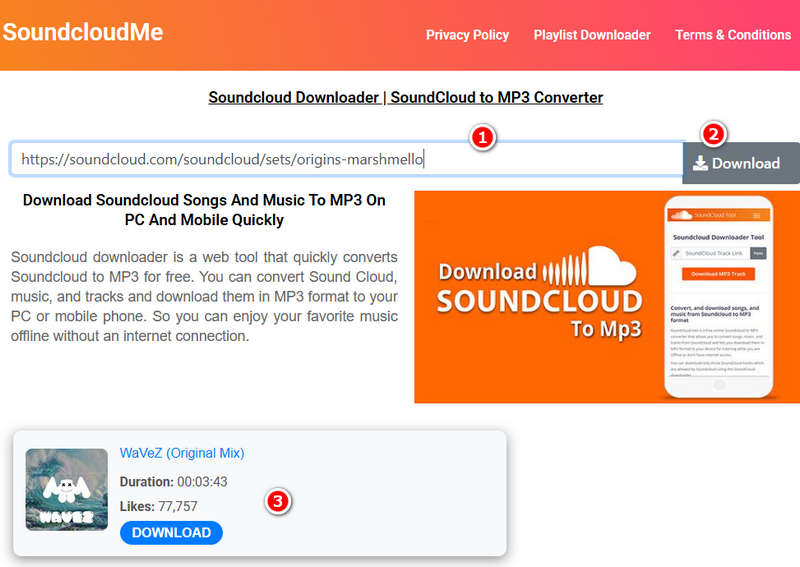
ScloudMe is another free online tool for downloading SoundCloud music to MP3 files. Like similar tools, it works by pasting a SoundCloud link into the converter. The interface is clean and user-friendly, making it easy to find what you need. However, you might run into a few redirects during use; for example, clicking the download button could open a new tab. Overall, the tool is simple and convenient. But the ads can sometimes be annoying, especially if you're trying to download multiple tracks in a row.
4. SoundCloudDownloader
🔗 https://scloudplaylistdownloader.app/en1/
SoundCloudDownloader is a free online platform and one of the few that can download entire albums and playlists, but a subscription is required to use this feature. Similarly, users can choose their preferred format, including MP3 and M4A. It supports high-quality audio and batch downloads, with files packaged as ZIP archives. However, a subscription is required to download complete SoundCloud albums or playlists. Otherwise, free users can only download two songs.
Part 5. SoundCloudMe vs Best Alternatives to SoundCloudMe
| Supported Music Streaming Platforms | Batch Download | Format | Bit rate | Ad-Free | |
|---|---|---|---|---|---|
| SoundCloudMe | SoundCloud | × | MP3 | 80-128 kbps | √ |
| TunePat Music One | SoundCloud, Spotify, Amazon Music, Apple Music, YouTube Music, Tidal, etc. | √ | MP3, AAC, FLAC, WAV, AIFF, and ALAC | Up to 320 kbps | √ |
| KlickAud | SoundCloud | × | MP3 | 125 kbps | × |
| ScloudMe | SoundCloud | × | MP3 | 98 kbps | √ |
| SoundCloudDownloader | SoundCloud | √ | MP3, M4A | Up to 320kbps | √ |
Part 6. FAQs about SoundCloudMe
Q1: Why can't I access SoundCloudMe?
A: Due to its inherent characteristics, free online downloaders like SoundCloudMe often face various issues, including frequent domain name changes, unexpected server outages, and regional restrictions that may prevent access in some countries. Currently, its legitimate domain is DownCloudMe. Please verify the domain name before using the tool; this will help you avoid visiting fake or malicious websites attempting to mimic the original tool.
Q2: Can I download playlists or albums with SoundCloudMe?
A: No. Using SoundCloudMe to download playlists and albums usually has some limitations. First, during the parsing process, the results don't always show all the songs in the album or playlist. Typically, only a portion of them appear. Second, the tool lacks a batch download function for entire playlists or albums. Therefore, it's best to use SoundCloudMe only for downloading individual tracks. For batch downloads, a dedicated desktop tool such as TunePat Music One is recommended.
Q3: What file formats does SoundCloudMe support?
A: SoundCloudMe only supports MP3 downloads. For other formats, please consider using a different tool.
Q4: Are there better alternatives to SoundCloudMe?
A: Whether you need a stable download experience or professional features, TunePat Music One is the best choice. For stability, it is completely ad‑free and has no redirects, ensuring an uninterrupted download process. For professional needs, it offers adjustable download speeds and preserves ID3 tags.
Q5: What should I do if my download fails?
A: Check the track URL, ensure the website is running, or try downloading a single track instead of a playlist. For frequent downloads, it's recommended to use a more professional download tool.
Conclusion
Our testing shows that SoundCloudMe is suitable for fast, occasional MP3 downloads and is very convenient for ordinary users. However, compared to more advanced solutions, its limitations become more apparent when downloading longer SoundCloud tracks, playlists, or large amounts of music. It lacks batch downloading and stable conversion performance. For users who frequently download SoundCloud music and are looking for a more stable, long-term solution, TunePat Music One is a better choice. If you are also interested in TunePat Music One, click to download and try it!


Olivia Anderson
Senior Writer