The Hidden Cost of "Free": A Deep Dive into Pandora MOD APKs
 By Olivia Anderson
Pandora Music Tips
Updated on 9/4/2026
By Olivia Anderson
Pandora Music Tips
Updated on 9/4/2026
Ever wished you could enjoy Pandora's perfect music streams without the ads, skip limits, or subscription fee? If you've searched for a way to do this, you've likely stumbled upon something called a "Pandora Mod APK". Touted as a key to unlocking Pandora's premium features for free, these modified apps are incredibly tempting. But are they safe, and are they worth the risk? In this comprehensive guide, we'll cut through the hype and give you the straight facts. We'll explain what a Pandora Mod APK really is, examine the potential risks and limitations of using modified apps, and introduce a safer and more reliable alternative for enjoying Pandora music offline.

This article is intended for informational purposes only. TunePat does not provide, distribute, or support any Pandora Mod APK files. Modified applications are unofficial versions that may pose security, privacy, and account-related risks. Users should understand these potential risks before installing any third-party applications.
Part 1: What is a Pandora Mod APK?
In simple terms, a Pandora Mod APK is a modified, unauthorized version of the official Pandora radio app for Android. These modified versions are created by third-party developers and distributed outside the official Google Play Store. They usually modify the original app code in an attempt to unlock paid features without a subscription.
Pandora Mod APKs often claim to offer features such as ad-free listening, unlimited skips, offline playback, or on-demand music access. Some versions may also claim to provide additional premium functions. However, these features are not officially supported by Pandora and may not work as expected. Since these apps are developed and distributed by unknown third parties, users cannot verify what changes have been made to the original application or whether the promised features are actually reliable.
Part 2: Why You Should Avoid Pandora Mod APK?
While Pandora Mod APKs may appear to offer a convenient way to unlock premium features for free, the risks behind these unofficial apps often outweigh their claimed advantages. Since they are modified and distributed by unknown third parties, there is no guarantee that they are safe, stable, or trustworthy.
1. Security and Privacy Risks from Mod APKs
Unlike the official app, Mod APKs are unverified and may contain malware or spyware. They often request excessive permissions (e.g., files, contacts, microphone) and alter the original code, making it difficult to know whether any data is collected in the background, potentially exposing your account, device info, and personal information to unknown parties. These combined flaws put both your device and personal data at serious risk.
2. Account and Feature Reliability Risks
Using a Mod APK violates Pandora's Terms of Service and risks account restrictions and loss of official support. Meanwhile, advertised premium features like offline listening and unlimited skips often fail because they depend on server-side verification that cannot be reliably bypassed; they may stop working after updates or crash unexpectedly. Instead of a stable experience, these mods create more frustration. For safer offline access, consider using a legitimate music converter with your own account.
Part 3: Best Alternatives to the Pandora Mod APK
Given the security threats, privacy concerns, and constant instability of modded apps, it's clear that a safer path is needed. What if you could enjoy all the benefits of offline Pandora music—downloading your favorite songs and playlists—without violating any terms of service or risking your device's security?
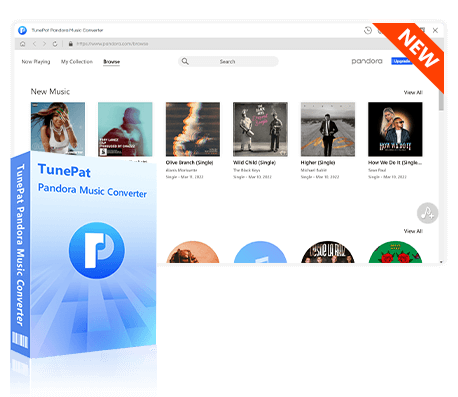
The answer isn't another questionable APK, but a powerful and, most importantly, safe desktop tool: TunePat Pandora Music Converter. Unlike a modded app that runs on your phone, TunePat operates on your computer, providing a secure bridge between the official Pandora service and your personal music library. It allows you to download and convert songs from Pandora into common MP3, AAC, or FLAC files, storing them directly on your hard drive for true, permanent offline playback.
TunePat Pandora Music Converter
TunePat Pandora Music Converter helps you download and convert all Pandora Music songs and playlists to MP3 and other common formats.
Ready to build your personal, offline Pandora music library? Just follow these five simple steps. With TunePat, you can download your favorite songs, albums, and playlists without a Premium subscription.
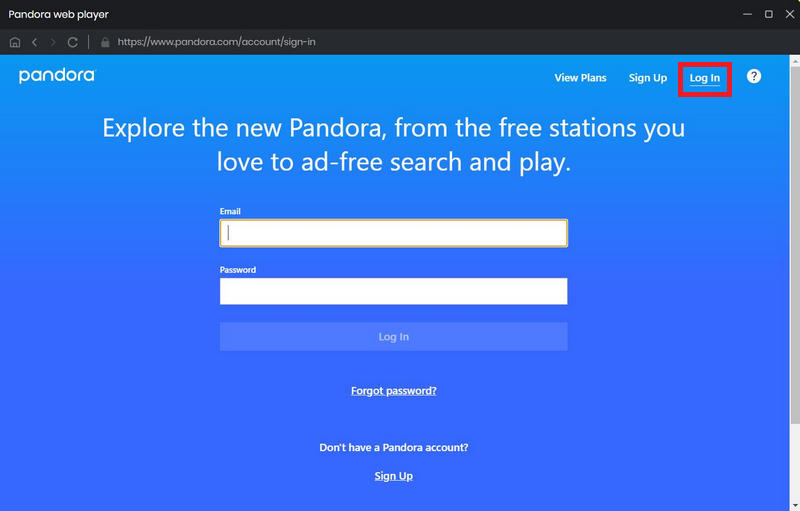
Step 1 Launch TunePat and Log Into Pandora
Begin by installing, launching, and registering TunePat on your computer. The built-in Pandora web player will open automatically. Log in with your free Pandora account—no subscription required.
Step 2 Adjust Your Output Settings
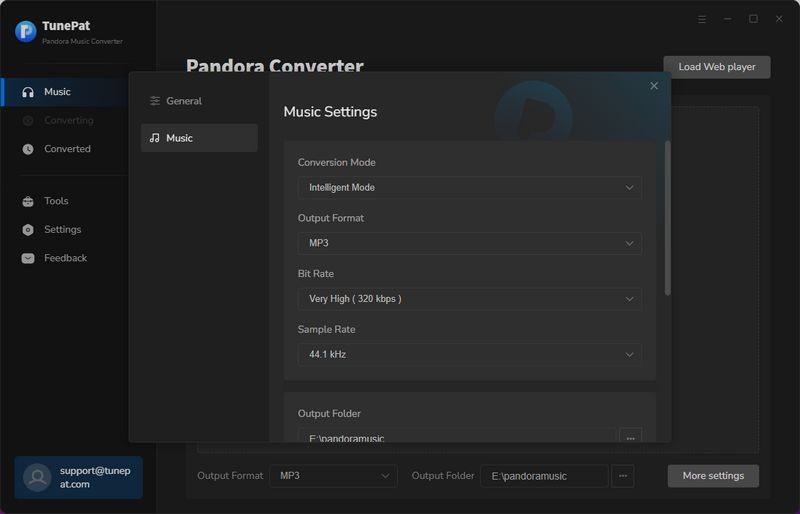
Click the "Settings" (or gear) icon, usually found in the lower-left corner. Here, you can customize the output format. For the best device compatibility, we recommend selecting MP3. You can also adjust the bit rate, sample rate, and where you'd like the files to be saved on your computer.
Step 3 Add the Music You Want to Download
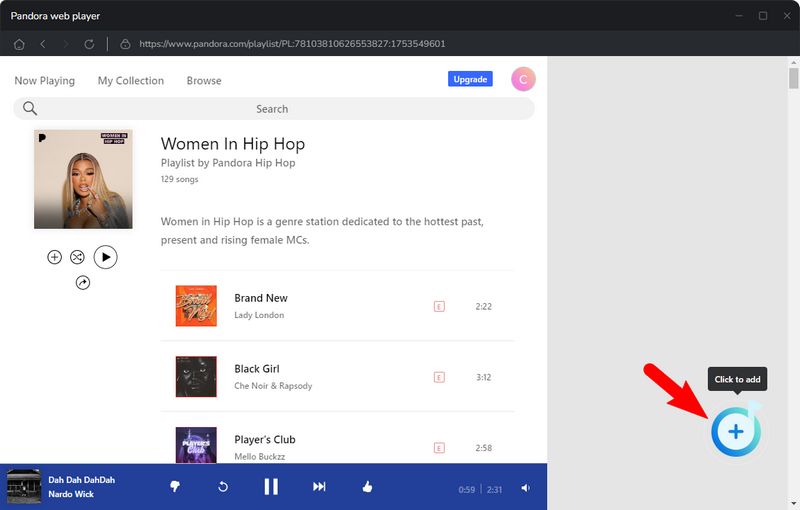
Navigate through the Pandora web player to find the songs, albums, or playlists you wish to download. Click the "+" button. TunePat will quickly analyze the page and list all available tracks in a new window. Simply deselect any songs you don't want, then confirm by clicking "Add".
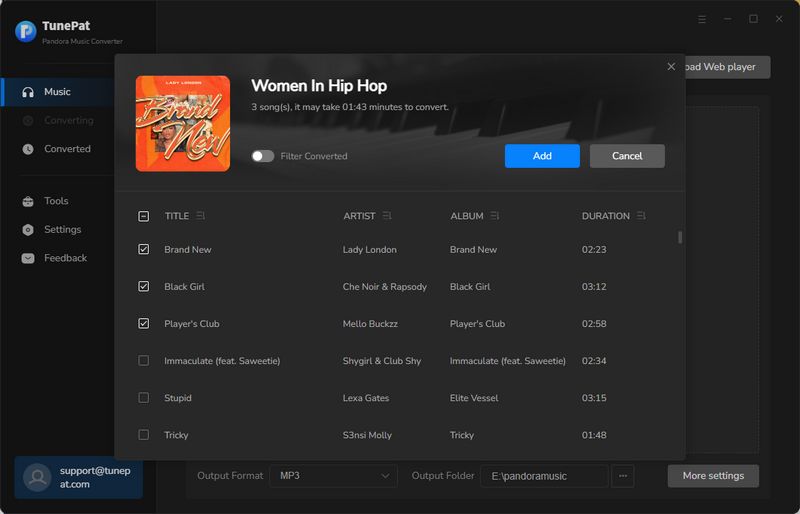
Step 4 Convert and Download Your Songs
Click the "Convert" button to start the downloading process. TunePat works at high speed, so it won't take long. Want to download more music from a different playlist? Just click "Add More" and repeat Step 3 to batch-convert everything at once.
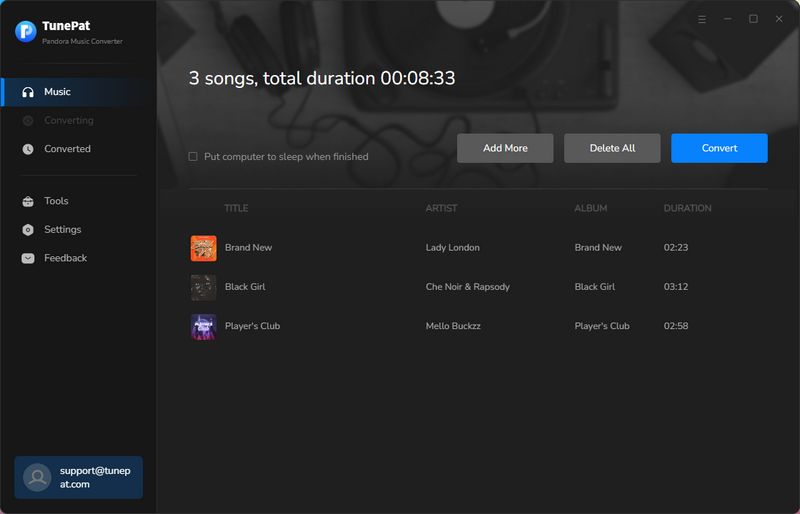
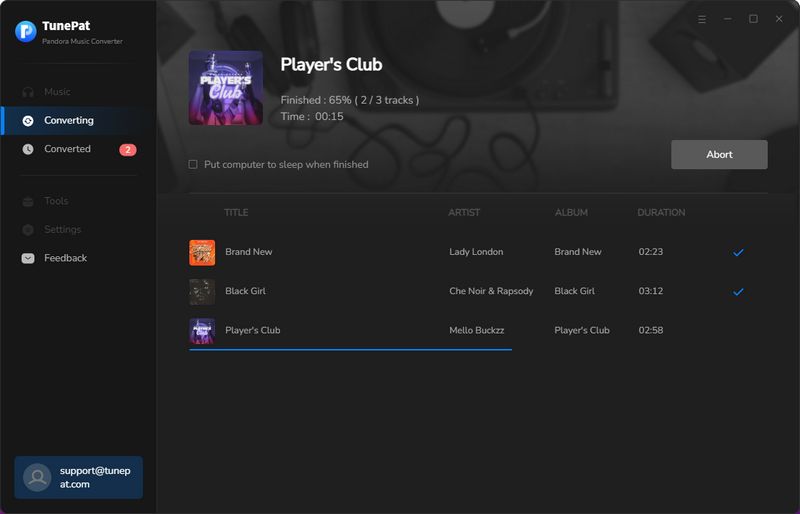
Step 5 Access Your Offline Music Library
Once the conversion is complete, you can find all your downloaded songs in the "History" section. Click the folder icon next to any song to open its location on your computer, or double-click the track title to play it directly within TunePat.
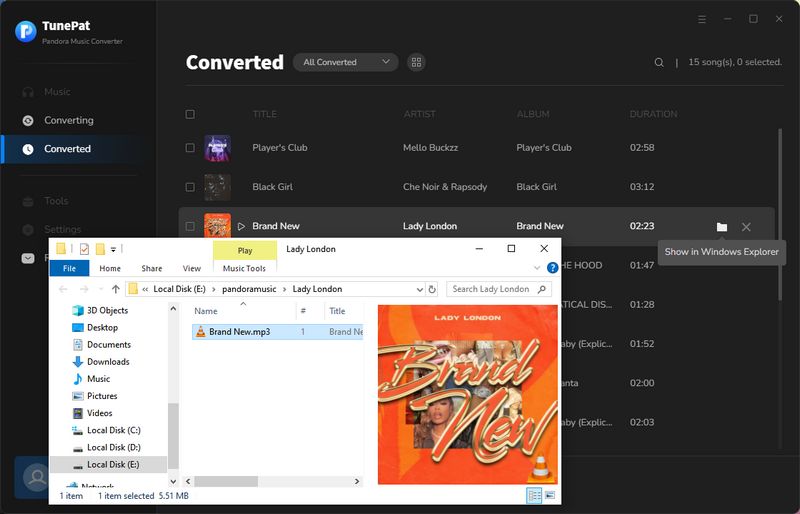
Congratulations! You now have permanent, offline access to your Pandora music. These downloaded files are yours to keep—transfer them to any device and play them on any music player, completely free from the limitations of the Pandora platform.
Part 4: FAQs About Pandora Mod APK
Q1. Is the Pandora MOD APK safe to use?
A: No. It is generally unsafe. MOD APKs are unauthorized third-party files that are not verified by Google or Pandora. They often contain malware, viruses, or spyware designed to steal data.
Q2. Can I get banned from Pandora?
A: Yes. Pandora actively monitors for unauthorized access. If the system detects you are using a modified client, your account is at risk of being shut down.
Q3. What's the Difference Between Pandora Mod APK and a Paid Subscription?
A: The main difference is security and reliability. A paid subscription gives you legal, safe, and guaranteed access to all premium features like offline mode, on-demand playback, and ad-free listening. A Mod APK illegally unlocks these features but comes with significant risks: no security, no customer support, potential for account bans, and features (especially offline mode) that often don't work reliably.
Q4. Does the Offline Download Feature in Mod APKs Actually Work?
A: Rarely, and not reliably. True offline downloading requires server-side verification that you have an active Premium subscription. Since a Mod APK cannot provide this verification, the download feature often fails, crashes, or simply doesn't appear. However, you can use tools like TunePat Pandora Converter to download Pandora songs for offline playback.
Conclusion
To conclude, while Pandora Mod APKs may seem like a simple way to unlock premium features for free, the risks behind these unofficial applications should not be ignored. Security threats, privacy concerns, account restrictions, and unreliable features can make these modified apps a risky choice for long-term music enjoyment.
For users who want to save Pandora music for offline listening without relying on modified applications, TunePat Pandora Music Converter provides a safer and more reliable alternative. It works with your existing Pandora account and helps you convert your favorite tracks into common audio formats for flexible offline playback.
Instead of taking risks with unofficial apps, choosing a trusted music tool like TunePat Pandora Music Converter allows you to build and manage your personal music library with greater security and convenience.


Olivia Anderson
Senior Writer