
MusicFab All-In-One combines multiple streaming music downloaders in one desktop app, but is it worth paying for the lifetime bundle? In this MusicFab All-In-One review, we tested the free trial with Apple Music, YouTube Music, and SoundCloud to assess download speed, output audio parameters, and metadata accuracy. We explain what worked and where we encountered issues. You'll also find a breakdown of its pricing and a comparison with TunePat Music One to help you choose based on the services and features you need.
Part 1: MusicFab All-In-One Overview
1.1 What Is MusicFab All-In-One?
MusicFab All-In-One is a desktop music downloader that bundles multiple streaming-service converters into one application. It allows users to save songs, albums, and playlists from supported platforms as local audio files in formats such as MP3 and FLAC. It is aimed at listeners who want to build a local music collection from more than one streaming service.
1.2 Which Streaming Services Does It Support?
MusicFab lists support for Spotify, Amazon Music, Apple Music, YouTube Music, TIDAL, Deezer, Qobuz, SoundCloud, and Pandora, along with regional services such as LINE MUSIC and dhits. It also offers an Audible converter for audiobooks.
1.3 MusicFab All-In-One vs. Individual Converters
The main difference is the scope of the license. MusicFab's service-specific converters are modules within the same desktop application and can be purchased individually or as part of the All-In-One bundle. An individual converter may be sufficient if you only need to download from one service, such as Spotify. The All-In-One package is more relevant if you need converters for several platforms.
Part 2: MusicFab All-In-One Review: Features and Test Results
2.1 Key Features of MusicFab All-In-One
The table below summarizes MusicFab All-In-One's advertised features, while our hands-on tests examine its download performance, audio quality, and reliability in practice.
| Feature | Details |
|---|---|
| Output Formats | MP3, M4A, FLAC, WAV, and OPUS. Available options may vary by streaming service. |
| Batch Downloads | Supports downloading multiple tracks from playlists and albums in one task. |
| ID3 Tags and Artwork | Preserves track metadata, such as title, artist, album, year, and cover artwork. |
| Lyrics | Supports saving available lyrics as separate .lrc files. |
2.2 Hands-on Test: MusicFab All-In-One
To evaluate MusicFab's actual performance, we tested its downloading capabilities, download speed and stability, audio quality, and metadata accuracy across Apple Music, YouTube Music, and SoundCloud. The following tests focus on real-world usage, including individual song downloads, song and album parsing, parallel downloads, and the quality of the downloaded audio files.
Our Testing Environment
- Operating System: Windows 11
- MusicFab Version: 2.0.0.5
- Streaming Services: Apple Music, YouTube Music, SoundCloud
- Account Types: Apple Music (Paid Subscription), YouTube Music Free, SoundCloud Free
- Software License: MusicFab Free Trial
- Test Date: November 16, 2026
Installation and User Interface
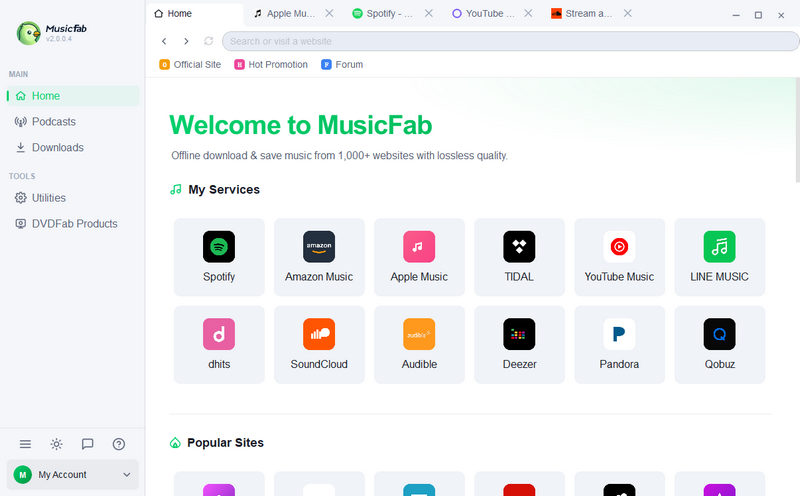
Installing MusicFab All-In-One was straightforward, with no obvious installation issues. However, the software displayed multiple prompts encouraging users to purchase a registration code. After launching the program, the main interface appeared clean and easy to navigate. The homepage displayed supported music platforms, letting us quickly find and open different services. We could also open multiple platforms simultaneously, making it convenient to switch between them. However, some download settings were not immediately accessible from the main interface, making them slightly harder to find for first-time users.
Song and Album Parsing and Downloads
MusicFab provides built-in interfaces for supported streaming services. In our tests, we opened a song or album and clicked the download button on the right. The software then analyzed the content and displayed the available tracks for us to select and add to the download queue.
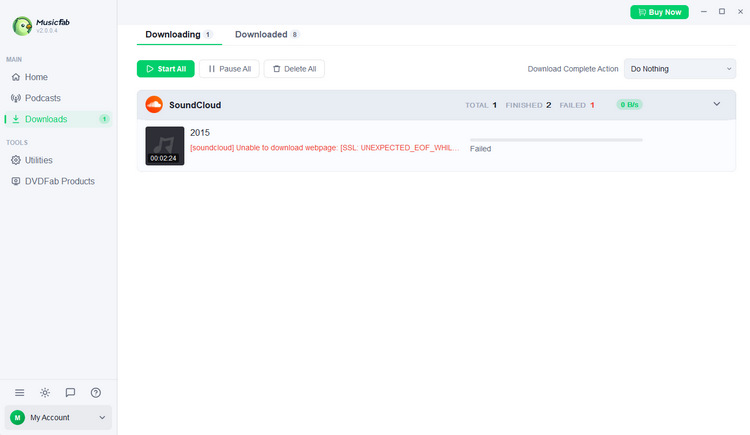
We tested song and album parsing across Apple Music, YouTube Music, and SoundCloud, but the free trial limited actual downloads to three tracks per service. Apple Music and YouTube Music each downloaded all three selected tracks successfully, while SoundCloud downloaded two out of three.
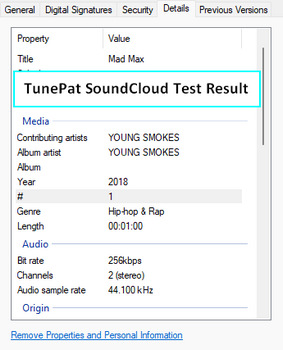
In our trial, TunePat Music One successfully converted all tested tracks and preserved more complete metadata. Try it free with your selected tracks.
| Streaming Service | Tested | Successful Downloads | Success Rate |
|---|---|---|---|
| Apple Music | 3 | 3 | 100% |
| YouTube Music | 3 | 3 | 100% |
| SoundCloud | 3 | 2 | 66.7% |
| Total | 9 | 8 | 88.9% |
Download Speed and Stability
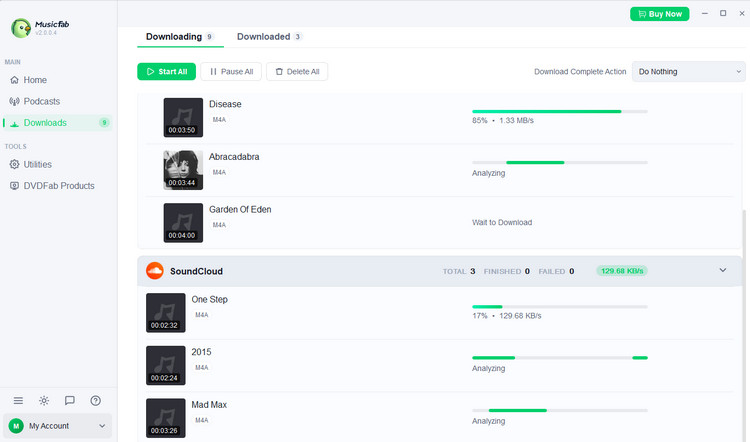
Across the eight successfully downloaded tracks, MusicFab took approximately 5 seconds per song on average. We also confirmed that MusicFab could download music from multiple streaming platforms simultaneously, allowing users to process tasks from different services without waiting for one to finish before starting another. However, the free trial's three-song limit per service prevented us from evaluating its performance with larger batches or extended download sessions.
Audio Quality Comparison
To evaluate MusicFab's actual audio output quality, we examined the format, bitrate, and sample rate of all eight successfully downloaded songs using the Original output setting. All eight tracks were saved in M4A format, but their audio parameters varied noticeably across streaming services.
| Streaming Service | Format | Bitrates of Tested Tracks | Sample Rate |
|---|---|---|---|
| Apple Music | M4A | 266, 267, 268 kbps | 44.1 kHz |
| YouTube Music | M4A | 130, 131, 133 kbps | 48 kHz |
| SoundCloud | M4A | 160, 159 kbps | 44.1 kHz |
These results show that MusicFab's output bitrate varies by streaming service, even when the same Original output setting is selected.
Metadata Accuracy
Finally, we examined how well MusicFab preserved song metadata, including titles, artist names, album information, cover artwork, and lyrics.
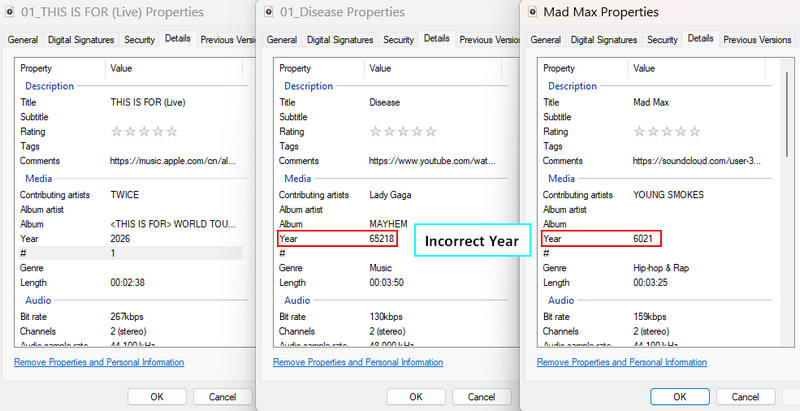
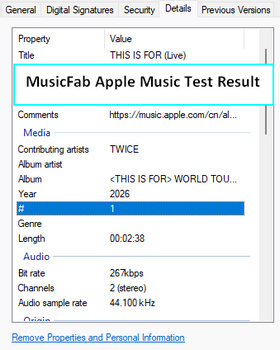
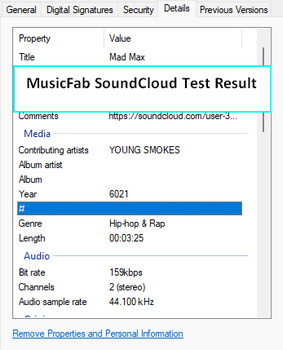
Our tests revealed some differences across streaming platforms. Apple Music downloads retained album information and saved lyrics as separate .lrc files, but genre information was missing. YouTube Music downloads also preserved album details, but no lyric files were generated, and the release year was incorrect. Meanwhile, the two successfully downloaded SoundCloud tracks had missing album information, incorrect release years, and no saved lyric files.
Part 3: MusicFab Pricing and Lifetime License
3.1 Free Trial Limitations
MusicFab offers a 30-day free trial that allows users to download up to three songs per supported streaming service. In our testing, this limit was sufficient to evaluate basic downloading and audio output but prevented us from testing complete playlists or larger batches. Frequent purchase reminders also interrupted the experience. The three-song trial restriction is removed after purchasing a license.
3.2 All-In-One Lifetime License: What's Included?
The All-In-One lifetime package bundles multiple music downloaders into one license. According to MusicFab, lifetime All-In-One purchasers also receive access to newly released modules without additional purchases. As of November 2026, the advertised lifetime price is $199.99. Users should confirm the included modules, supported operating systems, and computer authorizations before purchasing.
3.3 Is MusicFab All-In-One Worth the Price?
At $199.99, MusicFab All-In-One may be expensive for occasional users or those who only need one streaming service. However, it could offer better value for users who regularly download music from multiple platforms. Keep in mind that the license does not include subscriptions to paid music streaming services. In addition, paid users are still subject to a daily limit of 300 downloads per streaming service.
Part 4: Pros and Cons of MusicFab All-In-One
Pros
-
 Supports multiple streaming services in one application
-
Offers multiple output formats, including MP3, FLAC, WAV, and M4A
-
Fast download speed, averaging about 5 seconds per song in our tests
-
Supports batch and simultaneous downloads across different platforms
-
Preserves track metadata and cover artwork with some inconsistencies in our tests
Cons
-
 Free trial is limited to three downloads per streaming service
-
One download failed during our nine-track tests
-
Some downloaded tracks have missing or inaccurate metadata
-
Frequent purchase reminders can interrupt the user experience
-
Lifetime license is relatively expensive at $199.99
-
Paid users are limited to 300 downloads per service per day
Part 5: MusicFab vs. TunePat: Which Fits Your Needs?
Although MusicFab All-In-One offers a comprehensive solution for downloading music from multiple streaming platforms, it is not the only option available. TunePat Music One is another multi-platform music converter worth considering. They differ in platform coverage, output options, pricing, and other practical features. Instead of looking at either product in isolation, let's compare MusicFab All-In-One and TunePat Music One across several important aspects to help you decide which one better suits your music collection needs.
Here's how they compared in our tests.
| Comparison | MusicFab All-In-One | TunePat Music One |
|---|---|---|
| Supported Platforms | Downloads from 12 streaming platforms, including Spotify, Apple Music, Amazon Music, and YouTube Music, plus audio recording from additional websites. | Downloads from 20+ streaming platforms, including Spotify, Apple Music, Amazon Music, and YouTube Music, plus audio recording from additional websites. |
| Available Output Formats | MP3, M4A, WAV, FLAC, OPUS | MP3, AAC, WAV, FLAC, AIFF, ALAC |
| Free Trial | 3 full songs/service | First 1 min/song |
| Test Result | 8/9 full tracks converted | 9/9 one-minute previews converted |
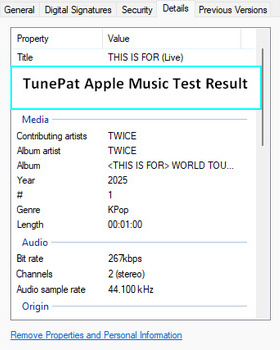
| Apple Music Test | Same measured bitrate as TunePat; less complete metadata. | Same measured bitrate as MusicFab; more complete metadata. |
| YouTube Music Test | Retrieved YouTube versions of the selected tracks in our test. | Retrieved YouTube Music versions with higher measured bitrates. Different versions prevent a direct audio-quality comparison. |
| SoundCloud Test | Downloaded 2 of 3 tracks; lower measured bitrates and less complete metadata. | Converted all 3 tracks; higher measured bitrates and more complete metadata. |
| Price (Lifetime) | $199.99 | $159.90 |
| Built-in Tools | Music Transfer for transferring music to phones and other devices. | Format Converter, CD Burner, Audio Editor, Tag Editor, and AI Vocal Remover (included at no extra cost); AA/AAX Converter (additional purchase required). |
*Test results are based on the free trial versions. MusicFab was tested with full-song downloads, while TunePat was tested using one-minute previews. Prices may vary by region and promotion.
Who Should Use MusicFab?
- You need OPUS output for your preferred player or device.
- You prefer parallel downloads between different services.
- You prefer testing full-song downloads before buying.
Who Should Use TunePat?
- You want broader platform support to save music from more sources.
- You need AIFF or ALAC output for your music collection.
- You want to stream and record broadcasts from 67,000+ radio stations.
- You want to customize output file names and organize downloaded music into folders.
- You want to convert formats, edit audio and tags, or burn CDs without switching between programs.
- You want built-in vocal separation to create instrumental or vocal-only tracks.
FAQs About MusicFab All-In-One
Q1. Does MusicFab All-In-One Support Spotify and Apple Music?
A: Yes. MusicFab All-In-One supports both Spotify and Apple Music, allowing users to download songs, albums, and playlists from these streaming platforms. Both Spotify Converter and Apple Music Converter are included in the All-In-One package.
Q2. Can MusicFab Download Music in FLAC?
A: Yes. MusicFab supports FLAC output. However, the actual audio quality of the downloaded file depends on the original streaming source.
Q3. Does MusicFab Require a Premium Streaming Account?
A: Not necessarily. MusicFab supports both free and premium streaming accounts, depending on the music service and the content you want to download. For example, Spotify and YouTube Music offer free streaming options, so a premium subscription is not universally required. You may still need to sign in to your streaming account through MusicFab's built-in browser to access your music library and selected tracks.
Q4. Can MusicFab Download Entire Playlists?
A: Yes. Keep in mind that MusicFab has a daily download quota of 300 tracks per supported streaming service for each authorized account, while the free trial is limited to three songs per service.
Q5. Is MusicFab Safe to Use?
A: MusicFab states that its software is safe and clean. However, as with any third-party desktop application, it is best to download the installer directly from the official MusicFab website rather than from unknown download sources. You can also scan the installation file with reputable antivirus software before installing it. Additionally, use MusicFab responsibly. Downloading and converting streaming content may be subject to the streaming platform's terms of service and local copyright laws. Make sure you have the necessary rights or permissions and avoid redistributing copyrighted music without authorization.
Final Verdict
MusicFab All-In-One delivered fast downloads in our limited trial, successfully saving 8 of 9 tracks across three streaming services. However, some files had missing or inaccurate metadata, and the trial limits prevented us from assessing large-playlist reliability. Its lifetime bundle may suit frequent multi-service users, but occasional listeners should weigh the cost against their actual needs.
For users who want to download, edit, and organize music in one place, TunePat Music One is a compelling alternative. Alongside multi-platform conversion, it offers AIFF and ALAC output, tag editing, audio editing, and CD burning, useful extras for managing a local music collection. Download TunePat Music One and try it free with your favorite tracks to see how it fits your workflow.


Olivia Anderson
Senior Writer