Is NoteBurner Amazon Music Converter Worth It? An Honest Review 2026
 By Olivia Anderson
Music Tips
Updated on 10/26/2026
By Olivia Anderson
Music Tips
Updated on 10/26/2026
As of today, there are all sorts of Amazon Music downloaders claiming to save high-quality MP3s from Amazon Music. The dedicated desktop solution, NoteBurner Amazon Music Converter, is on the spot list. But does it actually work as advertised? Is the output quality any good? And is it safe and worth using? To find out, we've run real conversion tests on this Amazon Music converter and taken a closer look at its features, the whole process, real-world conversion performance, where it falls short, and the like. Dive in!
The Quick Takeaway: 4.5 out of 5
This NoteBurner Amazon Music Converter review finds a usable paid Amazon Music workflow, verified high-quality outputs, batch downloads, and the ability to keep or edit metadata. But the trial's 1-minute-per-track limit makes it a little harder to properly judge the software. The final decision comes down to use cases, price, and the size of your music library.
Part 1. What Is NoteBurner Amazon Music Converter
An Overview
🔗 https://www.noteburner.com/amazon-music-recorder-windows.html
NoteBurner Amazon Music Converter is aimed at converting Amazon Music tracks, playlists, albums, and podcasts to MP3, WAV, FLAC, and more in batches. It works with both the Amazon Music desktop app and web player, then saves the converted audio to your computer with the relevant ID3 metadata. Notably, it is a desktop-only program, not a mobile downloader. You’ll need to pre-install it on a Windows PC or Mac to use it.
What Does NoteBurner Amazon Music Converter Do?
We collected the specifications listed on the official website and found some highlights of the NoteBurner Amazon Music Converter during testing. Here's a breakdown.
| Specification | Detail | Rating |
|---|---|---|
| System Support | Windows PC 7-11; macOS 11-26 | Average |
| Output Formats | MP3, FLAC, AAC, WAV, AIFF, ALAC | Excellent |
| MP3 Bitrate | 320Kbps — customizable | Good |
| Max Quality | Up to 24-bit / 192kHz for Ultra HD FLAC | Industry Max |
| Dolby Atmos | EAC3 + AC4 output (.m4a) | Rare feature |
| Download Port | Amazon Music App Source, Web Player Source, Screen Audio Capture | Very Flexible |
| Batch Conversion | Full playlists and albums in one queue | Excellent |
| Conversion Speed | Up to 10x for the web mode | Good |
| ID3 Metadata | Title, artist, album, year, cover art, track number, lyrics | Complete |
| Output Organized | Sort out audio by artist, album, playlist, genre, year, disc number | Good |
| Built-in Tools | Tag editor, format converter, CD burner | Useful bonus |
| Free Trial | 1-minute per track (no count limit) | Limited |
| Pricing | $44.95/year; $89.90 lifetime | Average |
| Main Features |
|
How to Use NoteBurner Amazon Music Converter?
Step 1 Get NoteBurner installed on your computer and run it. Choose to download music via App Mode or Web Mode.
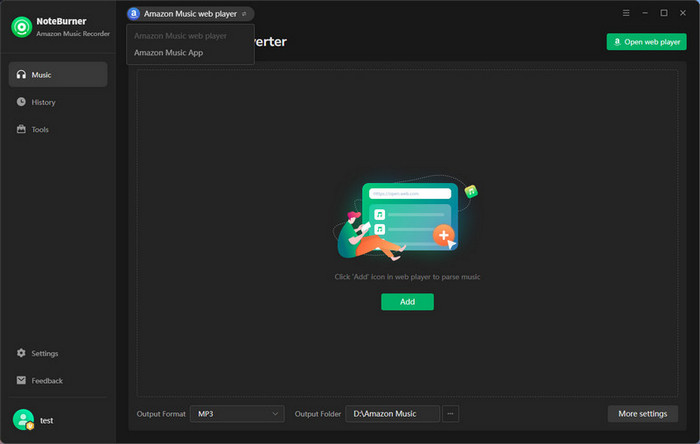
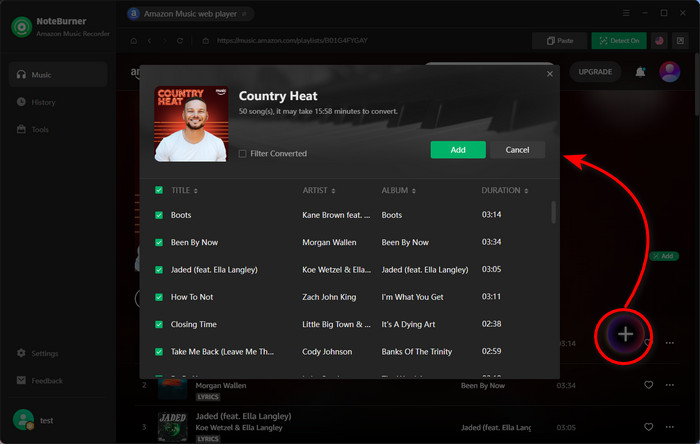
Step 2 Simply drag and drop a song or playlist from the Amazon Music webplayer to the converter, then click Add.
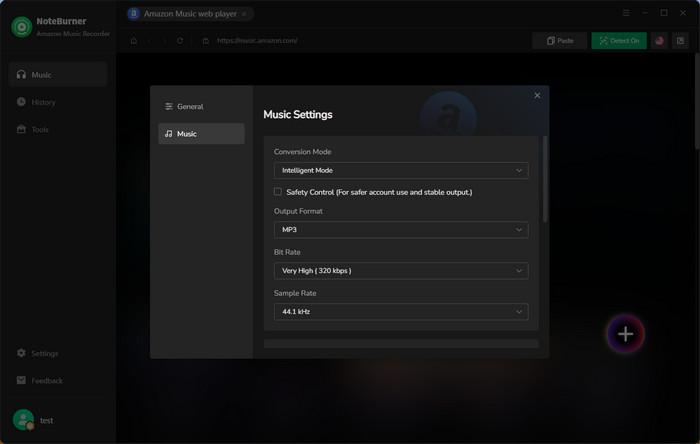
Step 3 Open the Settings menu by clicking the gear icon in the lower-right corner. Choose MP3 or another format you want, and select the quality for audio.
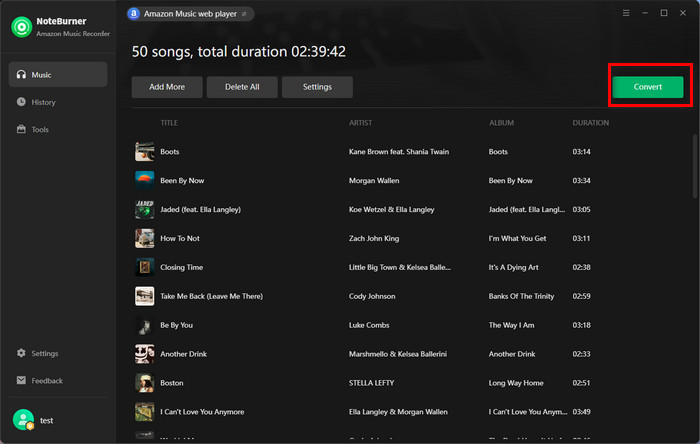
Step 4 Click the Convert button to start downloading music. When it is finished, go to History on the left. There's a folder icon next to the converted tracks that opens the location where the downloaded files were saved.
Part 2. Putting NoteBurner Amazon Music Converter to the Test [2026 Result]
Let's get into the test part. Here we'll briefly explain how we tested and what NoteBurner's actual conversion performance and results are.
- Tested Device: Dell Windows 10, Intel Core i7-13700H, 64GB RAM
- Download Content: Playlist, Album, Podcast
- Account: Amazon Music Free
- Quality & Tags Check: Spek, Mp3tag
- Calculated Duration: Timer app
- Security Scan: Windows Security
- Additional Note: For honest testing, we used the free trial for initial workflow testing, then the 1-year version for complete track conversion and batch testing.
Our Testing Setup
Real-World Testing Results at a Glance
| What We Tested | Result | Details | Rating |
|---|---|---|---|
| Playlists-Country Heat | 50/50 | All successfully | ★★★★★ (5/5) |
| Albums-Lover | 18/18 | All successfully | ★★★★★ (5/5) |
| Podcast-Gone Medieval | 3/3 (episodes) | All successfully | ★★★★★ (5/5) |
| Download speed & duration (for playlist) | Appro. 25 seconds for each track | Estimated duration: 32 min Actual duration: 21 min (more faster) |
★★★★☆ (4.5/5) |
| Audio Quality | MP3 320kbps (not all) | 50 tracks in playlist checked | ★★★★☆ (4.5/5) |
| Metadata | All preserved as set | Artwork, artist, album, playlist, year | ★★★★★ (5/5) |
| User Interface | Intuitive & ad-free | 100% no ads, redirects; Easily navigate all features |
★★★★☆ (4.5/5) |
| Extra features | Free, but not for advanced editing | Tag editor, CD burner, audio editor | ★★★★☆ (4.5/5) |
| Pricing Plans | Paid 1-year plan | No one-month plan; Not budget-friendly | ★★★☆☆ (3/5) |
| Overall Score: ★★★★☆ (4.5/5) | |||
1. Interface + Ease of Use
The program interface and features are divided cleanly, making it beginner-friendly. For the first installation and launch, the program offers onboarding steps to help click through. Add a playlist from Amazon's player into the queue—it appears with all tracks listed, art loaded, and ready to go. The time from installation to the first full playlist conversion took less than half an hour, and we weren't rushing. It needs extra steps to adjust output settings, but it's a minor point overall.
Rating: ★★★★☆(4.5/5)
One small usability note: It has two modes for converting Amazon Music. We tested it via the Web Mode. It obviously downloads songs at a faster speed than the app mode.
2. Speed + Batch Test
By converting 3 real music categories with NoteBurner Amazon Music Converter, including one full playlist (Country Beat), an album (Lover), and three podcast episodes (Gone Medieval). Surprisingly enough, all content was downloaded locally.
In practice, on our Dell computer, we consistently hit 8–10× for standard MP3 audio conversions. A 50-track playlist of 2-4 minute songs completed in roughly 21 minutes. That's 25 seconds for each track. A 18-track album finished in under 8 minutes. Compared with some online tools, it works faster and has stable output.
Rating: ★★★★☆(4.5/5)
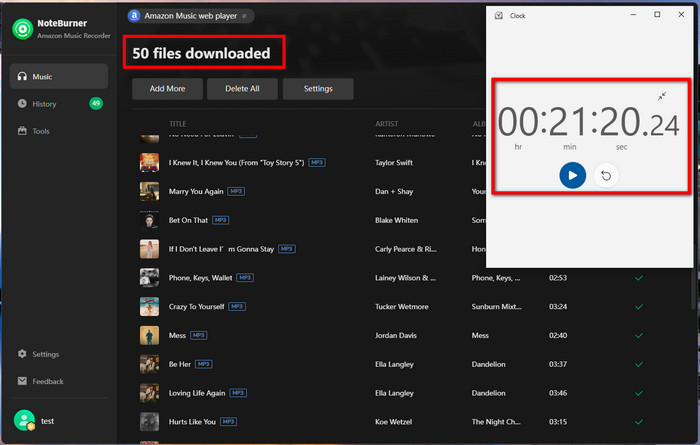
The one hiccup we encountered: In a 50-track batch test, the last track stalled at 99% and wasted most of the time. (Occasional bugs during long playlist conversion are mentioned in some user reviews; they are rare and need patience to let it finish.
3. True Output Quality
A lot of Amazon Music converter software claims 320kbps output but delivers false output. Some of the audio literally comes from a YouTube source; the authentic quality is 128-256 kbps. But NoteBurner's output didn't have that cutoff. It is captured from the Amazon Music source, so the quality is higher than online ones.
Upon verifying via Spek, we noticed that some audio is genuine 320 kbps 20 kHz, but some is not up to that level. The standardized audio is around 20 kHz in the spectrogram, while the unstandardized audio has a visible frequency cutoff at 16 kHz.
Rating: ★★★★☆(4.5/5)
- 🔬Spek Analysis—NoteBurner Output Results · Certain Tracks · MP3 · Clean to 18~20 kHz—genuine 320 kbps ✓
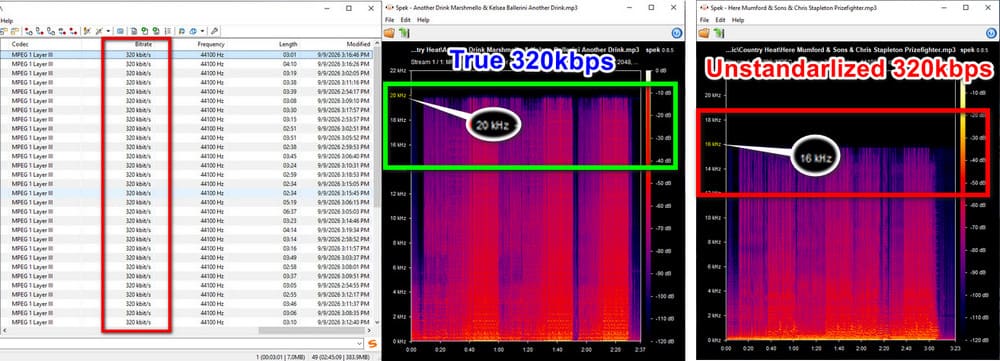
Tester's Note: Since we tested the music download via the Amazon Music Free account, the current tested quality is limited to 320 kbps. The website claims it delivers higher-quality music (Ultra HD or Dolby Atmos) if using the paid Amazon account. We have not tested it, so the lossless output is not confirmed yet.
4. Metadata Integrity & Organized Output
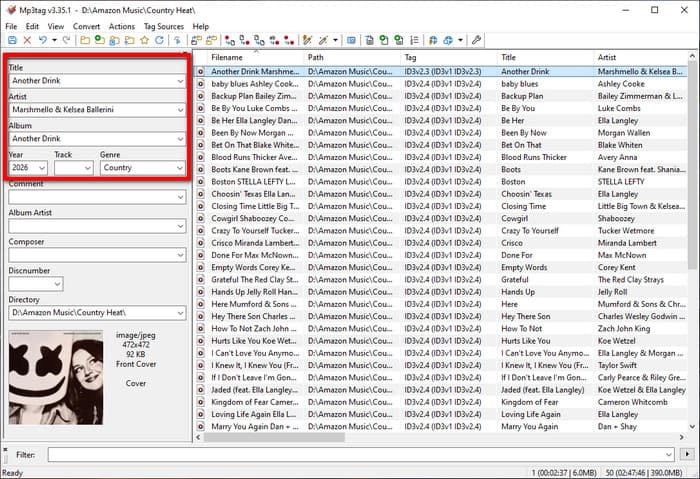
We verified the metadata across 50+ tracks. Here's what was embedded in every single output file without exception as long as you added it in the settings: track title, artist name, album name, track number, release year, and cover art. Lyrics were also embedded for the majority of tracks.
Regarding the option for output organization, in our testing, it does sort out downloaded audio into folders by artist and album—no manual renaming, no chaotic Downloads dump.
Rating: ★★★★★(5/5)
5. Explore Its Audio Tools
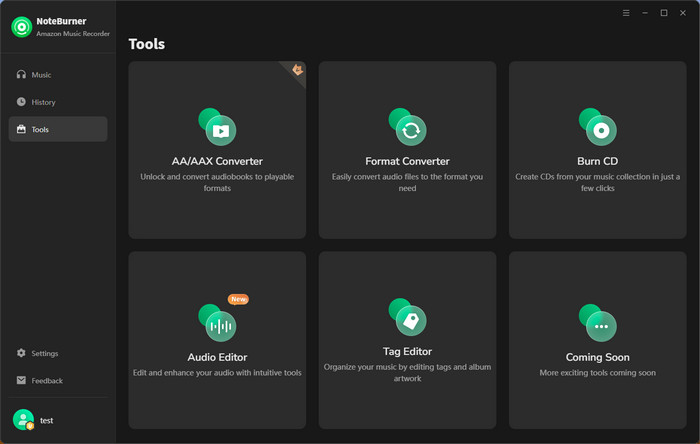
It includes a built-in tag editor, format converter, and CD burner as part of the package. These are genuinely useful additions rather than bloatware. An extra highlight when you need simple audio editing. Notably, it offers simple features but is not very suitable for someone with advanced audio configuration needs.
Rating: ★★★★☆(4.5/5)
Part 3. What Do Real NoteBurner Users Review?
Beyond our own testing, we also checked some of what people outside the review ecosystem are actually saying—from Trustpilot's verified reviews.
Trustcore: 4.4 (360+ reviews as of September 2026)
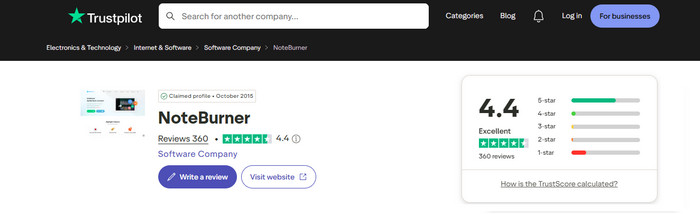
"I love that the Amazon version of NoteBurner uses the Amazon Music web interface, so there is no real learning curve. Fast and clean downloads of individual files or entire playlists. Worked every time. ★★★★★
"I don’t use Amazon Music Prime very often, but I do listen to Amazon Music a lot. The monthly Prime fee was a bit too much for me, but luckily I found it, and it works perfectly!" ★★★★★
"Supports me in being able to download music that I’ve already paid for, so I can mix it with DJay software. This means I can finally use them with my USB decks." ★★★★★
"The app on the whole is okay, easy to use, and does the job, but there is a distinct drop in audio quality if you're using the free account." ★★★
"Since I updated the note burner, it has gone really slow opening up and getting the music to load." ★★
Our Summary: Ease of use gets mentioned repeatedly in positive reviews. And users praise reliability and downloading capabilities, while the main concerns are free-account audio quality and occasional performance issues after updates.
Part 4. Final Verdict: Is NoteBurner Amazon Music Converter Worth Using?
So, in the final analysis, is NoteBurner Amazon Music Converter actually worth using? It does a lot of things well, but it also has a few limitations to know about before you invest in it.
Pros
-
 Safe, ad-free, and simple to use.
-
Batch conversion & 10x download speed.
-
Multiple audio formats and qualities.
-
Keep Amazon Music HD/Ultra HD and even Dolby Atmos EAC3/AC4 (if using Prime or Unlimited accounts).
-
Full ID3 metadata & easy editing.
-
Offer customer care while using.
Cons
-
 No mobile version.
-
Need a subscription plan to download full-length tracks.
👍 Best Fit for?
- Active Amazon Music users who want to convert songs in batches and keep them forever.
- Audiophiles who pursue HD or lossless audio quality.
- Users building an organized offline music library with metadata.
🤔 Not Good for?
- Users who only need a completely free tool to convert a handful of songs.
- Users who don't care about audio quality beyond standard MP3.
Part 5. FAQs
Q1. Is NoteBurner Amazon Music Converter Safe?
A: The software itself is safe to use. The downloaded files do not carry any malicious risk; we've scanned the downloaded files via Windows Security. But you'd better get it from the official website; some third-party platforms may offer unverified and false apps.
2. Is it legal to use the NoteBurner Amazon Music Converter?
A: This review is for sharing testing results for reference, not to encourage any violations. Like all third-party conversion tools, the legal picture depends on the music content and use case. It is only for personal use. Keep using this tool responsibly. All downloaded music content should not be distributed or used for business.
3. Is NoteBurner Amazon Music Converter free to use?
A: NoteBurner does provide a free trial for the initial installation. But note that it is only available for each first-minute audio conversion. Users need to upgrade to the paid version to download full songs from Amazon.
4. Does NoteBurner work with a free account on Amazon Music?
A: Yes. We tested it via a free Amazon Music account, and it delivers output normally. In some cases, it even works with an account login.
5. Can I use NoteBurner for downloading Amazon Music Ultra HD music?
A: Yes. The website claims it can do the job of saving Ultra HD audio if you're on an Amazon Music Unlimited account. But what it actually does requires you to try it on your own.
Wrapping It Up
Hopefully this hands-on review gives you a clearer picture of what to expect from NoteBurner Amazon Music Converter. We tested the converter in real-world scenarios and reviewed the conversion process and output quality for its overall performance.
All in all, NoteBurner Amazon Music Converter is worth considering if you have a lot of Amazon Music to convert and want high-quality output without doing everything one track at a time. That said, the final output can still depend on variables like your Amazon Music account, the quality of the source audio, and the settings you choose. So you’d better physically start with its free edition to test the download outcomes before utilizing it.


Olivia Anderson
Senior Writer