Sidify Music Converter Review: Features, Pros, Cons and Full Analysis
 By Olivia Anderson
Music Tips
Updated on 3/30/2026
By Olivia Anderson
Music Tips
Updated on 3/30/2026
When it comes to downloading and converting streaming music for offline playback, tools like Sidify Music Converter might come to mind. But is it still a worthwhile option today? Now, this article will take an in-depth look at Sidify Music Converter, covering its features, price, pros and cons, and overall performance. More importantly, we'll compare it with other alternatives to help you find the best solution for your needs. Whether you prioritize higher sound quality, faster conversion speeds, or better compatibility, this comprehensive analysis will help you decide if Sidify is the right choice or if there are better alternatives.

- Part 1: What Is Sidify Music Converter?
- Part 2: Key Features of Sidify Music Converter
- Part 3: How to Use Sidify Music Converter
- Part 4: Sidify Music Converter Pros and Cons: Real User Experience
- Part 5: Best Alternative to Sidify Music Converter
- Part 6: Sidify vs TunePat: Detailed Comparison
- Part 7: Common Questions About Sidify & TunePat
Part 1: What Is Sidify Music Converter?
Sidify Music Converter is a desktop music conversion tool designed to help users download and convert music from Spotify for offline playback. Sidify converts music through an embedded Spotify web player or the Spotify app, allowing users to save songs in various formats, including MP3, AAC, WAV, FLAC, AIFF, and ALAC. This makes it possible to easily transfer music between different devices without any limitations.
One of the main reasons users choose Sidify is its ability to retain metadata, including title, artist, album, and other ID3 tags, while converting music, as well as its relatively fast conversion speed. However, despite Sidify offering a range of useful features, its performance and flexibility will vary depending on the platform you use and your specific needs. As streaming services continue to evolve, many users are now looking for more stable, faster, and feature-rich alternatives.
Part 2: Key Features of Sidify Music Converter
- Multiple Output Formats: Supports MP3, AAC, WAV, FLAC, AIFF, and ALAC, allowing you to enjoy your music on almost any device.
- Spotify Free & Premium Supported: Works with both Spotify Free and Premium accounts, so you can convert tracks without upgrading your subscription.
- High-Quality Conversion: Preserves the original sound quality, but conversion speed may vary depending on the platform and network conditions.
- Metadata Preservation: Retains title, artist, album, artwork, and lyrics, making it easier to organize your music library.
- Batch Conversion: Converts multiple playlists, albums, and tracks simultaneously, saving you valuable time.
- High-Speed Conversion: Converts music up to 10× faster, so you get your playlists quickly.
- Simple and User-Friendly Interface: The page is simple and easy to use, with no ads or redirects.
- Cross-Platform Availability: Available for both Windows and Mac. That said, features and performance can differ slightly between platforms.
While Sidify Spotify Music Converter covers the essentials with reliable performance, users seeking a more versatile solution may find TunePat Music One worth considering. It supports multiple streaming platforms such as Spotify, Apple Music, SoundCloud, Tidal, Amazon Music, and YouTube Music, and offers advanced features, along with the ability to stream and download podcasts and record radio shows, providing a more comprehensive audio experience.
Part 3: How to Use Sidify Music Converter
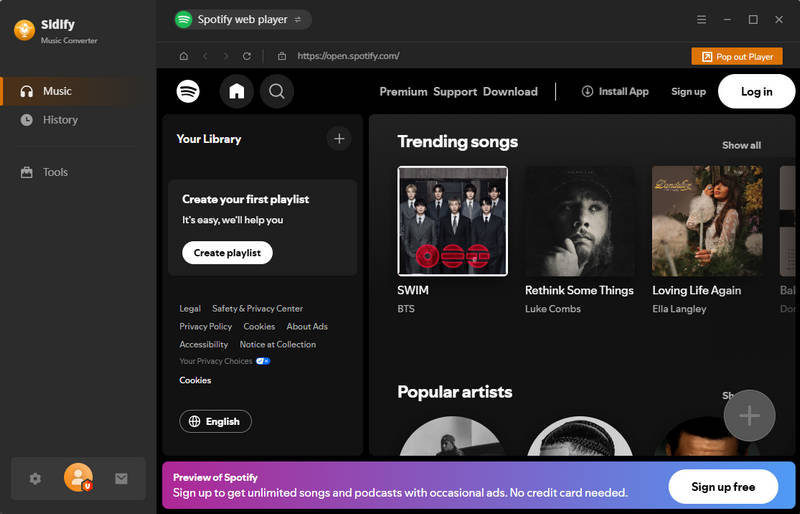
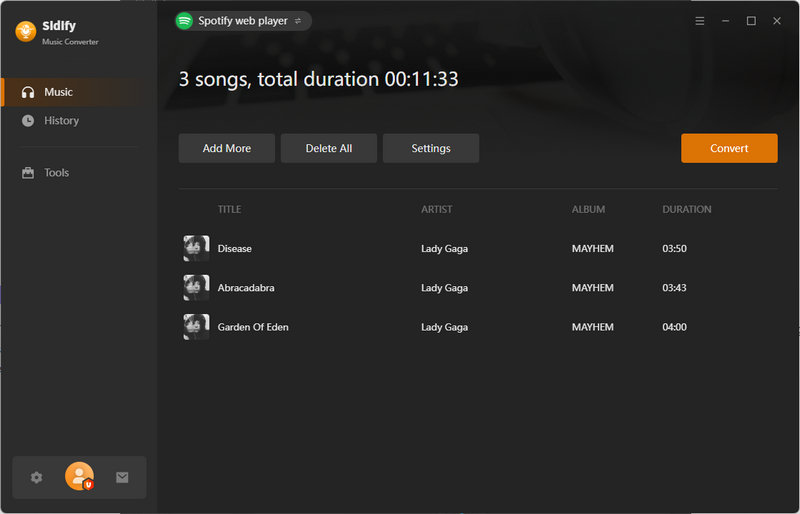
Step 1 Download Sidify Music Converter from the official website and launch the app. At the top, you'll find buttons to switch between audio sources (either the Spotify app or Spotify web player). Follow the prompts to log in to your account. While you can use the app without an account, downloading certain songs requires a premium account.
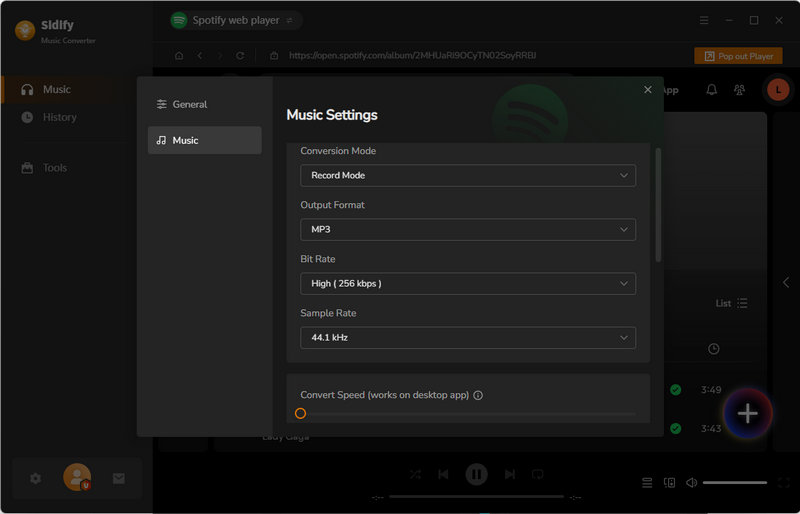
Step 2 After logging in, if you're a new user, click the settings button in the lower-left corner to adjust a few basic options, such as conversion mode, output format, bit rate, sample rate, and conversion speed. Sidify will automatically save your settings once you've made the changes.
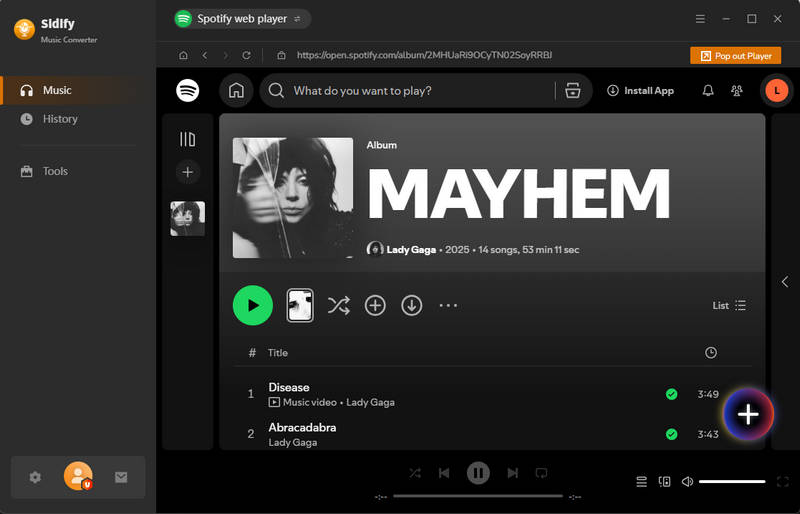
Step 3 Return to the Spotify app or web player, browse your favorite Spotify music, and tap "+". This will open a new window showing a list of the songs you’ve selected. Then, in this new window, uncheck the songs you don't like and tap "Add" to add them to Sidify.
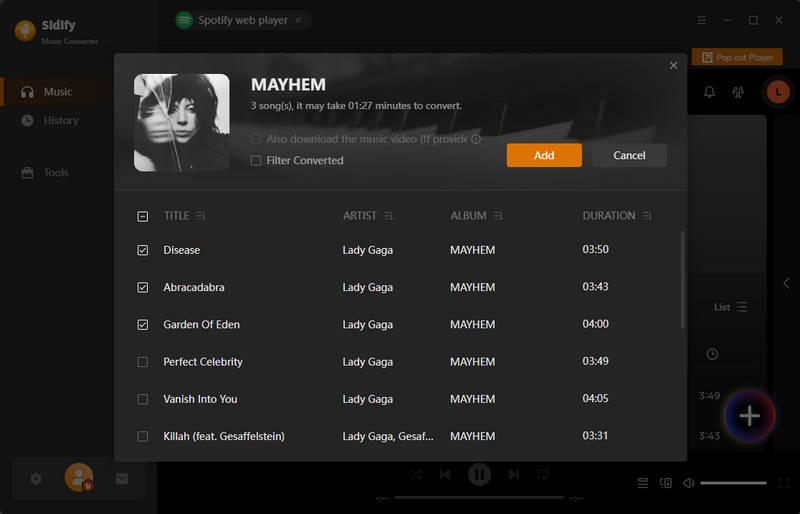
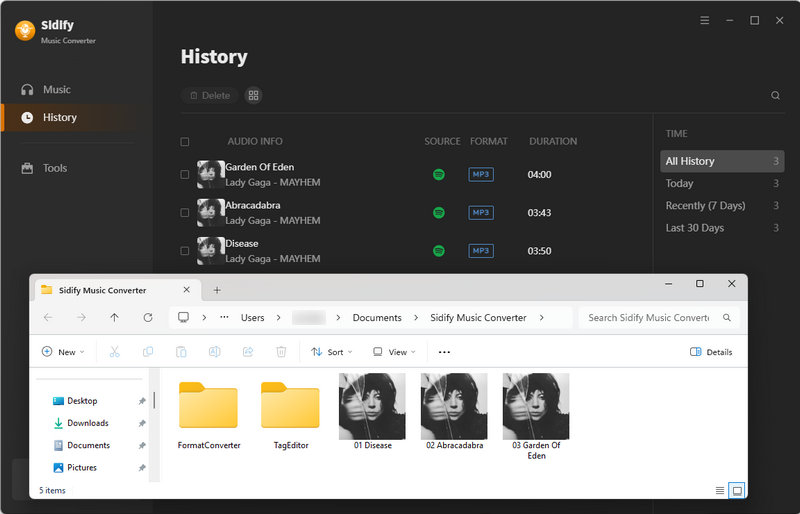
Step 4 If you want to convert songs from multiple playlists simultaneously, click "Add More". Otherwise, simply click "Convert" to start converting the songs. Sidify will complete the conversion very quickly. The folder you specified will then automatically pop up, where you can view it.
Part 4: Sidify Music Converter Pros and Cons: Real User Experience
To give you a clearer picture of how Sidify Spotify Music Converter performs in real-world use, we've gathered feedback from actual users. The Sidify Music Converter Review below presents a balanced mix of positive and negative experiences, offering an honest look at the tool’s strengths and limitations.
Pros
-
 Multiple output format support ( supports MP3, FLAC, and other formats for flexible playback across devices - jack parsi )
-
High-speed batch conversion ( converts a playlist with over 200 songs in less than ten minutes - James D )
-
Efficient music backup tool ( converts everything to MP3 quickly, and now all my music is safely stored offline on the hard drive. - Heidy Lynn )
-
Stable and dependable performance ( maintains consistent performance with ongoing improvements and updates - Alia )
-
Intuitive and suitable for beginners ( It’s by far the most intuitive music converter I’ve tried. It makes converting Spotify playlists to MP3 so easy. - Nicholas )
Cons
-
 Licensing issues after updates ( prompted to repurchase despite having a lifetime license, affecting access to features - james laracuenta )
-
Potential account suspension risk ( reported issues with Spotify accounts being restricted after use - MatDerKater )
-
Overpriced pricing ( considered excessively expensive compared to similar tools, with questionable value for money - Sharing Is Knowledge )
-
Poor customer support ( lack of response and assistance when issues arise, leaving problems unresolved - Rodgers Banda )
Part 5: Best Alternative to Sidify Music Converter
In today's streaming world, most people don't limit themselves to just one platform. Sidify Spotify Music Converter works well if Spotify is all you use, but if you have music spread across multiple services, you'll quickly run into its limitations. That's where a more flexible tool becomes essential.
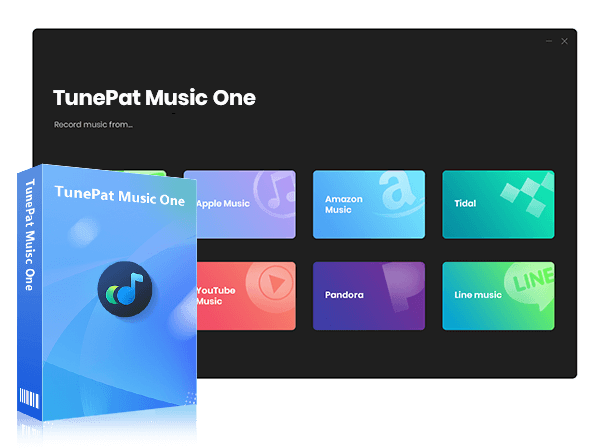
If you’re looking for something that does more than Sidify Spotify Music Converter, TunePat Music One is easily one of the best alternatives out there. Unlike Sidify, which is mainly built for Spotify, TunePat Music One is an all-in-one music converter that works with a bunch of different streaming services, including Spotify, Apple Music, Amazon Music, Tidal, YouTube Music, and more. So if you use multiple platforms, it’s definitely a better fit.
TunePat Music One
TunePat Music One is an all-in-one converter that can support any music streaming platform.
TunePat Music One supports high-speed downloads from multiple major streaming platforms while preserving the highest available audio quality from each source, including lossless or Hi-Res formats where provided. It can also record audio from a wide range of niche websites.
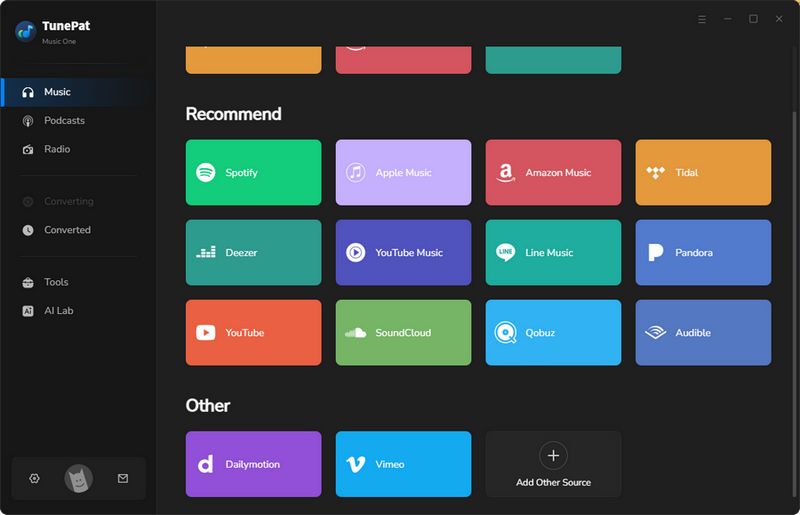
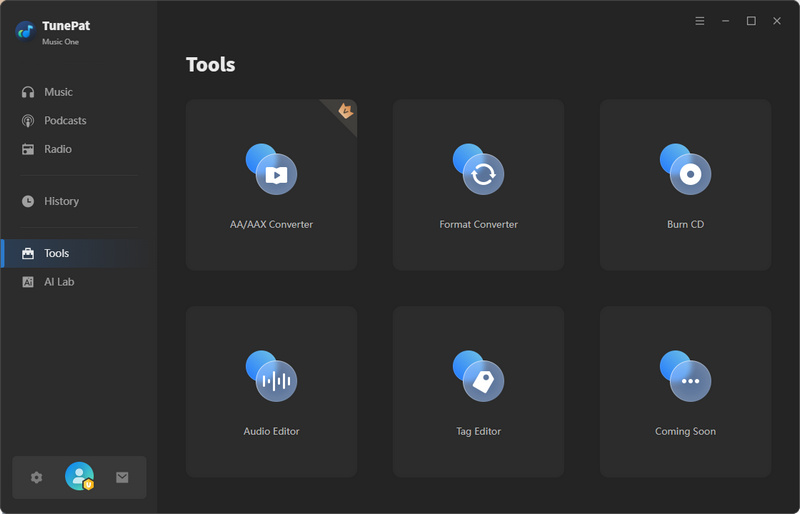
TunePat Music One also comes with a useful tools module that offers several straightforward audio processing features, including an AA/AAX Converter, an AI Audio Splitter, an Audio Editor, a Format Converter, a Burn CD tool, a Tag Editor, and more. With the exception of the AA/AAX Converter, which requires a paid license, all the other tools are free to use. Take the vocal separation feature, for example, it can split vocals from the instrumental track in a song. All you need to do is add your local music file to TunePat, click "Split", and wait a moment for the process to finish.
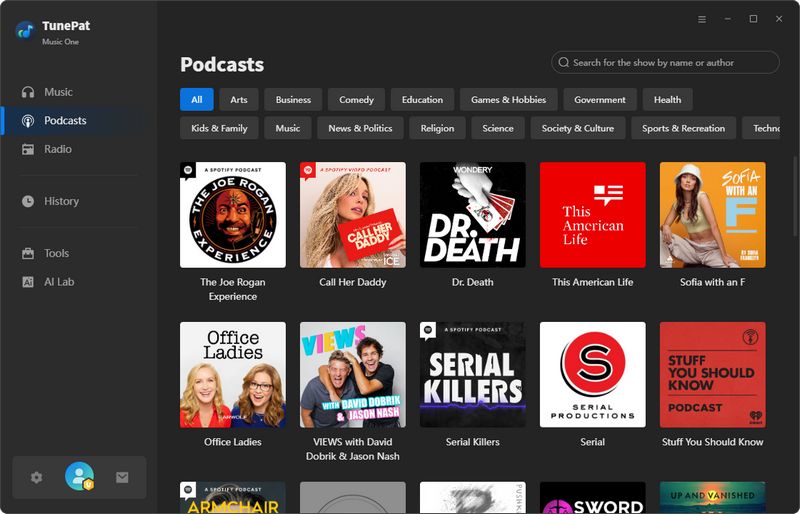
In addition to its music conversion features, TunePat Music One also lets users stream and download podcasts, as well as record radio shows, all for free. This gives them access to over 10,000 podcasts and hundreds of popular radio stations.
Overall, while Sidify Spotify Music Converter remains a solid choice for users who only need a simple Spotify-focused tool, TunePat Music One offers a more comprehensive and flexible experience, making it an excellent option for those seeking more features, broader platform support, and greater customization.
Part 6: Sidify vs TunePat: Detailed Comparison
| Tool | Supported Music Services | Audio Quality | Output Formats | Download Audiobooks & Podcasts | Handy Tools | Best For |
|---|---|---|---|---|---|---|
| Sidify Spotify Music Converter | Spotify only | Lossless (Spotify) | MP3, AAC, FLAC, WAV, AIFF, ALAC | Spotify Audiobooks & Podcasts |
CD Burner, Tag Editor, Format Converter, Audio Editor, AA/AAX Converter |
Spotify-only users |
| TunePat Music One | Spotify, SoundCloud, YouTube Music, Tidal, Apple Music, YouTube, Amazon Music, and more |
Lossless (Spotify) Hi-Res (Tidal) HD / Ultra HD (Amazon Music) Lossless (Apple Music) |
MP3, AAC, FLAC, WAV, AIFF, ALAC, MP4 | 10,000+ podcasts & hundreds of radio stations |
All basic tools, AI Audio Splitter, Podcast & Radio Stream and Download |
All-in-one music downloader |
Part 7: Common Questions About Sidify & TunePat
Q1: Can Sidify download music in high-res or lossless quality?
A: Yes. Sidify can preserve lossless audio from Spotify, but this feature requires a Spotify Premium. Otherwise, you can only download the highest audio quality your account can get from Spotify.
Q2: Can I convert multiple playlists at once?
A: Yes! Sidify supports batch conversion, allowing you to add multiple playlists, albums, or tracks and convert them all at once. This can save time and effort, especially when downloading large music libraries. However, the overall speed of batch conversion depends on factors such as the audio source you are converting, your computer's performance, and your internet speed.
Q3: Should I pick TunePat over Sidify?
A: It largely depends on your needs. If you only use Spotify and prefer a straightforward converter, Sidify is a solid choice. However, if you use multiple streaming services or require advanced audio processing features built into the program, TunePat is the better all-in-one option. It not only supports a wide range of platforms but also offers additional tools such as AI vocal separation, podcast downloading, a built-in audio editor, and flexible output settings.
Conclusion
In this Sidify Music Converter Review, we took a closer look at how it stacks up against more versatile alternatives. If you primarily use Spotify and just want a simple way to download and convert music for offline listening, Sidify Music Converter is a solid, user-friendly option. It covers the basics, offers quick speed, supports multiple output formats, and reliably preserves metadata. That said, many people today use more than one streaming platform and expect greater flexibility and features beyond basic conversion. In this regard, tools like TunePat Music One stand out; it's a more comprehensive, all-in-one solution that goes well beyond what Sidify offers.
Ultimately, which one you choose depends on your needs. If you're focused solely on Spotify and prefer something straightforward, Sidify is still a good choice. But if you want more control over your music and how you listen, TunePat is the better fit.

Olivia Anderson
Senior Writer