AudiCable Music One Review 2026: Features, Tests & Results
 By Olivia Anderson
Music Tips
Updated on 9/30/2026
By Olivia Anderson
Music Tips
Updated on 9/30/2026
A music downloader that supports different streaming platforms is not always easy to find. Some tools are restricted to a single platform, and others, while feature-rich, may sacrifice audio quality, download speed, or simplicity. AudiCable Music One takes a broader approach. It supports music and audio downloads from a wide range of streaming and online platforms while also offering multiple output formats, batch downloading, metadata preservation, and several built-in audio tools. But how well does it actually perform outside of its feature list? In this AudiCable Music One review, we put its download performance, output quality, metadata retention, supported platforms, and overall usability to the test.
Part 1. What Is AudiCable Music One?
AudiCable Music One at a Glance
| Category | Details |
|---|---|
| Website | https://www.audicable.com/ |
| Supported Platforms | Spotify, Apple Music, Amazon Music, Tidal, Deezer, YouTube Music, Qobuz, SoundCloud, Pandora, LINE MUSIC, and more |
| Output Formats | MP3, AAC, WAV, FLAC, AIFF, ALAC, and others, depending on the source |
| Batch Download | Yes |
| Maximum Speed | Up to 10× |
| Metadata | Title, artist, album, year, artwork, track number, playlist index, and more |
| Operating Systems | Windows and Mac |
| Free Trial | Try each song with the first minute free |
| Built-in Tools | Format Converter, ID3 Editor, Audio Editor, CD Burner, and more |
| Supported Download Content | Songs, playlists, albums, podcasts, radio, audiobooks, music videos |
| Pricing | $79.90 per year; $149.90 for lifetime |
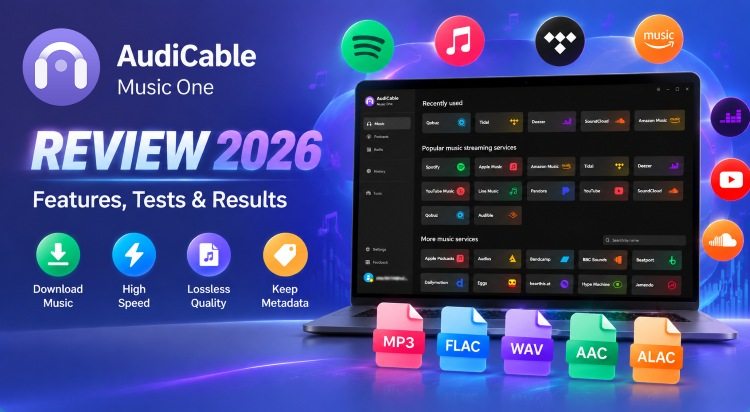
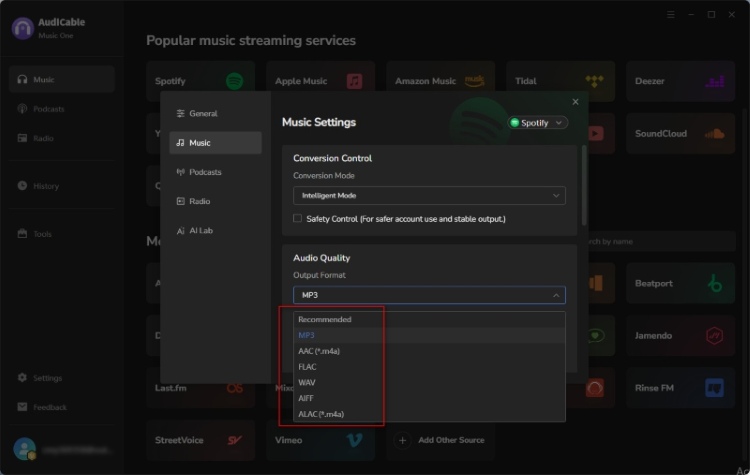
AudiCable Music One is a desktop-based music downloader designed for users who work with multiple streaming services. It supports Spotify, Apple Music, Amazon Music, Tidal, Deezer, YouTube Music, Qobuz, SoundCloud, Pandora, Line Music, and other supported websites. Depending on the source, users can save audio in formats such as MP3, AAC, WAV, FLAC, AIFF, and ALAC. AudiCable also provides options for adjusting bitrate, sample rate, file naming, and other output settings.
Its latest update version also includes a built-in library with more than 67,000 radio stations and more than 10,000 podcasts. Another notable part of Music One is its collection of built-in audio tools. Besides downloading music, the software includes a format converter, ID3 editor, audio editor, CD burner, AA/AAX converter, and other utilities.
Part 2. How to Use AudiCable to Download Songs to a Local Computer?
We’ll use the Tidal platform as an example to walk through the steps. The process is similar on other platforms.
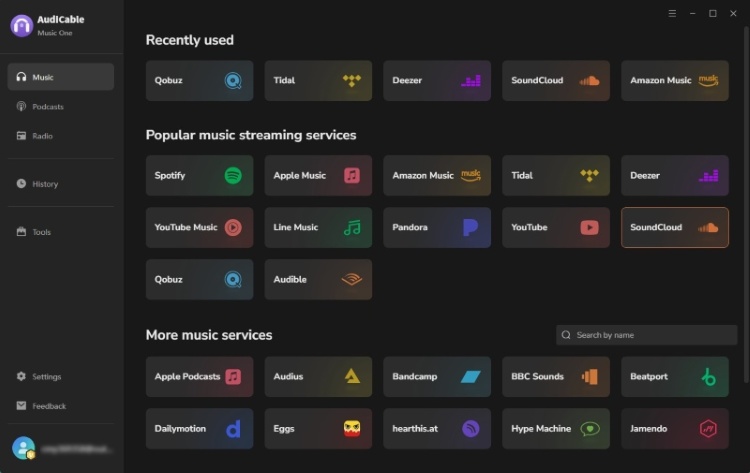
Step 1 Launch AudiCable on the computer. On the Music interface, we saw a range of supported music platforms. Select Tidal to get started.
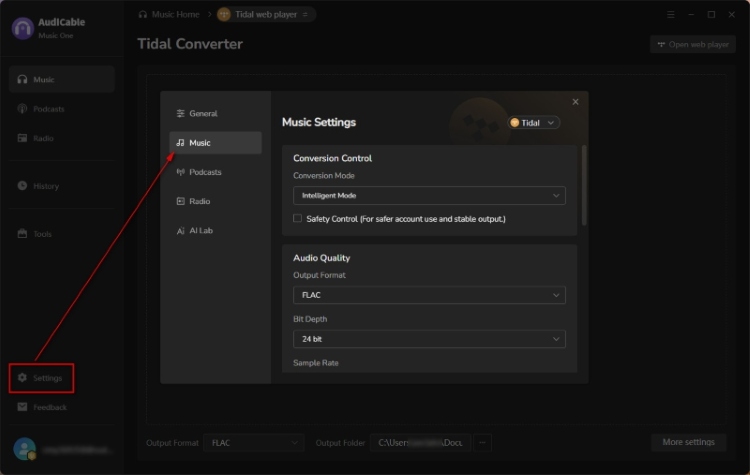
Step 2 Open Settings and choose the output format. Next, select a local folder where we want to save the converted Tidal tracks.
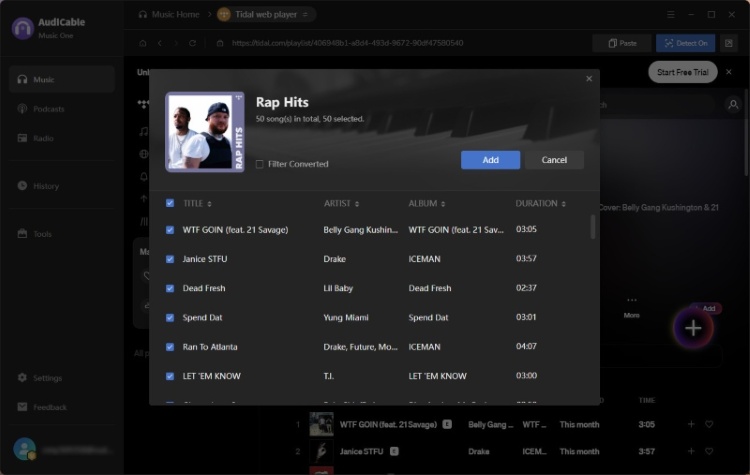
Step 3 Open the Tidal web player and drag an album, artist, or playlist into AudiCable's URL parsing box. Select the songs to download, then click Add.
Step 4 Click Convert to start downloading the selected Tidal tracks as MP3 files. AudiCable will process the songs automatically.
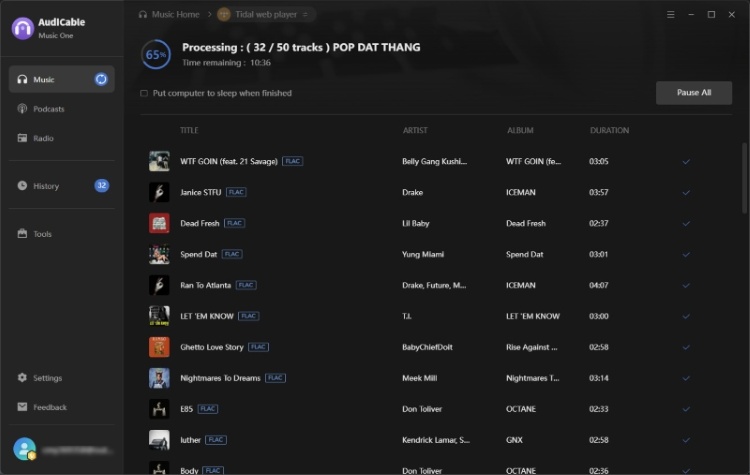
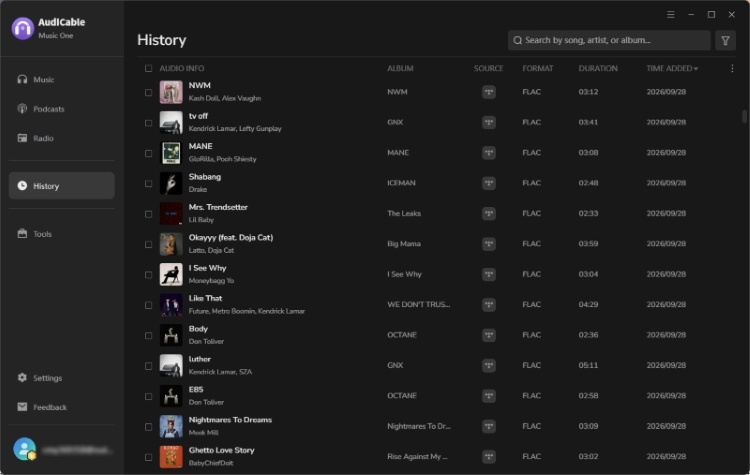
Step 5 When the conversion is complete, open History from the left sidebar. Click the Folder icon next to any Tidal track to open the output folder and find the downloaded files.
Part 3. Our Hands-on Test of AudiCable
Features only tell part of the story. To see how AudiCable Music One performs in actual use, we tested the software with real music sources and checked the resulting files.
In our testing, we primarily evaluated several playlists from three platforms—Spotify, Qobuz, and Tidal. We also selected a few singles from other supported platforms to test their download performance. We examined the success rate of downloads and verified the actual output results using MediaInfo and Spek.
| Test Items | Test Result |
|---|---|
| Tracks Tested | 200 tracks were tested, and all were eventually processed successfully. |
| Output Formats | MP3, FLAC, and other selected formats were generated as expected. |
| Audio Quality | MediaInfo confirmed the selected bitrate, sample rate, and bit depth. Spek was used to check the frequency spectrum. |
| Metadata | Track title, artist, album, and other available metadata were retained in the output files. |
| Batch Processing | Multiple tracks could be added and processed in batches without manually handling each song. |
| File Consistency | The generated files were playable and matched the selected output settings. |
| Conversion Speed | An actual speed of about 8–10X. |
1. Overall Experience
The download process went relatively smoothly overall. We did not encounter any major errors or negative user experiences. Only a few songs experienced occasional stuttering during conversion. That said, we found error codes for a total of six songs during the conversion process; however, after clicking the Retry button, they were eventually converted successfully.
2. Download Speed
AudiCable Music One advertises download speeds of up to 10X, so we wanted to see how that figure translated into actual use.
To evaluate the download speed, we used the same test set with a combined playback time of 698 minutes. The download took approximately 81 minutes, corresponding to an average speed of about 8–10X. This was close to the advertised maximum, although actual speed can vary depending on the streaming service, network conditions, number of tracks, and output settings.
3. Metadata and Album Artwork
We also checked whether AudiCable preserved the information needed to keep a downloaded music library organized.
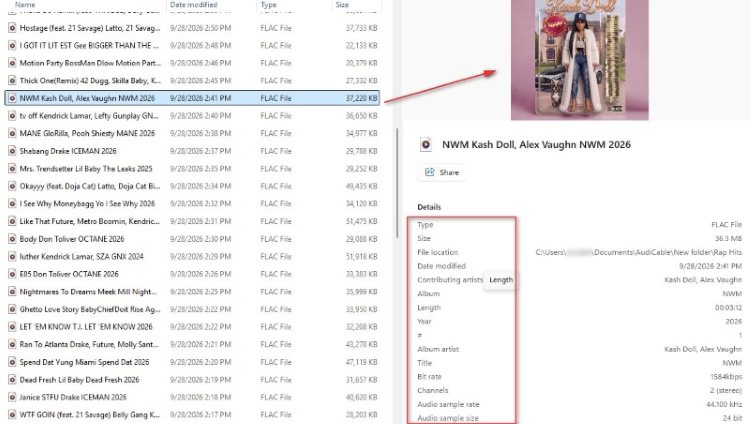
In our test, the downloaded FLAC file preserved the original metadata information successfully. The main track details, including artist, album, title, year, track number, audio format, sample rate, bit depth, and bitrate, were accurately maintained. The album artwork was retained and embedded in the file, indicating complete metadata preservation after download.
4. Audio Quality
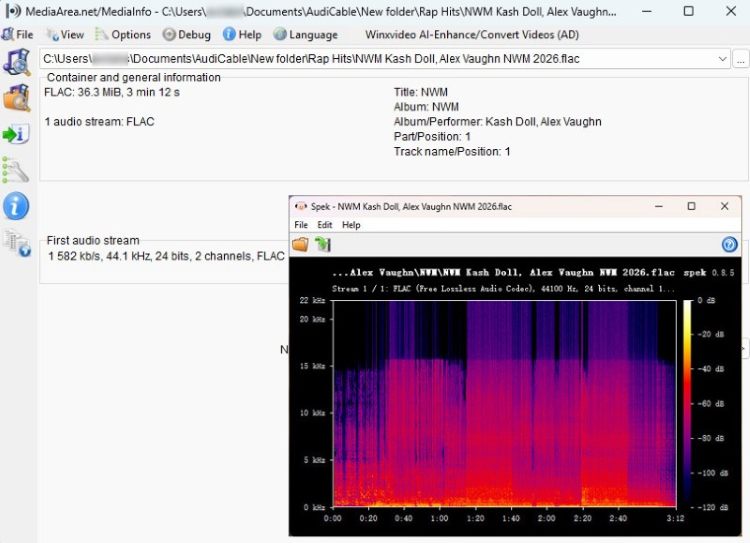
We tested the output using MediaInfo to verify the technical specifications and Spek to inspect the frequency spectrum. For our Tidal test, we selected FLAC as the output format. MediaInfo reported the following:
| Test Item | Format | Bitrate | Sample Rate | Bit Depth |
|---|---|---|---|---|
| Audio Quality | FLAC | 1500+ kbps | 44.1 kHz | 24-bit |
Spek showed a frequency spectrum extending to around 22 kHz, with no obvious low-pass cutoff. This provides a more useful check of the actual output than relying on the selected FLAC format alone.
5. Playlist and Batch Download
For a real-world batch test, we ran AudiCable through three playlists with 50+ tracks each. Multiple tracks could be queued and processed together, saving us from starting each download manually. The result: All tracks were downloaded successfully.
6. Supported Services and Formats
AudiCable supports batch downloads from a wide range of streaming platforms, including Spotify, Apple Music, Amazon Music, Tidal, Deezer, YouTube Music, Qobuz, SoundCloud, Pandora, Audible, and Line Music. It also supports some niche platforms such as Bandcamp and Beatport.
The exact output options depend on the source. Common formats include MP3, WAV, FLAC, AAC, AIFF, and ALAC. For example, someone who wants a compact format for everyday playback can choose MP3 or AAC, while users who want lossless output can select a supported lossless format when the source allows it.
Part 4. Final Verdict
Based on our testing, AudiCable Music One combines multi-platform support, batch downloading, flexible output options, and metadata preservation in one desktop application. The main limitations are its desktop-only availability and the need for a paid license to access the full feature set.
Pros
-
 Simple workflow with no major issues during our testing.
-
Supports multiple streaming platforms in one application.
-
Retains audio quality and output specifications.
-
Preserves metadata and album artwork.
-
Supports lossless formats such as FLAC and ALAC.
-
Batch downloading and built-in audio tools improve usability.
Cons
-
 Desktop only.
-
Need to pay to unlock the full version.
Part 5. FAQs About AudiCable
Q1. Is AudiCable Music One safe to use?
A: Yes. We tested the official AudiCable website and the AudiCable installer on VirusTotal. Neither showed any security risks or detections by antivirus engines during the scan. Based on our review, the installation and use of AudiCable Music One are safe.
2. Can I transfer downloaded music from AudiCable to a USB drive?
A: Yes. Since AudiCable saves music as standard audio files such as MP3, FLAC, WAV, and AAC, you can copy the files to a USB drive and play them on compatible devices. Playback support depends on the device and audio format.
3. How can I use AudiCable to download podcasts?
A: AudiCable Music One has a built-in podcast downloader that lets users search for and download podcast episodes directly to their computer. For detailed steps, see AudiCable's official guide on how to download podcasts to MP3.
Wrapping It Up
AudiCable Music One performed consistently across our hands-on tests, with all tested tracks eventually processed successfully. Its multi-platform support, batch processing, flexible output options, and metadata retention make it a practical desktop option for managing audio from multiple supported services.
In a nutshell, AudiCable Music One is worth trying for users who want a straightforward way to download music in common formats to their computers.
Olivia Anderson
Senior Writer