SpotiDownloader Review: Is It Safe and Does It Really Work?
 By Olivia Anderson
Spotify Tips
Updated on 8/26/2026
By Olivia Anderson
Spotify Tips
Updated on 8/26/2026
If you want to download music from Spotify, you may have come across SpotiDownloader. But does it really work, and what do you actually get after downloading a song or playlist? In this SpotiDownloader review, we tested its downloads, audio quality, playlist support, and download speed. We also checked for ads, redirects, and other things worth knowing before using the site.
Part 1: What Is SpotiDownloader and How Does It Work?
SpotiDownloader is an online Spotify downloader that works right in your browser. You can paste a link to a song, album, or playlist into the site and download the available files without installing a separate app. The process is straightforward: copy the link from Spotify, paste it into SpotiDownloader, and start the download.
How to Use SpotiDownloader?
Step 1 Copy the share link for a song, album, or playlist from Spotify. Paste it into the box on the SpotiDownloader website, then click "Download".
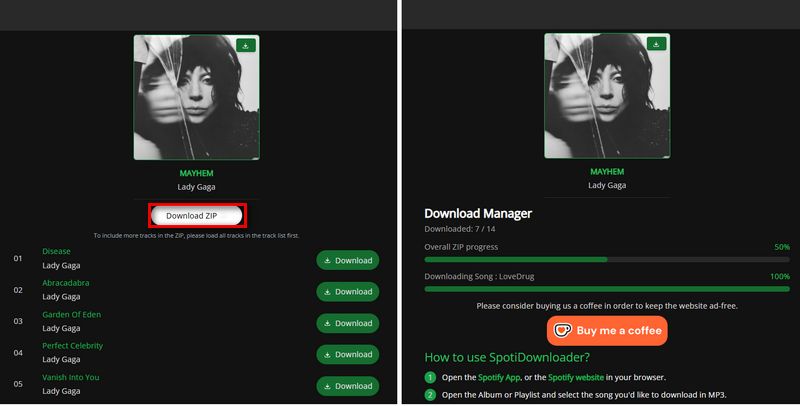
Step 2 SpotiDownloader will process the link and show the available files. If you pasted a playlist, you can either download the whole playlist as a ZIP file or pick individual songs.
Step 3 Click "Download ZIP" to save the full playlist. For a single song, simply click its download option to save the MP3 file.
Part 2: SpotiDownloader Test Results
To see how SpotiDownloader performs in real use, we tested it with different types of Spotify content instead of relying on just one or two downloads. We tried individual songs, full albums, and playlists of different lengths, then checked the download results, audio quality, file information, and overall download experience.
Test Samples of Spotify Music:
| Type | Test Samples | Details |
|---|---|---|
| Songs | Dai Dai — Shakira, Burna Boy Beauty And A Beat — Justin Bieber, Nicki Minaj SWIM — BTS |
3 individual songs |
| Albums | I'm The Problem — Morgan Wallen DeBÍ TiRAR MáS FOToS — Bad Bunny |
2 full albums |
| Playlists | Crying Sad Mix — Spotify Summer Hits 2026 — Spotify |
2 playlists with different lengths |
Testing note: All tests were performed on a Windows PC with an Intel Core i3-8100 processor and 8 GB of RAM, using Google Chrome. The same test samples were used throughout the review.
| Test | Result | Details | Verdict |
|---|---|---|---|
| Single Songs | ✓ 3/3 | 3 songs tested | All successful |
| Albums | ⚠ 51/54 | 54 tracks tested | 3 missing |
| Playlists | ⚠ 118/125 | 125 tracks tested | 7 missing |
| Audio Quality | Mostly 320 kbps | 30 tracks checked | Good |
| Download Speed | 1.5–2× slower | Compared with estimates | Average |
| Metadata | Poor | Album & year tags | Needs fixing |
| Ads & Redirects | Present | Redirects & pop-ups | Annoying |
Want to download full Spotify playlists and albums while keeping the correct ID3 tags? If you have a large music library to download and organize, try a dedicated desktop Spotify converter for a more reliable experience. It supports Windows, Mac, and Android, with batch downloading and proper ID3 tag preservation to help keep your music library organized.
Batch Downloads Can Miss Tracks
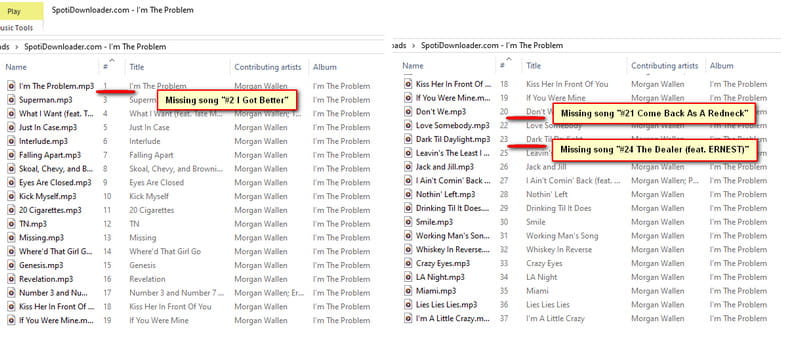
SpotiDownloader handled individual songs without any problems, but we found some issues when downloading larger batches. Summer Hits 2026 contains 75 tracks, but only 68 songs were downloaded even though the site showed that the download was complete. I'm The Problem also missed 3 tracks out of 37.
The missing tracks were not always at the end of the list. For example, I'm The Problem was missing "I Got Better," "Jangan Paksa Rindu – Beda," and "Innocence," which appeared at different positions in the album.
We also had to download Crying Sad Mix twice. The first attempt saved only 30+ tracks, while the second attempt successfully downloaded all 50 tracks. Based on our testing, a stable internet connection is important when downloading larger playlists. More importantly, SpotiDownloader does not clearly warn you when some tracks are missing, so it's a good idea to check the downloaded files after a large batch finishes.
Audio Quality Was Mostly Good
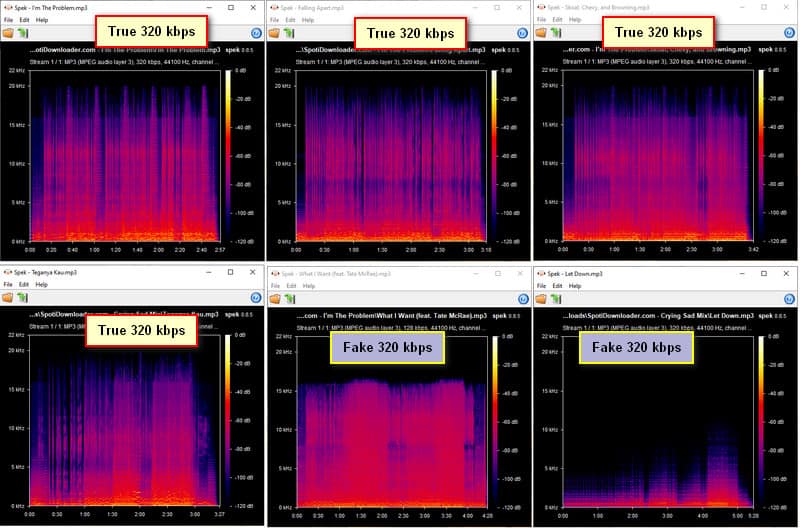
All of the downloaded files were labeled as 320 kbps. To verify the actual audio quality, we randomly selected 30 tracks and analyzed their frequency spectrums with Spek. More than 20 tracks showed a frequency range consistent with a true 320 kbps MP3, with no obvious high-frequency cutoff. A few tracks showed a noticeable cutoff around 15 kHz, indicating a lower-quality source, while one or two files had an unusually narrow frequency range, cutting off at around 5 kHz. Despite these exceptions, most of the files showed good frequency coverage, so the overall audio quality was fairly good in our testing.
Metadata Needs Improvement
Metadata was the biggest weakness we found during testing. The album information was often incorrect. For example, "favorite crime" by Olivia Rodrigo was tagged as "favorite crime" instead of its actual album, SOUR. Similarly, "Falling" by Harry Styles was listed under "Falling" instead of its actual album, Fine Line. The year information was even more problematic, with all of the downloaded files we checked showing 1970 regardless of their actual release year. For example, "anything" by Adrianne Lenker was released in 2020, but the downloaded file showed 1970.
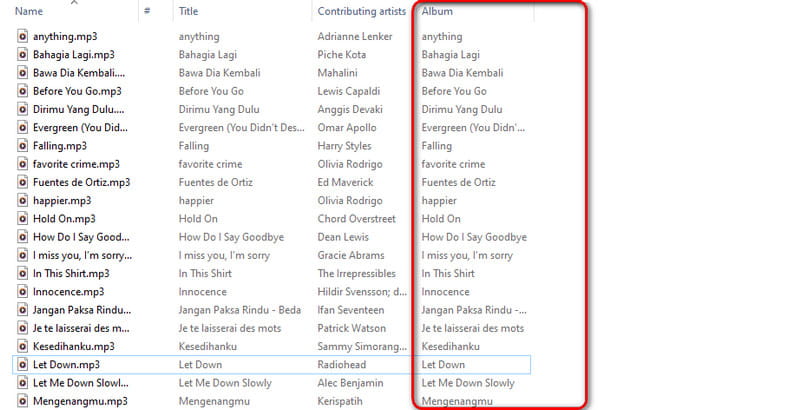
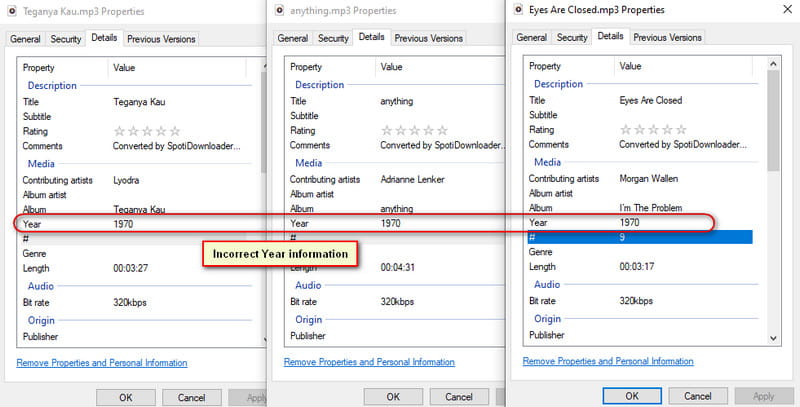
This may not be a big deal if you simply want to download songs and listen to them. However, if you are building or organizing a local music library, these incorrect tags can quickly become a hassle, and you'll need to fix the album and year information manually.
Part 3: Is SpotiDownloader Safe?
SpotiDownloader does not require you to install a desktop program or sign in with your Spotify account. You can paste a Spotify link directly into the website and start the download in your browser. This makes the basic process fairly simple and avoids some of the risks that can come with installing unknown third-party software.
However, the website does use redirects and pop-up ads. During our testing, clicking the Download or Download ZIP button sometimes triggered a redirect, and pop-up ads occasionally appeared in the upper-right corner of the page. These did not prevent us from downloading the music, but they can make the site less straightforward to use and increase the chance of clicking the wrong button.
There is also no need to download or install anything shown through these ads or redirects. If an unexpected tab opens, simply close it and return to the SpotiDownloader page. When downloading music, stick to the download options shown on the main page and avoid any buttons or prompts that look unrelated to the download.
Part 4: Best SpotiDownloader Alternatives
SpotiDownloader works well for quick downloads, but its missing metadata, occasional incomplete playlist downloads, redirects, and pop-up ads may be frustrating if you download and organize music regularly. If you want a more complete solution, the following alternatives are worth considering.
4.1 TunePat Spotify Converter (Windows/macOS)
If you mainly use a Windows or Mac computer, TunePat Spotify Converter is a more complete option for downloading and organizing Spotify music. It supports songs, albums, playlists, podcasts, audiobooks, and more, and lets you save them as MP3, FLAC, WAV, and other common formats.
More importantly for users who care about their local music library, TunePat can preserve important ID3 tags such as the song title, artist, album, artwork, track number, disc number, and year. You can also customize the output file names and folder structure, which makes it easier to manage a large music collection.
Step 1 Select a Spotify Source and Configure Settings
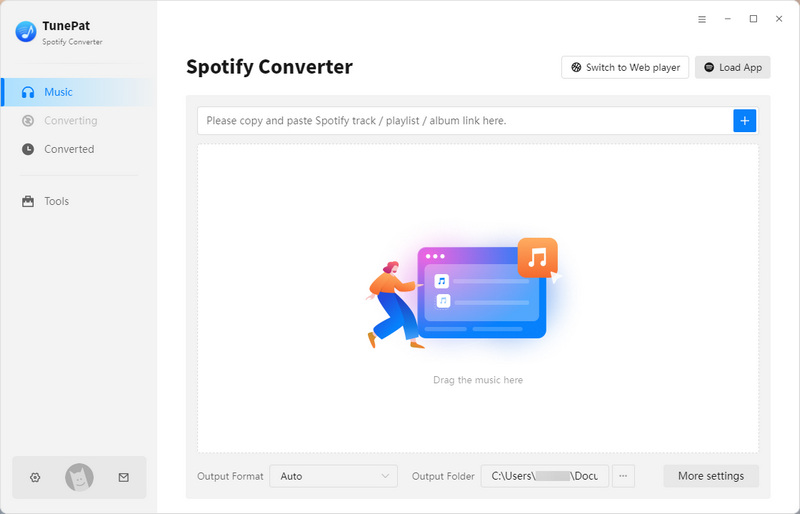
Launch TunePat Spotify Converter and choose between the Spotify App and Spotify web player as your music source.
Next, open Settings from the left-side menu. Here, you can choose the output format, bit rate, sample rate, output folder, and file naming settings.

Step 2 Add Spotify Music
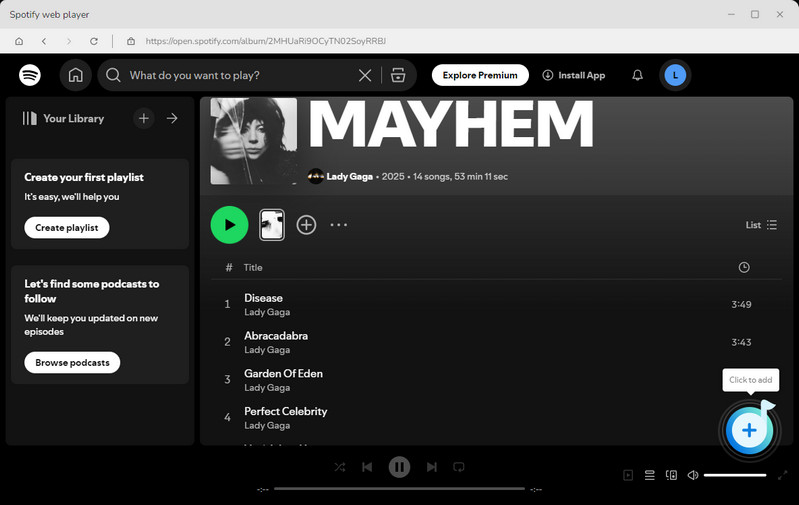
Open the song, album, or playlist you want to download in Spotify, then click the "+" button in the bottom-right corner of TunePat. TunePat will scan and identify the selected content.
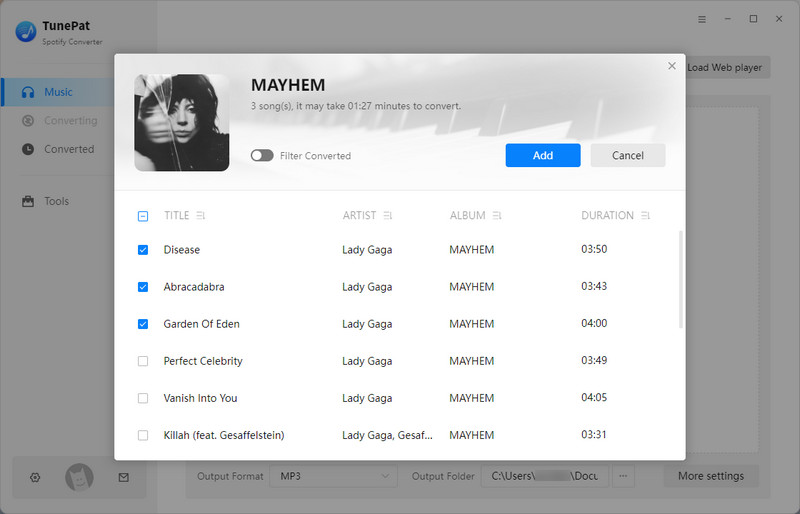
Once the analysis is complete, a pop-up window will show the available tracks. The songs are selected by default, so you can deselect any tracks you don't want and click "Add" to continue.
Step 3 Convert and Check the Downloads
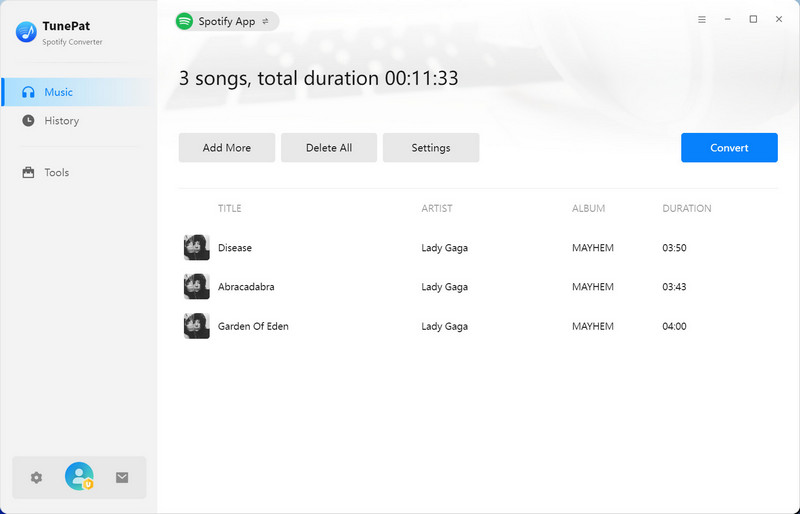
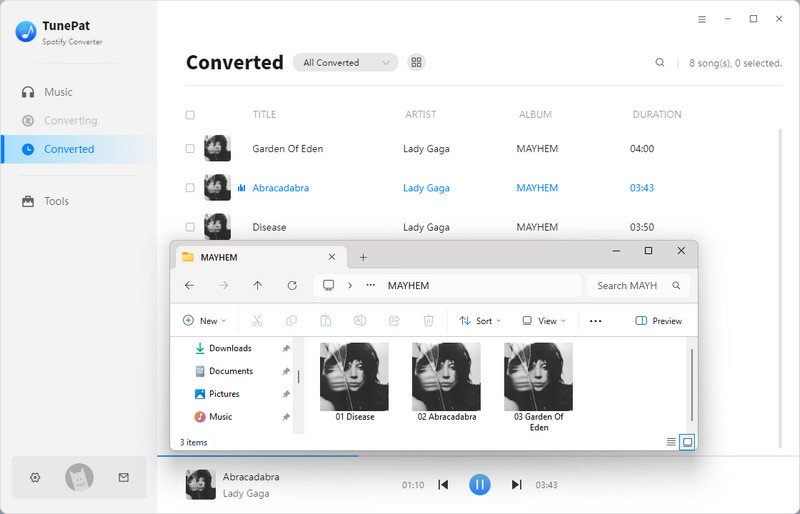
If you want to add more Spotify content, click Add More. Otherwise, click Convert to start downloading the selected songs. When the conversion is finished, you can check your previous downloads from the History tab.
4.2 TuneCable Spotify Downloader (Android)
If you prefer downloading Spotify music directly on your Android phone, TuneCable Spotify Downloader is a convenient alternative to a browser-based tool like SpotiDownloader. It lets you download Spotify songs, albums, and playlists directly to your Android device.
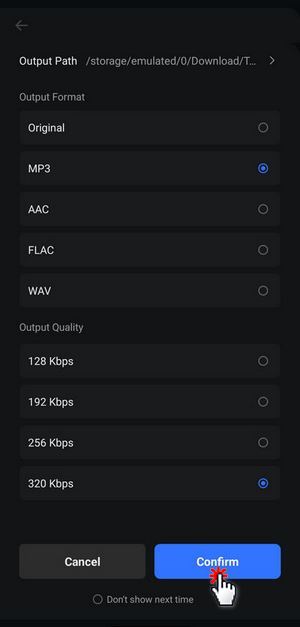
It also lets you choose the output format, audio quality, and storage path before downloading. This makes it a practical option for Android users who want to save Spotify music directly to their phones.
Step 1 Install and Run the TuneCable APK
Use the button below to download the TuneCable Spotify Downloader APK. Once the file is saved to your phone, open it and follow the on-screen instructions to complete the installation. After installing the app, launch it and grant the necessary permissions when prompted.
Step 2 Select Spotify Music to Download
Open TuneCable Spotify Downloader and tap "Login Spotify" at the top to sign in to your Spotify account. Then return to the "Home" page and open the album or playlist you want to download.
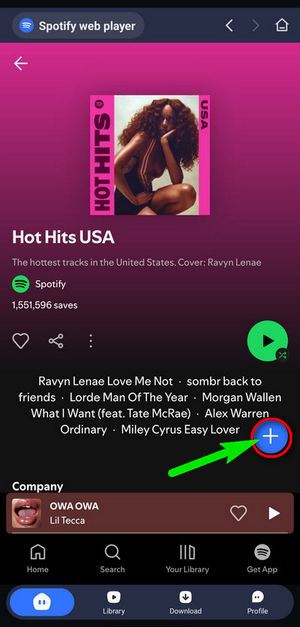
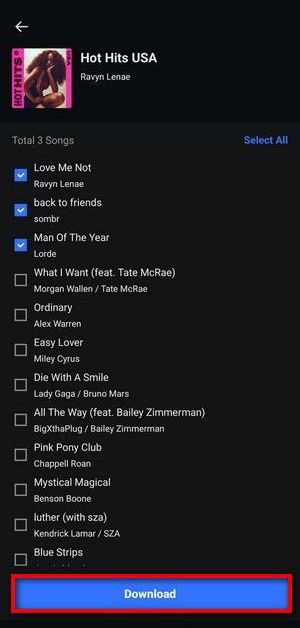
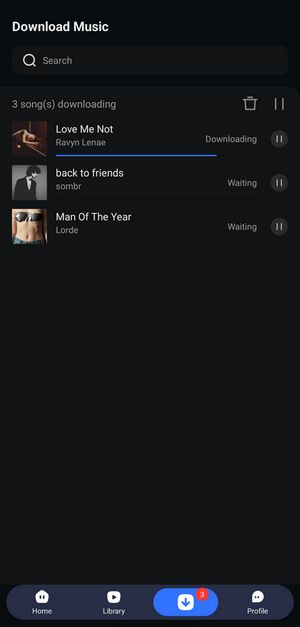
Tap the "+" button to load the available tracks. On the next screen, select the songs you want to save and tap "Download". Before starting the download, check the output format and audio quality, then tap Confirm to proceed.
Step 3 Find and Play the Downloaded Music
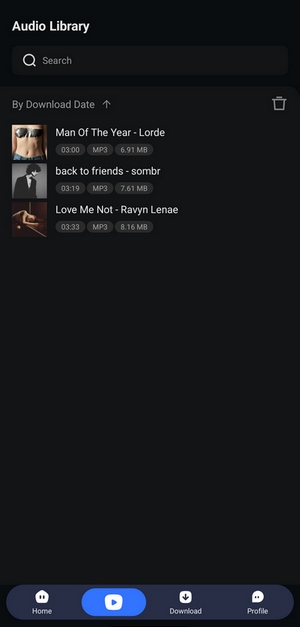
Once the download is complete, tap "Library" in the bottom menu to view your saved songs. Tap any track to play it.
Part 5: FAQs About SpotiDownloader
Q1. Does SpotiDownloader really work?
A: Yes, SpotiDownloader can download Spotify songs, albums, and playlists. In our testing, individual songs downloaded successfully, while albums and playlists generally worked as well. However, some longer playlists did not download every track, especially when the network connection was unstable.
Q2. Can SpotiDownloader download Spotify playlists and albums?
A: Yes. You can paste a Spotify album or playlist link into SpotiDownloader and download the available tracks. Playlists can be downloaded as a ZIP file or as individual songs. However, larger playlists may take longer to process, and our testing showed that some tracks can be missing even when the site reports that the download is complete.
Q3. Do I need Spotify Premium to use SpotiDownloader?
A: SpotiDownloader does not ask you to log in with a Spotify account before downloading. You simply paste a Spotify share link into the website and start the download. This makes it fairly straightforward to use, although the available download quality and results may vary from track to track.
Q4. What audio quality does SpotiDownloader offer?
A: SpotiDownloader labels its downloaded MP3 files as 320 kbps. In our tests, most of the files we checked showed audio characteristics consistent with genuine 320 kbps MP3 quality. A small number of tracks had lower frequency cutoffs, so the 320 kbps label should not be treated as a guarantee of the actual source quality for every song.
Q5. What are the main limitations of SpotiDownloader?
A: The main limitations are inconsistent playlist downloads, incorrect metadata, and the ads and redirects around the download process. If you mainly want a quick way to save a few Spotify tracks, these issues may not be a major concern. But if you have a large music library to download and organize, a desktop Spotify converter such as TunePat Spotify Converter may be a more convenient option, especially if you want batch downloads and more complete ID3 tag information.
Conclusion
Overall, SpotiDownloader is a workable choice if you just want to download a few Spotify songs or playlists without installing a program. In our tests, the audio quality was mostly good, but playlist downloads were not always complete, and the downloaded files had noticeable metadata problems. The redirects and pop-up ads also make the overall experience less smooth. So, while SpotiDownloader can get the job done, it is not the best choice for everyone, especially if you have a large music library to download and organize.
If you want a more complete desktop solution, TunePat Spotify Converter is worth considering. It supports Windows and Mac and can batch download Spotify songs, albums, playlists, podcasts, and audiobooks while keeping important ID3 tags. For Android users, TuneCable Spotify Downloader APK provides a more convenient way to download and manage Spotify music directly on a phone.

Olivia Anderson
Senior Writer