10 Best Spotify Link to MP3 Converters That Still Work in 2026
 By Olivia Anderson
Spotify Tips
Updated on 9/29/2026
By Olivia Anderson
Spotify Tips
Updated on 9/29/2026
Converting Spotify links to MP3 is one of the most requested features for music lovers who want offline playback, playlist backup, or cross-device sharing. Spotify allows offline listening within its apps but does not permit exporting songs as MP3s.
Fortunately, there are several tools that let users convert Spotify links to MP3, ranging from desktop software to online converters and open-source command-line tools. Each has its strengths and limitations.
In this guide, we've curated 10 Spotify link to MP3 converters that still work in 2026, helping you choose the most suitable solution for your needs.

Part 1: Best Desktop Spotify Link to MP3 Converter
If you are looking for a safe, efficient, and feature‑rich tool to convert Spotify links to MP3, TunePat Spotify Converter is a professional and reliable choice. It supports a wide range of Spotify content. In addition to songs, playlists, and albums, it can also export Spotify audiobooks, podcasts, podcast & music videos.
With TunePat, you can batch download and convert Spotify music to MP3, FLAC, WAV, ALAC, AIFF, or AAC at high speed, making it easy to build and manage your offline music library. Whether you want to download Spotify songs, convert full playlists, or save albums locally, the entire process is fast and efficient. Even better, the software is extremely easy to use. With just a few clicks, it can automatically analyze and convert Spotify content, and you don’t need to copy and paste Spotify links one by one.
👍 Who Should Use TunePat Spotify Link to MP3 Converter:
- Users who want reliable downloads for large playlists or full albums.
- Those who need high-quality MP3s with metadata and album art preserved.
- People who prefer a user-friendly desktop interface over command-line tools.
- Frequent music downloaders who want batch conversion and offline storage.
How to Use TunePat Spotify Converter to Download Spotify Songs?
Let's click the "Download" button below to complete the one-click installation, and then see the detailed operation steps:
Step 1 Launch TunePat Spotify Converter
Run TunePat Spotify Converter on your computer. You can choose to convert Spotify music from either the "Spotify web player" or the "Spotify App". After selecting the audio source, you may log in with a Spotify Premium account, a Spotify Free account, or continue without logging in. However, logging into your Spotify account is recommended if you want to keep the output audio settings consistent with the original Spotify source.
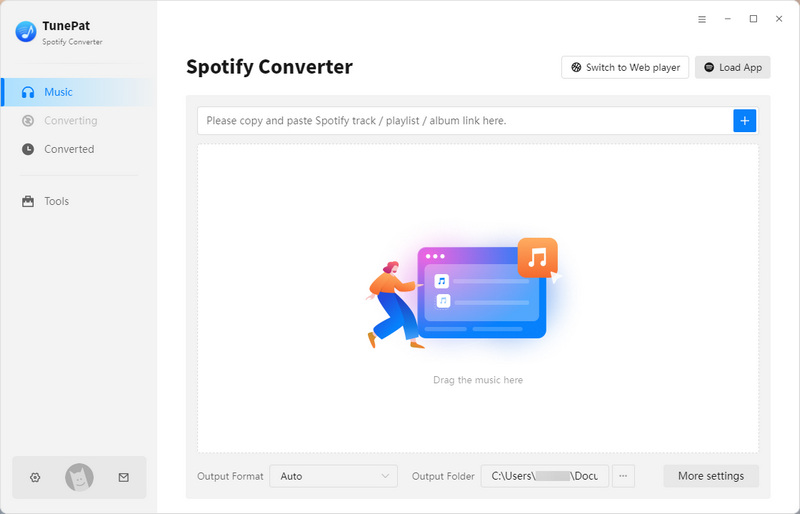
*Note: If you choose to convert from the Spotify app, you can copy the link of the target Spotify song, playlist, or album and paste it into the input box on the main interface, then click the "+" button to parse the link.
However, TunePat also offers a simpler method that does not require copying and pasting links one by one. With just one click, it can parse Spotify links automatically, whether you are converting from the Spotify app or the web player. The following steps will guide you through this easier method, allowing you to choose according to your preference.
Step 2 Adjust Output Settings
Click the "Settings" option in the left sidebar of the main interface. Here you can customize the output settings, such as conversion mode, output format, bit rate, sample rate, output folder, output file name, etc.

Step 3 Add Spotify Music
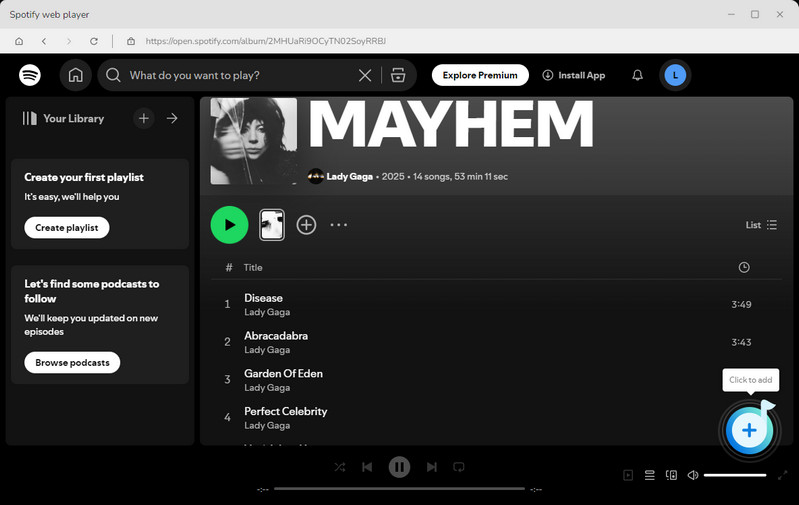
After completing the settings, go back to the Spotify library and open the audio content you want to convert. Then click the "+" button in the lower-right corner. TunePat will automatically start reading and analyzing the Spotify content.
Step 4 Select Songs to Convert
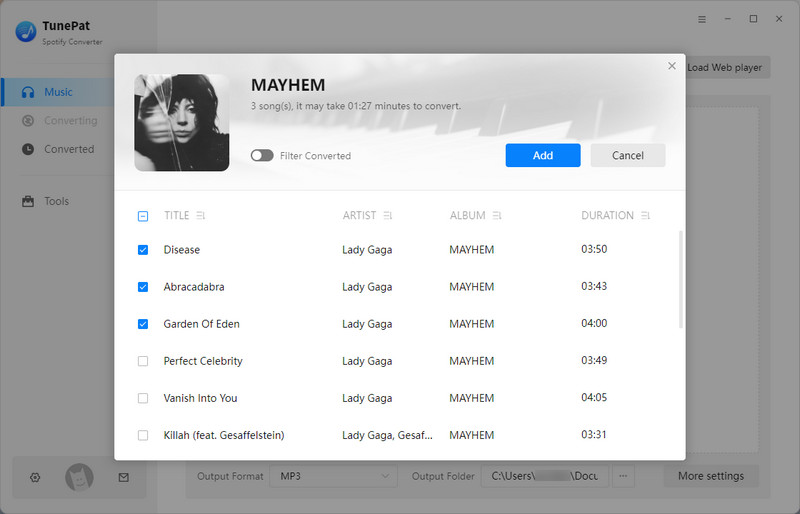
Once the Spotify link is parsed, all songs included in the selected playlist, album, or page will appear in a pop‑up window and will be selected by default. You can uncheck any tracks you do not want. After making your selection, click "Add" to add the songs to the conversion list.
Step 5 Start Converting & Get Spotify MP3 Files
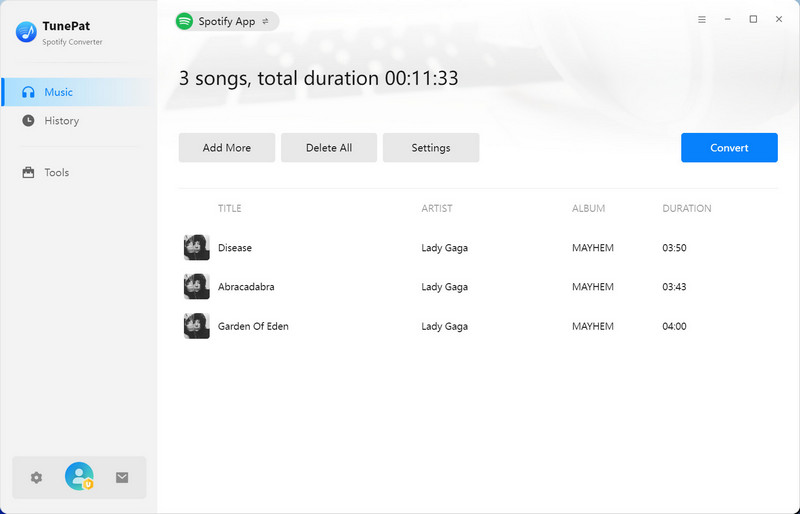
On the conversion screen, you can click "Add More" to continue adding songs, playlists, or albums and convert them in batches. When everything is ready, click "Convert" to start the conversion process. After the conversion is finished, you can find your converted Spotify songs in the "History" section or directly in the output folder on your computer.
Pros
-
 Safe, simple, ad‑free, and maintained by a professional team.
-
Supports a wide range of output formats, including MP3, AAC, FLAC, WAV, ALAC, and AIFF.
-
High audio quality, retaining up to 320 kbps or lossless formats like FLAC (24‑bit/44.1kHz).
-
Can convert various Spotify audio and video content, including audiobooks, podcasts, radio, and music videos.
-
Allows batch conversion of one or multiple albums/playlists.
-
Retains important ID3 tags and supports preset file names and organization, making local music management easier.
Cons
-
 Free trial has limitations.
-
Only available for Windows and macOS.
Part 2: Top 8 Online Spotify Link to MP3 Converters
If you prefer not to install any software, using a Spotify link to MP3 online converter can be a convenient alternative. These web-based tools allow you to paste a Spotify song, album, or playlist link directly into a browser and quickly generate downloadable MP3 files. Most online Spotify link converters work across different devices, including Windows, Mac, Android, and iOS, making them a practical option for occasional downloads. However, compared with desktop converters, online tools often come with limitations such as pop-up ads, lower stability, or restrictions on batch downloads.
👍 Who Should Use Online Spotify Link to MP3 Converters:
- Users who want quick downloads of a few tracks without installing software.
- Those who need mobile-friendly solutions or access from any device.
- People downloading small playlists or single songs casually.
- Users who don't mind encountering ads or pop-ups while using the tool.
#1: SpotiDownloader
🔗: https://spotidownloader.com/en9
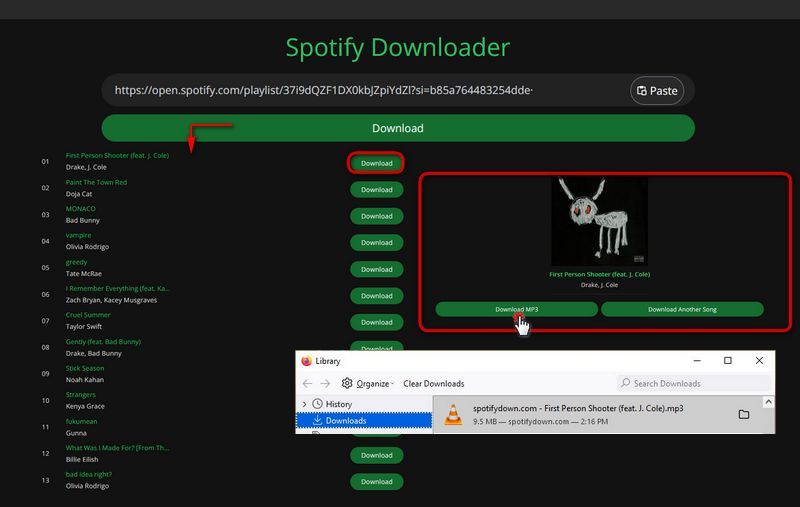
SpotiDownloader is a free online tool for converting Spotify links to MP3. Users can paste a Spotify URL to download songs, albums, or playlists as MP3 files for offline listening quickly and easily.
How to Utilize SpotiDownloader to Convert Spotify Links?
Step 1 Open Spotify and copy the link of the track, album, or playlist you want to save.
Step 2 Paste the link into SpotiDownloader and click "Download" to parse the content.
Step 3 Click "Download" for individual songs, or "Download ZIP" to save the entire playlist as MP3s.
- Looking for more details? Check out our full SpotiDownloader review.
Pros
- Supports playlists and albums in ZIP files for batch downloads.
- Retention of essential ID3 tags, including artist, album, and artwork.
- High-quality MP3 downloads up to 320kbps.
Cons
- Cannot parse podcasts or audiobooks.
- Playlist downloads may be incomplete at times.
- Collects personal information.
#2: SPOTISAVER
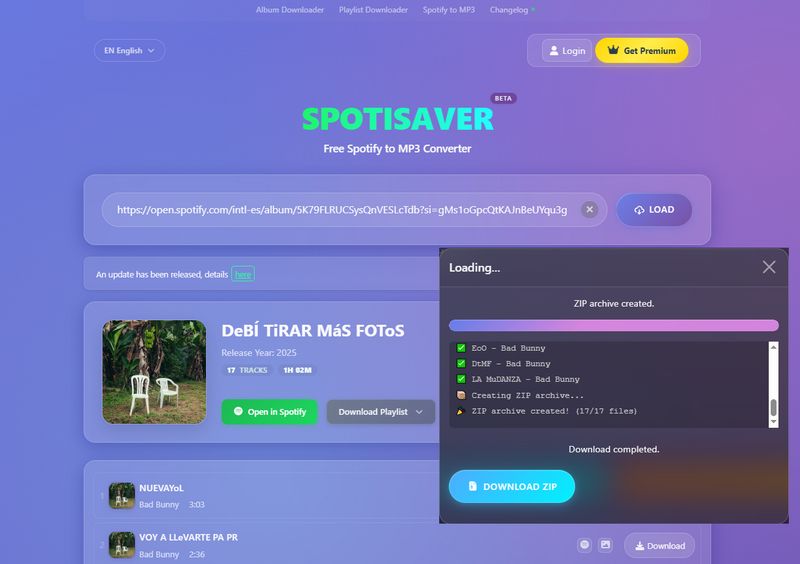
SPOTISAVER is a convenient Spotify link-to-MP3 tool that lets users download Spotify songs, albums, or playlists by pasting a Spotify link. It supports exporting full albums or playlists as a ZIP file with high-quality MP3 audio. Downloaded files retain metadata such as cover art, artist name, and release date, making it easier to organize your music library.
How to Convert Spotify Link to MP3 with SPOTISAVER?
Step 1 Copy the Spotify link you want to convert.
Step 2 Paste the link into the input box and click the "LOAD" button to parse it.
Step 3 You can download individual tracks by clicking "Download", or select "DOWNLOAD ENTIRE PLAYLIST" to download the full album or playlist at once.
Pros
- Clean and simple interface with no ads.
- Supports downloading an entire album or playlist as a ZIP file (free users up to 100 tracks).
- Maintains up to 320 kbps.
Cons
- Playlist downloads for free users may fail due to high traffic; retrying several times is often required.
- Does not support parsing podcast, show, or artist page links.
#3: SpotifyMate
🔗: https://spotifymate.com/ ; https://spotimate.io/; https://www.spotmate.net/
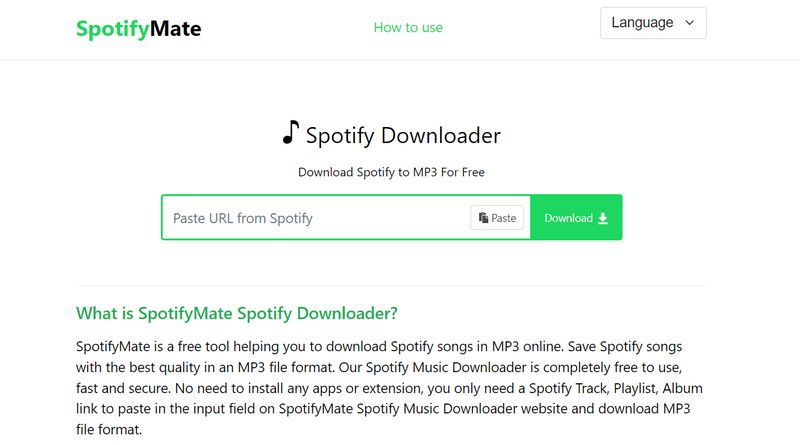
SpotifyMate is a free online Spotify downloader that converts Spotify tracks, playlists, or albums to MP3 using a Spotify link. Simply paste the link into the website to download Spotify songs directly as MP3 without installing any software. It's fast, secure, and requires no extensions.
How to Download Spotify to MP3 with SpotifyMate?
Step 1 Copy the Spotify link of the song, album, or playlist.
Step 2 Paste it into SpotifyMate and click "Download".
Step 3 Click "Download Mp3" to save the track.
📕 You might also be interested in: SpotifyMate Review: Is It Worth Using?
Pros
- Supports multiple languages and 320kbps MP3 downloads.
- Retains song metadata like cover art, artist, album, and title.
- Fast and convenient Spotify link to MP3 conversion.
Cons
- Playlist downloads require SPOTIDOWN and a subscription for more than 5 songs.
- Parsing may fail on unstable networks.
- Ads before downloading.
- Collects personal info.
#4: SpotiSongDownloader
🔗: https://spotisongdownloader.com/
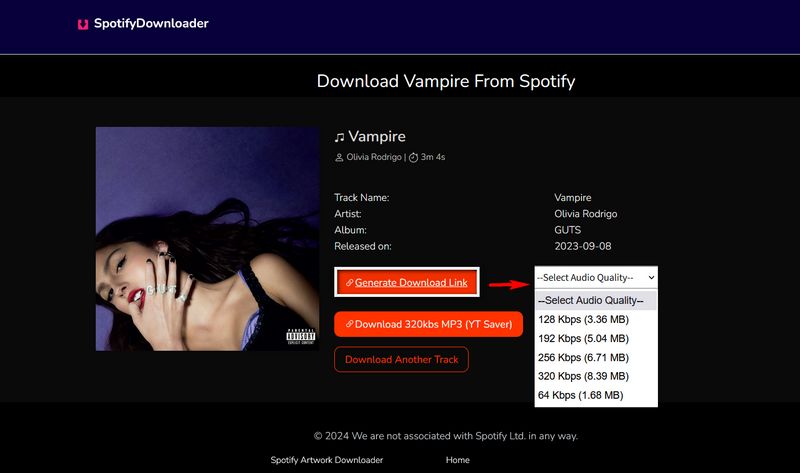
SpotiSongDownloader is a free browser-based Spotify downloader that converts Spotify songs, albums, and playlists to MP3 using a Spotify link. It supports MP3 output up to 320 kbps and works smoothly on all major browsers for quick offline listening.
How to Download MP3 from Spotify Links with SpotiSongDownloader?
Step 1 Copy the Spotify link of your desired song, album, or playlist.
Step 2 Paste the link into the website input box and wait for it to parse.
Step 3 Click "Generate Download Link" and select your audio quality, then download individual songs or the entire playlist as a ZIP.
Pros
- Ad-free and user-friendly.
- Batch downloading of albums or playlists in ZIP format.
- The output sound quality can be customized (from 64 to 320 Kbps).
Cons
- Full playlist downloads require account registration and payment.
- Spotify Episodes, Shows, & Podcasts URLs are not supported.
#5: SpotMate
🔗: https://spotymate.com/ ; https://spotmate.online/en1
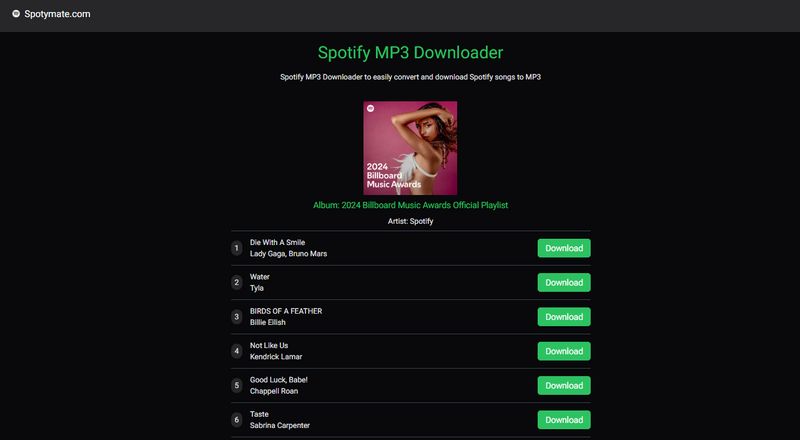
SpotMate is a free online Spotify music converter that allows users to download Spotify songs and playlists to MP3 from links without a subscription. It also retains some ID3 metadata and supports parsing albums efficiently.
How to Use Spotymate to Convert Spotify to MP3?
Step 1 Copy the Spotify link of the song, album, or playlist.
Step 2 Paste it into SpotMate and click "↓ Download" to parse.
Step 3 Click the "Download" button next to each track to save them as MP3 files.
Pros
- Free and fast downloads.
- Supports parsing Spotify album or playlist links.
- Retains artist name, track name, album, and cover art metadata.
Cons
- Pop-up ads appear during use.
- Convert one song at a time only.
- Output is lossy audio.
- Collects personal info.
#6: Spowload
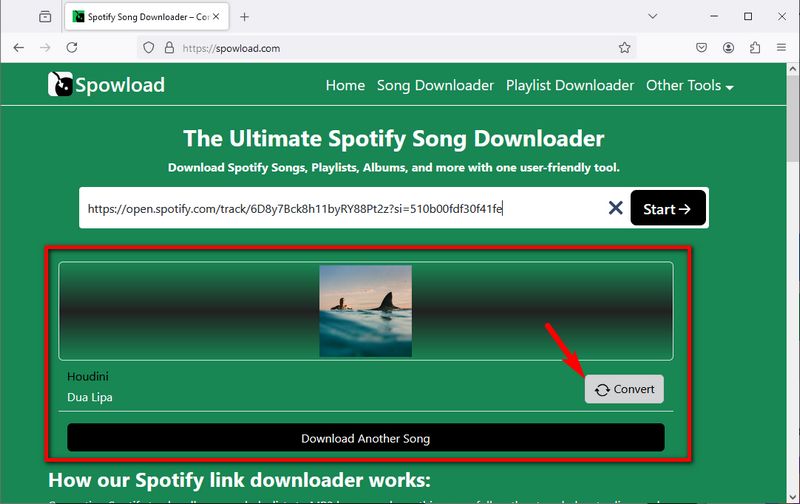
Spowload is a free online Spotify downloader that allows users to download Spotify music from links without registration or software installation.
How to Use Spowload to Extract MP3 from Spotify Links?
Step 1 Copy the Spotify URL.
Step 2 Paste into Spowload’s input box and click "Start →".
Step 3 Click "Convert > Download" to save as MP3.
Pros
- Easy access and fast parsing.
Cons
- Cannot parse albums or playlists.
- Many pop-up ads.
- Low output quality.
- Collects personal info.
#7: SpotDL Spotify Downloader
SpotDL Spotify Downloader is a free online Spotify link-to-MP3 converter that lets users download Spotify songs, playlists, or albums in seconds. No registration is required, and the original audio quality is preserved.
How to Use SpotDL to Free Download Spotify Link to MP3?
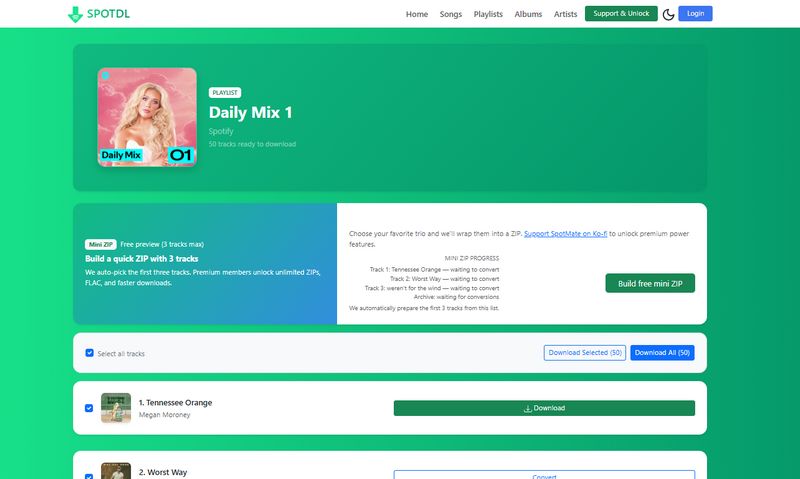
Step 1 Copy the link of the Spotify song, playlist, album, etc., that you want to convert from Spotify into the box, and click "Start" to begin parsing.
Step 2 If you are parsing a list containing multiple songs, you will see them listed one by one. You can click the "Convert" button next to any desired song, and then click "Download" to start the download.
Pros
- Supports playlists, albums, and individual tracks.
- Maintains audio quality up to 320 kbps.
- Preserves song metadata like artwork, artist, album, and track number.
Cons
- Free ZIP downloads are limited to 3 songs; more requires payment.
- Collects personal info.
#8: SpoMp3 Spotify Downloader
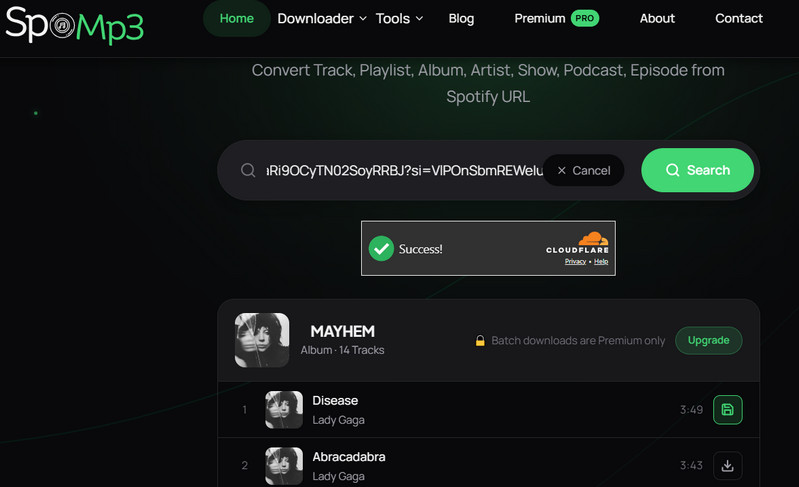
SpoMp3 is an online tool that claims to convert Spotify songs, playlists, albums, and other audio content to MP3. Just paste a Spotify link to get started. In our tests, the audio quality was low, redirects occurred during downloads, and batch downloads required payment.
How to Use SpoMp3 Spotify Downloader with Ease?
Step 1 Copy the Spotify song URL, paste it into the input box, and click "Search".
Step 2 Click the download button next to any song in the results.
Step 3 When the button changes to "Save file", click it to get the MP3 file.
Pros
- Supports different types of Spotify audio, including songs and podcast episodes.
- Keeps song metadata such as cover art, artist, song title, and album name.
Cons
- The audio quality is lower than advertised. SpoMp3 claims 128 kbps for free downloads and up to 320 kbps for paid downloads, but the songs we tested were only 64 kbps.
- Downloads can be slow and unstable, taking anywhere from a few seconds to around 20 seconds.
- Clicking "Save file" may redirect you to another website.
- Downloaded filenames include the website name at the beginning.
- Batch downloads require payment.
Part 3: Open-Source Spotify Link to MP3 Tool
SpotDL is an open-source Spotify link downloader hosted on GitHub. Unlike most online converters mentioned above, SpotDL works locally and searches external sources to find matching audio files for Spotify songs, playlists, and albums.
As a command-line tool, SpotDL runs on Windows, macOS, and Linux, giving users greater transparency and control over the download process. However, because it relies on terminal commands and manual setup, it can be more complex to use, especially for beginners who are not familiar with command-line tools.
👍 Who Should Use the Open-Source Spotify Link to MP3 Tool:
- Users are comfortable with command-line interfaces.
- Those who want automated batch downloads or scripting.
- People looking for free, open-source, fully customizable downloads.
- Users who don't mind relying on external audio sources like YouTube for conversion.
How to Use SpotDL to Download Spotify Links to MP3s in Bulk?
Step 1 Install Python
Download and install Python 3 from the official Python website (https://www.python.org/downloads/). During installation, make sure to check "Add Python to PATH" so you can run Python commands directly from the terminal.
Step 2 Install FFmpeg
FFmpeg is required for audio processing when using SpotDL.
- Windows: Download the FFmpeg static build, extract it (for example to C:\ffmpeg), and add the bin folder (such as C:\ffmpeg\bin) to your system PATH.
- macOS: Install FFmpeg using Homebrew by running:
brew install ffmpeg
Step 3 Install SpotDL
Open Command Prompt (Windows) or Terminal (macOS/Linux), then run the following command to install SpotDL: pip install spotdl
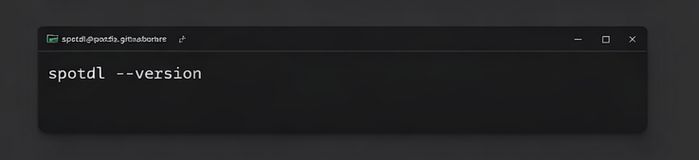
Step 4 Verify the Installation
Check whether SpotDL is installed correctly by running: spotdl --version
If a version number appears (for example, 4.3.0), the installation was successful.
Step 5 Download Spotify Music from Links
You can now download Spotify music using SpotDL commands.
- Download a single track:
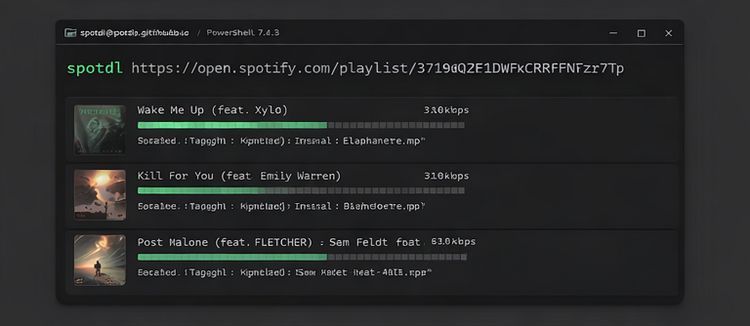
spotdl https://open.spotify.com/track/xxxxxxxxxxxx - Download a playlist or album:
spotdl https://open.spotify.com/playlist/xxxxxxxxxxxx - Download an Album:
spotdl https://open.spotify.com/album/xxxxxxxx - Save downloads to a specific folder:
spotdl [URL] --output "C:\Users\YourName\Music" - Search and Download by Song Name:
spotdl "Artist - Song Name" - Download Multiple Links at Once:
spotdl [songQuery1] [playlistURL] [albumURL]
📕 You might also be interested in: SpotDL Review: Spotify Downloader & Alternatives
Pros
- Open‑source and completely free to use.
- Supports batch downloads of single or multiple playlists and albums.
- High‑quality MP3 downloads up to 320 kbps.
- Preserves song metadata such as title, artist, and album information.
- Runs locally on Windows, macOS, and Linux, ensuring privacy and security.
Cons
- Requires command‑line setup with Python and FFmpeg, which may be difficult for beginners.
- Audio quality depends on external sources and may vary; FLAC or WAV output is not true lossless.
- Download success rates can be inconsistent for large or rare playlists.
- Does not support podcasts, audiobooks, or video content links.
- No official support; users must rely on community help.
Part 4: FAQs About Spotify Link to MP3 Converters
Q1: Can you convert a Spotify link to MP3 directly?
A: Yes, using desktop software like TunePat, online converters, or SpotDL CLI. You can paste a Spotify track, album, or playlist link and download it as MP3.
Q2: Are Spotify link to MP3 converters legal?
A: Most tools operate in a gray area. Personal use is generally tolerated, but redistribution or sharing of downloaded files may violate copyright law. Always check local regulations.
Q3: Why do some Spotify link to MP3 tools stop working?
A: Online tools can fail due to Spotify API changes, source removal, or website downtime. Free services are most prone to interruptions.
Q4: What is the safest Spotify link to MP3 converter?
A: Desktop software like TunePat Spotify Converter is the most reliable for large playlists and high-quality audio. Open-source tools are reliable but require technical knowledge. Online converters are convenient but less stable.
Q5: Can I convert Spotify playlists to MP3?
A: Yes. Desktop software supports full playlists and albums. Online tools are usually limited to single tracks or small playlists, and SpotDL CLI can also handle batch playlist downloads.
Conclusion:
Many tools can convert Spotify links to MP3, but free online converters often have limits like ads, slow downloads, or variable audio quality. Open-source tools like SpotDL offer flexibility but require command-line skills and rely on external sources.
For a reliable, high-quality solution, TunePat Spotify Converter is the top choice. It supports songs, playlists, albums, audiobooks, podcasts, and music videos, allows batch conversion to MP3, FLAC, WAV, ALAC, AIFF, or AAC, and preserves metadata and original order. With TunePat, managing your offline Spotify library is fast, easy, and hassle-free.


Olivia Anderson
Senior Writer