
YT1s is a popular online YouTube downloader that lets users convert videos to MP3 or MP4 for offline use without installing software. But is YT1s reliable, safe, and worth using in 2026? In this review, we test its accessibility, download speed, audio quality, and user experience to help you understand its pros and cons. We also explore its potential risks and compare it with alternative tools to help you find the best option for your needs.

YT1s vs Alternatives: Feature Comparison
| Method | Best For | Advantages | Limitations |
|---|---|---|---|
| YT1s | Quick YouTube video and MP3 downloads | Free to use; browser-based; supports MP3 and MP4 formats | Few redirects; low and unstable audio quality; limited advanced customization features |
| TunePat Music One | Downloading and converting music from supported streaming services | Multiple music platforms; original audio quality; offers MP3, FLAC, WAV, and more output; batch conversion; ID3 tag preservation | Requires desktop software installation |
| EZRIP | Simple online YouTube-to-MP3 conversion | Free to use; no software installation; supports MP3 and MP4 formats | The actual bitrates did not match the selected settings; few redirects |
Part 1: What is YT1s?
🔗 https://yt1s.africa.com/
1.1 YT1s Features and Supported Formats
| Feature | Details |
|---|---|
| Platform | Web-based |
| Video source | YouTube |
| Output formats | MP4, MP3 |
| Software installation | No |
| Playlist download | No |
| Batch download | No |
| Audio quality | Depends on the source audio quality. See our audio quality test results. |
| Price | Free |
1.2 How to Download YouTube Videos with YT1s?
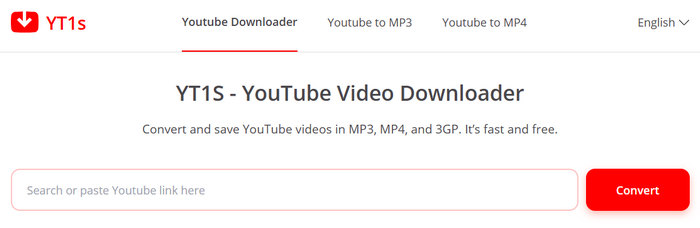
Step 1 Open YT1s in your browser, enter the YouTube URL into the red input box on the page, and click "Convert".
Step 2 The page will automatically begin analyzing the YouTube video link. Once the analysis is complete, you will be prompted to select a format and bitrate/resolution. Make your selection and click "Convert", and the file will automatically download to your device.
Part 2: YT1s Review 2026: Testing Results and User Feedback
2.1 Website Accessibility Test
During our testing, we searched for "YT1s" directly in the browser and found that, despite ranking high in search results, some sites were actually similarly named websites; this suggests potential risks. Additionally, these free online sites frequently change their domains, meaning a bookmarked URL might stop working after a while, which can certainly be a hassle for users. In October 2026, we tested the site in Chrome, Edge, and Safari, and it loaded successfully in all three.
2.2 Download Process Test
The download process is straightforward and requires only two steps. We tested ten video URLs and encountered no issues with downloading or usage limits; furthermore, the download speed was impressive, with most videos converted to MP3 in under a minute.
2.3 Audio Quality Test
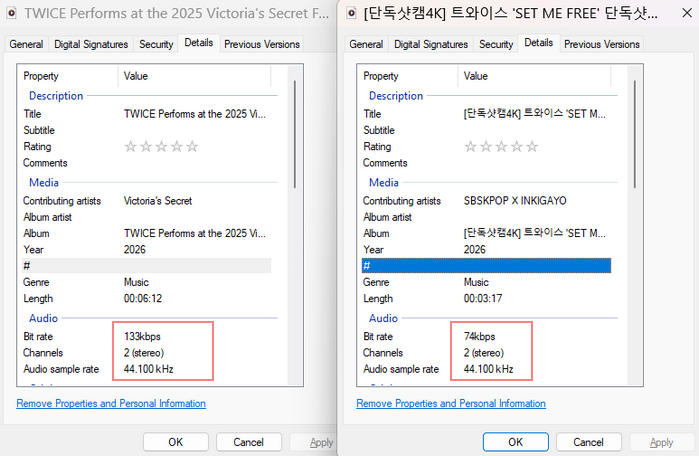
Regarding audio quality, we tested ten video URLs and selected the 320kbps option for all downloads, yet the results were disappointing. The highest measured bitrate achieved was 133kbps, with four files at 128kbps; the rest fell short of the 128kbps mark, with the lowest coming in at just 74kbps. It seems this tool's audio quality is inconsistent, which may disappoint users who prioritize high-quality sound.
2.4 Ads and User Experience Check
During testing, we paid close attention to advertisements, pop-ups, and redirects on the page. The layout is clean and free of intrusive ads; however, after clicking the "Convert" button twice, you are redirected to an unfamiliar website. Users should close this immediately.
2.5 What Do Users Say About YT1s?
Besides our own testing, user experiences can provide additional insight into how YT1s performs in real-world situations. Feedback about online YouTube downloaders is often mixed, with users mainly discussing convenience, download quality, advertisements, and reliability.
Pros
-
 Fast and easy to use. - Black Nguyen
Cons
-
 Frequent redirects may lead users to unsafe or illegal websites, raising security concerns. - Kane O
-
Antivirus software detected Trojan files during the download process. - Alberto Agudo
-
Experienced download errors. - Md Taif
Part 3: Is YT1s Safe to Use in 2026?
3.1 Does YT1s Have Virus or Malware Risks?
During our testing, we did not detect any malware or suspicious files in the downloaded content. However, this does not guarantee that every file downloaded through YT1s is completely risk-free. The potential risk of online converters usually comes from third-party advertisements, fake download buttons, or modified websites rather than the conversion process itself. Users should always verify the downloaded file before opening it and avoid clicking unrelated download buttons.
3.2 Why Does YT1s Show Ads and Redirects?
During our test, we did not encounter traditional pop-up advertisements on the YT1s website. However, we experienced two unexpected redirects while navigating through the download process. Redirect behavior is relatively common among free online download services because many of these platforms rely on third-party advertising networks for revenue. Although redirects do not automatically mean a website is malicious, they can create confusion and increase the chance of users clicking misleading pages. Users should carefully check the URL before downloading files and avoid pages that request unnecessary permissions or software installation.
Part 4: Is YT1s Legal?
4.1 YouTube Terms of Service
Using YT1s to download YouTube videos may conflict with YouTube's Terms of Service, depending on how the downloaded content is obtained and used. YouTube generally restricts downloading content unless the download is expressly authorized by the service or the relevant copyright holder. Therefore, users should check YouTube's current Terms of Service and only download content when they have permission or when the download is otherwise permitted.
4.2 Copyright Considerations
Downloading a YouTube video does not automatically give you the right to reuse or distribute that content. Copyright protection generally remains with the original copyright holder. Users should make sure they have the necessary permission or a valid legal basis before downloading, reproducing, modifying, or sharing copyrighted content. Content that is in the public domain, available under an appropriate Creative Commons license, or otherwise authorized for downloading may be treated differently.
Part 5: Best YT1s Alternatives in 2026
5.1 TunePat Music One - Best Desktop YouTube Downloader
TunePat Music One is a desktop music downloader that provides a more comprehensive alternative to online YouTube downloaders such as YT1s. Unlike browser-based tools that may have limited download options or frequent redirects, TunePat Music One supports batch downloading and provides more control over the output files.
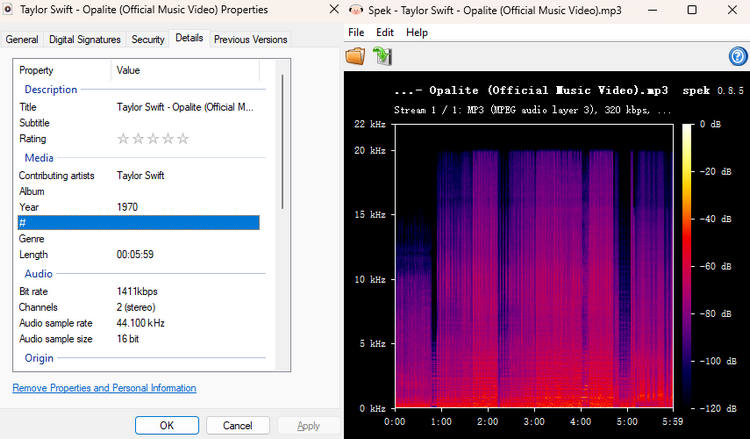
As an all-in-one music downloader, TunePat Music One supports downloading songs, albums, playlists, podcasts, and audiobooks from a variety of popular music platforms, including YouTube Music, YouTube, Spotify, Amazon Music, Apple Music, SoundCloud, and TIDAL. Users can download multiple tracks at once and save them in their original audio quality. The software also supports download speeds of up to 10x and preserves essential ID3 tags, such as the artist, album, and title information. In addition, users can customize output settings and file names, making it easier to organize downloaded music and manage a local music library.
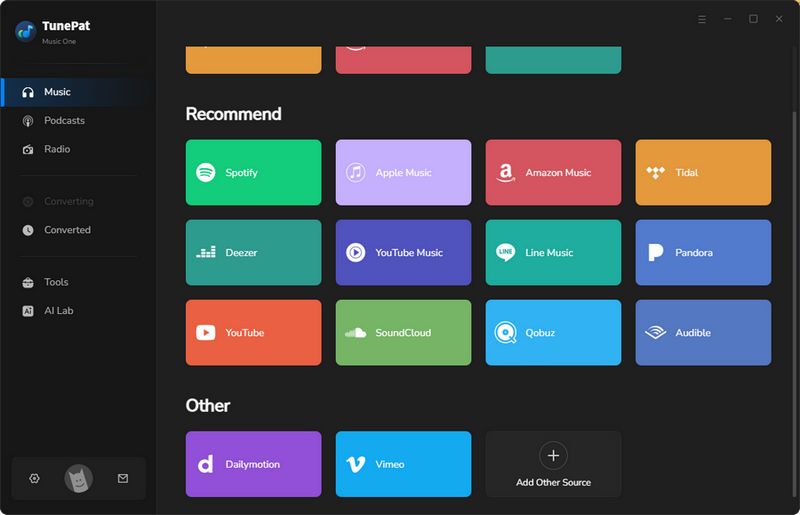
Step 1 Launch TunePat to view the list of supported music platforms. For this test, we will use YouTube as an example: select the "YouTube" tab and log in to your YouTube account as prompted. Click the "Settings" button in the bottom-left corner to adjust parameters such as audio format, bitrate, and the output folder.
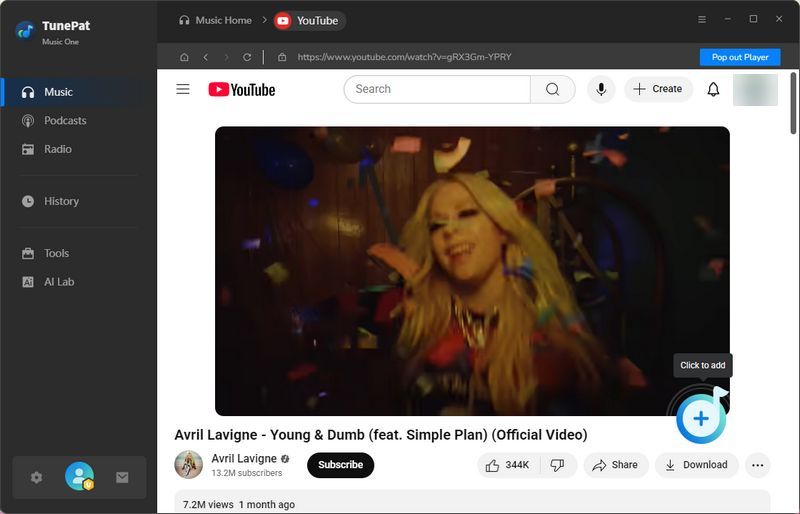
Step 2 Select the videos you wish to convert from the YouTube library and click the "+" button in the bottom-right corner; the software will automatically parse the selected content. Once parsing is complete, the results will appear on the screen; click "Add" to confirm and add the items to the conversion queue.
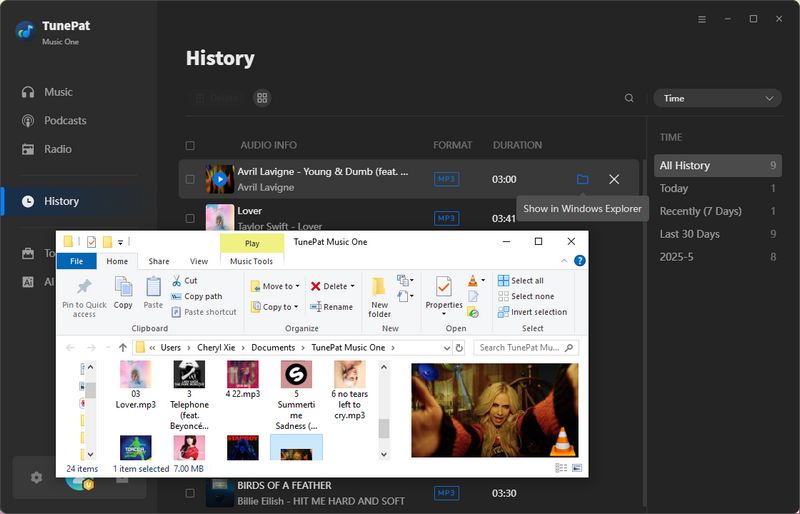
Step 3 After confirming that all target videos have been added to the list, click the "Convert" button to begin batch conversion. Once conversion is finished, you can view the results in the "History" section and use the built-in player to preview the audio, or navigate to the designated output folder to play the converted files using another media player.
5.2 EZRIP - Online YouTube to MP3 Alternative
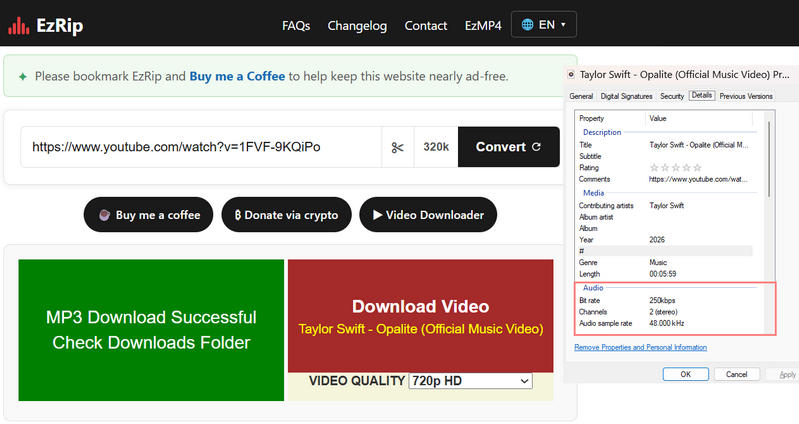
Several online tools claim to offer a convenient way to download YouTube content, but how well do they actually work? In this review, we put EZRIP to the test. EZRIP is a browser-based YouTube-to-MP3 converter that lets users extract audio from online videos without installing additional software. In our test, we selected the 320 kbps option, but the downloaded file had a measured bitrate of approximately 250 kbps. We also encountered occasional redirects during the download process.
Step 1 Open the site in your browser and enter the YouTube video URL. Then, select the desired download format.
Step 2 Click "Convert", then click "DOWNLOAD MP3".
FAQs About YT1s
Q1: Is YT1s still working in 2026?
A: As of October 2026, the service remains available; however, its future availability may be affected by factors such as domain changes and technical issues. Should YT1s become unavailable, please exercise caution regarding unofficial mirror sites, as some may feature intrusive ads or misleading download buttons. To avoid these issues, you can use secure TunePat Music One as an alternative to YT1s.
Q2: Does YT1s support MP3 downloads?
A: YES. YT1s has been known as a YouTube downloader offering MP3 audio conversion as well as video downloads.
Q3: What is the best YT1s alternative?
A: If you are looking for a simple alternative that does not require software installation, carefully compare the available online conversion tools. Similar websites may use redirects, and the advertised audio quality often fails to match the actual output files. If you want the best audio quality and wish to avoid security risks, TunePat Music One is the best alternative.
Q4: Does YT1s work on mobile devices?
A: Yes, YT1s websites advertise support for mobile devices, including Android phones, iPhones, and tablets.
Q5: Is YT1s free to use?
A: Yes, YT1s advertises free video and audio downloads. Keep in mind that free does not necessarily mean risk-free. Be cautious of misleading download buttons, unexpected redirects, and requests to install unknown software.
Conclusion
YT1s is a convenient option for occasional YouTube downloads, with support for MP3 and MP4. In our tests, however, the downloaded audio files did not match the selected bitrate settings, and unexpected redirects interrupted the process. It may be enough for basic downloads, but these drawbacks are worth keeping in mind. If you regularly save audio and want batch conversion, support for more music platforms, and flexible output settings, TunePat Music One is worth considering.
Olivia Anderson
Senior Writer