Best Apple Music Online Downloader Tools in 2026 That Still Work
 By Olivia Anderson
Apple Music Tips
Updated on 9/29/2026
By Olivia Anderson
Apple Music Tips
Updated on 9/29/2026
Finding a reliable Apple Music online downloader can be frustrating, as many popular tools like KeepVid, Soundloaders, or apple-playlist-downloader-pvx.onrender have either shut down or stopped working. To save your time, we tested various options and filtered out the dead links, bringing you only the verified methods that still work perfectly in 2026.
Whether you need a quick Apple Music to MP3 converter online, a way to download Apple Music to PC, or a trustworthy Apple Music download online solution, this guide provides the most realistic options available.

- Part 1: Most Recommended – TunePat Apple Music Converter [Windows & Mac]🔥🔥 - Quick View of Video Tutorial
- Part 2: am-dl – Apple Music Online Downloader [Online]
- Part 3: AppleMusicMp3 – Apple Music to MP3 Converter Free [Online]
- Part 4: APLMate – Apple Music Download Online Tool [Online]
- Part 5: MP3PAW – Download Apple Music to MP3 [Online]
- Part 6: FAQ About Apple Music Online Downloaders
#1: TunePat Apple Music Converter [Windows & Mac]
Recommendation Index: ⭐⭐⭐⭐⭐
If you want something stable and consistent, TunePat Apple Music Converter is easily the best choice available right now. While it is not a typical Apple Music downloader online, it completely solves the biggest limitation of web-based tools by effortlessly handling protected tracks. You can load songs directly from the built-in Apple Music web player, process multiple playlists at once, and easily convert protected Apple Music to MP3 in bulk.
Another major advantage is the flawless output quality. Compared to many free Apple Music to MP3 converter tools that suffer from distortion, this method delivers highly consistent audio while preserving all essential ID3 tags and metadata properly.
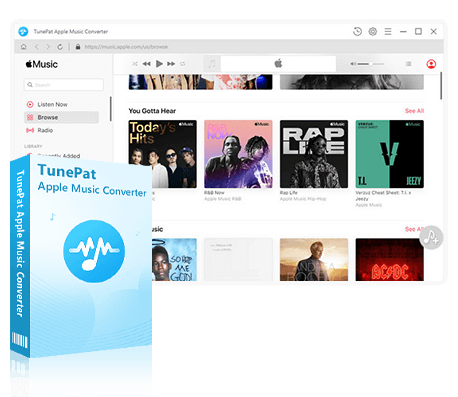
TunePat Apple Music Converter
TunePat Apple Music Converter helps you download and convert all Apple Music songs and playlists to your local computer for offline listening.
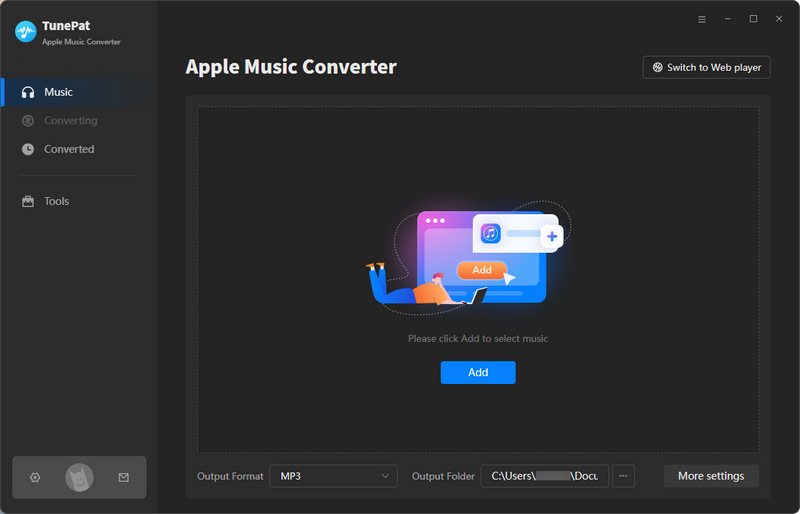
Step 1 Install and launch TunePat Apple Music Converter. You can choose to load music from the Apple Music Web Player or from the iTunes / Music app. For a smoother experience, it is recommended to use the web player and sign in with your Apple ID.
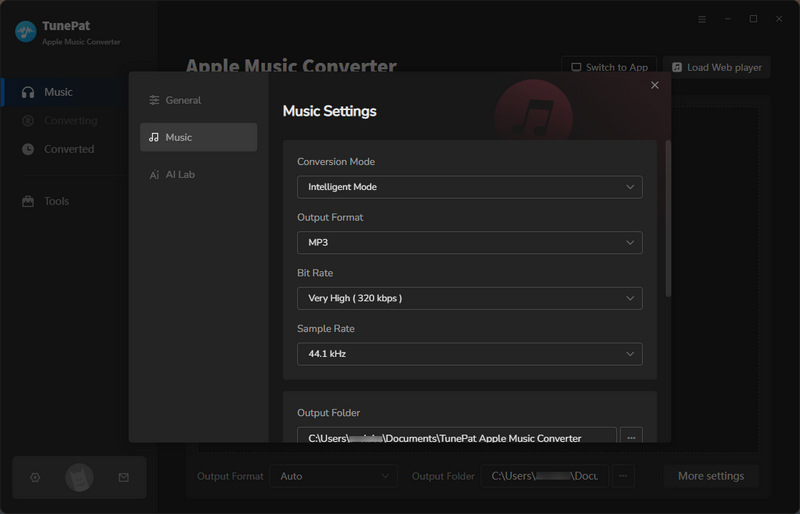
Step 2 Click the "Settings" button on the left panel. Here you can customize output parameters. Set the output format to MP3, and adjust bit rate, sample rate, and output file naming as needed.
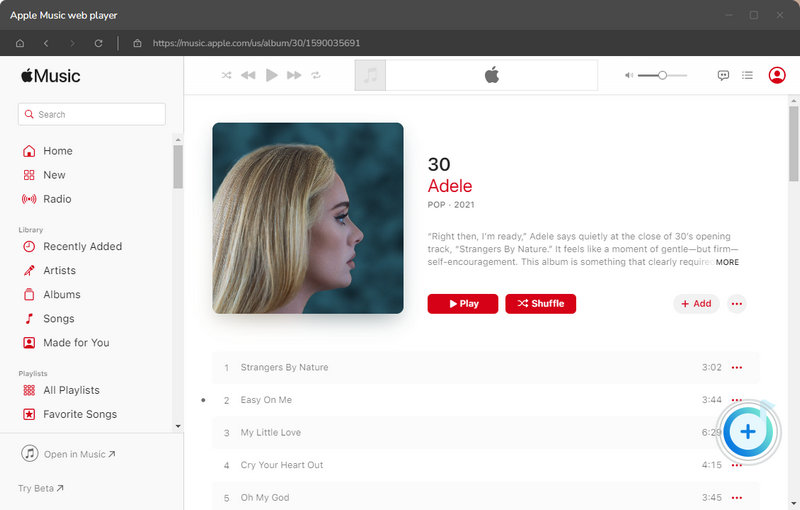
Step 3 Go back to your Apple Music library, select songs, albums, or playlists, and click the "+" button to parse them. After parsing, select the tracks you want and click "Add" to include them in the conversion list.
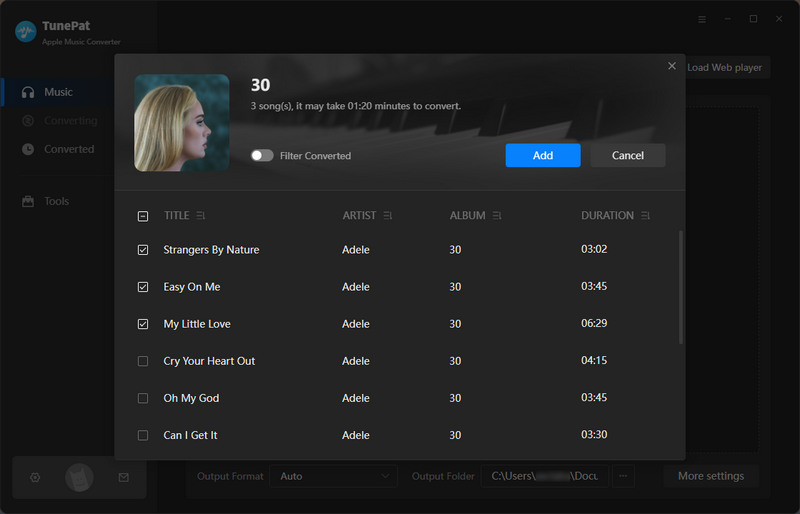
Step 4 On this screen, you can click "Add More" to continue adding songs from different playlists for batch conversion. This is especially useful if you want to process multiple lists at once, which is something most Apple Music downloader online tools cannot do. Finally, click "Convert" to start. Once finished, you can check your files in the "History" section.

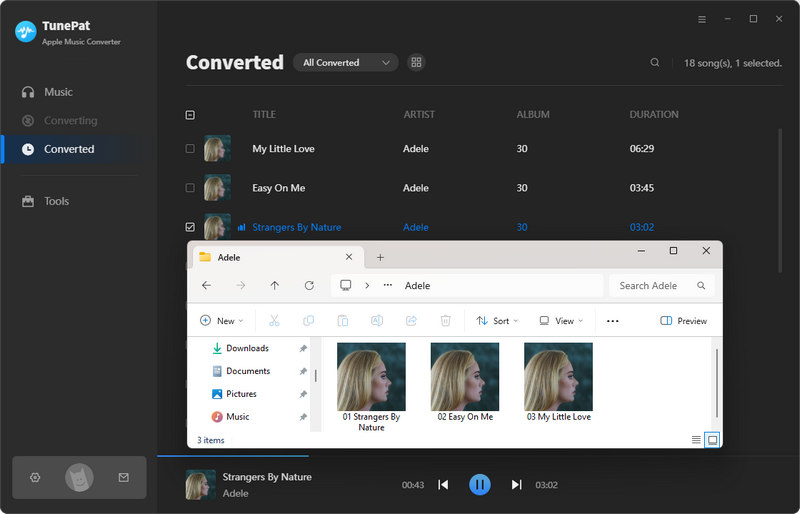
 Video Tutorial: How to Use TunePat to Download Apple Music to MP3?
Pros
-
 Supports converting Apple Music songs, albums, playlists, podcasts, audiobooks, and iTunes library content.
-
Supports multiple formats, including MP3, AAC, WAV, FLAC, AIFF, and ALAC.
-
Preserves lossless Hi-Res audio quality, with bit rate up to 3730 kbps.
-
Offers up to 10X faster conversion speed and supports batch processing across multiple playlists.
-
Keeps complete ID3 tag information such as title, album, artist, artwork, and genre.
-
Supports extracting and saving lyrics in LRC format from Apple Music.
Cons
-
 Only available on Windows and macOS.
Part 2: am-dl – Apple Music Online Downloader
Recommendation Index: ⭐⭐⭐⭐
As a simple and straightforward option, am-dl is one of the few Apple Music online downloaders that still works perfectly in 2026. It allows you to process music links directly in your browser, supporting a wide range of content including songs, albums, music videos, and even radio episodes through a clean, ad-free interface.
However, batch downloading full playlists can occasionally be hit-or-miss. During our hands-on testing, 2 out of 12 tracks failed to process in a single run, though they could be successfully downloaded individually afterward without any further trouble.
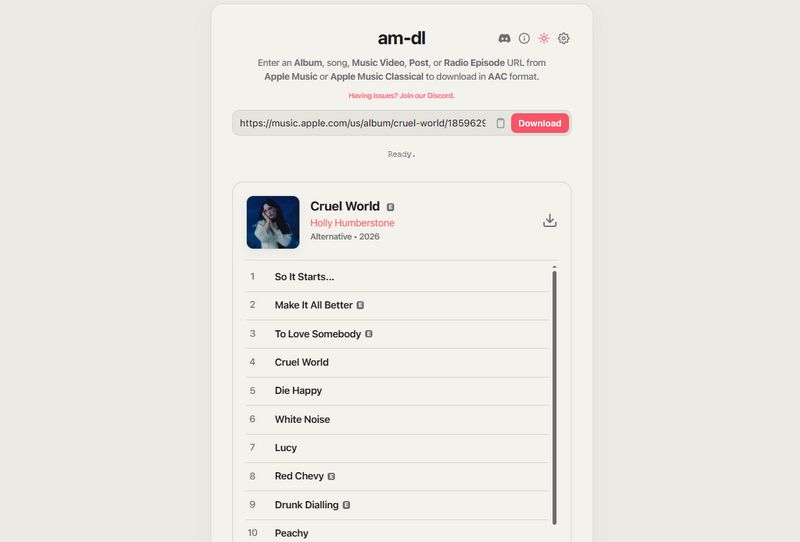
Step 1 Copy an Apple Music link, paste it into the box, and click Download to start parsing.
Step 2 After parsing, click the download icon.
Step 3 You will see the download progress displayed. After that, the tool will generate a ZIP file or M4A files automatically.
Pros
-
Supports downloading albums, songs, music videos, posts, and radio episodes in AAC or ALAC format.
-
Clean interface without ads.
-
Supports full album or playlist parsing with ZIP download.
-
Allows customizable file naming with variables like trackName, artistName, albumArtist, trackNumber, etc.
-
Preserves full metadata information.
Cons
-
There is a small failure rate when downloading entire playlists at once.
Part 3: AppleMusicMp3 – Apple Music to MP3 Converter Free
🔗: https://aaplmusicdownloader.com/ ; https://aaplmusictomp3.com/
Recommendation Index: ⭐⭐⭐
AppleMusicMp3 is a classic web-based converter designed for quick and simple use. It works directly in your browser as a fast Apple Music download online solution, handling individual songs reliably and even exporting full playlists as ZIP files.
The interface is clean and very easy to navigate, so it is perfect for beginners. However, please note that certain limitations still apply to free users.
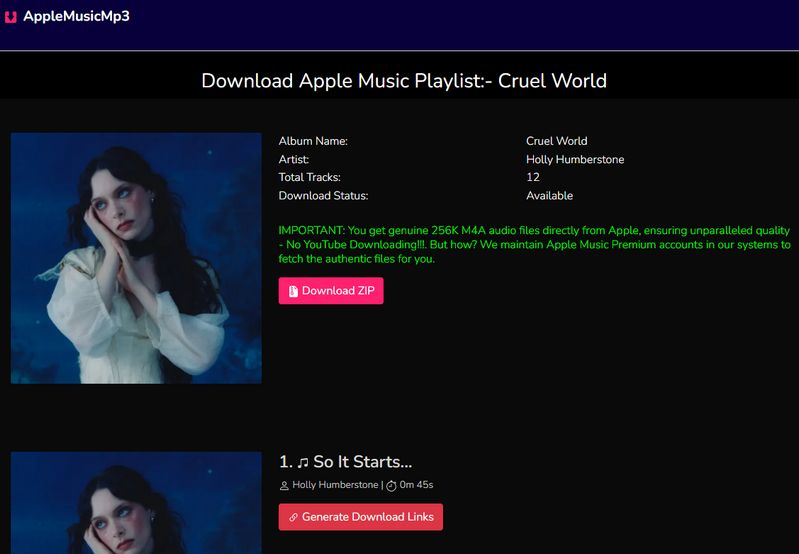
Step 1 Copy and paste an Apple Music song or album link, and then click Download to start processing.
Step 2 For playlists or albums, click the Download ZIP button. For a single song, click the Generate Download Links button.
Step 3 Choose to download as MP3 with a bitrate from 64 kbps to 320 kbps, or as M4A.
Pros
-
Clean interface without ads.
-
Supports album and playlist parsing with ZIP download.
-
Supports both MP3 and M4A formats.
-
Preserves metadata such as artist, title, composer, track number, disc number, artwork, etc.
Cons
-
Free users can only download 2 songs in a ZIP file.
-
Full access requires a subscription priced at $8.99 per month.
Part 4: APLMate – Apple Music Download Online Tool
Recommendation Index: ⭐⭐
APLMate is a simple Apple Music download online tool designed for quick MP3 downloads. It is easy to use and does not require installation, so it is highly convenient for occasional use. The tool supports parsing both individual songs and full playlists, delivering output quality up to 320 kbps while retaining basic metadata.
However, the main downside is the presence of ads and the complete lack of batch functionality. It does not allow full playlist downloads in one click, which may slow down the entire process if you need to save multiple tracks.
Step 1 Copy an Apple Music song or playlist link and then paste it into the box, click Download.
Step 2 After parsing, click the Download button on the right.
Step 3 Then, click Download MP3 to save the track.

Pros
-
Supports parsing albums and playlists.
-
Provides MP3 downloads up to 320 kbps.
-
Retains artist name, title, and artwork.
Cons
-
Contains ads.
-
Does not support downloading entire playlists in one click.
Part 5: MP3PAW – Download Apple Music to MP3
Recommendation Index: ⭐
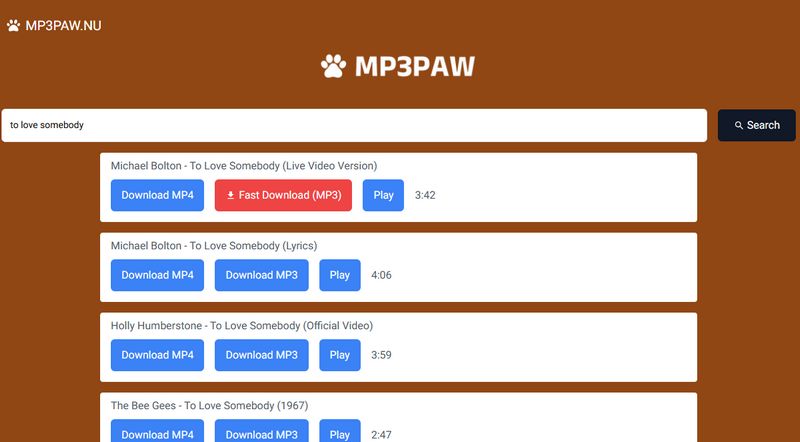
In actual use, the tool doesn't pull audio from Apple Music itself. Instead, it sources tracks from YouTube, which is why it can return results quickly even without a link. This makes it a convenient option if you just want to quickly download Apple Music to MP3 by searching for a song title.
That said, because the audio comes from YouTube, the overall quality is noticeably lower compared to a dedicated Apple Music to MP3 converter online. It is better suited for users who do not have strict requirements for audio quality and only need to download a few songs occasionally rather than entire playlists.
Step 1 Enter the song name or keywords directly into the search box.
Step 2 Browse the search results and select the track you want, and click the Download button next to the selected result.
Step 3 Then, click "Fast Download (MP3)" to save the file.
Pros
-
Very easy to use with direct keyword search.
Cons
-
Frequent redirects during the download process.
-
Audio is sourced from YouTube, usually at around 128 kbps quality.
-
Does not preserve any ID3 tag information.
-
Does not support batch downloading.
Part 6: FAQ About Apple Music Online Downloaders
Q1: How to convert protected Apple Music to MP3?
A: Apple Music tracks are protected by DRM, so not every tool can handle them in the same way. Some Apple Music to MP3 converter online tools can still process certain songs or playlists, which makes them convenient for quick use.
However, results can vary depending on the track and tool. Online options are good for simple needs, while users who want more stable performance and consistent quality often prefer a dedicated solution like TunePat.
Q2: Can I use an Apple Music downloader online without installing software?
A: Yes, many Apple Music downloader online tools work directly in your browser without any installation, which makes them very easy to use for quick downloads or trying a few songs.
Q3: What is the best Apple Music to MP3 converter free?
A: The Apple Music to MP3 converter free tools mentioned in this article work well for basic tasks like downloading single tracks or small playlists. They are convenient and usually support Apple Music downloads online without setup.
Q4: Is it possible to download Apple Music to a PC permanently?
A: Yes, depending on the method. Some Apple Music download online tools allow you to save songs quickly to your device, which is useful for temporary listening, but for long-term storage and better file control, desktop tools are generally more reliable since they let you download Apple Music to PC as local files with stable format and quality.
Q5: Why do some Apple Music online downloader tools fail?
A: An Apple Music online downloader may stop working sometimes because Apple Music frequently updates its protection and streaming system. Some tools adapt quickly, while others may become temporarily unstable or fail on certain tracks.
Conclusion
After testing multiple options, it is clear that using an Apple Music online downloader can still be convenient for quick and simple tasks. Tools like am-dl are useful when you only need to download a few songs without installing anything, and they can handle basic requests reasonably well.
That said, once you start working with full playlists or higher audio quality, the limitations become more noticeable. Failed downloads, restricted features, and inconsistent performance are still common with many online tools.
If you are looking for a more reliable and long-term solution, especially if you want to download Apple Music to PC or understand how to convert protected Apple Music to MP3, a dedicated tool like TunePat Apple Music Converter provides a much smoother and more consistent experience.



Delilah Rene
Senior Writer