
Mixcloud is home to millions of DJ mixes, radio shows, and podcasts, making it one of the most popular platforms for long-form audio. With so many Mixcloud downloaders available online, however, choosing one isn't always straightforward. To find out which tools are actually worth using, we tested and compared 4 Mixcloud downloaders available in 2026, including both desktop software and free online services. This guide summarizes our hands-on results to help you choose the option that best fits your needs.

Quick Picks: Which Mixcloud Downloader Is Right for You?
| Rank | Our Test Highlights | Best for |
|---|---|---|
| 🥇 TunePat Music One |
Convert to MP3, AAC, WAV, FLAC, AIFF & ALAC Batch download support Preserve original audio quality |
Users who want a reliable desktop tool |
| 🥈 BraveDown |
No software installation MP3 output at 128 kbps or 256 kbps |
Users who need quick MP3 downloads |
| 🥉 MixcloudDownloader.net & AnyDownloader |
Works in web browsers No account required M4A output |
Users who only download occasionally |
Part 1: Can You Download Music from Mixcloud?
Does Mixcloud Allow Downloads?
The short answer is yes, but not in the way many users expect. Mixcloud allows Premium and Creator subscribers to download DJ mixes, radio shows, and podcasts in its official mobile app. However, these downloads are stored within the app and cannot be exported as local audio files. Even content uploaded by users themselves cannot be permanently downloaded from the website as an MP3 or M4A file.
Why Use a Mixcloud Downloader?
Since Mixcloud already offers offline listening, why do people still turn to third-party downloaders? As mentioned earlier, even user-uploaded content cannot be downloaded directly as an MP3 or M4A file. For users who need more flexibility, third-party tools provide a more practical alternative.
Before choosing a Mixcloud downloader, it's worth considering what matters most to you:
- Do you want the best audio quality available from the source?
- Do you want to download multiple mixes at once?
- Do you need support for formats like MP3, AAC, WAV, or FLAC?
Answering these questions first will help you find the best ways to download music from Mixcloud. In the following sections, we will also compare several common Mixcloud downloaders on the market, focusing on these points that you care about most.
Part 2: Best Desktop Mixcloud Downloader (Safe & Reliable)
Among the desktop Mixcloud downloaders available today, TunePat Music One is one of the tools that has gained attention for supporting multiple audio platforms and offering flexible output options. It is designed for users who want more control over downloaded audio instead of relying on simple browser-based download methods.
According to its listed features, TunePat Music One supports formats including MP3, AAC, WAV, FLAC, AIFF, and ALAC, giving users more flexibility when downloading music from Mixcloud. It also allows users to organize downloaded files locally, which can be useful for those who regularly save DJ mixes, radio shows, or podcasts. These features make it a potential choice for Mixcloud users who want to save DJ mixes, radio shows, or podcasts for offline listening.
Since Mixcloud content often includes long-form audio such as extended DJ sets and live recordings, we decided to test whether TunePat Music One could deliver a reliable experience in real-world downloading scenarios, including download stability, output quality, and ease of use.
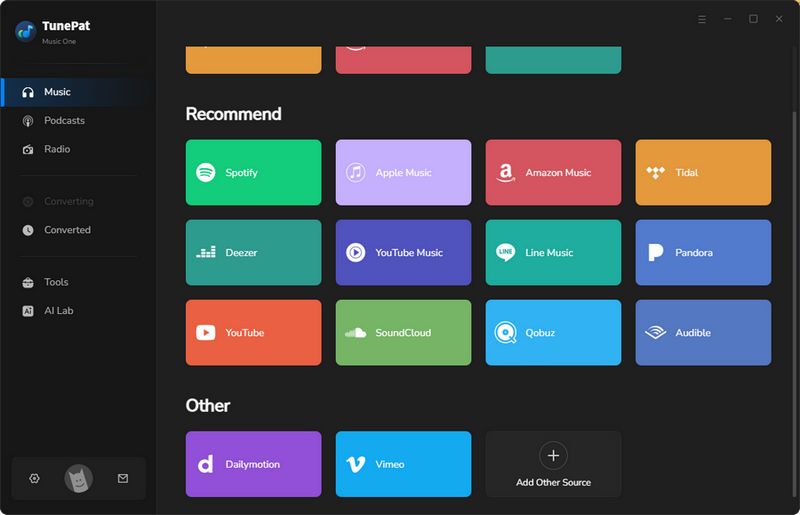
Step 1 To start the test, we selected "Mixcloud" from the supported services list. Instead of copying and pasting URLs manually, TunePat Music One opened its built-in web player, allowing us to access Mixcloud content directly inside the program. We logged into our account and accessed our music library. At the top of the program, we noticed two modes: recording mode and download mode.
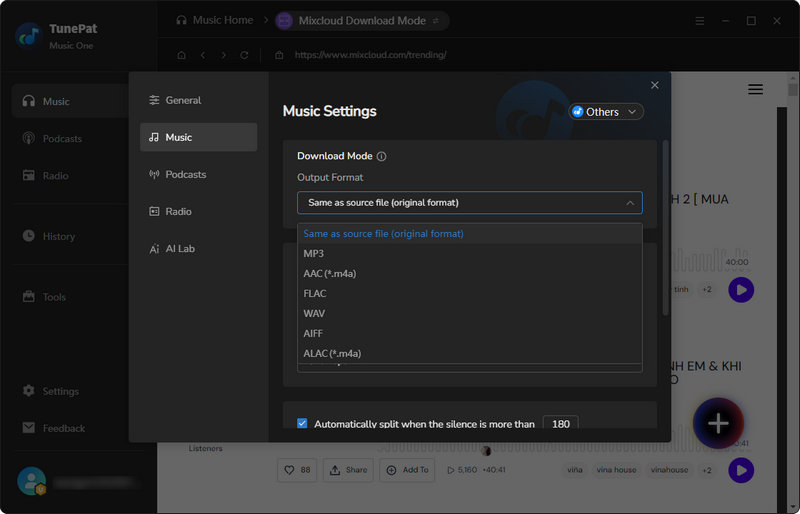
Step 2 Before downloading, open the output settings and choose an audio format. TunePat Music One supports MP3, AAC, WAV, FLAC, AIFF, and ALAC, or you can keep the original format. After making the selection, return to the Mixcloud web player.
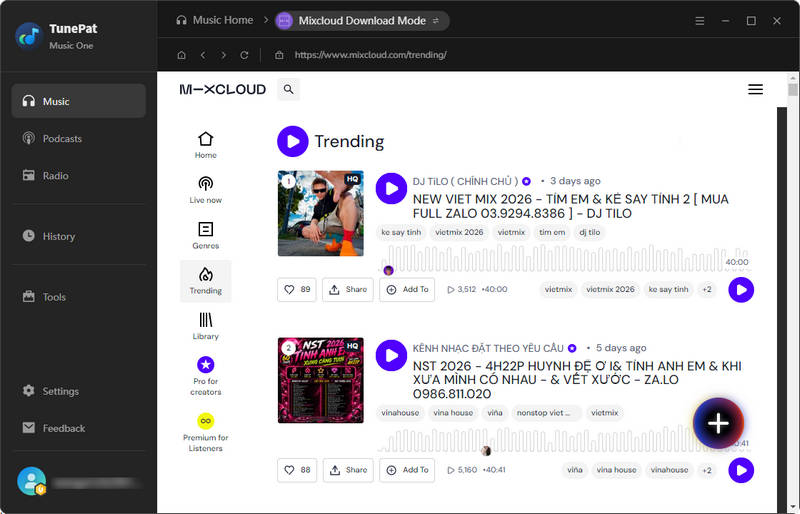
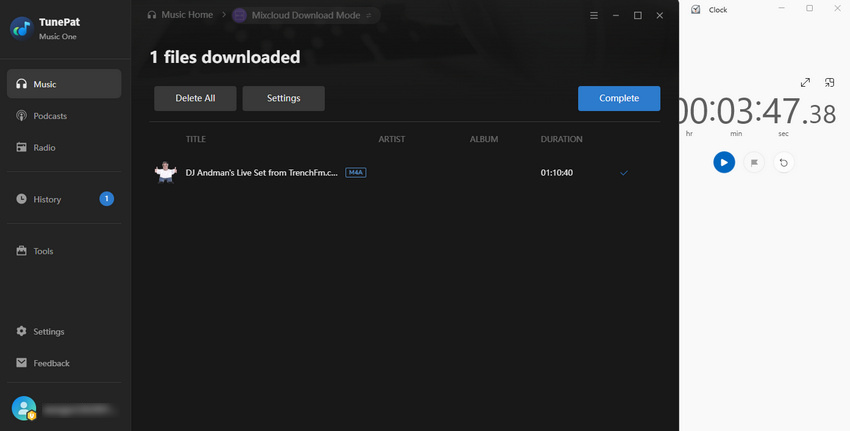
Step 3 After selecting a track, click the "+" button on the right. The software detects downloadable tracks on the current page. In the pop-up window, select the desired tracks and add them to the download queue. Click "Convert" to start the process. During our test, a 1-hour-and-10-minute track was downloaded in less than 4 minutes under our network conditions. Once the download finishes, the output folder opens automatically. If it does not, you can find it in the "History" section on the left.
Editor's Real Test (July 2026) | Rating: ★★★★☆
To evaluate TunePat Music One as a Mixcloud downloader, we tested the latest version of TunePat on Windows 11 in July 2026 using a regular home network connection. We tried different types of Mixcloud links, including individual tracks, playlists, and artist pages. During testing, we found that some Mixcloud links could not be parsed in download mode. In such cases, TunePat Music One suggests using recording mode. This mode captures audio in real time and can serve as an alternative when direct download is not available.
After the download test, the file was saved in M4A format at a bitrate of about 194 kbps, matching the quality of the source audio. This indicates that TunePat preserved the original stream quality during the download process.
Pros
-
 Stable performance for long Mixcloud mixes.
-
Handles different Mixcloud link types.
-
Supports multiple output formats including MP3, FLAC, WAV, AIFF, and ALAC.
-
Record Mode provides an alternative when direct download is unavailable.
Cons
-
 Some Mixcloud content may require recording instead of direct downloading.
-
No web version available.
Part 3: Free Online Mixcloud Download Sites: Are They Safe?
1. Mixcloud Downloader
🔗 https://mixclouddownloader.net/
MixcloudDownloader.net allows users to download music from Mixcloud without installing any additional software. Since it works entirely online, it is often recommended for users who only need to save a few tracks occasionally or prefer a quick, installation-free solution. According to the website, users simply need to paste a Mixcloud URL to generate a downloadable audio file. Because online downloaders often differ in download reliability, audio quality, and ad experience, we decided to test MixcloudDownloader.net to see how it performed with different types of Mixcloud content.
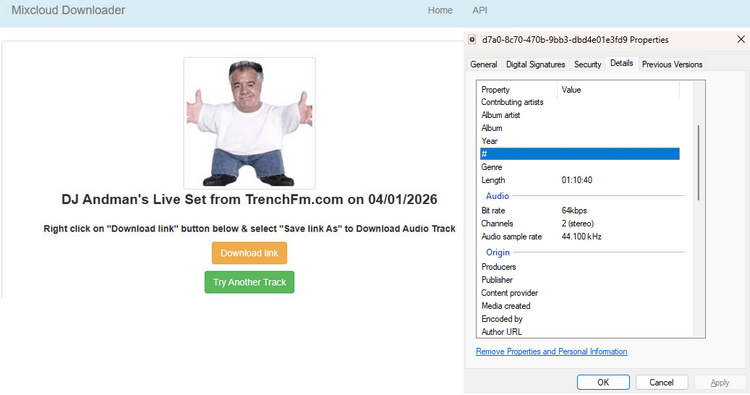
We opened the website, pasted a Mixcloud URL into the search box, and clicked Download. The site then redirected us to a new page, where we clicked Download Link to generate the audio file. After another redirect, the audio opened in the browser's built-in player. From there, we clicked the three-dot menu and selected Download to save the file locally. The entire process took only a few clicks and required no software installation or account sign-in, although the multiple page redirects were noticeably different from the more streamlined workflow offered by a desktop application.
Editor's Real Test (July 2026) | Rating: ★★☆☆☆
We tested this Mixcloud downloader under the same conditions as the other tools. Four downloads succeeded on the first attempt, while one failed initially but completed successfully after a second try a few minutes later. The download process involved several redirects and a pop-up ad. Downloading a 1-hour-and-10-minute Mixcloud track took about 4 minutes and 30 seconds on a standard home network. The downloaded file was saved in M4A format at around 64 kbps, and metadata such as the track title and cover artwork was not preserved.
Pros
-
No software installation required.
-
Supports downloading directly from a Mixcloud URL.
Cons
-
Outputs only M4A files at around 64 kbps.
-
Does not preserve track titles or cover artwork.
-
Intrusive pop-up ads.
-
Multiple redirects before the download starts.
2. BraveDown
🔗 https://bravedown.com/mixcloud-downloader
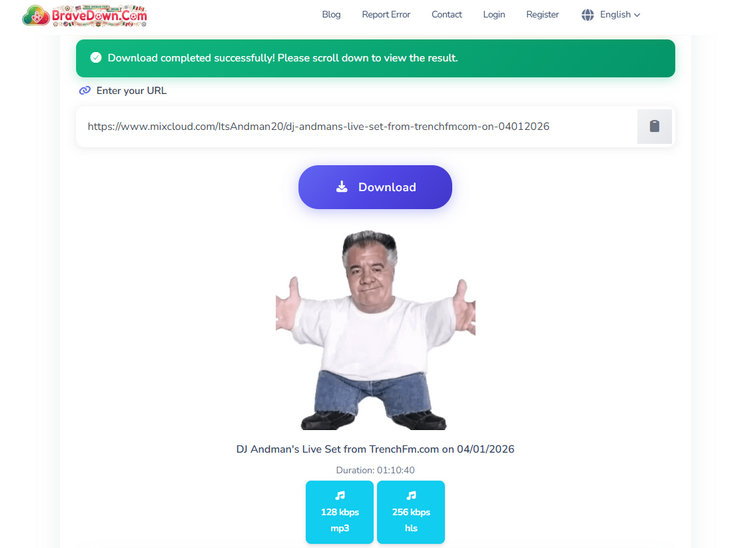
BraveDown Mixcloud Downloader is a lightweight online tool focused on MP3 downloads. Unlike some browser-based downloaders that provide only a fixed output quality, BraveDown offers users two MP3 bitrate options: 128 kbps and 256 kbps.
The tool follows a simple URL-based workflow: users paste a Mixcloud link, process the page, and download the generated MP3 file directly from their browser. While this approach is convenient for occasional downloads, we tested BraveDown to see whether its download reliability and actual output quality matched the simplicity of its design.
Editor's Real Test (July 2026) | Rating: ★★★☆☆
To evaluate BraveDown Mixcloud Downloader, we tested it under the same conditions as other downloaders in this comparison. Five different Mixcloud links were tested, and all downloads were completed successfully without any failed attempts. The main drawback was the heavy advertising, including pop-ups, banners, and misleading download buttons, which made the process less convenient.
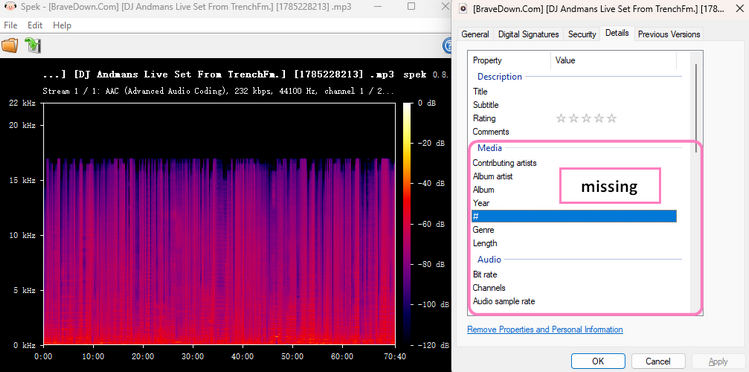
We also tested the available MP3 quality options and used Spek to analyze the downloaded files. The actual bitrate matched the selected settings, although the bitrate information was not shown in the file properties. The downloaded files did not preserve any metadata, and the filenames included the website's watermark.
Pros
-
Offers 128 kbps and 256 kbps bitrate options.
-
Easy MP3 download without software installation.
Cons
-
Too many ads and misleading download buttons.
-
No metadata or cover art preservation.
-
Downloaded filenames include website watermark.
3. Anydownloader
🔗 https://anydownloader.com/en/mixcloud-music-downloader/
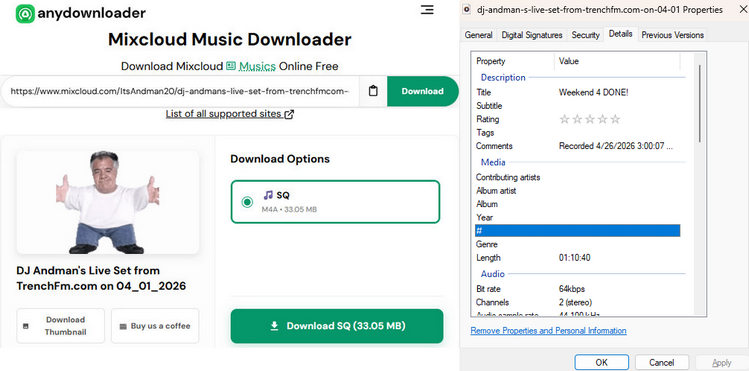
AnyDownloader Mixcloud Downloader stands out with a more user-friendly website design compared with many simple online downloaders. The tool provides a language switch option in the top-right corner, making it accessible to users from different regions. It is designed to download Mixcloud mixes, DJ sets, and podcasts directly from the browser without requiring software installation or account registration.
According to its official website, AnyDownloader claims to preserve the original audio quality during the conversion process and allows users to save Mixcloud content as downloadable audio files. Let's verify together whether the sound quality matches the claims.
Editor's Real Test (July 2026) | Rating: ★★☆☆☆
We tested AnyDownloader under the same conditions as our previous evaluations to ensure a fair comparison. Five Mixcloud links were tested. Four downloaded successfully, while one failed to process. The successful downloads completed without issues, but the failed attempt suggests that the tool may have limitations with certain Mixcloud content. During testing, pop-up ads appeared without clicking, disrupting the process. The tool claims to preserve original audio quality, but the output was M4A at about 64 kbps, which did not match that claim. Track titles were kept, but cover artwork and most other metadata were missing.
Pros
-
Does not require installation.
Cons
-
Pop-up ads affect the user experience.
-
No cover art or complete metadata.
-
Output quality was limited to 64 kbps M4A.
During our research, we also tested several other Mixcloud download websites. Some were no longer functioning, while others failed to generate downloadable files consistently or redirected us to unrelated pages. Since we couldn't complete a reliable download experience, we decided not to include them in this review.
Part 4: Desktop vs Online Mixcloud MP3 Downloader
| Downloader | Best For | Test Result | Strengths | Limitations |
|---|---|---|---|---|
| TunePat Music One | Regular Mixcloud users | ★★★★☆ | Stable downloads, multiple formats, metadata preserved | Desktop installation required |
| MixcloudDownloader.net | Occasional downloads | ★★☆☆☆ | No installation | 64 kbps output, no metadata |
| BraveDown | MP3 downloads | ★★★☆☆ | 128/256 kbps MP3 options | Heavy ads, watermarked filenames |
| AnyDownloader | Basic online downloading | ★★☆☆☆ | No installation | Ads, occasional failures, limited quality |
FAQs About Downloading Music from Mixcloud
Q1: Can you download Mixcloud mixes?
A: Yes, in our tests, most Mixcloud mixes were downloaded without issues, but some links could not be processed by certain tools. Desktop downloaders like TunePat generally offered more consistent results than free online downloaders.
Q2: Is Mixcloud downloader legal?
A: It depends on how you use it. Downloading your own uploads or content that the creator has explicitly made available for download is generally acceptable. However, downloading copyrighted Mixcloud content without permission may violate the creator's rights or Mixcloud's terms of use.
Q3: Can I download Mixcloud to MP3?
A: Yes, but not every Mixcloud downloader supports MP3. In our tests, most free online tools downloaded audio in M4A format by default. If you specifically need MP3, BraveDown and TunePat Music One were the only tools we tested that offered direct MP3 output.
Summary
Finding a reliable Mixcloud downloader is no longer just about whether it can save a file. Download stability, audio quality, metadata preservation, and the overall download experience can vary significantly between tools. Among all the tools we tested, TunePat Music One delivered the most consistent overall performance. It successfully handled most Mixcloud links in Download Mode, provided Recording Mode as a practical fallback for unsupported content, and preserved the original stream quality during our tests. We hope the results in this comparison help you choose the Mixcloud downloader that best matches your needs.


Dereck Martin
Staff Writer