
Spotify lets you download podcasts for offline listening, but what if you want to save episodes as regular MP3 files? Whether you're looking to keep a single episode or download an entire podcast show, you'll need a different approach. We tested 5 Spotify podcast downloaders, including desktop software and free online tools, to see how well they handle downloads, audio quality, filenames, and batch processing. Below, you'll find a quick comparison of our results, followed by hands-on instructions and the issues we encountered during testing.
Can You Download Spotify Podcasts as MP3 Files?
Not directly as MP3 files. Spotify allows both Free and Premium users to download podcast episodes for offline listening, although some shows may require Premium. However, these downloads stay within Spotify and can't be exported as regular MP3 files.
If you want to save episodes to your computer, play them in other media players, or keep a collection of podcast files, you'll need another method. Some podcast downloaders work with Spotify episode links, while others find the same shows through publicly available podcast sources. The tools below cover both approaches, with different options for single episodes and batch downloads.
5 Spotify Podcast Downloaders Compared
We tested five Spotify podcast downloaders to see how they compare in everyday use. The table below highlights their download methods, batch support, processing times, and the main issues we found.
| Downloader | Download Method | Batch Download | Test Time | Key Findings |
|---|---|---|---|---|
| TunePat Spotify Converter | Spotify library | ✓ Yes | ~2 min | Spotify-matched playback; artwork and tags retained |
| TunePat Music One | Podcast search | ✓ Yes | ~12 sec | Free downloads, no login; ⚠ Artwork varies |
| PodcastToMp3.com | Podcast search | ✓ Up to 100 episodes | Seconds per episode; ~3 min for 10 | Clear filenames; metadata retained |
| SpotScribe | Spotify episode URL | ✕ No | ~54 sec | Metadata retained; ⚠ Unreadable filename |
| PodcastMP3.com | Spotify episode URL | ✕ No | ~1 min 35 sec | Metadata retained; ⚠ Unreadable filename |
Testing note: We tested the "Marcello Hernández" episode of Good Hang with Amy Poehler. All five tools produced 128 kbps MP3 files. TunePat Spotify Converter returned a roughly 74-minute version that matched Spotify's playback, while the other 4 tools downloaded versions longer than 78 minutes with ads at the beginning. Download times may vary depending on network conditions and audio sources. PodcastToMp3.com's 10-episode batch result is not directly comparable to single-episode downloads.
Best Desktop Spotify Podcast Downloaders
For desktop downloads, here's a closer look at how to use each program and what to expect from the downloaded files.
1. TunePat Spotify Converter – Download Podcasts from Spotify's Library
TunePat Spotify Converter lets you browse Spotify's podcast library and save episodes on your computer. You can download multiple episodes at once and choose from formats such as AAC, WAV, FLAC, and more, or use the default Recommended MP3 format. It also supports downloading video podcasts from Spotify, which can be saved as MP4 videos or MP3 audio files. You can adjust the output settings and destination folder, and you don't need to sign in to Spotify to search for or download podcasts.
How to Download Spotify Podcasts with TunePat Spotify Converter
Step 1 Find a podcast on Spotify.
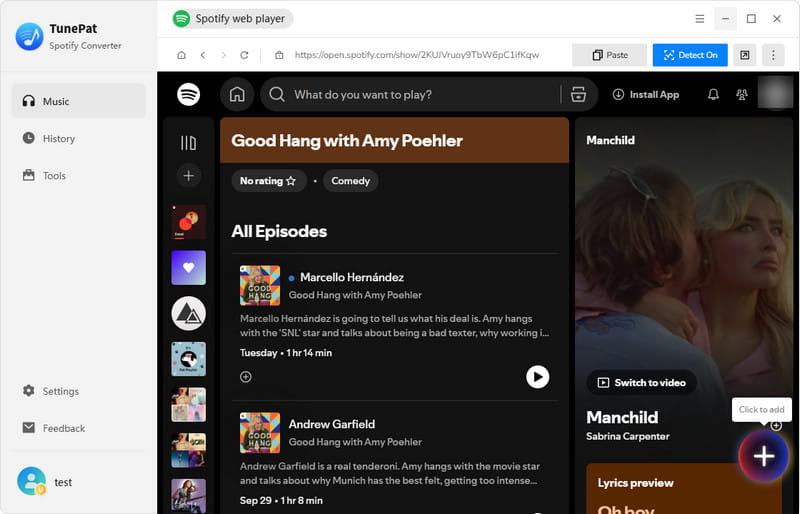
Download and install TunePat Spotify Converter on your Windows PC or Mac. Open the Spotify library in the program and search for the podcast you want. For our test, we chose Good Hang with Amy Poehler.
Step 2 Select the episodes.
Open the podcast and click the "+" button in the lower-right corner. The program will load the available episodes, with all of them selected by default. Uncheck any episodes you don't want, then click "Add".
Step 3 Choose the output settings and convert.
Open Settings to adjust the output format, audio quality, and destination folder. We kept the default "Recommended" format, which produced a 128 kbps MP3 file in our test. Click "Convert" to start downloading the selected episodes.
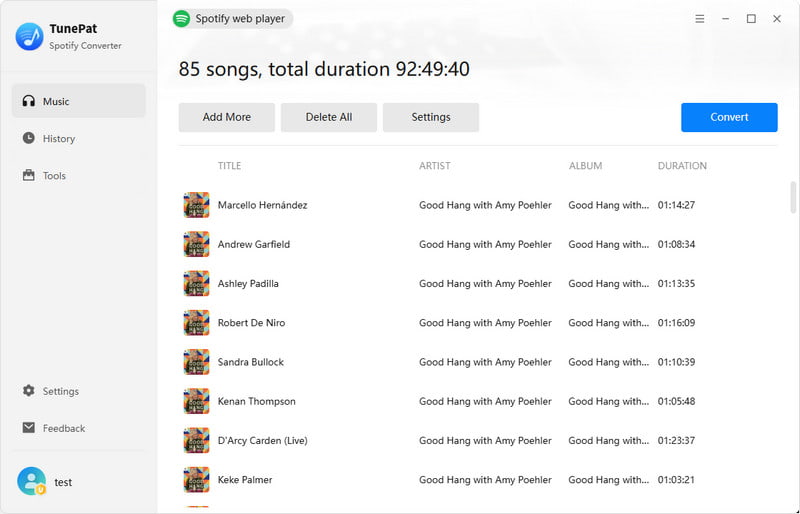
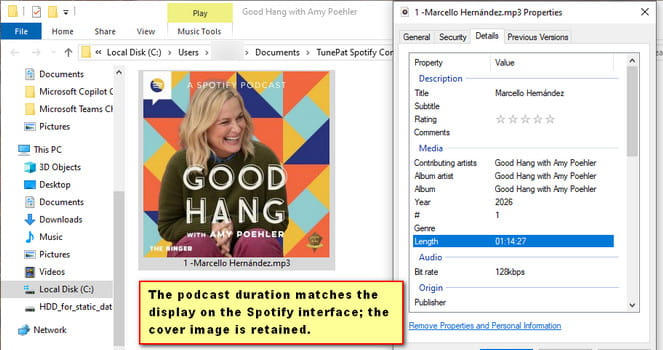
Our Test: The "Marcello Hernández" episode took about two minutes to download. The file was named after the episode and retained its cover artwork and title information. More importantly, its length and opening audio matched what we heard on Spotify. However, the program is available for Windows and Mac only. A free trial is available, but a paid license is required to download full-length podcast episodes.
2. TunePat Music One – Free Podcast Downloads
TunePat Music One has a separate Podcasts section where you can search for shows and download episodes as MP3 files. This section is completely free, with no account required and no limit on the number of episodes you can download. It includes podcasts from many different sources, so you can often find shows that are also available on Spotify without going through Spotify itself.
How to Download Podcasts with TunePat Music One
Step 1 Open the Podcasts section.
Install and launch TunePat Music One on your Windows PC or Mac. Click "Podcasts" in the left sidebar.
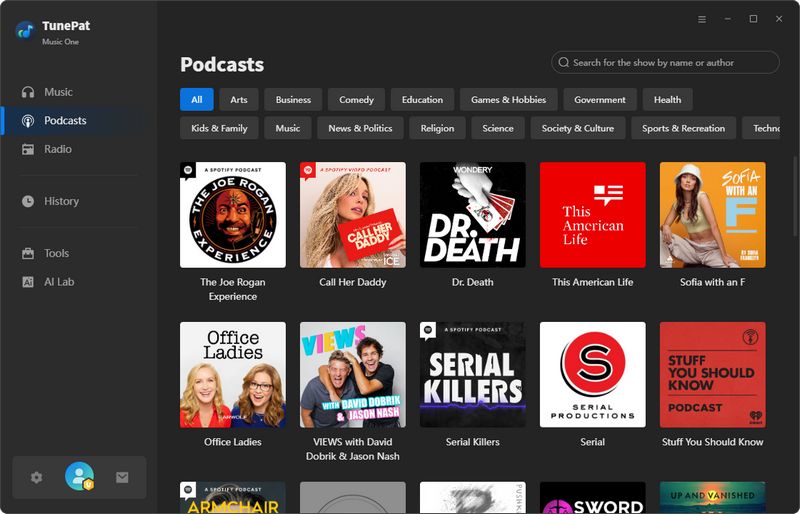
Step 2 Search for a podcast.
Enter the show name in the search box at the top right. We searched for Good Hang with Amy Poehler and opened the show from the results.
Step 3 Download the episodes.
Click the download icon next to an episode to save it individually. To download several episodes, select the ones you want and click "Download Selected". You can also click "Download All" to save all available episodes.
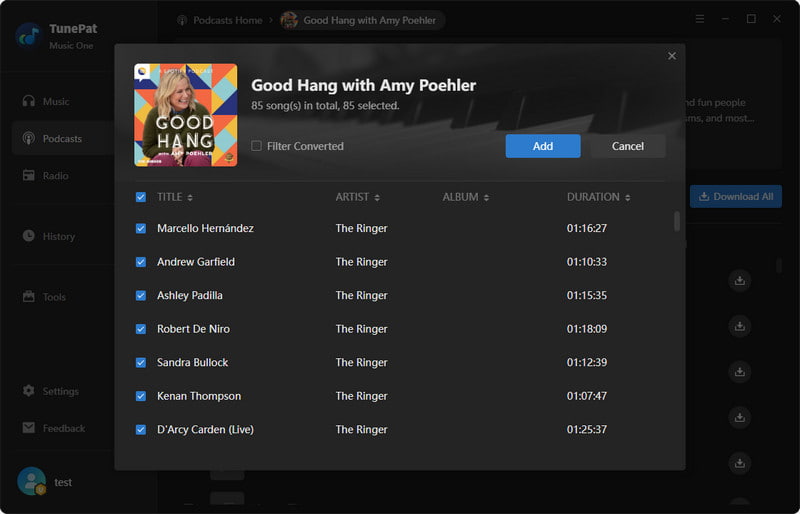
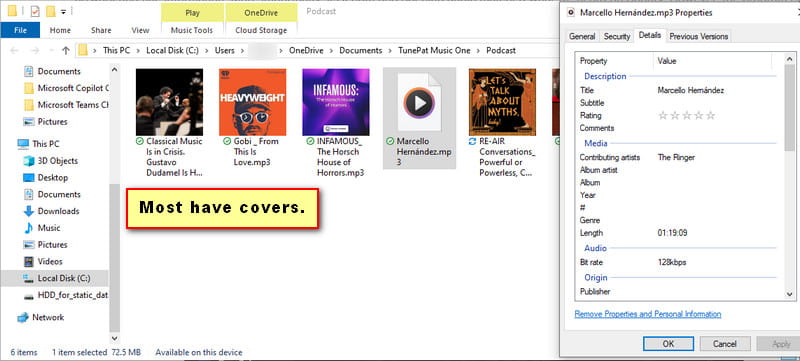
Our Test: The "Marcello Hernández" episode downloaded in just 12 seconds, with the correct filename. The process was quick and straightforward, although the cover artwork was missing for this episode. Most other podcasts we tested retained their artwork. Since Music One uses a separate podcast directory, some shows available on Spotify may not be included.
Best Online Spotify Podcast Downloaders
If you don't want to install a program, these online tools let you save podcast episodes through your browser. Some work with Spotify episode links, while others let you search for shows by name.
1. PodcastToMp3.com – Free Podcast Downloads in Batches
PodcastToMp3.com lets you search for podcasts by name rather than paste a Spotify link. Once you find a show, you can download individual episodes or several at once. The website is free to use and doesn't require an account.
How to Use PodcastToMp3.com to Download Spotify Podcast Show in Bulk?
Step 1 Visit PodcastToMp3.com and search for a show, such as Good Hang with Amy Poehler. Open the matching result to see its episodes.
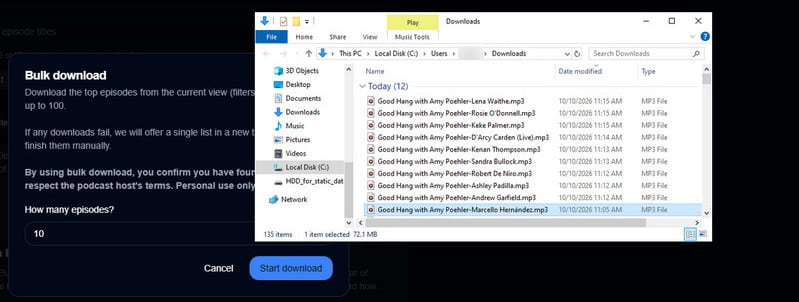
Step 1 Click Download beside an episode to save it directly. To get multiple episodes, click Bulk Download, choose how many you want, and allow multiple downloads in your browser if prompted.
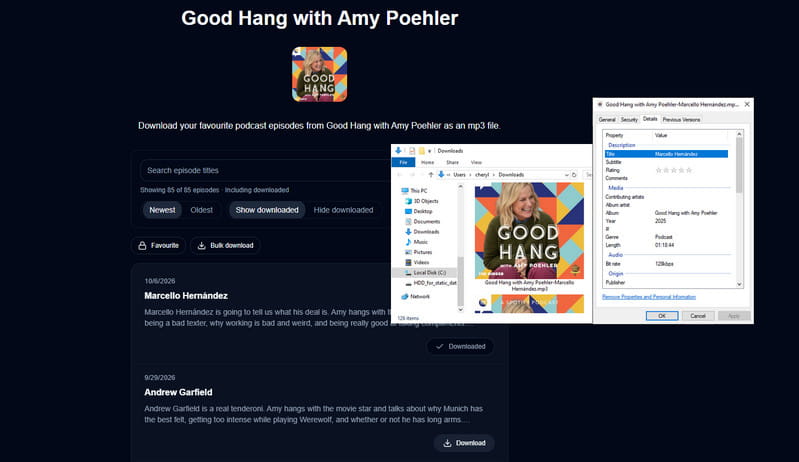
Our Test: The "Marcello Hernández" episode downloaded in just a few seconds. The MP3 had a clear filename combining the show and episode names, and its cover artwork and tags were retained. We also downloaded 10 episodes in about 3 minutes. The bulk download feature allows up to 100 episodes at a time, making it a useful option for saving multiple episodes without installing software.
2. SpotScribe – Download Individual Spotify Episodes
SpotScribe is a free online tool that works with Spotify episode links. It can download individual episodes, but it doesn't support a podcast show URL.
How to Use SpotScribe to Download Spotify Podcast Episode?
Copy an episode link from Spotify and paste it into SpotScribe. Click Download, then select Download again on the results page. When the audio opens in a new tab, use the player's menu to save the file.
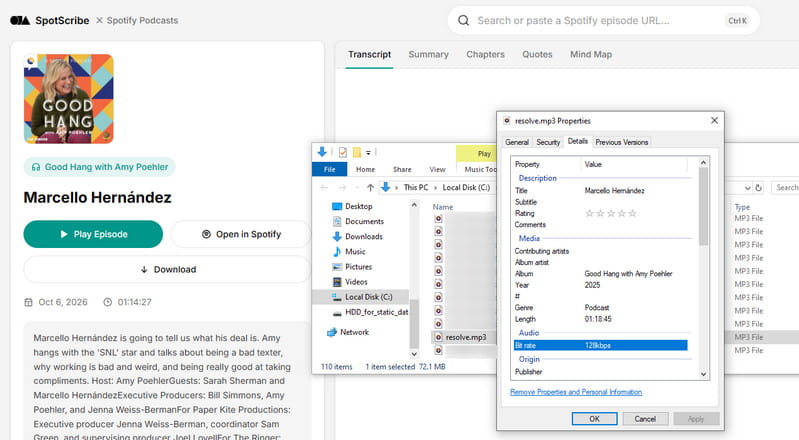
Our Test: The download took about 54 seconds. The MP3 retained its cover artwork, title, and other tags, but the filename was unreadable. We also tried a full podcast show link, which returned an "Invalid Spotify episode URL" error.
3. PodcastMP3.com – Another Option for Single Episodes
PodcastMP3.com also accepts Spotify episode links, making it useful when you only need to save one episode. Unlike PodcastToMp3.com, it doesn't offer a way to select or download multiple episodes at once.
How to Use PodcastMP3.com to Export Spotify Podcast in MP3?
Paste a specific Spotify episode link into PodcastMP3.com and click Download. After the link is processed, select Download Now. The audio opens on a separate page, where you can use the player's menu to download the MP3 file.
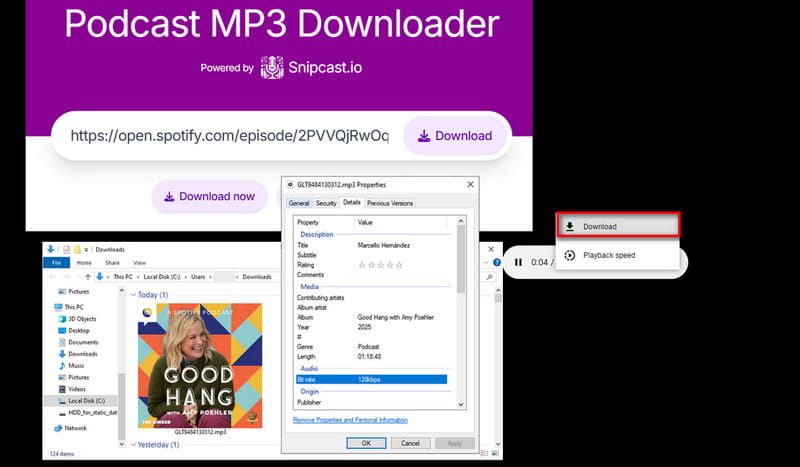
Our Test: Downloading the same episode took about 1 minute and 35 seconds. The file retained its cover artwork and audio tags, but the filename was unreadable, just as we found with SpotScribe.
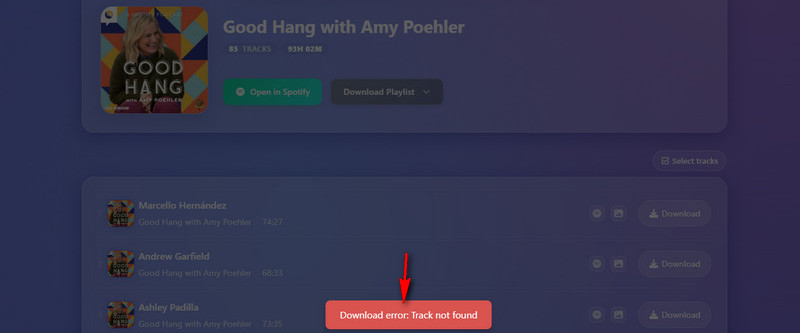
Also Tested: SpotiSaver. We tried SpotiSaver as well. It listed the podcast episodes, but neither individual nor full-show downloads worked in our test. The site returned an HTTP 400 error for the full show and a "Track not found" message for individual episodes, so we didn't include it among the five working downloaders.
FAQs About Downloading Spotify Podcasts
Q1. Can I download Spotify podcasts without Premium?
A: Yes. Spotify Free users can download podcasts for offline listening within the app, although some shows may require Premium. If you want separate MP3 files, third-party downloaders offer other options. You don't need Spotify Premium to use the tools we tested, but some desktop software requires a paid license for full-length downloads.
Q2. Can I download an entire Spotify podcast at once?
A: Yes, if the downloader supports batch downloads. TunePat Spotify Converter lets you select multiple episodes, while TunePat Music One offers a Download All option for available shows. PodcastToMp3.com also supports bulk downloads of up to 100 episodes at a time. However, not every tool can download an entire show from a Spotify link.
Q3. Can I download Spotify podcasts without logging in?
A: Yes. In our tests, TunePat Spotify Converter could search for and download podcast episodes without a Spotify login. TunePat Music One's free Podcasts section and the online downloaders we tested also worked without connecting a Spotify account. Keep in mind that downloading without logging in doesn't necessarily mean every tool is completely free.
Q4. Why can't I find some Spotify podcasts in a downloader?
A: Some downloaders search public podcast directories instead of Spotify's library. If a show isn't available through those sources, it may not appear in the results. Spotify-exclusive episodes, unavailable audio feeds, or changes to a show's distribution can also affect whether a downloader can find or process it.
Q5. Why is my downloaded podcast longer than the Spotify version?
A: Different downloaders may retrieve different versions of the same episode. Some include extra ads or introductions that aren't present in Spotify's playback. We noticed this in our tests: several downloaded files had additional ads at the beginning, making them longer than the Spotify version. A longer file doesn't necessarily mean the podcast itself is different or incomplete.
Conclusion
After testing these Spotify podcast downloaders, we found clear differences in how they handle podcast episodes. TunePat Spotify Converter is a good option if you want to work with Spotify's library and have more control over output settings, while TunePat Music One provides a simple way to download available podcasts for free. For occasional downloads without installing software, browser-based tools like PodcastToMp3.com can also be useful.
One thing we noticed during testing is that the same podcast episode may not always be identical across different downloaders. Some tools may retrieve different versions of an episode, so checking a few downloaded files before saving a larger collection is a good idea.
Download Spotify Podcasts with TunePat
TunePat Spotify Converter
Spotify library downloads
TunePat Music One
Free podcast downloads
Olivia Anderson
Senior Writer