BigMP3 Review: Our Tests, Results, and Better Alternatives
 By Olivia Anderson
Music Tips
Updated on 10/10/2026
By Olivia Anderson
Music Tips
Updated on 10/10/2026
In this BigMP3 review, we take a closer look at how well this online downloader works in real use. BigMP3 lets you download music and videos as MP3 or MP4 files, with different quality options available. On paper, the available settings look fine, but the real results can be different. We tested several songs and music videos to check the actual audio and video quality, download speed, metadata, and overall download experience.
Part 1: What Is BigMP3?
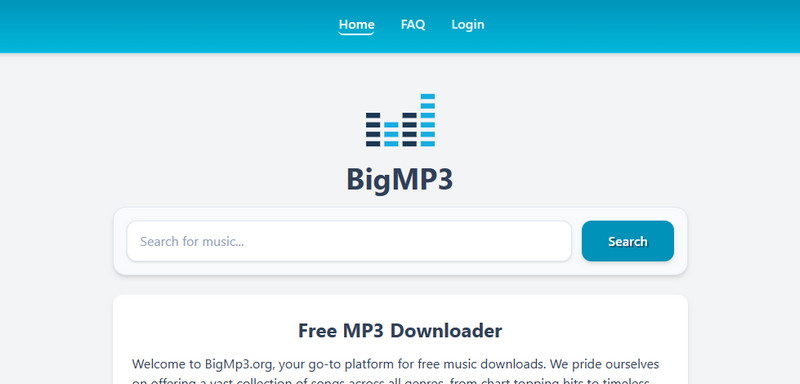
BigMP3 is a free online downloader that lets you search for songs and download them as MP3 or MP4 files directly from your browser. There is no software to install, and the interface is fairly simple to use. For MP3 downloads, it offers quality options from 128 kbps to 320 kbps, while MP4 downloads are available from 360p to 1080p. However, the settings shown on the site don't always match what we found in the downloaded files, and we also ran into some redirects and other issues during testing. We'll cover these findings in more detail below.
BigMP3 Rating
Part 2: BigMP3 Test Results: Does It Really Deliver?
To evaluate BigMP3's actual performance, we tested several songs and music videos using both its MP3 and MP4 download options. We compared the selected quality with the properties of the downloaded files and also checked the audio spectrum, video resolution, video bitrate, and metadata.
Test Environment: What We Used for Testing
| Item | Details |
|---|---|
| Device | Windows PC |
| Processor | Intel Core i3-8100 @ 3.60 GHz |
| RAM | 8 GB |
| System | 64-bit Windows |
| Browser | Google Chrome |
MP3 Download Test: Is 320 kbps Really 320 kbps?
We tested five songs and selected the highest available MP3 quality, 320 kbps, for each one. The downloaded files all showed 320 kbps in their file properties, but that number didn't tell the whole story. We checked each file with Spek to see how much audio frequency was actually present and whether basic song information was preserved.
Testing note: The five test tracks were Wildest Dreams and You Belong With Me by Taylor Swift, BIRDS OF A FEATHER by Billie Eilish, Golden by Kelly Clarkson, and Just Us by Bruno Mars ft. Lady Gaga.
| Test | Result | Details | Verdict |
|---|---|---|---|
| 5 MP3 Tracks | ⚠ ~16 kHz cutoff | All 5 files showed 320 kbps in file properties | Lower-quality audio |
| Audio Quality | ⚠ Likely lower bitrate | Spectrum results suggest re-encoding from a lower-quality source | Not genuine 320 kbps quality |
| Metadata | ✗ Not preserved | Title, artist, and cover art missing from all 5 files | Needs manual tagging |
The results were consistent across all five tracks. Although all five files showed 320 kbps in their properties, Spek revealed a clear cutoff at around 16 kHz in every test. None of the files retained basic metadata such as the title, artist, or cover art.
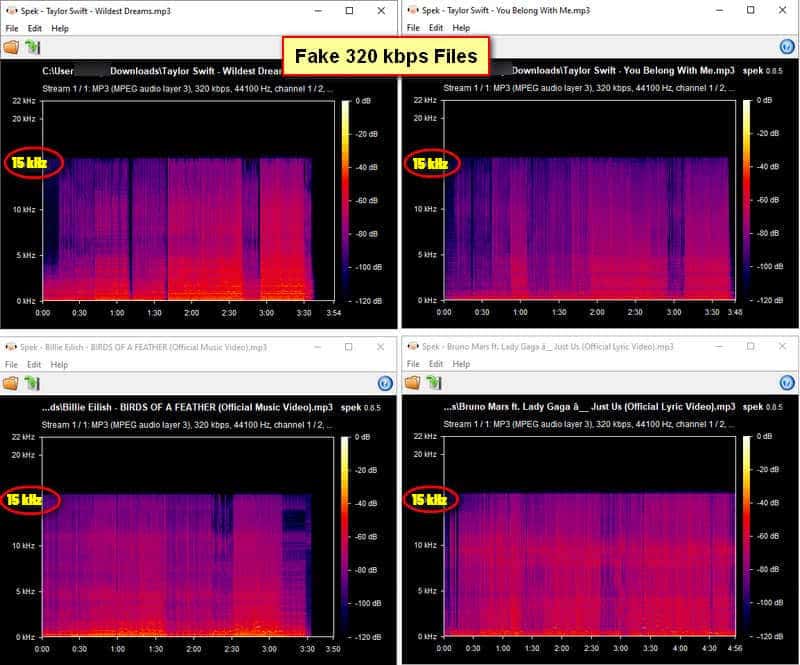
This clear cutoff suggests that the files were likely sourced from lower-quality audio and then re-encoded as 320 kbps MP3s. Re-encoding a lower-quality source can make a file show a higher bitrate, but it cannot bring back audio detail that was already lost. In other words, the 320 kbps label doesn't necessarily mean you'll get genuine 320 kbps audio quality.
MP4 Download Test: Does 1080p Really Mean 1080p?
We also tested five music videos and selected the highest available video quality, 1080p, for each one. We then checked the downloaded files to see whether the actual resolution and video bitrate matched what BigMP3 showed on the download page.
| Test | Result | Details | Verdict |
|---|---|---|---|
| Wildest Dreams – Taylor Swift | ⚠ 720p | 1080p selected; 1280 × 720, 389 kbps | Below 1080p |
| You Belong With Me – Taylor Swift | ✗ 480p | 1080p selected; 854 × 480, 556 kbps | Far below 1080p |
| BIRDS OF A FEATHER – Billie Eilish | ⚠ 720p | 1080p selected; 1280 × 720, 573 kbps | Below 1080p |
| Golden – Kelly Clarkson | ⚠ 720p | 1080p selected; 1280 × 720, 807 kbps | Below 1080p |
| Just Us – Bruno Mars ft. Lady Gaga | ⚠ 720p | 1080p selected; 1280 × 720, 104 kbps | Very low bitrate |
None of the five videos were actually downloaded in 1080p. Four files were 1280 × 720, while You Belong With Me was only 854 × 480. So even though we selected 1080p every time, the actual files were all below the quality shown on BigMP3. This was the biggest issue we found in the MP4 test.
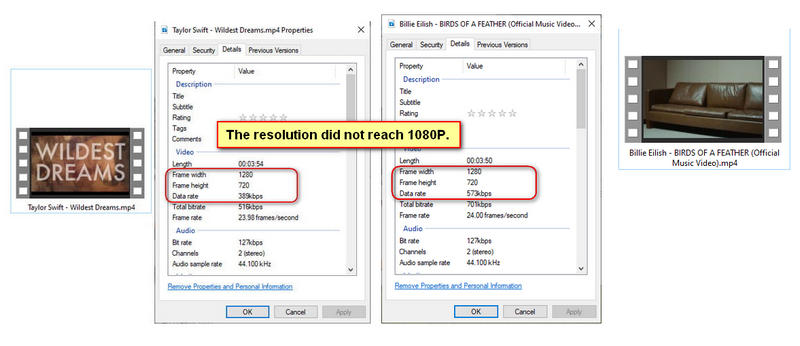
The video bitrates were also quite low across the five tests. Some files had especially low bitrates for their actual resolution, which can lead to softer images, more compression artifacts, and less detail, especially in scenes with a lot of movement. Combined with the fact that none of the files reached 1080p, the results show that selecting 1080p on BigMP3 does not guarantee either the advertised resolution or good video quality.
Download Speed: How Fast Is BigMP3?
We also checked how long BigMP3 took to complete both MP3 and MP4 downloads during our tests. Most files finished within a few seconds to around 10 seconds, although we occasionally ran into a “Failed” message.
| Test | Result | Details | Verdict |
|---|---|---|---|
| MP3 Downloads | ✓ Fast | Usually completed within a few seconds to around 10 seconds | Good |
| MP4 Downloads | ✓ Fast | Usually completed within a few seconds to around 10 seconds | Good |
| Failed Downloads | ⚠ Occasional | Some downloads showed “Failed” and required reopening the download page | Minor issue |
Overall, download speed was one of BigMP3's stronger points. Once the download actually started, both MP3 and MP4 files were usually ready within seconds. The occasional “Failed” message was a minor inconvenience, but speed itself was not a major problem in our testing.
Part 3: Is BigMP3 Safe to Use?
BigMP3 appears usable, but we would not consider it a particularly safe or trustworthy option. The main concern is not the downloaded files themselves, but the frequent redirects, ads, and third-party download pages we encountered during testing. You may be redirected even when clicking on blank areas of the page, and the first click on the download button may take you somewhere else before the actual download page appears.
| Test | Result | Details | Verdict |
|---|---|---|---|
| Page Interaction | ⚠ Frequent redirects | Clicking some blank areas could trigger a redirect | Annoying |
| Download Button | ⚠ Multiple redirects | The first click redirected elsewhere; a second click was needed | Confusing |
| Download Page | ⚠ Third-party site | Download was completed through tikdownloader.net | Less trustworthy |
| Ads & Pop-ups | ⚠ Present | Bottom-of-page ads and occasional pop-ups | Annoying |
| “Learn more” | ⚠ Multiple redirects | Several redirects could occur before related content opened | Poor experience |
The biggest concern was that the actual download was handled through tikdownloader.net rather than directly by BigMP3. The third-party page displayed ads at the bottom and occasionally showed pop-ups. We also experienced several redirects when using the "Learn more" option to view related songs.
We did not find clear evidence that the downloaded files contained malware, so we wouldn't say that BigMP3 is outright dangerous based on our tests. However, the frequent redirects and third-party download process make it less trustworthy than a cleaner, direct-download service. If you use it, be careful with unexpected pages, ads, and download prompts.
Part 4: Better Alternatives to BigMP3
BigMP3 can be useful when you just want a quick download, but our tests showed some clear limitations, including the gap between the selected and actual quality, missing metadata, frequent redirects, and the use of a third-party download page. If you want more control over quality and output, a cleaner download process, or more options for managing your music and videos, these two alternatives are worth considering.
TunePat Music One: A Better Choice for Music Downloads
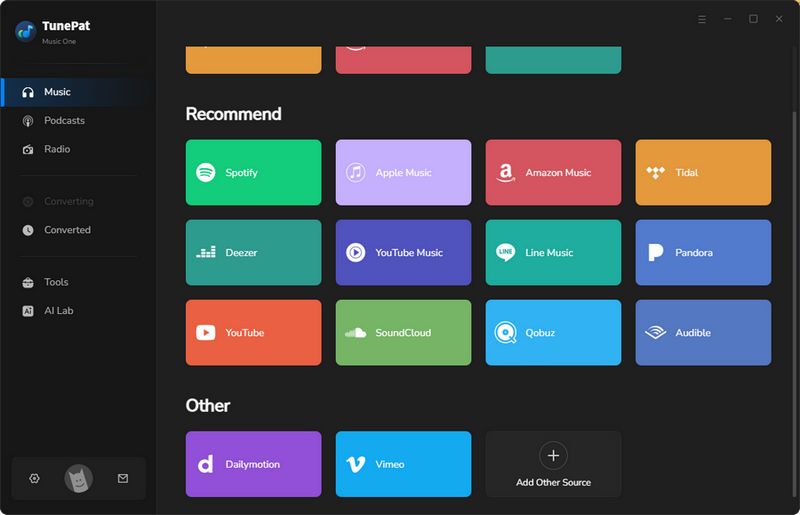
TunePat Music One is a music converter for downloading music from popular platforms such as Spotify, Apple Music, YouTube Music, Amazon Music, YouTube, SoundCloud, TIDAL, and Deezer. Compared with BigMP3, it gives you more control over the audio output instead of simply choosing a bitrate and hoping the downloaded file matches it.
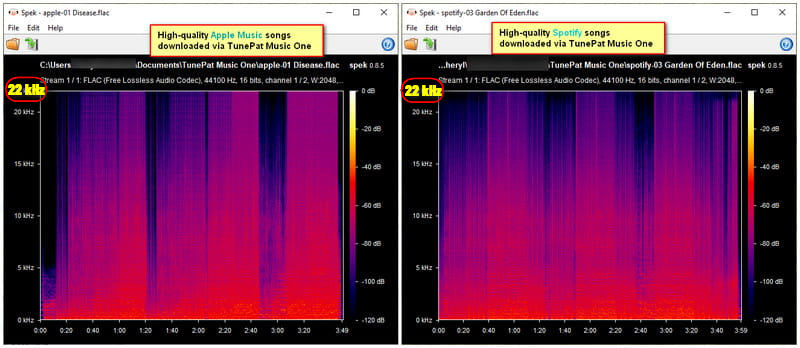
This is especially useful after seeing the results of our BigMP3 test. The five files we downloaded as 320 kbps showed a clear cutoff at around 16 kHz, and none of them kept basic metadata. TunePat Music One can keep the original audio quality for supported platforms, preserve metadata, and support batch downloads. It is a better fit for users who regularly download music, save full albums or playlists, or want to keep their music files properly organized. It also avoids the ads and redirects we encountered with BigMP3.
| Category | Result |
|---|---|
| Supported Platform Types | Spotify, Amazon Music, Apple Music, YouTube Music, YouTube, SoundCloud, TIDAL, Pandora, Deezer, Line Music, Pandora, Bandcamp, Vimeo, Mixcloud, etc. |
| Output Format | MP3, FLAC, WAV, AIFF, AAC, ALAC, etc. |
| Audio Quality | Keep original quality (Up to lossless audio quality) |
| Metadata | Preserve artist, album, year, cover art, etc. |
| Download Speed | Fast (~ 10X; Spotify can reach speeds of up to 40x.) |
| Ads & Redirects | None found |
| Safety | Safe to use. Official desktop software with regular updates. |
How to Download Music with TunePat Music One
Step 1 Download and install TunePat Music One, then select the music platform you want to use.
Step 2 Find the song, album, or playlist you want to download and add it to the conversion list.
Step 3 Choose your preferred format and quality, then click "Convert" to start the download.
💡 Tips: The quality of your downloaded audio depends on the original source. If you choose a platform where the available audio is compressed, such as YouTube or Pandora, the download cannot be truly lossless, even if you select a higher-quality output setting. For platforms that offer lossless sources, such as Spotify, Apple Music, TIDAL, and more. TunePat can preserve the available source quality when downloading.
TunePat VideoGo All-In-One: A Better Choice for Video Downloads
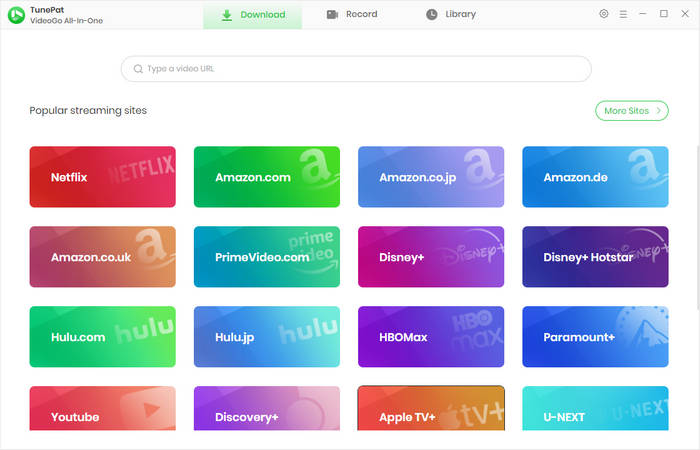
TunePat VideoGo All-In-One is a video downloader for saving videos from popular platforms such as Dailymotion, Netflix, Amazon Prime Video, Disney+, YouTube, and Facebook. Compared with BigMP3, it gives you more control over video quality and output instead of relying only on the quality option shown on the download page.
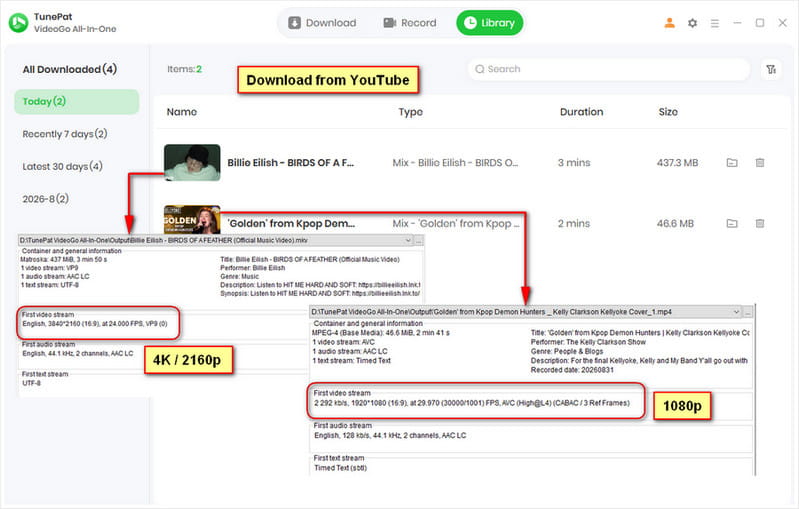
This is especially useful after our BigMP3 video test. We selected 1080p for all five videos, but the actual files were only 720p or 480p, with relatively low video bitrates. VideoGo supports higher-quality downloads, with up to 4K available on some supported platforms, depending on the source. It also supports batch downloads, making it useful for both everyday video downloads and users who regularly save movies and TV shows. The download process is also much cleaner, with no ads or redirects found in our testing.
| Category | Result |
|---|---|
| Supported Platform Types | Netflix, Prime Video, Disney+, Hulu, HBO Max, Paramount+, Discovery+, YouTube, Apple TV+, Crunchyroll, etc. |
| Output Format | MP4, MKV |
| Video Quality | Up to 4K (depending on the specific video) |
| Download Speed | Fast |
| Ads & Redirects | None found |
| Safety | Safe to use. Official desktop software with regular updates. |
How to Download High-quality Videos with TunePat VideoGo All-In-One
Step 1 Download and install TunePat VideoGo All-In-One, then open the video platform you want to use.
Step 2 Find the video you want to download and click the "+" button to analyze it.
Step 3 Select your preferred video quality and output format, then click "Download" to start.
Part 5: FAQs About BigMP3
Q1: Is BigMP3 free to use?
A: Yes. BigMP3 can be used for free without a subscription. The site also offers optional ways to support the service, including "Buy Me a Coffee" and "Donate via Crypto", as well as a paid Subscribe plan starting at $5.50/month, which is promoted as an ad-free option. However, neither payment nor a subscription is required for basic downloads.
Q2: Can I use BigMP3 on my phone?
A: Yes. BigMP3 works through a web browser, so you can access it from phones, tablets, and computers without installing a dedicated app.
Q3: Can BigMP3 download both MP3 and MP4 files?
A: Yes. BigMP3 supports MP3 audio and MP4 video downloads. The website lists MP3 options from 128 kbps to 320 kbps and MP4 options from 360p to 1080p, but our tests found that the actual files did not always match the selected quality.
Q4: Can I download multiple songs or videos at once with BigMP3?
A: BigMP3 is mainly designed for individual downloads rather than batch processing. If you regularly download multiple songs, albums, playlists, or videos, a desktop downloader with batch support will be more convenient.
Q5: Is BigMP3 a good choice for high-quality downloads?
A: Not really, especially if audio or video quality is your main priority. Our tests found that the actual quality did not always match the options shown on the site. If you want more reliable output quality and better control over your downloads, TunePat Music One is a better option for music, while TunePat VideoGo All-In-One is a better choice for videos.
Conclusion
BigMP3 is convenient for quick, occasional downloads, and its basic download features can be used without subscribing to a paid plan. However, our testing found that the actual audio and video quality did not always match the options shown on the site. The MP3 files labeled as 320 kbps showed a clear cutoff around 16 kHz, while the videos selected as 1080p did not reach 1920 × 1080. Missing metadata, redirects, ads, and the third-party download page also made the overall experience less reliable.
So, is BigMP3 worth using? It can be fine for a quick, one-off download if you don't care too much about quality or metadata. But if you want more reliable quality, batch downloads, and a cleaner experience, there are better options. For music, TunePat Music One is a better fit for higher-quality audio and organized music downloads, while TunePat VideoGo All-In-One is a better choice for users who want higher-quality video downloads and more flexible options.
Olivia Anderson
Senior Writer