Is SaveTube Safe? What We Found After Testing Different Versions
 By Olivia Anderson
More Tips
Updated on 8/05/2026
By Olivia Anderson
More Tips
Updated on 8/05/2026
If you typed "Is SaveTube safe?" into Google, you've probably realized something confusing: there isn't just one SaveTube. From random websites and browser extensions to Android APKs, multiple tools share the exact same name.
So, is it actually safe? It comes down to which one you're using. Some are fine, but others are packed with sketchy ads, fake download buttons, or privacy risks. In this article, we'll cut through the confusion and show you which SaveTube versions are safe, as well as which ones you should completely avoid.
| Category | Details |
|---|---|
| Overall Safety | Depends on the version you use |
| Safest Option | Browser extensions from trusted stores |
| Highest Risk | Third-party Android APKs |
| Main Security Concerns | Fake download buttons, aggressive ads, and unofficial sources |
Part 1: What Is SaveTube?
SaveTube is a tool that helps you download online videos for offline viewing by pasting a video link and saving the file to your device. It comes in several formats, including websites, browser extensions, desktop applications, and Android apps. Because these versions interact with your device differently, such as requiring software installation or system permissions, some options are naturally safer and more reliable than others.
Part 2: Comparing Different SaveTube Versions: Which One Is Safer?
Not all SaveTube tools carry the same security risks. Online tools are quick and work directly in your browser, while installed apps and extensions require setup and additional permissions. Below, we compare each SaveTube option to help you understand their main differences and choose the safest option for your needs.
Quick Comparison: Which SaveTube Version Fits Your Needs?
| Version | Best For | Key Point |
|---|---|---|
| SaveTube Website | YouTube Shorts downloads | Simple MP4/MP3 downloading without installation |
| Save.tube | Multi-platform online downloads | Easy to use, but download results may vary |
| Firefox Extension | Browser-based downloading | More control, but requires browser permissions |
| SaveTube Youtube-dl GUI | Advanced users | More formats and features, but requires installation |
| SaveTube Android APK | Mobile downloads | Convenient, but source verification is important |
SaveTube Website (save-tube.com)
SaveTube is an online downloader primarily built for YouTube Shorts. Since it operates entirely in your browser, you can grab videos quickly without installing any software or extensions. This makes it a handy choice for quick, occasional downloads.

Pros
-
 No software or extension installation needed.
-
Offers MP4 and MP3 output options.
-
Designed specifically for YouTube Shorts.
-
Works across different devices.
Possible Risks
-
 High chance of pop-up ads or unexpected page redirects.
-
Fake or similar-looking websites may exist.
-
Users should verify download buttons before clicking.
Safety Consideration
Lower installation risk, but verify the website source.
Because the web version requires no software installation or device permissions, it carries a lower security risk. However, you should still stay cautious of aggressive ads and make sure you are using the correct domain.
If you download videos frequently and prefer an ad-free experience without manual copying and pasting, a dedicated tool like TunePat provides a much cleaner alternative.
Save.tube Online Downloader
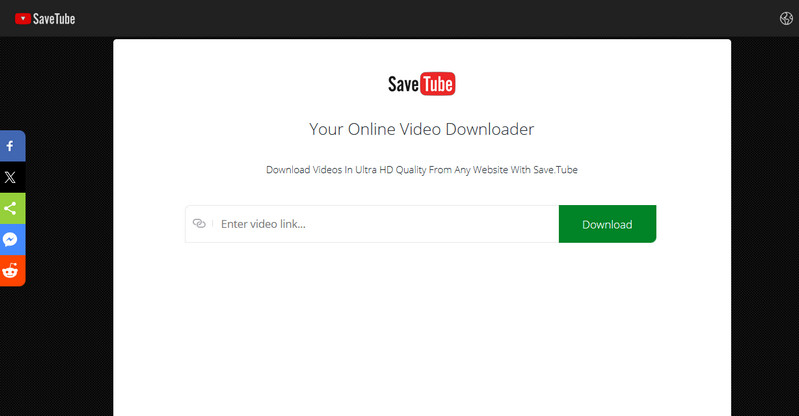
Save.tube is a browser-based downloader that supports videos from multiple platforms, including YouTube and other media sites. To download a video, you simply paste the URL into the page and select an available file option.
During testing, Save.tube displayed buttons like "Download Fast" and "More qualities & formats," but these options did not always offer different resolution choices. In most cases, downloads were limited to low-quality MP4 files, and output results were inconsistent, sometimes yielding empty files or altered file names.
Pros
-
No software installation required.
-
Supports videos from multiple online sources.
-
Simple URL-based download process.
Possible Risks
-
Download results may be inconsistent or unreliable.
-
Output file names may not match the original title.
Safety Consideration
Lower installation risk, but download reliability is inconsistent.
Because Save.tube runs entirely in your browser, it does not require app permissions or software installation, keeping security risks relatively low. However, due to its unpredictable download performance, you should always check your files after downloading.
If you need reliable quality and batch processing, a dedicated desktop downloader like TunePat provides a much more dependable alternative.
Firefox Extension
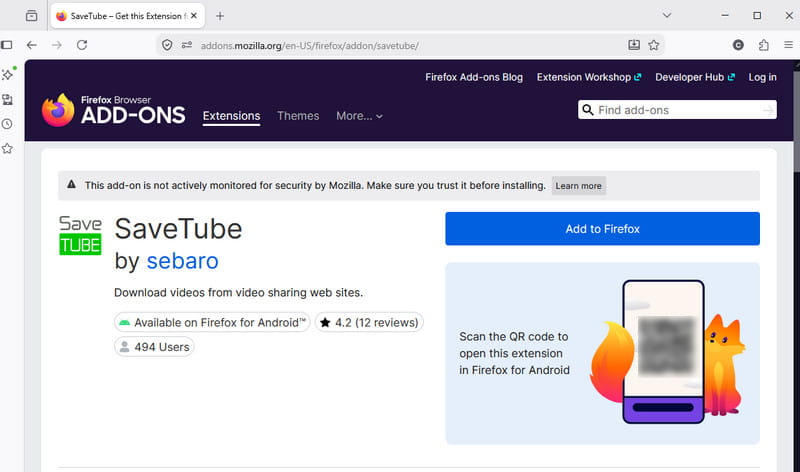
The SaveTube Firefox Extension lets you download videos directly on supported websites without needing a separate downloader page. It places download options right on the video page, making it easy to pick your preferred format and quality while browsing.
This extension is built on a SaveTube JavaScript userscript. You can run it through script managers like Tampermonkey or install the packaged extension directly via Mozilla Add-ons. It supports a wide range of platforms, including YouTube, Vimeo, Dailymotion, and IMDb.
Pros
-
Downloads videos directly within your browser.
-
Provides video format and quality selection options.
-
Supports common formats like MP4 and WebM.
-
Available directly on official Mozilla Add-ons.
Possible Risks
-
Requires website access permissions.
-
Users should review permissions before use.
-
Manual installation or scripts from unknown sources may carry additional risks.
Safety Consideration
Generally safer when installed from Mozilla Add-ons, but permissions should be checked.
Because it is distributed on Mozilla's official platform, the Firefox extension is generally safer and more transparent than unverified extensions. However, since it needs page access to detect video links, you should always check what permissions it asks for before installing.
SaveTube Youtube-dl GUI (SourceForge)
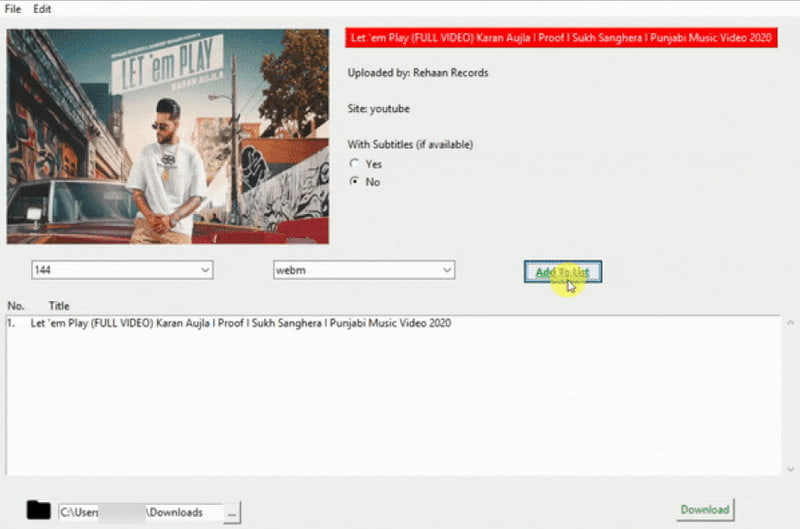
The SaveTube Youtube-dl GUI on SourceForge is a cross-platform desktop application that acts as a graphical wrapper and command-line tool for youtube-dl. It lets you download videos directly to your computer without using web browsers or online tools.
Available for Windows, macOS, and Linux, it supports video downloads, audio extraction, and format selection for files like MP4, MP3, and M4A. Through the underlying youtube-dl engine, it can process media links from a wide range of websites.
Pros
-
Supports Windows, macOS, and Linux.
-
Provides both GUI and command-line options.
-
Supports a wide range of video websites.
-
Allows users to choose available video and audio formats.
Possible Risks
-
Requires installation and additional dependencies.
-
Project updates appear to be limited.
-
Older software may have compatibility concerns.
Safety Consideration
Feature-rich, but check the project status before installation.
As a desktop application, this tool provides more advanced controls like audio extraction and format conversion. However, because youtube-dl updates can be irregular, you should check if the software is actively maintained before installing it.
SaveTube Android APK
The SaveTube Video Downloader Android app allows you to download videos directly to your mobile device from social platforms like TikTok, Shorts, Vimeo, and Reels. Unlike web-based tools, installing an Android app requires downloading an APK file and granting storage permissions on your phone.

Pros
-
Built specifically for Android mobile devices.
-
Downloads videos directly to your phone.
-
Convenient link-sharing workflow.
-
Works well for short-form video clips.
Possible Risks
-
APK files from third-party sources may be modified.
-
Apps may request unnecessary permissions.
-
Users should verify the download source before installation.
Safety Consideration
Requires the highest caution among all SaveTube versions.
Android APKs require the most scrutiny because installing apps outside official stores carries higher risks. Before installing, always make sure you download the APK from a reputable source and double-check what permissions the app asks for.
Part 3: How to Use SaveTube More Safely?
Before using SaveTube, check which version you are using and where you got it from, as different versions work differently and carry different security risks. To avoid common issues like fake websites, excessive permissions, or corrupted downloads, keep these practical tips in mind:
1. Use the Correct SaveTube Website or Source
Multiple tools share the SaveTube name, but they do not all come from the same developers or offer the same safety. Always verify that you are on the official website or a trusted source, especially when getting browser extensions, desktop programs, or Android APK files.
2. Be Careful with Ads and Download Buttons
Online downloaders are often filled with ads and misleading redirects. Some download buttons do not actually start your video download and may redirect you to external pages instead. Stick strictly to the genuine download option and avoid installing extra software suggested by suspicious pages.
3. Check Permissions Before Installing Extensions or Apps
Extensions and mobile apps naturally require permissions to function properly. For example, a browser extension needs page access to detect videos, while an Android app needs storage access to save files. However, if a tool asks for access that seems completely unrelated to video downloading, do not grant it.
4. Verify Downloaded Files After Completion
A completed download does not always mean the file is correct. Depending on the tool you use, you may occasionally get incomplete files, strange file names, or lower resolution than expected. Open your file right after downloading to ensure it plays properly and matches the quality you wanted.
5. Choose a Tool That Fits Your Download Needs
For occasional video downloads, simple web-based tools are usually enough. But if you save videos frequently, dealing with ads and manual steps can quickly get frustrating. In that case, using a dedicated desktop downloader with features like batch downloading and cleaner file management will give you a much better experience.
Part 4: Alternatives to SaveTube for Different Needs
SaveTube can be useful for quick downloads. However, users who download content regularly may need more stable tools or official options. The best choice depends on whether you want to save music, videos, or use offline features.
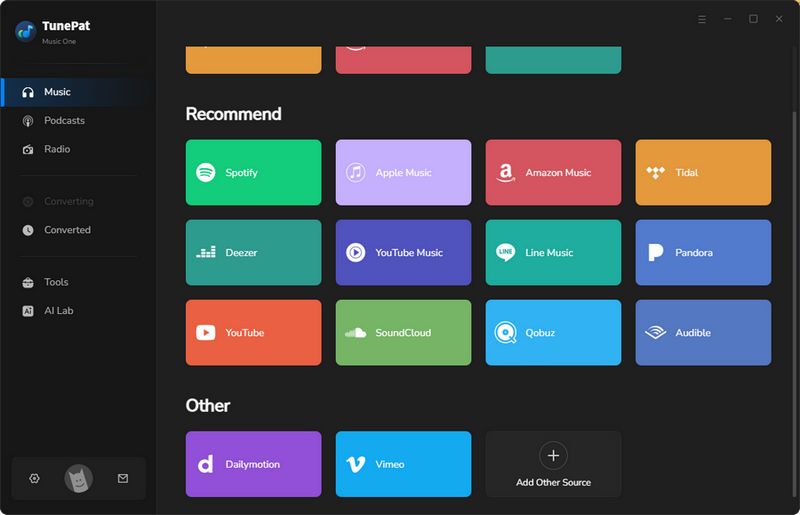
1. TunePat Music One (For Music Downloads)
TunePat Music One is designed for users who want to save music from streaming platforms. It supports services such as YouTube, YouTube Music, Spotify, Apple Music, Amazon Music, TIDAL, Deezer, SoundCloud, and more. Users can convert songs, albums, playlists, and podcasts into common audio formats and save them as local audio files.
| Feature | Details |
|---|---|
| Supported Sources | YouTube, YouTube Music, Spotify, Apple Music, Amazon Music, TIDAL, Deezer, SoundCloud, and more. |
| Output Formats | WAV, FLAC, MP3, AAC, AIFF, ALAC |
| Download Mode | Batch download songs, albums, playlists, and podcasts |
| Metadata | Keep available ID3 tags, like title, artist, album, and more |
| Compatibility | Windows & macOS |
Step 1 Launch TunePat and select a supported music platform.
Step 2 Choose your output settings and add the songs or videos you want to save.
Step 3 Click "Convert" and find your downloaded files in the output folder.
2. TunePat VideoGo All-In-One (For Video Downloads)
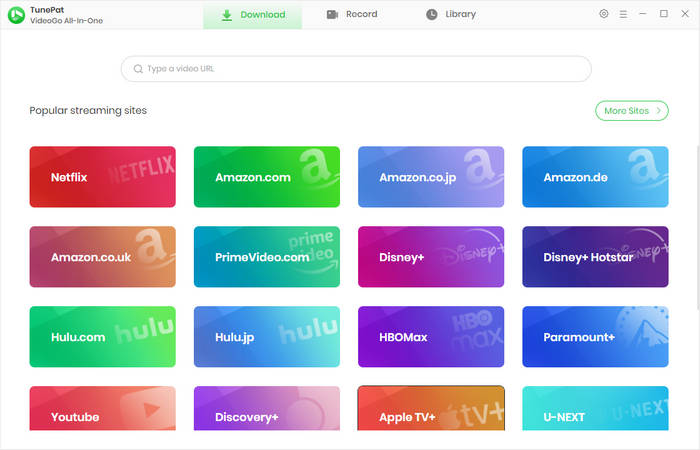
TunePat VideoGo All-In-One is designed for users who want to save videos from online platforms. It supports YouTube and other popular video websites. Users can download videos in available quality options, save them in common formats, and manage downloaded files locally.
| Feature | Details |
|---|---|
| Supported Sources | YouTube and other popular video platforms |
| Output Formats | MP4, MKV, and other supported formats |
| Video Saving Methods | Direct download and screen recording with up to 8X speed |
| Audio & Subtitles | Keep available audio tracks and subtitles |
| Compatibility | Windows & macOS |
Step 1 Launch TunePat VideoGo All-In-One and select the video platform you want to use, such as "YouTube".
Step 2 Add the video you want to download and choose your preferred settings.
Step 3 Click "Download" and find your saved videos in the output folder.
3. Official Download Options (When Available)
Some platforms provide their own offline download features. For YouTube users, YouTube Premium is the official option for offline viewing. New users may also have access to a free trial offer, depending on availability in their region. This is usually the simplest option because the download feature comes directly from the platform.
However, official downloads often have limitations. The content usually stays inside the official app and cannot be saved as normal video files for use on other devices.
| Feature | Details |
|---|---|
| Source | Official platform feature (e.g., YouTube Premium) |
| Installation | No third-party software required |
| Access | Available through the official app |
| Availability | Depends on the platform and subscription plan |
| File Access | Usually limited to in-app playback |
Part 5: FAQs About SaveTube
Q1: Is SaveTube free?
A: Yes, most SaveTube versions are available for free. However, free tools may use different methods to provide their services, such as advertisements or redirects. Users should always check the source of the tool and avoid suspicious download pages.
Q2: Does SaveTube support YouTube Shorts?
A: Some SaveTube versions support YouTube Shorts downloads. However, available features may vary depending on the specific version, such as the website, browser extension, desktop software, or mobile app.
Q3: Can SaveTube download YouTube videos as MP3?
A: Some SaveTube versions support converting YouTube videos to MP3 audio files. However, the available output formats depend on the specific tool. Some versions may only provide video downloads or limited format options.
Q4: Why is SaveTube not working?
A: SaveTube may stop working because of changes to supported websites, temporary service issues, or limitations of a specific version. Common problems include failed video processing, unavailable download links, or incomplete downloaded files.
Q5: Does SaveTube work on Android?
A: Yes, some SaveTube versions are available for Android devices. However, users should check the download source carefully before installing APK files, as third-party apps may come from different providers and may have different permissions.
Conclusion
SaveTube can be useful for downloading online videos, but its safety depends on the specific version and where it comes from. Using official sources, checking permissions, and avoiding suspicious pages can help reduce common risks such as misleading downloads or unwanted redirects.
For users who only download occasionally, a simple online tool may be enough. If you need to download content more often, manage files locally, or have more control over output options, dedicated desktop tools can provide a more stable experience.



Olivia Anderson
Senior Writer