
When we talk about digital music, MP3 has long dominated our headphones and playlists, yet there is another format that quietly lives inside professional recording studios, on the hard drives of music producers, and in the hearts of audiophiles who demand uncompromising sound quality. That format is WAV, and in the sections ahead, we will introduce several effective free WAV music download sites that can help you quickly access songs in this high-quality format.
#1: Most Recommended WAV Music Downloader: TunePat Music One 🔥
When it comes to high-quality audio, most people immediately think of the major streaming platforms that support high-resolution music. Tidal, Amazon Music, Qobuz, and Deezer are among the most well-known. Spotify also recently announced support for FLAC tracks up to 24-bit and 44.1 kHz, and Apple Music continues to offer its own ALAC encoding format. None of these popular platforms choose WAV as their primary format because, although WAV delivers excellent sound quality, its file size is extremely large and its metadata support is limited.
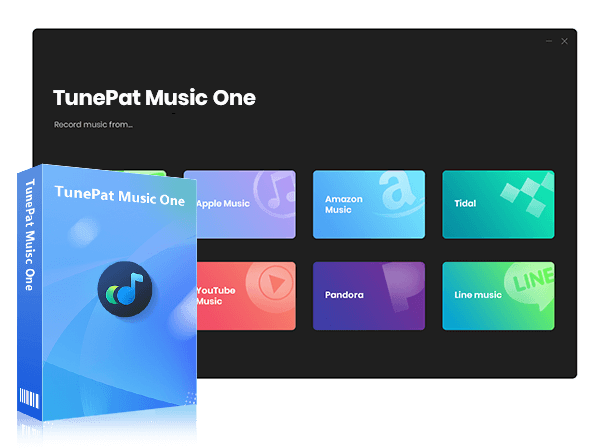
If you really need music in WAV format but find that purchasing individual WAV tracks or full albums is too expensive, there is no need to be discouraged. You can simply export music from streaming platforms in WAV format, which solves the problem instantly. TunePat Music One is a powerful tool that helps you achieve exactly that. With its assistance, you can quickly export songs from Spotify, Tidal, Amazon Music, SoundCloud, Deezer, YouTube, and other sources in batches as WAV, FLAC, MP3, or other files while preserving the original audio quality and essential ID3 tags.
TunePat Music One
It is an all-in-one converter that can support any music streaming platform.
Part 1: Download WAV from Streaming Platforms via Music One
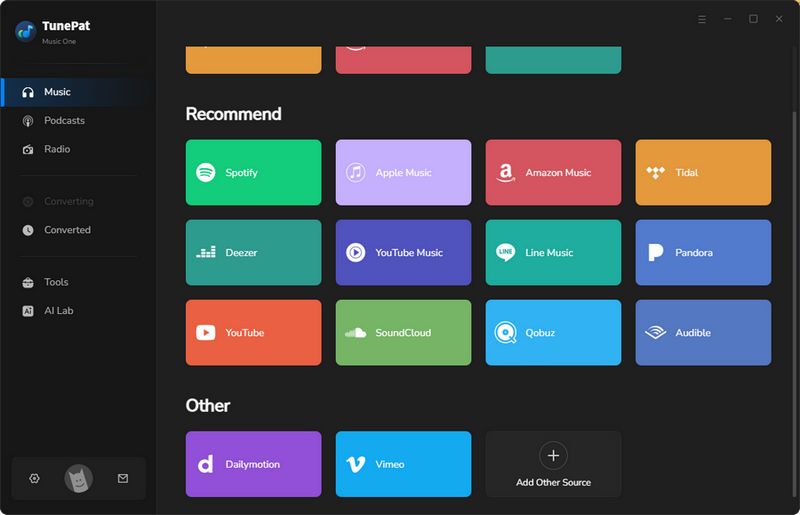
Step 1 Install and launch TunePat Music One on your computer. You will see its main interface, which displays a list of supported popular streaming services, as shown in the image below. Next, we will use Tidal as an example to demonstrate how to download lossless WAV music to your local computer. Please locate and select the "Tidal" tab here.
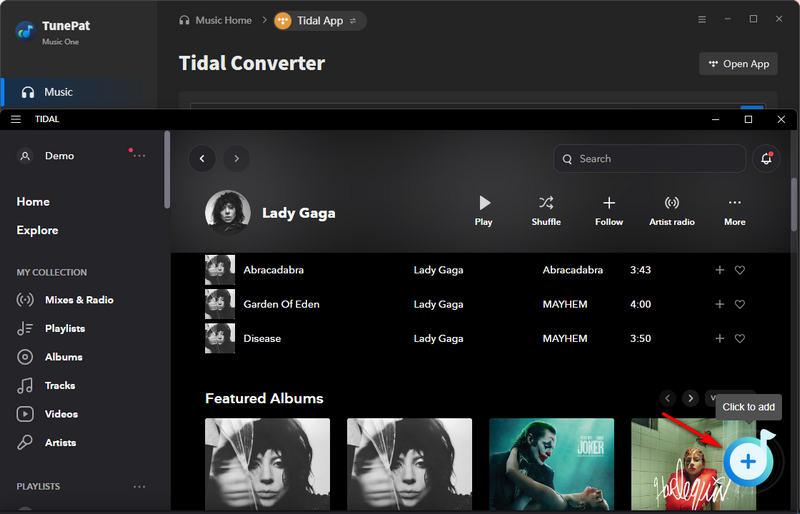
Step 2 Music One supports downloading and converting songs from both the Tidal app and the Tidal web player. For the best audio quality, choose to convert from the Tidal app. Open your Tidal library and select the playlist, album, or other content you want to download in WAV format. Click the "+" button to load the tracks.
Tips: When you choose to download music through the Tidal app, TunePat also gives you two other ways to import your tracks. You can simply drag and drop the songs into the Drag the music here area, or copy the link of any Tidal track and paste it into the blue input box. Tap the "+" button, and TunePat will instantly analyze and load your music.
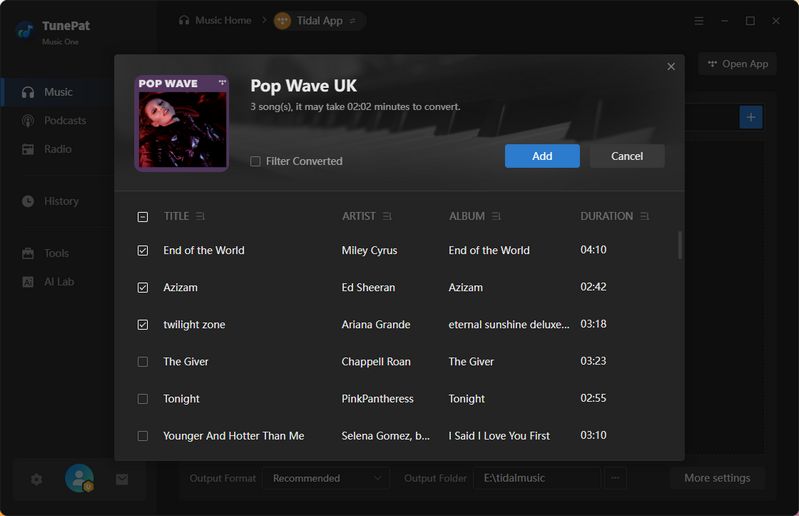
Step 3 All parsed tracks will appear in a pop-up window and will be selected by default. Simply check the songs you want and click the "Add" button to move to the next step.
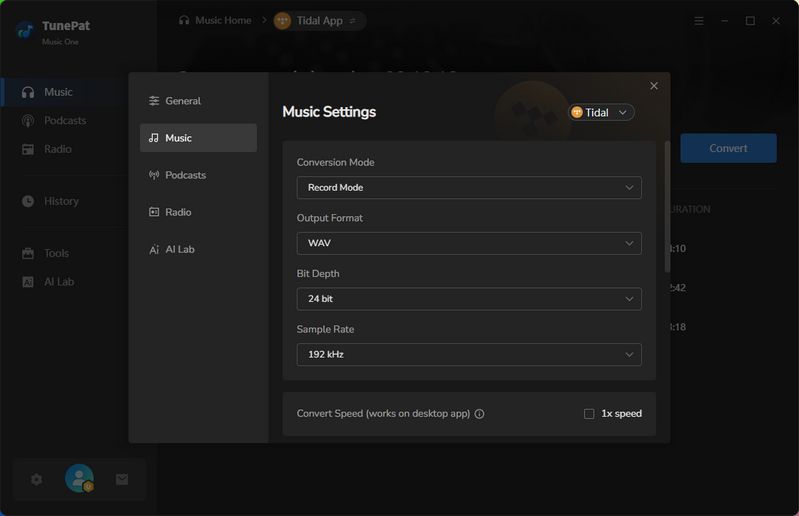
Step 4 On this page, do not start converting yet. Click the "Settings" option or the settings icon in the lower left corner to customize the output parameters. First, change the conversion mode option to "Record Mode". Select "WAV" as the output format. Choose your preferred output quality based on your needs. In general, the highest combination for WAV is 24-bit/192 kHz. Keep in mind that the file size will be very large, so ensure there is enough space in your output folder.
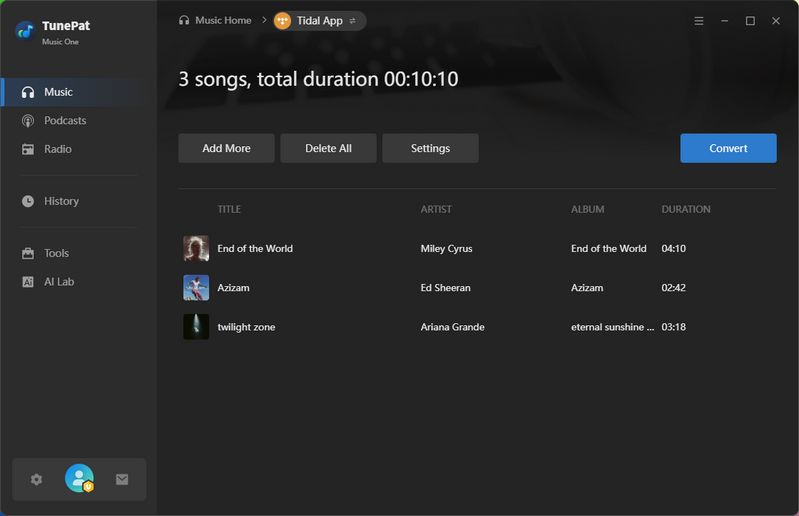
Step 5 Once the settings are complete, click "Convert" to begin. If you want to convert songs from different playlists all at once, you can also click "Add More", repeat the loading and selection steps, and then perform a single unified conversion.
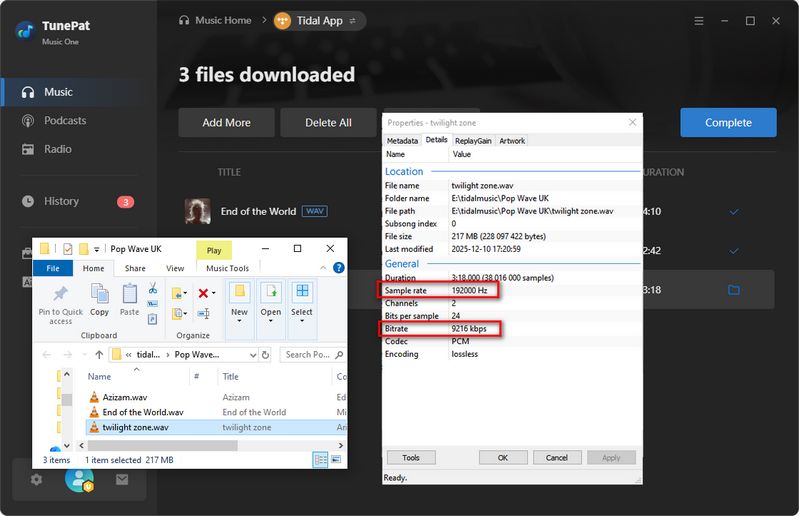
When the conversion is finished, you will receive high-quality WAV files. Enjoy listening to your lossless music.
| Rating | Ads-free | Format | Bit Rate | ID3 Tags | Batch Download | |
|---|---|---|---|---|---|---|
| TunePat Music One | ★★★★★ | ✔ | WAV, FLAC, ALAC, AIFF, MP3, M4A | 192 kHz / 9216 kbps | Artist Name, Track Title, Album Title, Track Number, Date, Disc Number, etc. | ✔ |
Part 2: Convert Local Audio Files to WAV for Free with Music One
As a powerful all-in-one audio converter, TunePat Music One not only supports converting and downloading songs from popular streaming services but also offers a free format conversion tool.
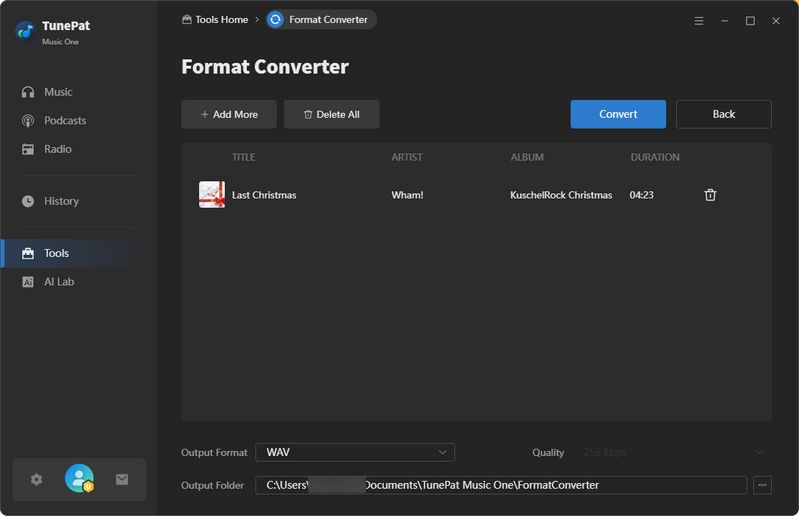
Simply go to the Tools section of the program and select Format Converter. Then drag and drop your local audio files and click on "Convert". Supported input formats include MP3, M4A, M4B, WAV, FLAC, OGG, AIFF, and M4R. The available output formats are MP3, M4A, FLAC, WAV, OGG, AIFF, and ALAC. Just import your local music and choose to export it as WAV.
#2: TubeRipper - Free YouTube WAV Music Download Site
Although YouTube is not a dedicated music streaming platform and is better known as a comprehensive video site, the music resources available on it are incredibly extensive. In some cases, uploaders even share lossless audio files. However, what YouTube users actually hear is always a compressed version of those uploads. Below is a free WAV downloader that can help you complete royalty free WAV downloads with ease.
TubeRipper.com is a free WAV music download site that allows you to extract and download media files from videos on platforms such as YouTube, Vimeo, and TikTok. It supports downloading either audio or video files. In addition to exporting in WAV, it also offers options like MP3, M4A, FLAC, etc.
🔗: https://tuberipper.com/42/
Step 1 Go to the website and paste the URL of your target YouTube video into the provided box. Click the ">" icon to start the parsing process.
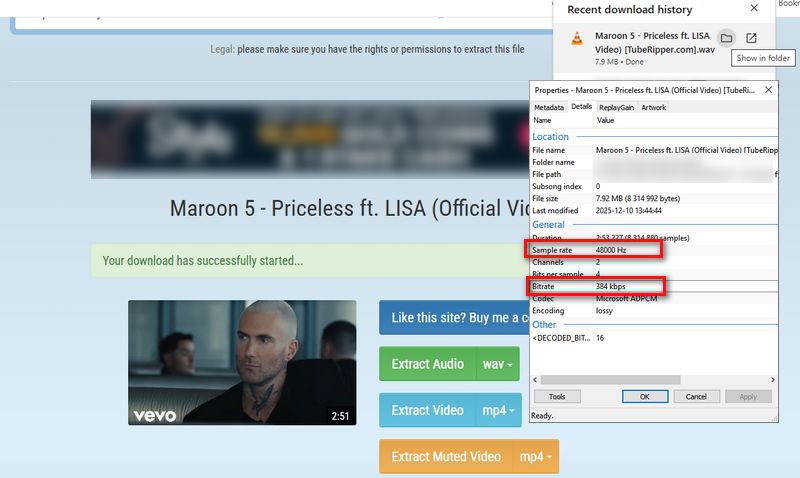
Step 2 Once the video information is loaded, locate the "Extract Audio" option. From the available format list, select "wav (quality: 48kHz)".
Step 3 Initiate the conversion and wait for it to finish. You can then download the completed WAV audio file directly to your device.
| Rating | Ads-free | Free to Use | Output Format | Output Quality | ID3 Tags | Batch Download | |
|---|---|---|---|---|---|---|---|
| TubeRipper | ★★☆☆☆ | ✖ | ✔ | MP3, M4A, FLAC, OGG | 48 kHz / 384 kbps | Song titles only | ✖ |
(*Note: The data in the table is based on a sample, and the actual quality will depend on your source file. Please also be aware that some download processes may redirect you to other pages, which can pose potential risks ⚠️, so avoid clicking on anything unfamiliar.)
#3: y2down.cc - Free Download YouTube to WAV Music Downloader
y2down.cc is another effective free YouTube WAV music download site. It is very easy to use and supports exporting files in formats such as WAV, MP4, AAC, and OPUS from platforms like YouTube, Facebook, SoundCloud, Vimeo, and TikTok.
🔗: https://y2down.cc/enJv/youtube-wav
Step 1 Copy the link of the YouTube video, SoundCloud track, or other supported media and paste it into the tool’s input box, then select WAV as the output format.
Step 2 Click Download to begin the parsing process.
Step 3 Once the parsing is complete, click Download again to start downloading the WAV file.
| Rating | Ads-free | Free to Use | Format | Bit Rate | ID3 Tags | Batch Download | |
|---|---|---|---|---|---|---|---|
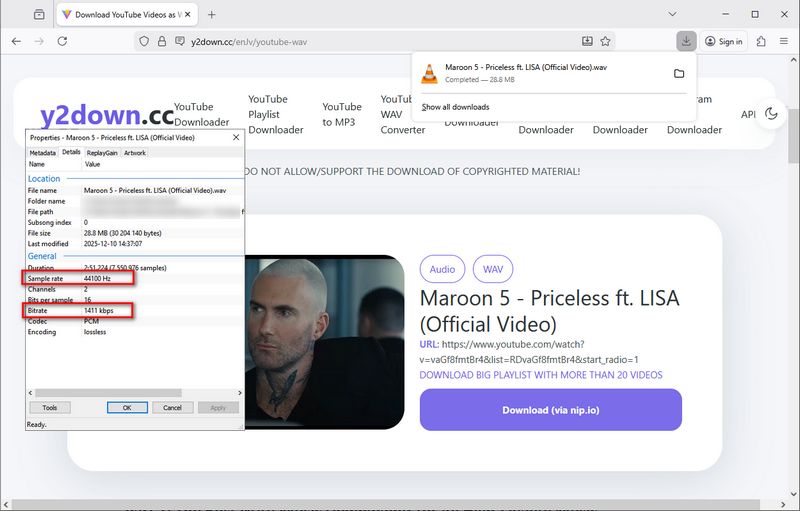
| y2down.cc | ★★★★☆ | ✔ | ✔ | MP3, M4A, AAC, OPUS.. | 44 kHz / 1411 kbps | Artist Name, Track Title, Date, Genre | ✖ |
(*Note: The table reflects sample data, and the final audio quality will vary based on the original file you use. In addition, some download steps may redirect you to external pages, which can carry potential risks ⚠️, so it is best not to click on anything unfamiliar.)
#4: SpotiDownloader - Free Spotify Lossless Music Downloader
When people mention streaming platforms, Spotify is often the first name that comes to mind, thanks to its large base of monthly active listeners and its extensive music catalog. However, anyone familiar with the platform will know that although there are many free online Spotify downloaders, most of them only export music in MP3 format, typically ranging from 128 kbps to 320 kbps. While they do not provide a direct way to download songs in WAV format, we did find an online tool called SpotiDownloader. It still focuses on MP3 downloads, but it has recently introduced support for exporting audio in the FLAC format, offering a higher quality option than before.
🔗: https://spotidownloader.com/en10
Step 1 Copy the Spotify link into the website and click Download to start the parsing process.
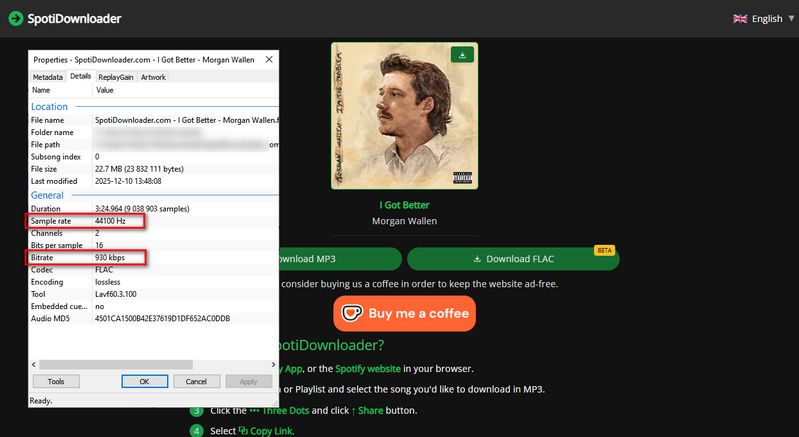
Step 2 Once the link is successfully parsed, select the Download FLAC option twice. Wait a moment, and you will receive a high-quality FLAC file.
Step 3 Open the Tools section in TunePat Music One, choose Format Converter and convert your lossless FLAC track to WAV for free.
| Rating | Ads-free | Free to Use | Format | Bit Rate | ID3 Tags | Batch Download | |
|---|---|---|---|---|---|---|---|
| SpotiDownloader | ★★☆☆☆ | ✔ | ✔ | FLAC, MP3 | 44 kHz / 930 kbps | Song titles only | ✖ |
(*Note: The table reflects sample data, and the final audio quality will vary based on the original file you use. )
#5: FlacMusic - Free Download in FLAC & Convert to WAV
In addition to the websites mentioned above that convert streaming platform songs to WAV, there are also music download sites like FlacMusic, where you can browse and download your favorite tracks in FLAC format.
🔗: https://flacmusicfinder.top/
Step 1 Visit the website in your browser, where you will see a list of FLAC songs available for download. Select one of the tracks you want.
Step 2 Click the green download button. You will be redirected to a new page, where you can click the Download.flac button and wait for the download to finish.
Step 3 Access the Tools area within TunePat Music One, select Format Converter, and convert your FLAC files to WAV for free.
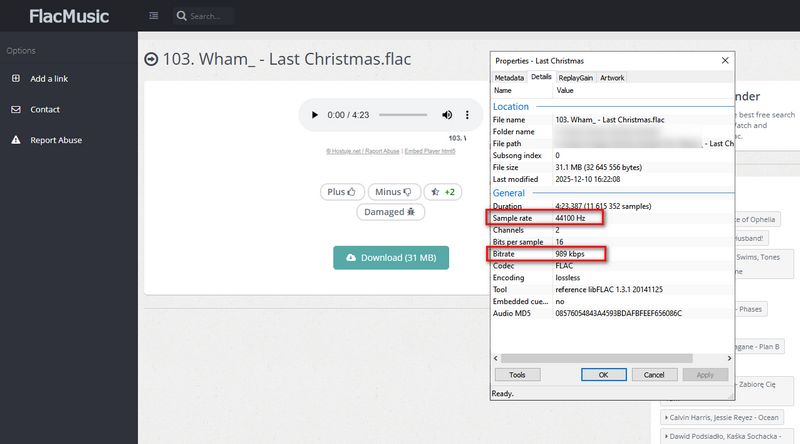
| Rating | Ads-free | Free to Use | Format | Bit Rate | ID3 Tags | Batch Download | |
|---|---|---|---|---|---|---|---|
| FlacMusic | ★★★☆☆ | ✔ | ✔ | FLAC | 44 kHz / 989 kbps | Artist Name, Track Title, Album Title, Track Number, Date, Disc Number, Artwork, etc. | ✖ |
(*Note: The table reflects sample data, and the final audio quality will vary based on the original file you use. Additionally, while songs downloaded via FlacMusic can preserve rich ID3 tag information, the WAV format has inherent limitations in metadata support. Therefore, when you convert these files to WAV, it is normal for some tags to be lost. You can manually edit the metadata afterward.)
Conclusion
This article introduced two free WAV music download sites for YouTube, along with a lossless music downloader that requires one extra step of converting the downloaded FLAC files to WAV. It is clear that each free site has its own strengths, yet they share some common drawbacks, such as potential redirects, intrusive ads, and the lack of batch downloading.
We can also see that there are very few tools on the market that support downloading WAV files for free. Even major streaming platforms tend to use FLAC as their high-quality format rather than WAV. Ultimately, songs from streaming services cannot be exported for editing or personal use in the first place. This is why the all-in-one converter TunePat Music One is highly recommended. It supports nearly all major streaming services, including Tidal, Amazon Music, Apple Music, Deezer, and Qobuz, which are well known for their high fidelity catalogs. It also allows fast and batch exporting in WAV format. The best part is that it is easy to operate and carries no hidden risks. Give it a try now!

Olivia Anderson
Senior Writer