Music Downloader with Album Cover - Download, Export and Add
 By Olivia Anderson
Music Tips
Updated on 8/18/2026
By Olivia Anderson
Music Tips
Updated on 8/18/2026
Album artwork is more than just decoration. It is part of metadata, embedded within the ID3 tag and displayed across media players, streaming services, and car systems. However, many downloaded tracks lose their album art during conversion. Some tools fail to embed cover images properly, while others don’t allow you to export or edit existing artwork at all. In this guide, we’ll show you how to download music with album cover, add cover art to local files, and extract album artwork in just a few clicks.
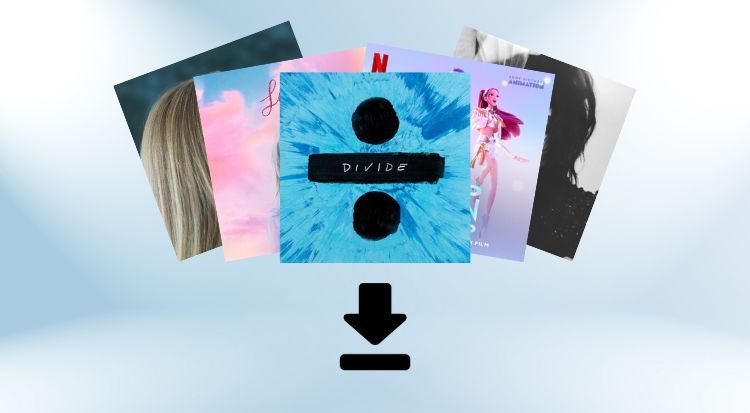
 Video Tutorial: How to Download Music with Album Cover Art?
Part 1: How to Download Music with Album Cover Art?
#1 TunePat Music One
TunePat Music One is a desktop music downloader that enables users to download music from multiple leading streaming platforms, including Spotify, Apple Music, YouTube, Tidal, SoundCloud, and Amazon Music. With conversion speeds up to 10 times faster than standard tools, it not only saves audio in plain formats such as MP3, AAC, WAV, FLAC, AIFF, and ALAC, but also ensures that all metadata is fully preserved during the process. Original album artwork is embedded directly into the ID3 tags of each downloaded track. In addition to automatic album art embedding, the software supports batch downloading of entire albums and playlists, offering users significant time savings.
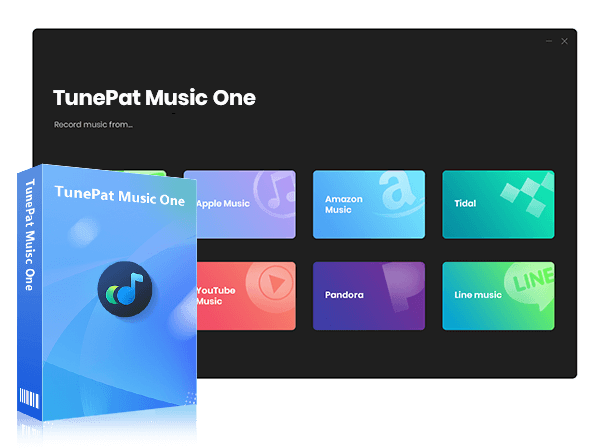
TunePat Music One
TunePat Music One is an all-in-one converter that can support any music streaming platform.
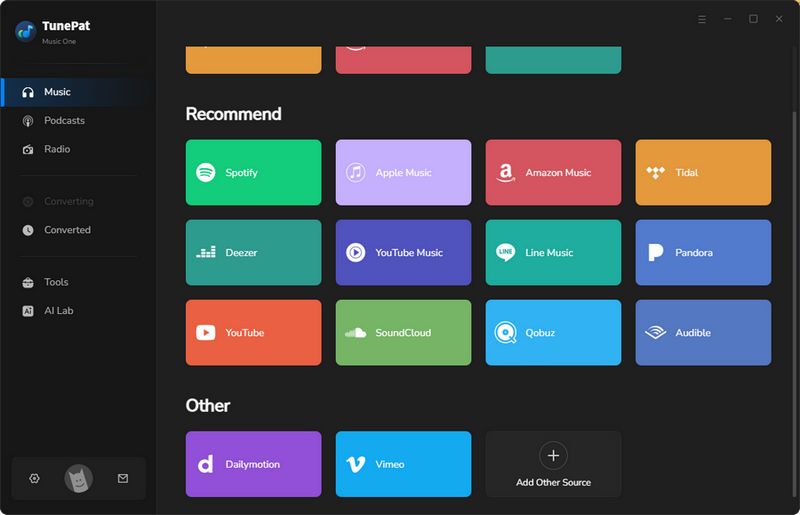
Step 1 To begin, launch TunePat Music One on your computer. You'll see a selection of dozens of mainstream streaming platforms. In this tutorial, we'll use YouTube as an example to demonstrate how to download music along with its album art. You can also add URLs to download songs from less common websites. Once ready, click the YouTube icon to open the YouTube website.
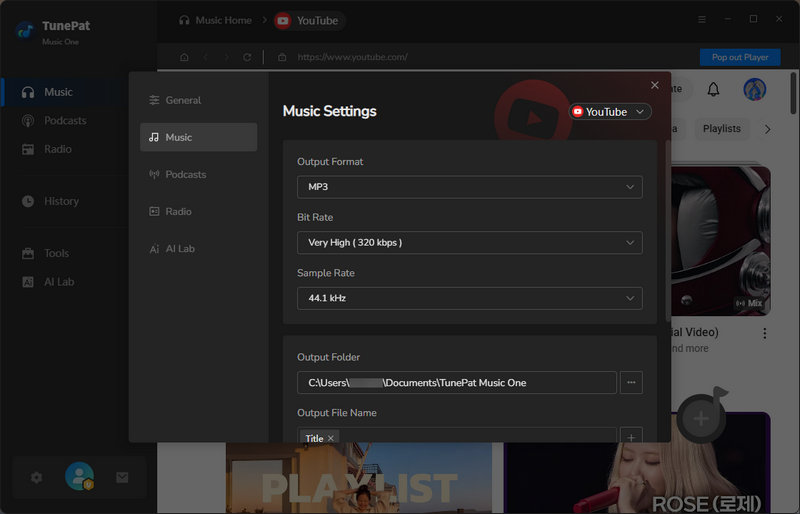
Step 2 First-time users can make some basic modifications to the program in the settings window as needed. For example, change the output format, bit rate, sample rate, specify the output folder for downloaded songs, filenames, etc.
Step 3 Return to the YouTube website and select the music with the album cover you want to download. Click the download button, and a pop-up window will appear for you to confirm the songs you want to add. After confirmation, click the "Add" button to proceed.
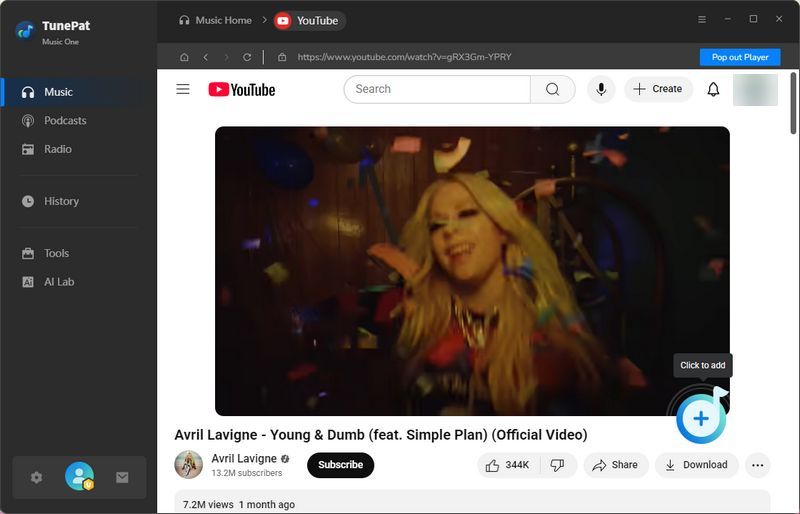
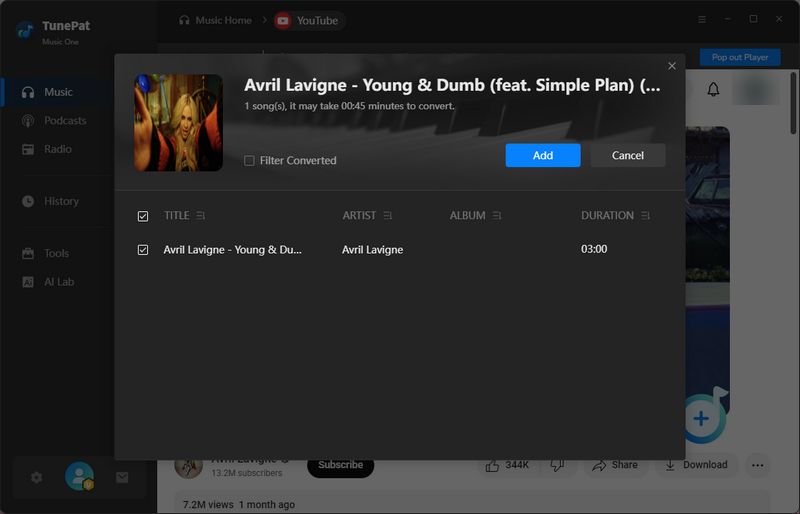
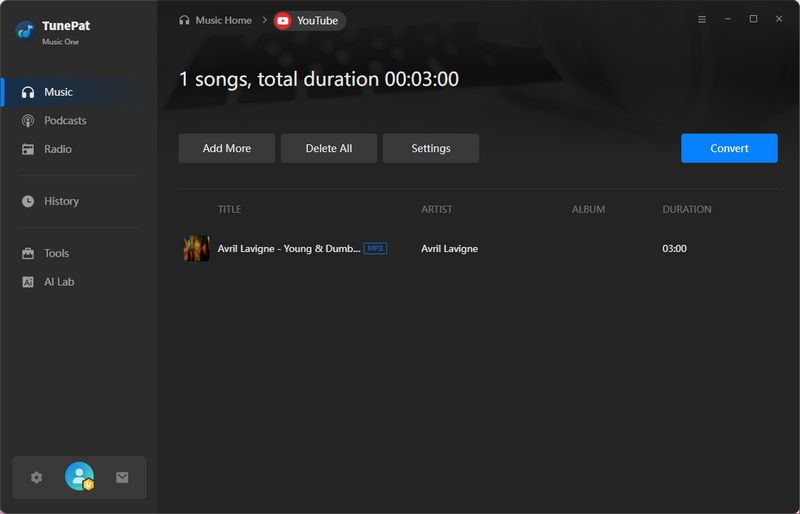
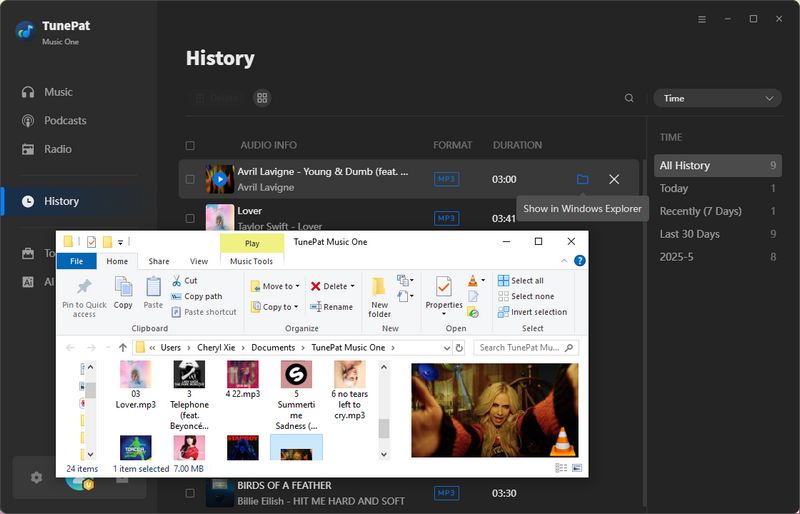
Step 4 To download multiple tracks at once, click "Add More". Once all desired items are added, click the "Convert" button to begin the conversion process. When the conversion is complete, the output folder you specified earlier will open automatically. Alternatively, you can access all downloaded files in the "History" tab, where you'll see that every track successfully includes its album cover.
#2 Spotimate
🔗 https://spotimate.app/
Spotimate is a browser-based online Spotify downloader that allows users to convert and download Spotify tracks, albums, and playlists directly to MP3 format, with no software installation required. Simply paste a Spotify song, album, or playlist URL into the input field on the site, and you can quickly generate downloadable MP3 files from your browser on both desktop and mobile devices.
One of the standout features of Spotimate is its ability to retain key metadata in the downloaded files, including embedded album artwork. This means that when you download a track from Spotify, the resulting MP3 file will often include the original album art, providing a more complete and visually polished experience in media players. Additionally, Spotimate allows you to download cover images directly, though this must be done one track at a time; there is no option to export album art in batches.
Since Spotimate operates entirely online, it’s a convenient solution for quick, one-off music downloads when you want to preserve album art without installing dedicated software. That said, like many online downloaders, it may offer fewer features than professional desktop applications, metadata completeness and audio quality can vary, and the service is primarily designed for straightforward MP3 conversion from only Spotify links.
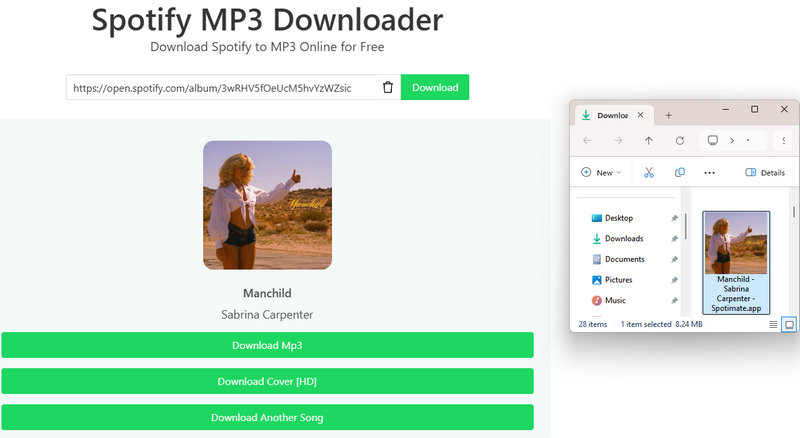

Spotify Playlist Downloaders (Android/Desktop/Online)
If you are looking for a more flexible Spotify music download option than online tools like Spotimate, you might want to explore a wider range of solutions that work on different devices. Learn More >>
#3 YT1Z
🔗 https://yt1z.net/en-O5n/
YT1Z is a free online YouTube video and audio downloader that allows users to convert and save YouTube content to formats like MP4 and MP3 directly, with no software installation or account registration required. Simply paste a YouTube URL or search by keyword, select your preferred format, and download the file to your device.
Many users turn to it specifically for downloading music tracks as MP3 files that come with cover thumbnails embedded in the metadata. This makes it a handy option when you want your downloaded songs to display album artwork in media players without extra effort.
That said, as with many free web-based downloaders, the experience can be hit or miss. The site tends to be unstable at times, and users often encounter frequent ads, multiple redirects, and occasional download failures. The quality of embedded artwork may also be inconsistent, making it less reliable than dedicated music download tools for those seeking a smooth and polished experience.
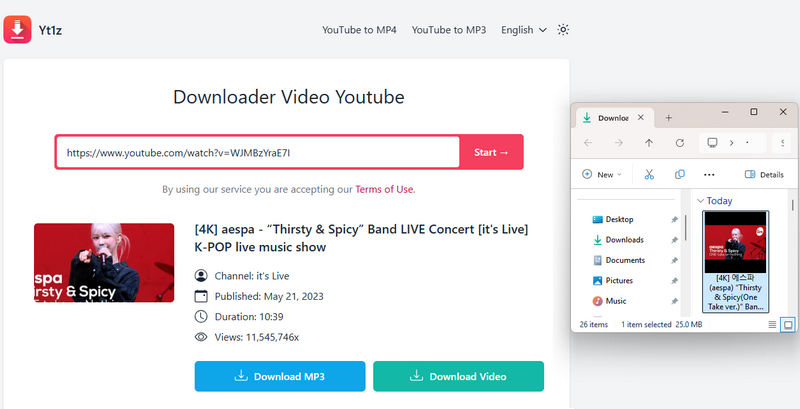

Top YouTube Audio Rippers: Fast, Safe & Free Options
If you’re looking for a more stable and reliable alternative to web-based tools like YT1Z, it’s worth exploring a broader comparison of YouTube audio rippers across different platforms. Learn More >>
#4 APLMate
🔗 https://aplmate.com/
APLMate is a free online music downloader that enables users to convert Apple Music tracks to MP3 format while preserving the original album cover. If you're looking to quickly download individual Apple Music singles along with their embedded cover art, APLMate offers a convenient, no-cost solution.
However, the tool does come with several notable limitations. It only supports at a fixed bitrate of 128kbps. Additionally, albums cannot be downloaded in batches, meaning each song and its album art must be saved individually. The website is also cluttered with ads and frequent pop-ups, which can appear even during the download process. Download failures are relatively common, and the generated filenames often include website branding, making music library organization more tedious.
APLMate may be suitable for users who need a quick, no-cost way to download individual Apple Music songs with embedded cover art. But for batch downloads, higher audio quality, or a more reliable experience, other tools may be better suited to the task.
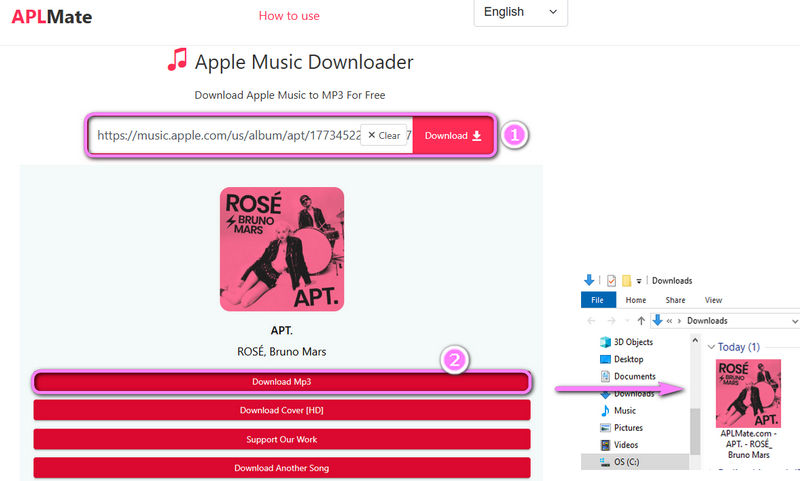
Free Apple Music to MP3 Converters
If APLMate feels too limited for your needs, you may want to explore a broader selection of Apple Music to MP3 converters that offer different features and performance levels. Learn More >>
Music Downloader with Album Cover Comparison:
| Ad-free | Supported Audio Source | Batch Download | Download Album Cover (Max Resolution) |
Edit Album Cover | |
|---|---|---|---|---|---|
| TunePat Music One | √ | YouTube, Spotify, Apple Music, SoundCloud, Amazon Music, Deezer, YouTube Music, Tidal, etc. | √ | Same as source resolution, no compression | √ |
| Spotimate | √ | Spotify | × | 640 x 640 | × |
| YT1Z | × | YouTube | × | × | × |
| APLMate | × | Apple Music | × | 630 x 630 | × |
Part 2: How to Export Album Art in One Click?
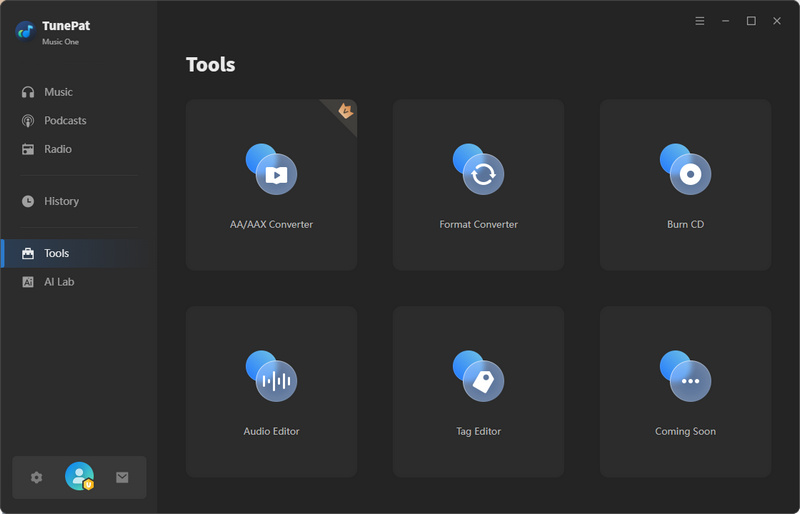
Step 1 If you wish to export music files that have already been downloaded to your local device, the process is equally straightforward. Using the aforementioned TunePat Music One tool, you can export album art with a single click, completely free of charge. Simply open TunePat Music One, select "Tools" from the left-hand menu, and then navigate to the "Tag Editor" tab.
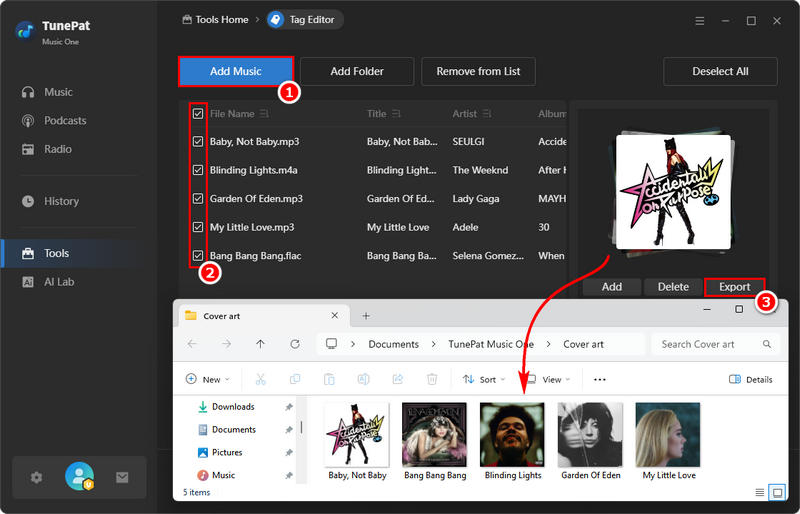
Step 2 Click "Add Music" to browse your local music files, then double-click to upload them to TunePat. The tool supports batch processing, allowing you to select and export album art from multiple files at once. After choosing the desired songs, simply click "Export". You will then be prompted to select a destination folder to save the extracted album art. Once completed, you can easily view the album art for all selected songs in the designated location.
Part 3: How to Add Album Art to Local Music Files?
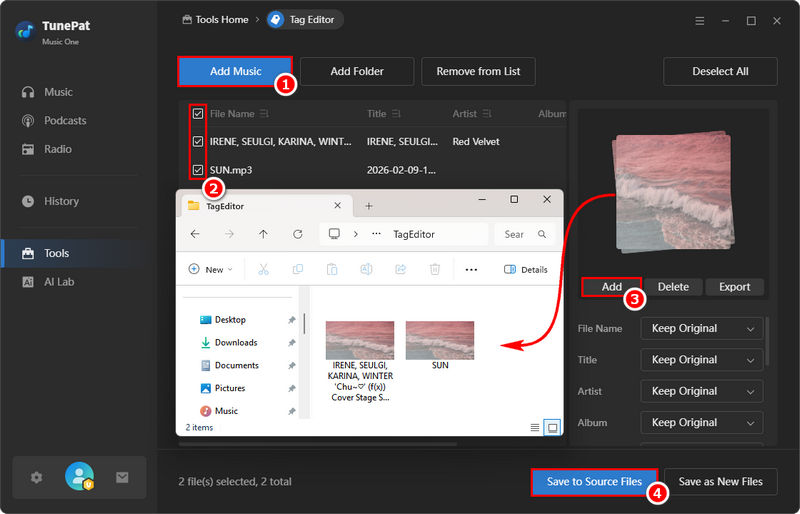
Step 1 If you previously downloaded songs using other software and did not save the accompanying album cover, TunePat allows you to add it afterward. The steps for importing your music are identical to those outlined in Part 2 above.
Step 1 Once your files are loaded, you can select attractive images you'd like to use as album art, click "Add", and then choose either "Save to Source Files" to update the original files or "Save as New Files" to create copies with the embedded artwork.
Part 4: FAQs About Music Downloader with Album Cover
Q1: Why does my downloaded music have no album cover?
A: Most basic downloaders only save the audio stream and fail to embed album artwork into the file’s ID3 tags. As a result, tracks may appear with a gray placeholder when played in media players or car stereo systems. To avoid this, using a music downloader that supports album cover, such as TunePat, ensures the cover is automatically embedded during the download process.
Q2: Which music formats support embedded album artwork?
A: Common formats such as MP3, M4A, and FLAC all support embedding album art into their ID3 or metadata tags. However, some formats may have limitations, so it's always a good idea to check the software specifications when downloading music or manually adding cover art.
Q3: Can I add album cover to music files I already have?
A: Yes. Programs like TunePat allow users to add album cover to local music files that lack it. This type of software can match your songs to official album art and embed them in batches, saving you the trouble of manually editing each song.
Q4: Can I export album art from my music files?
A: Many tools now offer the ability to extract album cover directly from local music files. This proves incredibly useful when you need to repurpose album covers for other projects, such as creating videos, designing playlists, sharing on social media, or even printing physical records. It is, however, rare to find a tool like TunePat Music One that not only downloads songs but also exports album images seamlessly with a single click.
Conclusion
This guide has walked you through how to download music with album cover, export album cover with a single click, and add missing cover art to your local music files. Choosing a reliable music downloader that supports album art helps prevent metadata loss and keeps your music library clean and well-organized. TunePat Music One is exactly that kind of tool, offering one-click solutions to download, export, and add album art, so you never have to worry about missing covers again. It not only saves you time but also ensures your music files not only enjoy excellent sound quality but also have a polished, professional appearance. Download and try it free right now!



Olivia Anderson
Senior Writer