Top YouTube Audio Rippers: Fast, Safe & Free Options
 By Olivia Anderson
YouTube Music Tips
Updated on 5/20/2026
By Olivia Anderson
YouTube Music Tips
Updated on 5/20/2026
To enjoy audio offline and play it on different devices, people often download YouTube videos as MP3 files. As a result, numerous YouTube to MP3 audio rippers have emerged. However, these tools are not always safe to use. If you want a quick and easy way to extract audio from YouTube, you should check out this review of YouTube audio rippers. Online tools rely on ads for revenue, so that an inadvertent click could lead you to dangerous sites. This review will highlight potential risks and recommend some more trustworthy professional tools, helping you find the most reliable and efficient way to extract audio from YouTube videos.

Top YouTube Audio Rippers Quick Overview:
| Tool Name | Audio Quality | Batch Download | Ads-free | Overall Score |
|---|---|---|---|---|
| TunePat YouTube Music Converter | 320kbps | ✅ Yes | ✅ Yes | 4.6 / 5 |
| TunePat Video All-In-One | 129kbps | ✅ Yes | ✅ Yes | 4 / 5 |
| CnvMP3 | 238kbps | ❌ No | ✅ Yes | 3.5 / 5 |
| EzMP3 | 320kbps | ❌ No | ✅ Yes | 3.6 / 5 |
| SAVEMP3 | 320kbps (Paid) | ❌ No | ❌ No | 2.6 / 5 |
| TubeRipper | 256kbps | ❌ No | ❌ No | 3.0 / 5 |
Notice: For improved audio quality, faster conversion speeds, and a safer experience, desktop YouTube audio ripper remains the best choice.
Part 1: Best Desktop Tools to Rip Audio from YouTube
#1 TunePat YouTube Music Converter
TunePat YouTube Music Converter is one of the highest-rated desktop tools in our testing. Designed specifically for ripping audio from YouTube, it allows users to convert tracks, playlists, and full albums into local audio files, including MP3, AAC, WAV, FLAC, AIFF, and ALAC formats. During our evaluation, the software stood out for its ability to maintain original audio quality while preserving essential metadata such as titles, artists, and album artwork. It also supports batch downloading, making it easy to download entire playlists or albums simultaneously. For users looking for a stable and high-quality way to extract YouTube audio efficiently, this desktop solution offers a well-rounded feature set.
TunePat YouTube Music Converter
TunePat YouTube Music Converter helps you download and convert all YouTube Music songs and playlists to MP3 and other common formats.
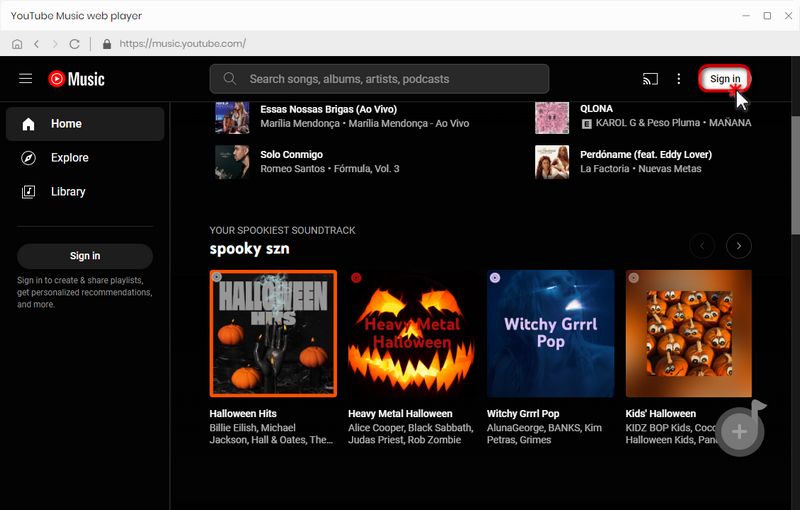
Step 1 Launch TunePat and log in to your YouTube Music account through its built-in browser. For easier operation, you can detach the embedded player from TunePat by clicking the "Pop out Player" button.
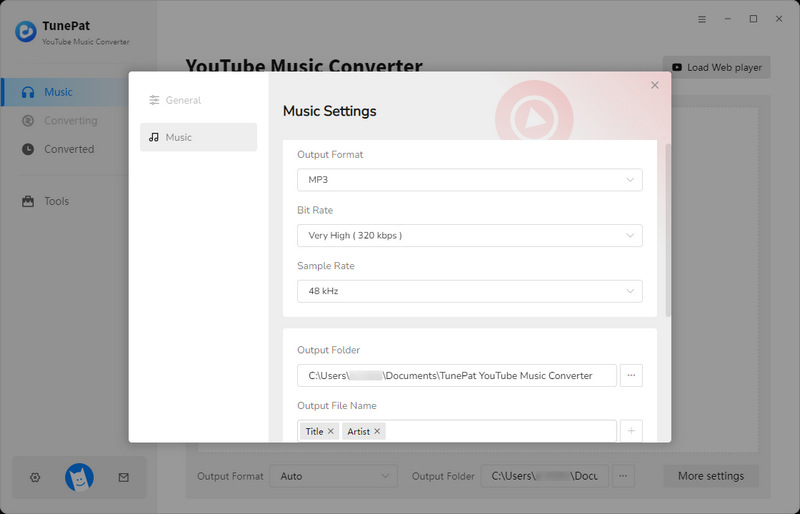
Step 2 Open the "Settings" window to modify the output format, bit rate, sample rate, output folder, and output filename, etc. After configuring and saving, these settings will apply to all future downloads without needing to be reset.
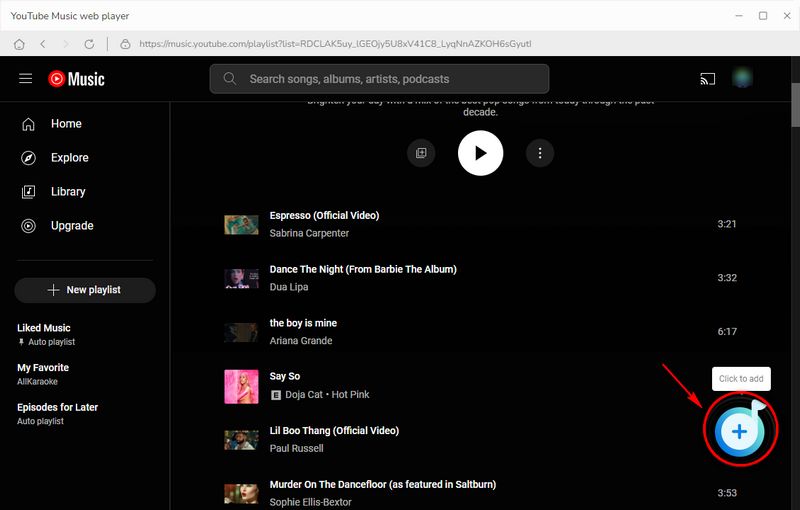
Step 3 Return to the YouTube Music web player and open the track, playlist, or album you want to convert. Once selected, click the button in the lower right corner. You can select the desired songs in the pop-up window and click the "Add" button to import them into TunePat.
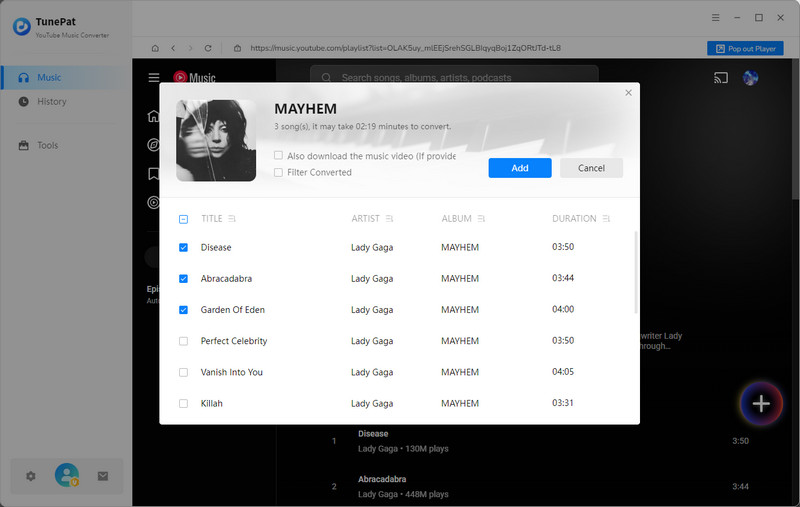
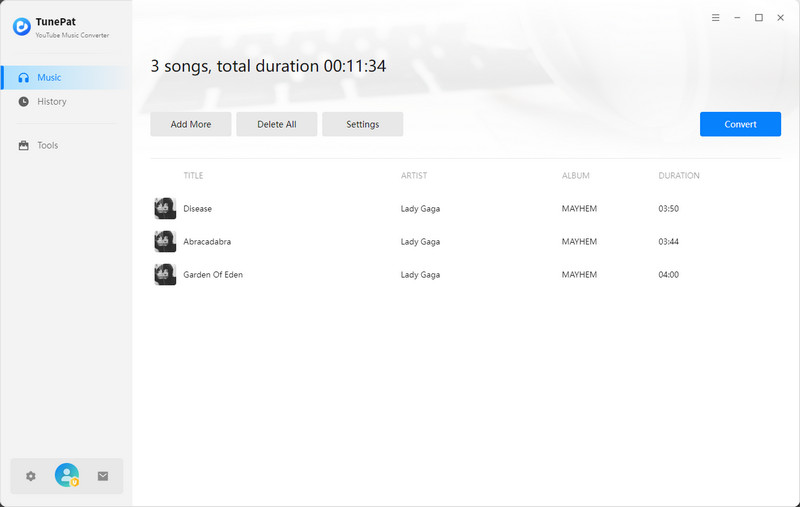
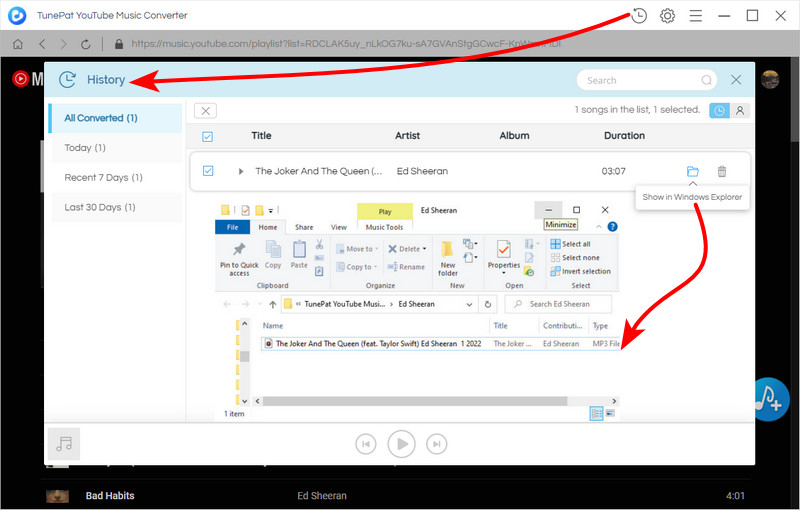
Step 4 To batch convert multiple playlists, click "Add More" and then repeat the above steps. Otherwise, click the "Convert" button to start the conversion process. TunePat will extract your YouTube Music songs at up to 10x the speed. Once complete, you can find the ripped YouTube songs in the "History" section.
#2 TunePat VideoGo All-In-One
TunePat VideoGo All-In-One is a more versatile desktop solution designed for users who need more than just music downloading. Unlike single-platform tools, it supports downloading videos and extracting audio from multiple streaming services, such as Netflix, Amazon Prime Video, Disney+, and Hulu, making it suitable for those who frequently work with different sources. It also maintains stable performance when processing longer videos and batch downloads. For users looking to rip audio efficiently while keeping flexibility across platforms, this all-in-one tool offers a practical and feature-rich option.

TunePat VideoGo All-In-One
TunePat VideoGo All-In-One is a comprehensive tool designed for downloading online videos from a wide range of platforms.
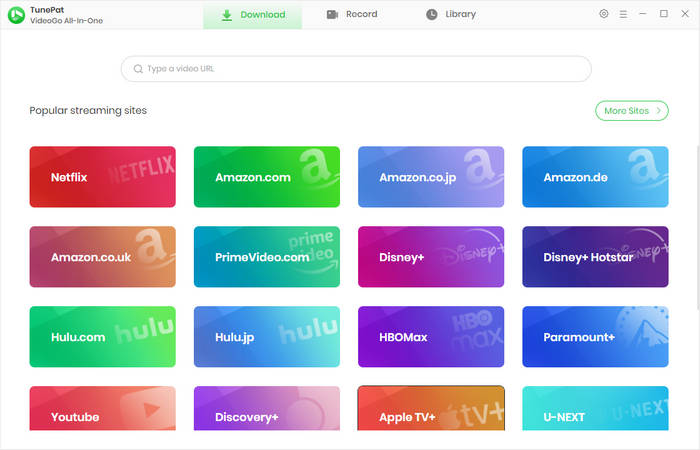
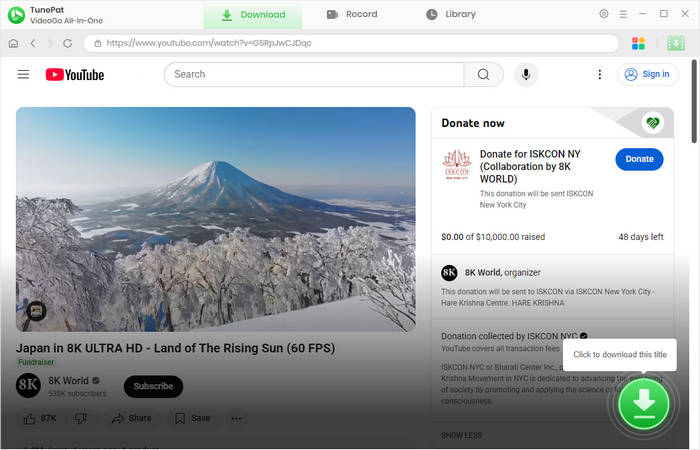
Step 1 Launch TunePat VideoGo All-In-One, then swipe down and click the "YouTube" option. The built-in YouTube browser will open; browse for the YouTube video from which you want to extract audio.
Step 2 Once you find the video you want to download, click the green arrow in the bottom right corner and wait for TunePat to analyze the video. After analysis, click "Advanced Download" to enter the settings interface.
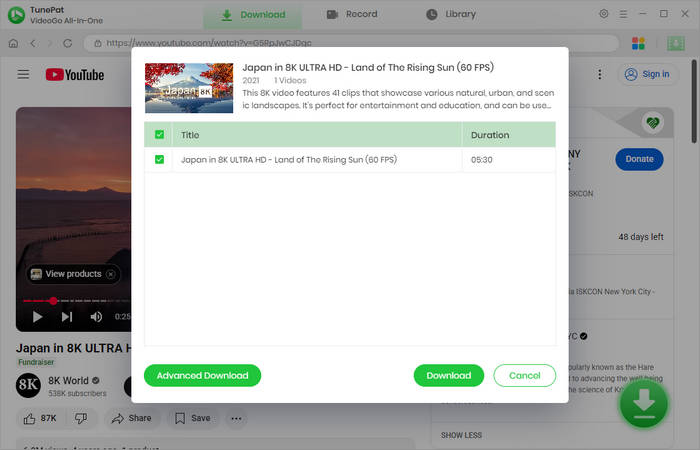
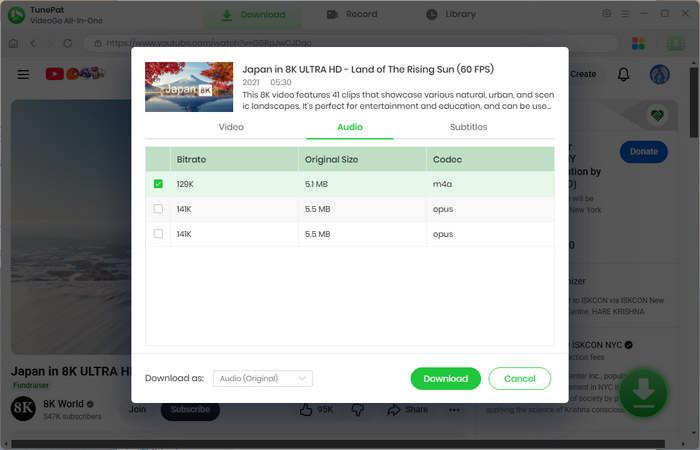
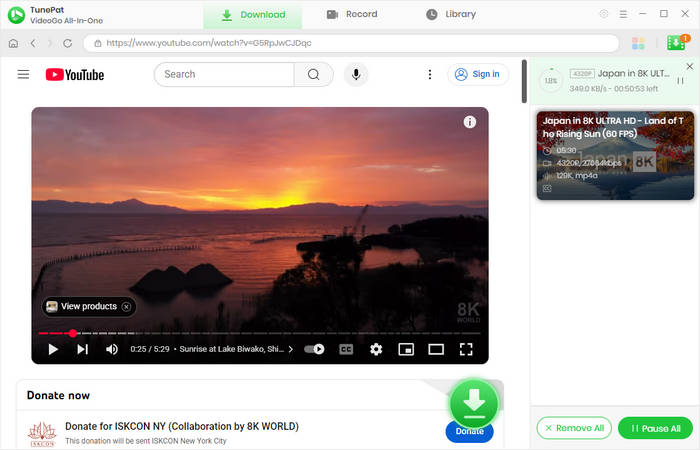
Step 3 Click "Audio" and select the desired Bitrate. After confirming, click "Download" to begin ripping. Please wait patiently for the download to complete. Once finished, the audio file will be saved in the specified output folder. To view your download history, go to the "Library" section.
Part 2: Free Online YouTube to MP3 Rippers
#1 CnvMP3 – Rip YouTube Audio to MP3
🔗 https://cnvmp3.com/v53
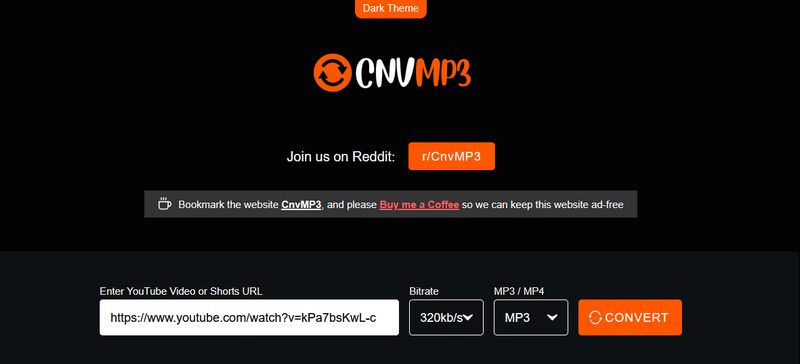
Brief introduction: CnvMP3 is a free, ad-free online converter that allows users to download videos as MP3 or MP4 files. Designed with a simple and intuitive interface, it lets users paste a video URL and convert it in just a few clicks. While primarily promoted as a YouTube converter, it also supports platforms like TikTok, Reddit, Instagram, Facebook, Twitter, and Twitch, offering high-quality audio output and broad compatibility.
📕 You might also be interested in: Full CnvMP3 Review
#2: EzMP3 – Online YouTube Music Ripper
🔗 https://ezconv.cc/
Brief introduction: EzMP3 is an online YouTube audio ripper designed for simplicity and speed. It allows users to rip YouTube audio and convert videos to MP3 without installing software or creating an account. With bit rate up to 320kbps and compatibility across various devices, EzMP3 offers a convenient and reliable way to extract and rip YouTube audio content quickly.
📕 You might also be interested in: EzMP3 Review & Top Alternatives

#3: SAVEMP3 - Fast YouTube Audio Rippers
🔗 https://savemp3.net/p18p0/youtube-video-to-mp3/
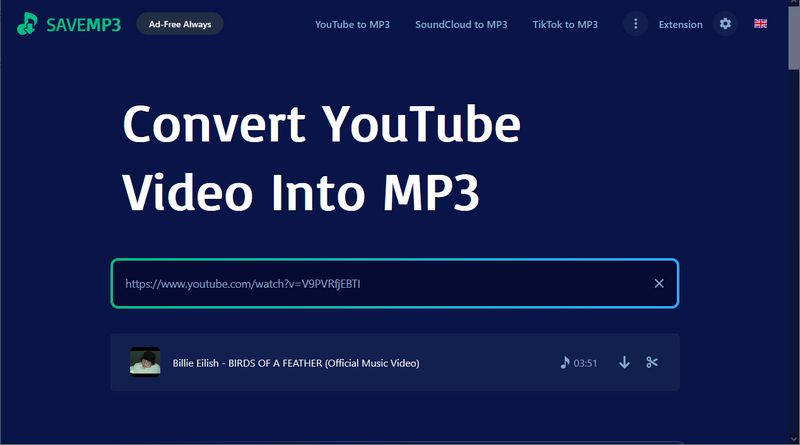
Brief introduction: SaveMP3 is an ad-free YouTube to MP3 ripper that lets users quickly extract audio from YouTube videos. The platform operates directly in your browser and enables downloads with just a few clicks. However, users can only download files in MP3 format and are unable to select the bitrate. Upon inspection, the bitrate is fixed at 128kbps. During the download process, a prompt encourages users to upgrade to the paid version for higher audio quality. Overall, SaveMP3 remains a decent YouTube audio ripper.
#4: TubeRipper - Rip Audio from YouTube Videos
🔗 https://tuberipper.net/73/
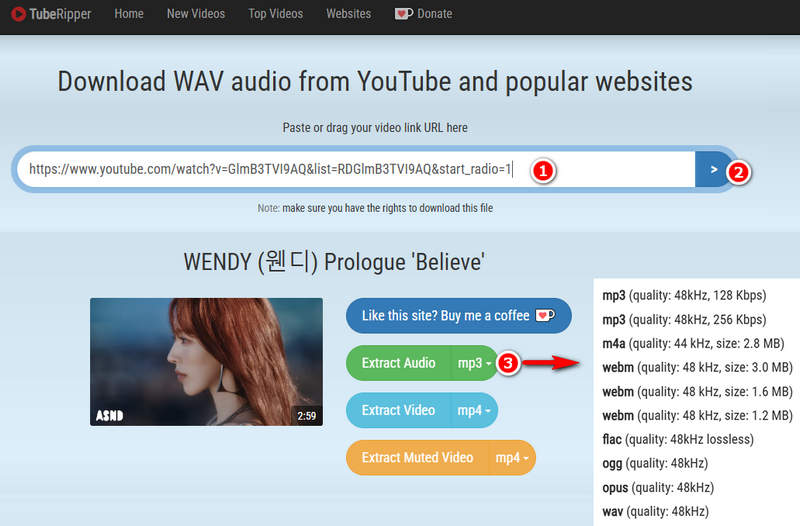
Brief introduction: TubeRipper is a downloading tool that allows users to extract YouTube audio in multiple formats. It does not require account registration. However, users may encounter occasional redirects while using the site. Although several output formats are supported, the audio quality is relatively low, making it unsuitable for users seeking high-quality audio.
Part 3: FAQs About Free YouTube Audio Ripping
Q1: Why is desktop software better than free online YouTube audio ripper?
A: Desktop tools like TunePat typically offer faster conversion speeds, batch download capabilities, better sound quality, and less ad interference. They are also more reliable when handling longer playlists or large files.
Q2: Can I extract audio from YouTube in 320kbps?
A: Yes. TunePat YouTube Music Converter can extract audio files up to 320kbps, and some online tools also claim to achieve this. However, most online tools typically limit bitrate options or automatically compress audio.
Q3: Are free online YouTube to MP3 rippers safe?
A: Most free online tools contain ads, pop-ups, and redirects, which negatively impact user experience and compromise privacy. If security and privacy are your priorities, we recommend more reliable desktop software like TunePat.
Q4: Is it legal to rip audio from YouTube?
A: Legality depends on how the audio is used and the laws in your region. Downloading copyrighted content without permission may violate YouTube's Terms of Service and copyright laws. However, extracting audio from videos you own or copyright-free content is generally permitted.
Conclusion:
Choosing the right YouTube audio ripper ultimately depends on your needs. If convenience is more important than advanced features, then a free online YouTube to MP3 converter might be better suited for occasional use. If you value higher audio quality, batch downloading, and a more stable, ad-free experience, then desktop software like TunePat YouTube Music Converter and TunePat Video All-In-One obviously offer greater control and reliability. Click the download button to try it for free!
Download TunePat YouTube Music Converter 👇
Download TunePat VideoGo All-In-One 👇


Olivia Anderson
Senior Writer