
SoundCloud is one of the leading streaming platforms where artists can upload and promote their original music. In fact, Billie Eilish began her career on SoundCloud. While free SoundCloud users can stream music, the experience is often disrupted by frequent ads. This leads many to ask whether it's possible to enjoy ad-free listening and offline playback without subscribing to SoundCloud. The answer is yes. In this article, we’ll introduce several SoundCloud playlist downloader tools that allow you to save playlists without a SoundCloud subscription.
| Best For | Recommended Tool | Why |
|---|---|---|
| Best overall | TunePat Music One | Supports multiple platforms, up to 320kbps, batch download, ad-free |
| Free online quick download | SoundCloudDownloader / SoundCloudRips | No installation required, simple to use (but limited quality & ads) |
| Browser-based solution | Addoncrop | Easy Chrome extension, but limited formats and security concerns |
Part 1: A Safe SoundCloud Playlist Downloader for Desktop
If you are looking for a stable and secure way to download SoundCloud playlists, a desktop program is often the best choice. We recommend TunePat Music One, a powerful all-in-one music downloader, especially suitable for users who work with multiple streaming services.
TunePat allows you to download entire SoundCloud playlists to your computer, and also supports other major platforms such as Spotify, Apple Music, YouTube, Amazon Music, Tidal, and more. Unlike many ad-filled online tools, TunePat Music One offers a clean interface, batch‑downloading capability, and consistent audio quality. Downloads can be saved in formats like MP3, AAC, FLAC, WAV, AIFF, or ALAC, while preserving the original sound quality and complete ID3 tags (artist, album, artwork, track number, etc.).
To get started, download and install TunePat on your computer. The following steps will guide you through downloading SoundCloud playlists.
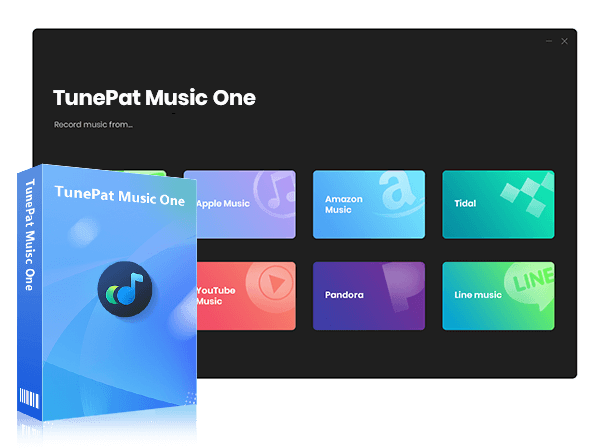
TunePat Music One
TunePat Music One is an all-in-one audio converter, ideal for fans of any music streaming platform.
Step 1 Select SoundCloud as the Source
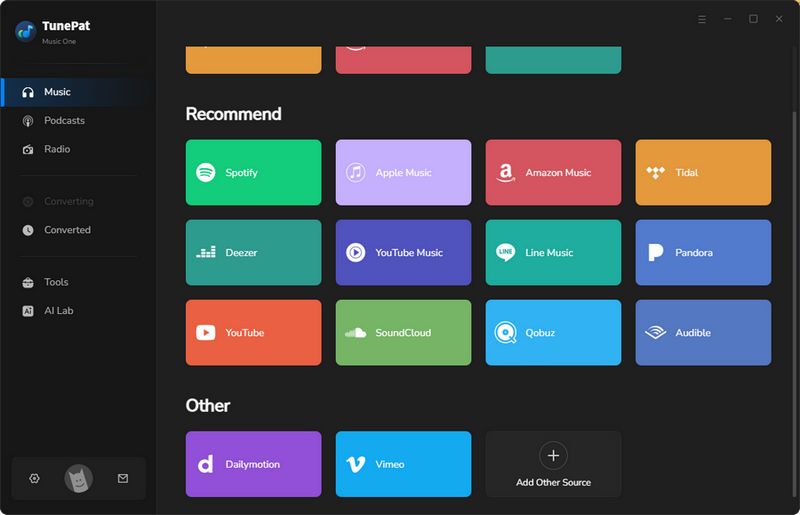
Launch TunePat Music One. You'll see a list of supported streaming platforms on the main interface. Simply select the "SoundCloud" tab to continue, and log in to your SoundCloud account.
Step 2 Customize Output Settings
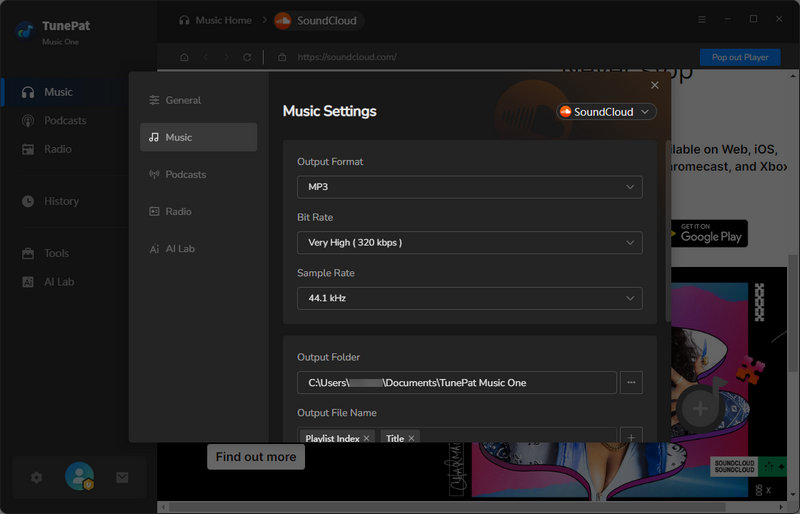
Return to TunePat and open the settings window. Here, you can customize your output preferences, including output format, bit rate, and sample rate.
Step 3 Add SoundCloud Playlists
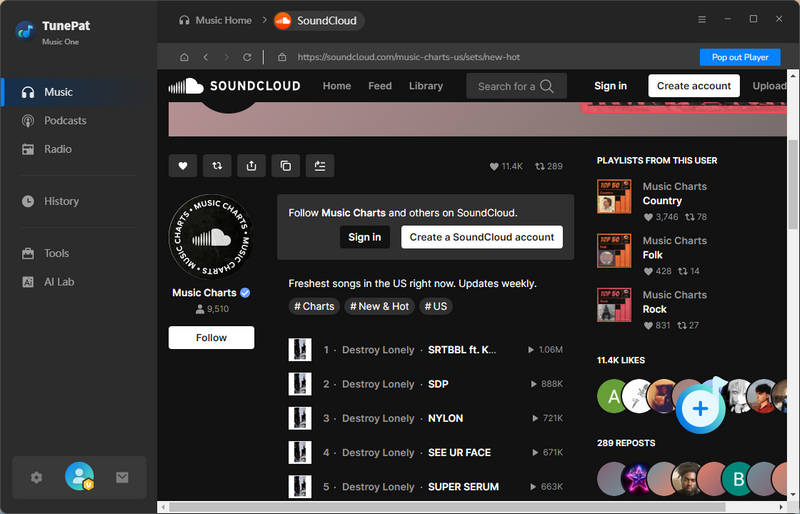
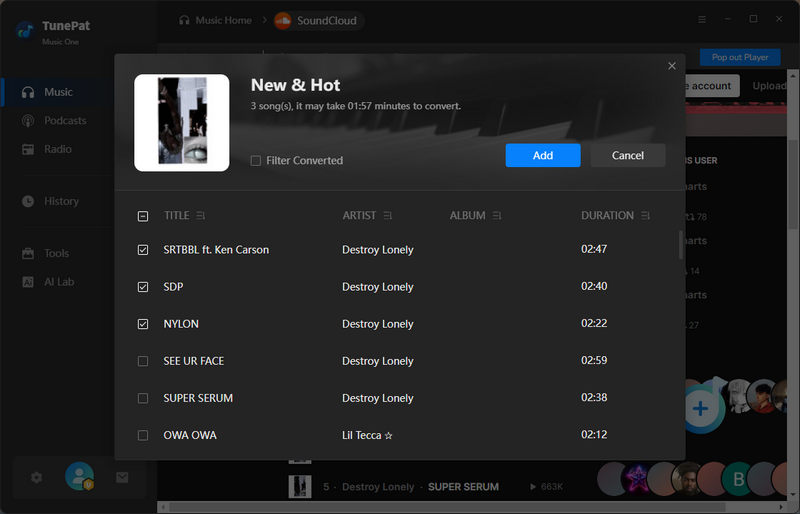
Open the SoundCloud web player and navigate to the playlist you want to download. Click the "+" button in the lower-right corner. TunePat will automatically detect and load all tracks in the playlist. Click "Add" to confirm and add the songs to the download list.
Step 4 Convert and Download SoundCloud Playlists
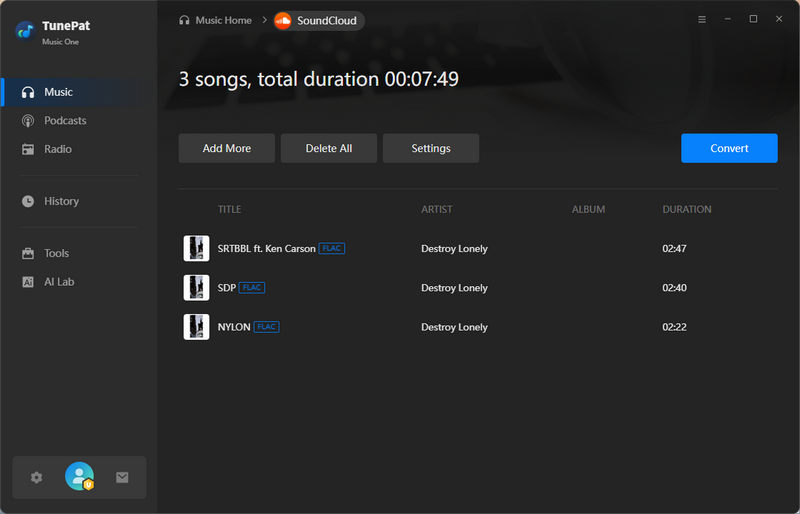
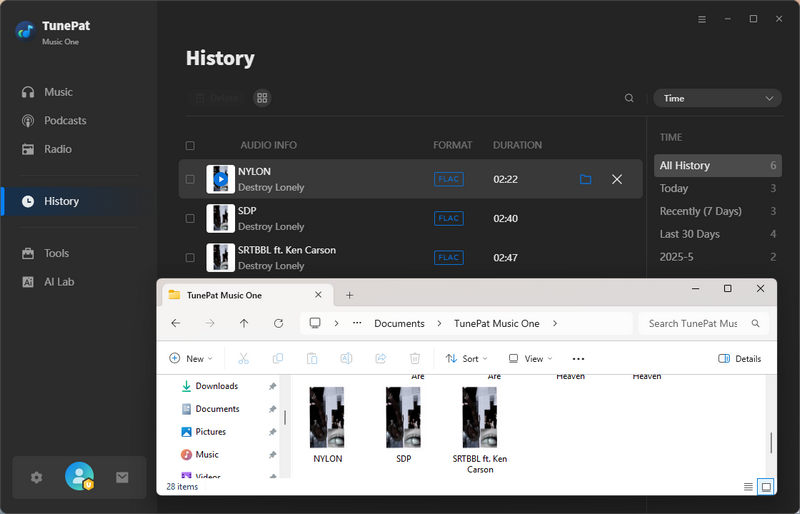
Click "Convert", and TunePat will begin downloading and converting the playlist. After a short wait, all SoundCloud playlists will be saved to your computer automatically. Once completed, the output folder you set before will open, and your SoundCloud playlist will be ready for offline playback or import into software like Serato DJ or Rekordbox.
Rating: ★★★★★
Pros
-
 Convert music from multiple platforms, such as SoundCloud, Spotify, Amazon Music, Tidal, Apple Music, etc.
-
Support MP3, AAC, FLAC, WAV, AIFF, and ALAC formats.
-
Download music at the source quality, with support for up to 320 kbps audio.
-
No ads on the interface.
-
Keep all ID3 tags, including artwork, title, album, artist, and track number.
Cons
-
 There is a free trial version, but it has some limitations.
Part 2: Online SoundCloud Playlist Downloader Websites
Below we present some online tools that allow you to download SoundCloud playlists without downloading apps or installing plugins. These online tools are both free and paid. You can read them all to see which one is right for you.
1. DownCloudMe (Formerly SoundCloudMe)
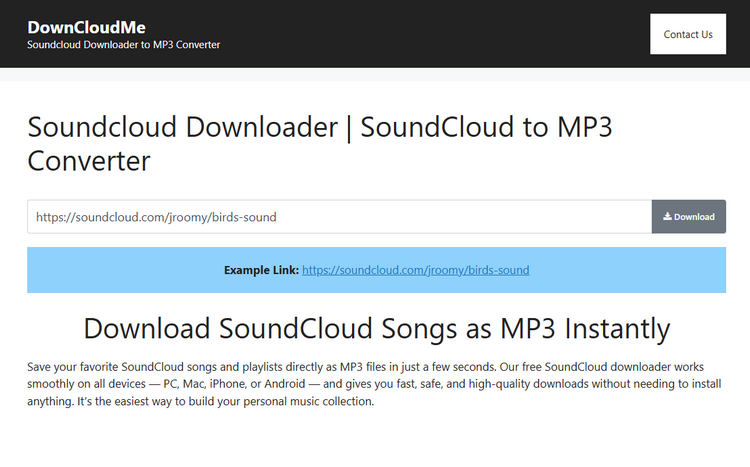
DownCloudMe is a website where you can download millions of SoundCloud songs and playlists in MP3 format. It's relatively easy to use, but doesn't offer batch downloading. To download playlists, you need to manually click on each song. This makes it best for users who want to quickly download SoundCloud music online and only use it once.
Step 1 Prepare the link to the SoundCloud playlist you want to download. Then copy the link into the text box on the DownCloudMe page.
Step 2 Click the "Download" button, and you can download the songs from the playlist.
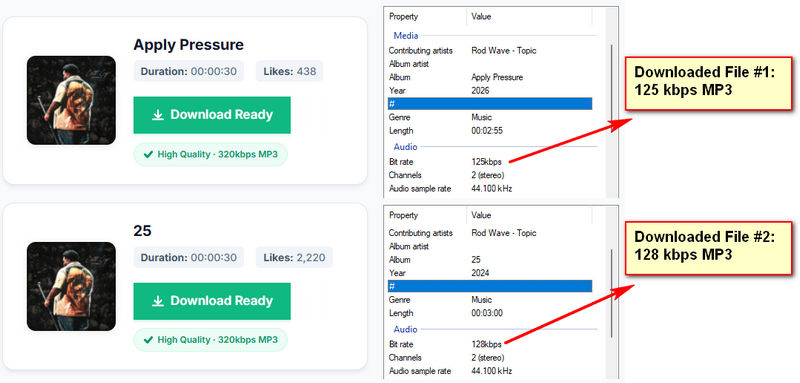
Editor’s Real Test (June 2026) | Rating: ★★☆☆☆
Pros
-
In our test, complete 5-minute song can be completed in just 4-6 seconds.
-
No ads clutter the page during use.
Cons
-
Limited to MP3 format only, and our tests showed actual bitrates of 80–128kbps instead of the advertised 320kbps.
-
Domain names change frequently; for example, SoundCloudMe was recently renamed DownCloudMe.
-
Does not support batch downloading.
-
Includes redirects and subscription prompts, but no forced installation was detected.
2. ScloudMe
ScloudMe is a free online tool that converts and downloads SoundCloud playlists to MP3 using just a link. It relies on third-party ad networks, so you may encounter ads and occasional redirects that can feel intrusive. Overall, it's straightforward for users who need basic access to SoundCloud tracks and don't require batch downloading.
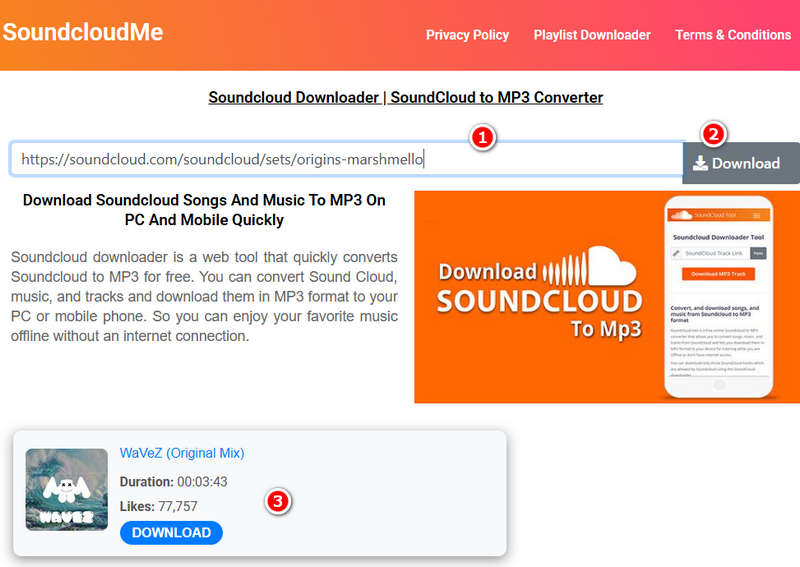
Step 1 Copy the URL of the SoundCloud playlist you wish to download. Open the ScloudMe website, paste the link into the search field on the homepage, and hit the "Download" button. You may encounter several redirects during this process. Please be sure to close any unsafe webpages.
Step 2 After processing, the playlist will be displayed as individual tracks. You’ll need to download each song separately, since ScloudMe does not currently offer a batch download option.
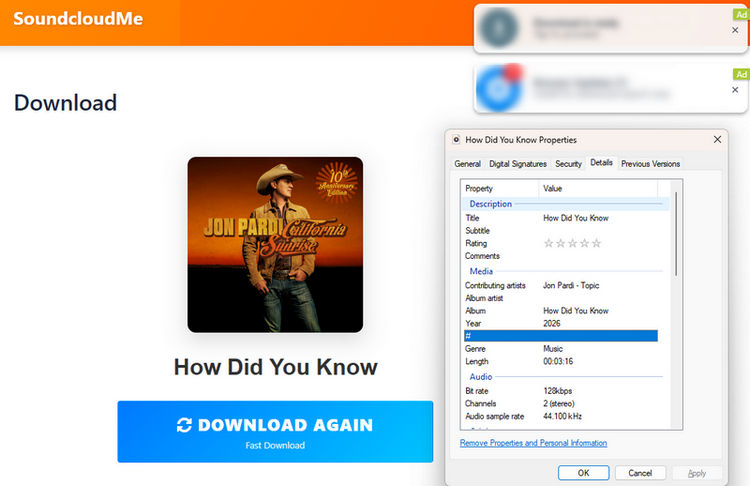
Editor’s Real Test (June 2026) | Rating: ★★★☆☆
Pros
-
Easy to use with an intuitive interface.
-
Completely free with no account registration required.
Cons
-
No advanced features such as batch downloading.
-
Limited to MP3 format only, and our tests showed the downloaded files max out at 128kbps.
-
Relies heavily on third-party ads, which can lead to pop-ups and redirects.
3. SoundCloudDownloader
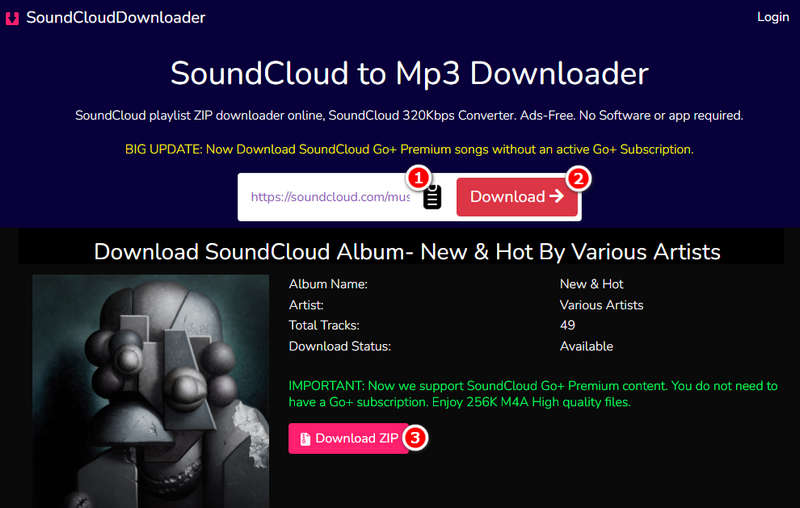
SoundCloudDownloader is a free online platform for downloading SoundCloud playlists, songs, and albums in MP3 or M4A format. It supports high‑quality audio and batch downloads as ZIP files. However, downloading a complete album or playlist requires a subscription. It is best for users who want to bulk download higher‑quality SoundCloud music with the ability to choose format and bitrate.
Step 1 Copy the link to the SoundCloud playlist you want to download, making sure it's correct. Open the SoundCloudDownloader website and paste the link into the input field. The website will automatically begin parsing the link, or you can click "Download" directly.
Step 2 Once the songs are parsed, a SoundCloud ZIP download button will appear at the top. Clicking it saves all tracks in a single ZIP file. For non-premium users, only two songs from a playlist can be downloaded at once. Alternatively, each track may be saved individually using the separate download buttons provided next to every song.
Editor’s Real Test (June 2026) | Rating: ★★★☆☆
Pros
-
Supports batch downloads.
-
Allows downloading in both MP3 and M4A formats.
-
Ad-free interface for a smoother user experience.
Cons
-
Batch downloads require a subscription; free users are limited to a few songs.
-
The site can be slow at times.
-
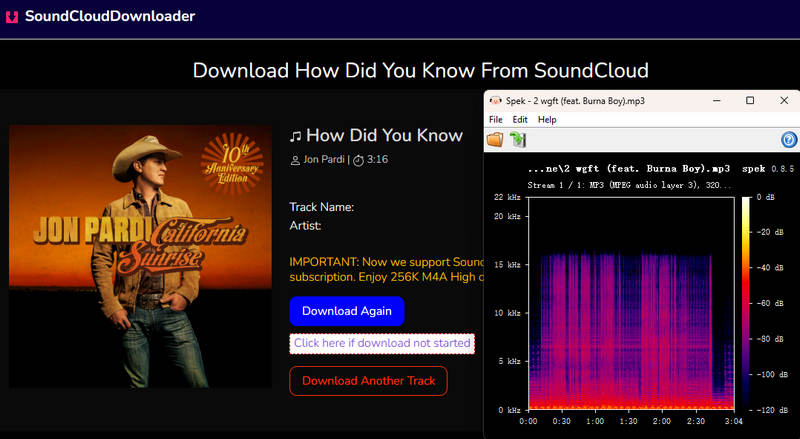
Although it offers the option to choose different bit rates, when we selected 320kbps for download, the spectrogram below shows a clear brick‑wall cutoff at the top, indicating that the file does not achieve true 320kbps quality.
4. SoundCloudAud
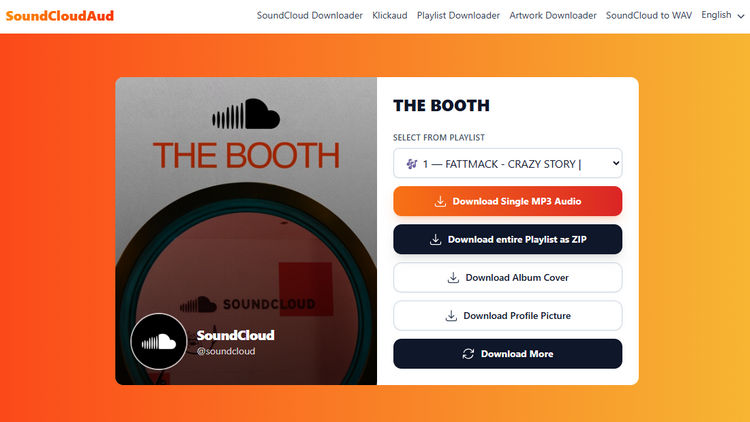
SoundCloudAud relies heavily on advertising, which leads to a cluttered and intrusive ad experience. Although it supports playlist parsing, our tests found that playlist downloads are unreliable. Therefore, the site is best suited for users who only occasionally need to download individual SoundCloud tracks, rather than full playlists.
Step 1 Copy the link of the playlist, open SoundCloudAud, and paste the link in.
Step 2 Click the "Download" button and wait a while. You can then choose to download a single track or the entire playlist.
Editor’s Real Test (June 2026) | Rating: ★☆☆☆☆
Pros
-
Free and convenient.
Cons
-
Contains many ads, so extra caution is needed.
-
Limited to MP3 output with no alternative formats.
-
Cannot choose the bit rate.
-
Although playlists can be downloaded as ZIP files, our tests showed that the downloaded archives were sometimes empty
5. Music Verter
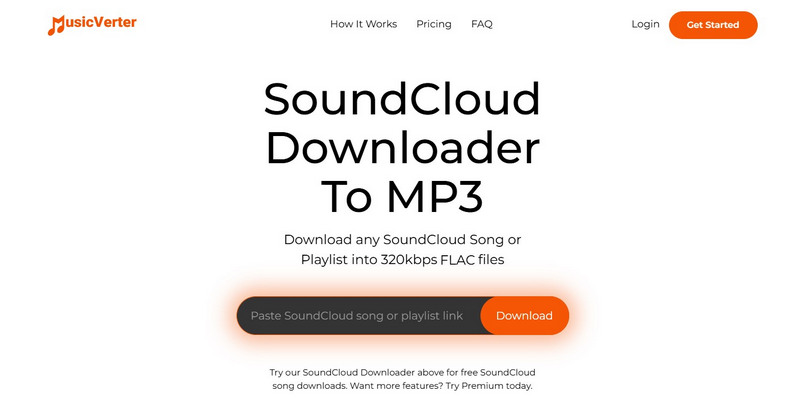
Music Verter is a website that allows you to download SoundCloud playlists in MP3, AAC, WAV, and FLAC formats. In general, this is a relatively comprehensive site; however, you have to pay a fee to use these features. Free users can only download tracks rather than playlists. In addition, only paid users can use it without ads. If you want to download unlimited songs per month and automatically renew your subscription every month, you have to pay $180 per year. As with the previous steps, copy the SoundCloud link and paste it into the box. Click "Download" to get the zip file.
Editor’s Real Test (June 2026) | Rating: ★★★☆☆
Pros
-
Allows batch downloads.
-
Supports multiple audio formats, including MP3, AAC, WAV, and FLAC.
Cons
-
Subscription required; relatively expensive.
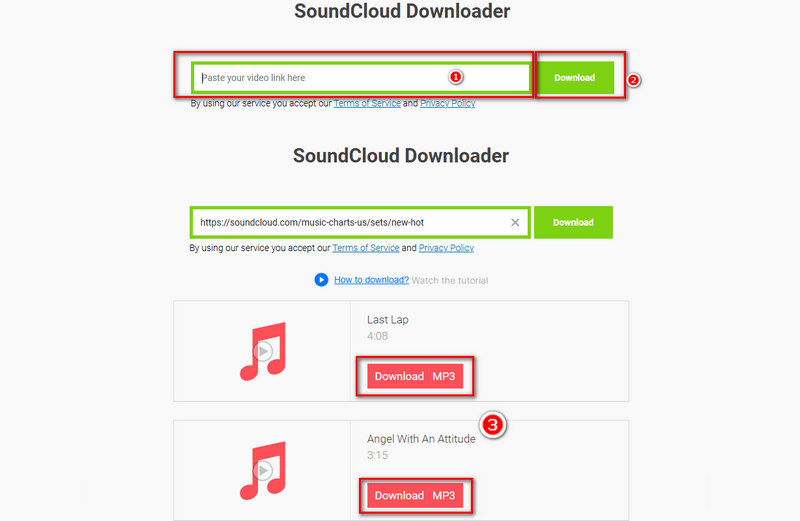
6. Savefrom. net | This tool is restricted in the United States
Savefrom.net is a website for downloading SoundCloud music, which allows users to download quickly and for free. However, it's worth noting that there are a lot of ads on this page. Be careful not to leave this page when downloading SoundCloud playlists, or you may be redirected to another page and download unknown and dangerous content.
Step 1 Copy the link of the playlists in SoundCloud.
Step 2 Open Savefrom.net, paste the copied link into the box and download the songs. When you click download, another web page may pop up. Please ignore it and don't leave, otherwise, you may download something unknown.
Editor’s Real Test (June 2026) | Rating: ★★☆☆☆
Pros
-
No payment required, and the download process is straightforward.
Cons
-
Contains frequent ads that affect usability.
-
Only MP3 format with no option to choose the bit rate.
-
Lacks batch download functionality.
-
In our tests, the site frequently failed to complete downloads due to instability.
7. KlickAud
KlickAud is an online SoundCloud downloader that saves individual tracks as MP3 files. It offers fast download speeds and maintains a public changelog so users can stay informed about new features and updates. With these advantages, KlickAud is a solid choice for anyone looking for a quick and easy way to store SoundCloud music offline.
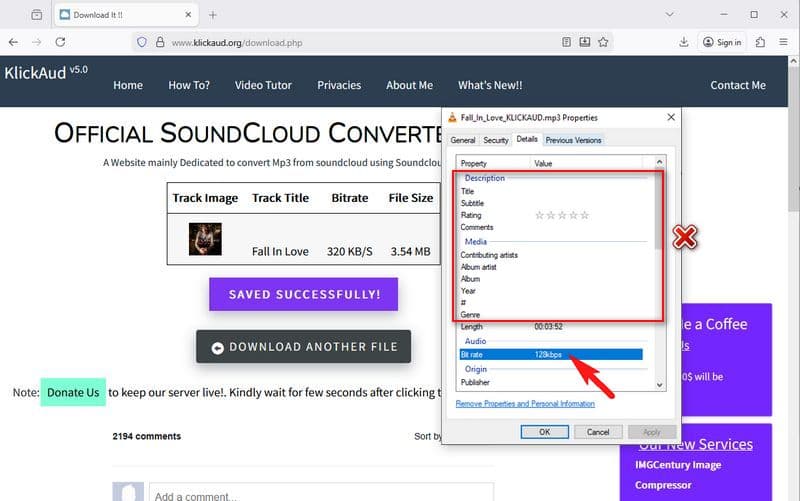
Step 1 Open the KlickAud website in your browser, paste the SoundCloud track link into the input box, and click "Convert".
Step 2 KlickAud will automatically analyze the link. Once the process is complete, click “DOWNLOAD THIS SONG” and wait for the download to finish.
Editor’s Real Test (June 2026) | Rating: ★★★☆☆
Pros
-
Completely free to use.
-
A maintained changelog shows ongoing progress and transparency.
-
Fast download speed.
Cons
-
Claims 320kbps on the page, but the downloaded audio quality is only 128kbps, far below the advertised level.
-
Does not support batch downloads.
-
Supports MP3 downloads only.
-
The website generates a large amount of advertising revenue, and users are usually required to watch a short ad before each download.
8. SoundLoadMate
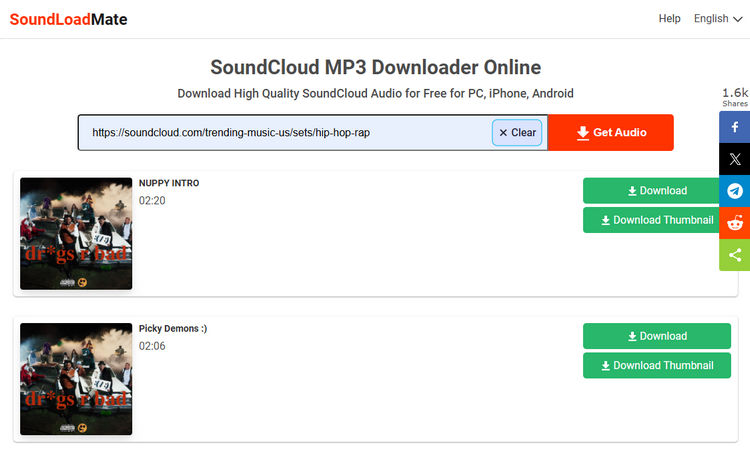
SoundLoadMate is an online tool that downloads audio by converting SoundCloud tracks, playlists, or albums to MP3 files. Although it is one of the few online tools that support playlist parsing, it lacks batch download functionality, which means users have to download each SoundCloud track manually, which can lead to omissions or duplicates. Additionally, the page contains a lot of ads, which hurts the user experience. During testing, conversion errors also occurred, making it somewhat unstable. On the positive side, the tool can also download cover art, so it is fairly feature-complete.
Step 1 Open the SoundLoadMate website. Please note that ads may pop up as soon as the page loads, so use the site carefully. Paste the copied SoundCloud URL into the input box and click "Get Audio".
Step 2 Wait for the tool to finish processing the link, then click "Download" to save the audio file. If needed, you can also click "Download Thumbnail" to save the cover image.
Editor’s Real Test (June 2026) | Rating: ★★☆☆☆
Pros
-
Supports SoundCloud playlist and album parsing.
-
Can download cover art along with the audio.
-
No software installation required.
Cons
-
Heavy ads and pop-ups throughout the site.
-
During our latest test, the site was unstable and multiple downloads failed.
-
No true batch download support for playlists or albums.
9. SoundCloudRips
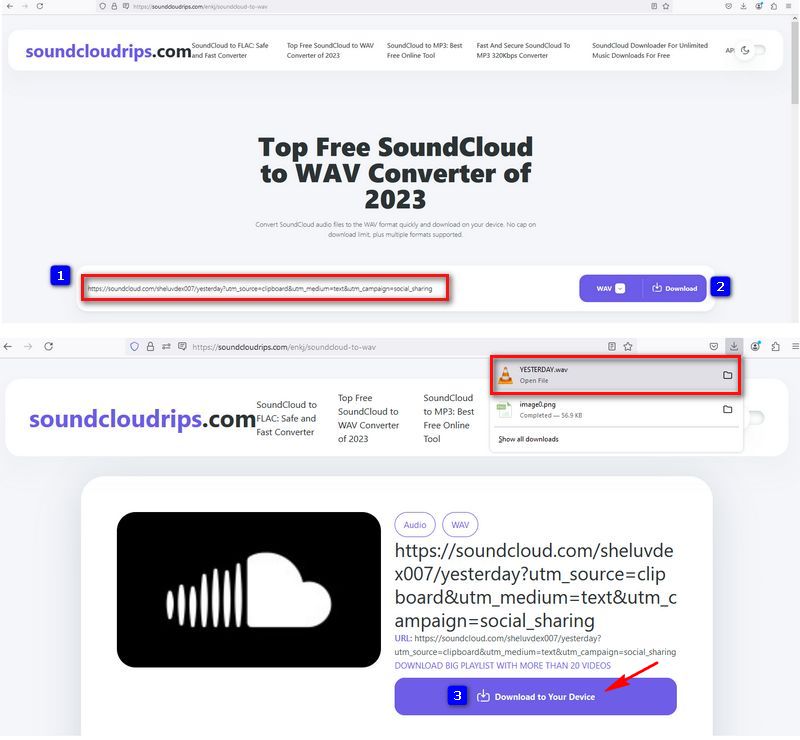
SoundCloudRips is an online SoundCloud downloader that supports downloading songs, playlists, and albums in multiple audio formats, including MP3, WAV, and FLAC. Unlike many basic SoundCloud downloaders that only offer MP3 conversion, SoundCloudRips focuses more on format flexibility and higher-quality audio options. The site occasionally redirects users to ad pages, and download stability varies depending on the selected format and song availability. Despite these drawbacks, SoundCloudRips remains one of the most feature-complete online SoundCloud downloaders available.
Step 1 Open the SoundCloudRips website, paste the URL of the SoundCloud track or playlist into the input box, select your preferred audio format, such as MP3, WAV, or FLAC, and then click "Download".
Step 2 Wait for the tool to process the link and then save the file to your device.
Editor’s Real Test (June 2026) | Rating: ★★☆☆☆
Pros
-
Supports downloading multiple formats, such as MP3, WAV, and FLAC.
-
Support downloading SoundCloud playlists and albums.
Cons
-
Ads and redirects may appear during downloads.
-
Playlist parsing is supported, but the process may not always be smooth. Our latest tests show multiple download failures.
Part 3: Download SoundCloud Playlists with Browser Plugin
1. Addoncrop
Users should be aware that browser extensions of this type may involve potential security risks. For a more stable and secure experience, we recommend using a desktop downloader such as TunePat Music One, which offers a safer environment.
Addoncrop works in Chrome, Opera, Edge, Yandex, Brave, and Vivaldi. Its main functions are downloading YouTube videos and converting SoundCloud tracks to MP3 files. The plugin is very easy to use. Below, we take Chrome as an example to show how to use it to download SoundCloud playlists.
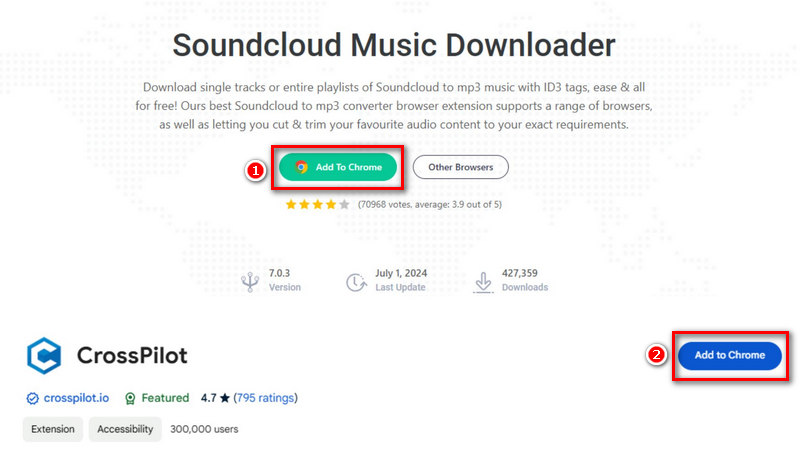
Step 1 Follow the instructions on the page and click "Add To Chrome" to add this plugin to your Chrome. Then click "Add extension > Allow Permissions > Allow" and wait for it to install on your Chrome.
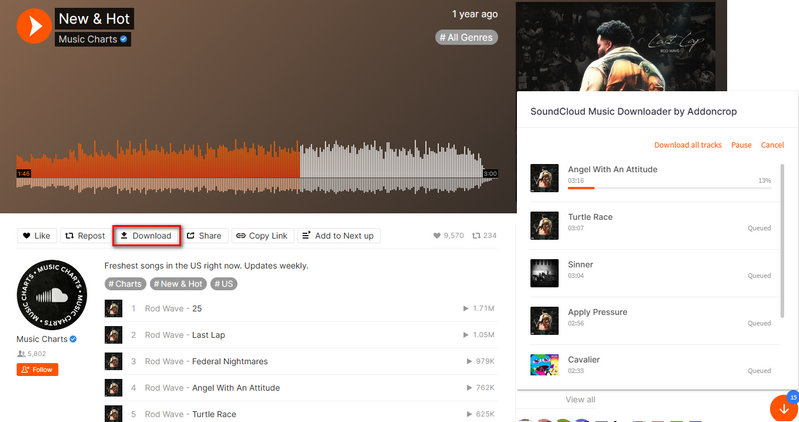
Step 2 Open the SoundCloud website and you will see a download icon in the upper-right of the page, which means Addoncrop is installed successfully. Now you can choose the playlists you want to download and click "Download". Then the playlist will start to download and you can see the process of downloading.
Pros
-
Free and convenient.
Cons
-
Only available on Chrome, Opera, Edge, Yandex, Brave, and Vivaldi browsers.
-
Supports MP3 output only.
-
Does not provide bit rate selection options.
-
Some negative reviews say this plugin is dangerous, contains viruses, and can change Google search results.
Part 4: Comparison of Top SoundCloud Playlist Downloaders
| Supported Music Streaming Platforms | Batch Download | Format | Bit rate | Ad-Free | |
|---|---|---|---|---|---|
| TunePat Music One | SoundCloud, Spotify, Amazon Music, Apple Music, YouTube Music, Tidal, etc. | √ | MP3, AAC, FLAC, WAV, AIFF, and ALAC | Up to 320kbps | √ |
| DownCloudMe | SoundCloud | × | MP3 | 128kbps | √ |
| ScloudMe | SoundCloud | × | MP3 | 128kbps | × |
| SoundCloudDownloader | SoundCloud | √ | MP3, M4A | Up to 320kbps (advertised) | √ |
| SoundCloudAud | SoundCloud | × | MP3 | 128kbps | × |
| Music Verter | SoundCloud | √ | MP3, AAC, WAV, and FLAC | 128kbps and 320kbps | No ads for paid members |
| Savefrom. net | SoundCloud | × | MP3 | 128kbps | × |
| KlickAud | SoundCloud | × | MP3 | Up to 320kbps (advertised) | × |
| SoundLoadMate | SoundCloud, Facebook, X, Reddit | × | MP3 | 128kbps | × |
| SoundCloudRips | SoundCloud | √ | MP3, WAV, and FLAC | 128kbps | × |
| Addoncrop | SoundCloud and YouTube | × | MP3 | 128kbps | √ |
Conclusion
This article mainly introduces several tools for downloading SoundCloud playlists, including a desktop program, a browser plugin, and some online websites. Generally, most websites are free, but they contain a lot of ads, which can be annoying, and you may end up accidentally visiting other unknown sites or downloading a lot of unknown files. This is where paid tools come into play. They don't contain annoying adverts and are a safer way to download SoundCloud playlists.
Each of these tools comes with its own pros and cons, so the best choice depends on your personal needs. That said, we highly recommend TunePat Music One. Not only does it support downloading songs from SoundCloud, but it also works with other streaming platforms such as Tidal, Apple Music, Spotify, Amazon Music, and more. Users are free to select the output format and bit rate according to their preferences. For music lovers, this program offers excellent value. Why not download it and give it a try?
Olivia Anderson
Senior Writer