Best Free MP3 Music Downloader for Android (2026 Guide)
 By Olivia Anderson
Popular Tips
Updated on 9/11/2026
By Olivia Anderson
Popular Tips
Updated on 9/11/2026
Looking for a free MP3 music downloader for Android? Whether you want to save music as MP3 files, listen offline with a music app, or download songs through a browser, there are several options to choose from. Since different tools work in different ways, some provide offline listening only, while others let you save actual MP3 files. In this guide, we'll compare Android music downloaders and online tools to help you find the option that best fits your needs.

📊 Quick Comparison: Best Free MP3 Music Downloaders for Android
| Tool Name | Platform | Best For | Key Features | Recommendation |
|---|---|---|---|---|
| TuneCable Spotify Downloader for Android | Android App | Spotify MP3 downloads | Spotify source, MP3 output, playlist downloads, local files | ⭐⭐⭐⭐⭐ |
| Seal | Android App | Advanced users | Audio downloads from supported sources, local file saving | ⭐⭐⭐⭐ |
| NewPipe | Android App | YouTube-based music downloads | Open-source app, audio extraction, background playback | ⭐⭐⭐ |
| Audiomack | Android App | Free music and offline listening | Licensed music catalog, offline playback, built-in player | ⭐⭐⭐ |
| Online MP3 Downloaders | Browser | Quick downloads without installation | Mobile browser access, no app installation required | ⭐⭐⭐ |
Part 1: Best Spotify MP3 Downloader for Android
TuneCable Spotify Downloader for Android
If you want to download Spotify music as MP3 files on an Android device, TuneCable Spotify Downloader for Android provides a simple way to save Spotify songs, albums, and playlists as local audio files. Unlike traditional music apps that only offer in-app playback, TuneCable allows users to download Spotify tracks as local files and access them without the official Spotify app.
TuneCable Spotify Downloader for Android: Quick Pros & Cons
How to Download Spotify Music with TuneCable:
Step 1 Download TuneCable and Log in to Spotify
Click the "Download" button above to get the TuneCable Spotify Downloader APK. After installation, open TuneCable on your Android phone and log in with your Spotify account. TuneCable supports both free and Premium Spotify accounts, allowing you to download Spotify music directly from your account.
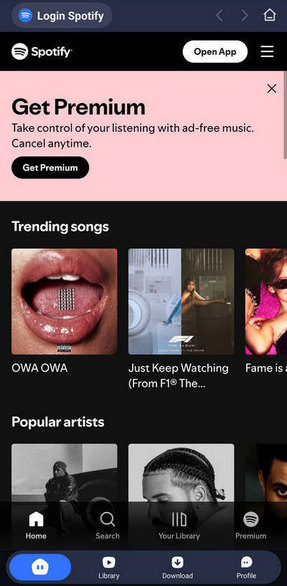
Step 2 Select Spotify Songs, Albums, or Playlists
Open the Spotify song, album, or playlist you want to download, just as you would in the Spotify app. Tap the "+" button, and TuneCable will automatically load the available tracks. Select the songs you want to download, adjust the output settings if needed, and tap "Download". Then click the "Confirm" button to start the download process.
Note: If you do not want to confirm the download settings every time, you can enable the "Don't show next time" option at the bottom. The conversion process will then start automatically when you tap the Download button.
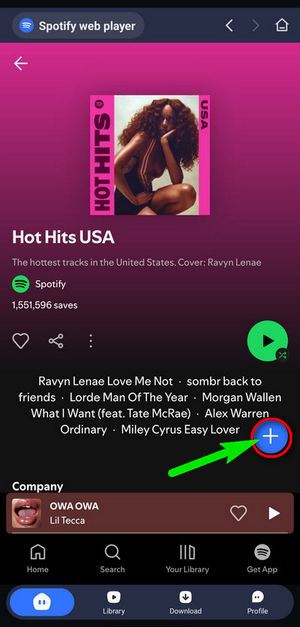
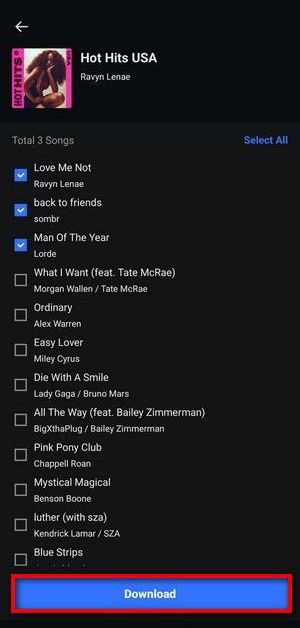
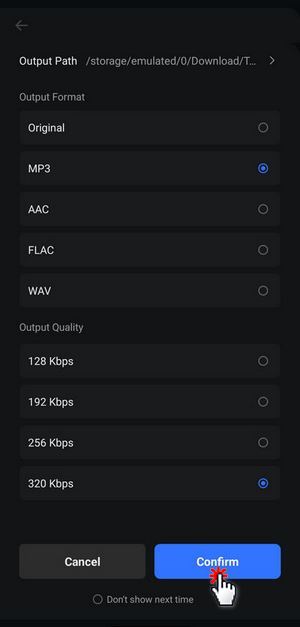
❓ Need Lossless Spotify audio quality? Try TunePat Music One for higher-quality output options.
Step 3 Download and Manage Your Spotify Music
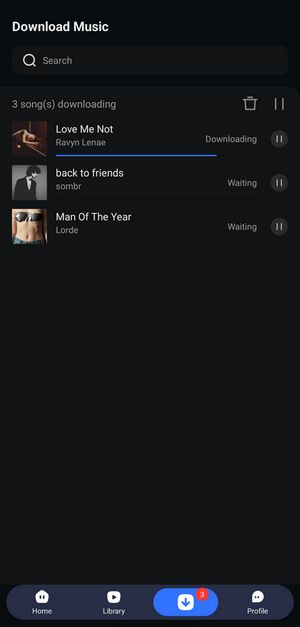
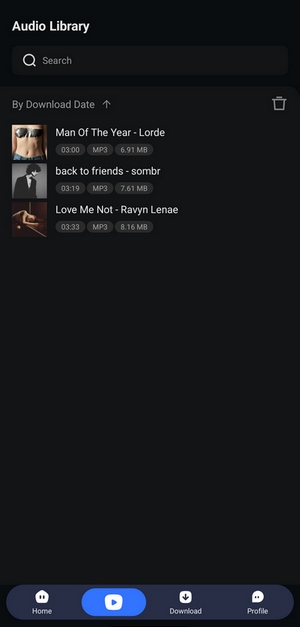
TuneCable will start downloading your selected Spotify songs to your Android device. Once the process is complete, open the "Library" section at the bottom of TuneCable to view your downloaded music. You can check details such as duration, file size, and output format of each downloaded song.
Part 2: Other Free MP3 Music Downloaders for Android
Besides TuneCable, there are also other free MP3 music downloaders and offline music apps available for Android. However, these tools work differently. Some allow you to save audio files locally, while others only provide offline playback inside their own apps. The available music sources and audio quality may also vary depending on the tool.
Seal
Seal is an open-source Android downloader that allows users to download audio and video files from supported online sources. It can save downloaded audio directly to local storage, making it suitable for users who want offline music files instead of app-only playback.
Seal: Quick Pros & Cons

NewPipe
NewPipe is a free and open-source Android app designed for accessing online video and music content without the official apps. It allows users to extract audio from supported sources, save files locally, and listen offline with background playback.
NewPipe: Quick Pros & Cons

Audiomack
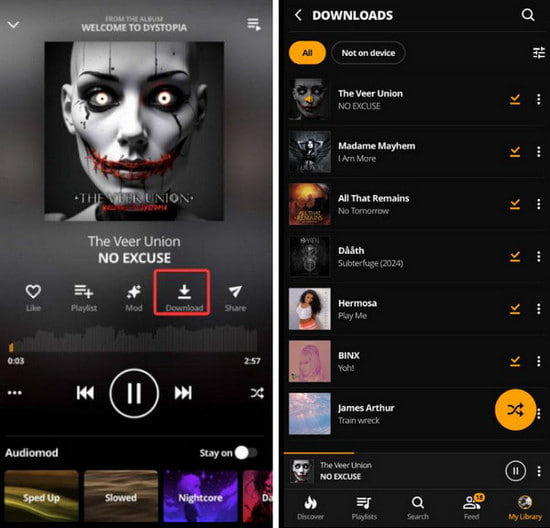
Audiomack is a free music streaming app for Android and iOS that provides supported songs and albums for offline listening. Unlike traditional MP3 downloaders, Audiomack stores downloaded content inside the app instead of providing transferable audio files.
Audiomack: Quick Pros & Cons
Part 3: Online MP3 Downloaders for Android
If you prefer not to install an Android app, online MP3 downloaders provide a convenient alternative. These browser-based tools allow you to convert or download audio files directly from your phone or computer without installing additional software.
However, online MP3 downloaders vary widely in terms of audio quality, supported features, download reliability, and overall user experience. Some services advertise high-quality MP3 output, but the actual results can differ. The comparison below summarizes the key features, limitations, and findings from our hands-on testing of several popular online tools.
Need better audio quality and batch downloads?
Online MP3 downloaders are convenient for quick downloads, but professional tools offer better audio quality, batch conversion, and more stable performance. Consider TuneCable Spotify Downloader for Android or TunePat Music One for a more reliable music downloading experience.
Online MP3 Downloader Comparison
| Tool Name | Best For | Key Limitations |
|---|---|---|
| MP3Banana | Quick browser-based MP3 downloads with multiple quality options | Download redirects, failed attempts, and unreliable audio quality |
| Tubidy | Simple mobile music search and MP3 downloads | Frequent redirects, mirror domains, and inconsistent output quality |
| MP3Paw | Online MP3 downloads with multiple format choices | Advertised bitrate may not match actual audio quality; occasional reliability issues |
| BigMP3 | MP3 and MP4 downloads through a browser | Actual quality may not match advertised settings; redirects and metadata issues |
| YTMP3 | Simple YouTube-to-MP3 conversion | Pop-ups, redirects, no batch downloads, and limited metadata support |
#1: MP3Banana
MP3Banana is a free online MP3 downloader that allows users to search for music and download audio files directly from a browser. It provides multiple quality options, including 128kbps, 192kbps, 256kbps, and 320kbps, without requiring software installation or account registration.
MP3Banana: Quick Pros & Cons

#2: Tubidy
Tubidy is a free online music downloader that allows users to download MP3 files directly from a browser without installing additional software. However, Tubidy operates through multiple domains and mirror websites, and the performance and reliability can vary between different versions.
Tubidy: Quick Pros & Cons

- For a detailed review of Tubidy's features, audio quality, and user experience, check out Is Tubidy MP3 Music Download Still Worth Using in 2026?
#3: MP3Paw
MP3Paw is a free online music downloader that allows users to download songs in different formats, including MP3, M4A, and OPUS. It provides a simple browser-based experience with a wide selection of music categories, but the actual audio quality may vary depending on the available source files.
MP3Paw: Quick Pros & Cons

- Want to learn more about MP3Paw's features, safety, and alternatives? Read our MP3Paw review.
#4: BigMP3
BigMP3 is an online MP3 and MP4 downloader that allows users to download music and videos directly from a browser. It offers high-quality download options, including 320kbps MP3 and 1080p video selections, but our testing found that the actual output quality did not always match the advertised settings.
BigMP3: Quick Pros & Cons

- Want to see our full test results for BigMP3, including audio quality, video quality, download speed, and safety analysis? Read our BigMP3 review.
#5: YTMP3
YTMP3 is a free online YouTube to MP3 converter that allows users to extract audio from YouTube videos directly through a web browser. It became popular because of its simple workflow: paste a YouTube link, select MP3, and download the converted audio file without installing additional software.
YTMP3: Quick Pros & Cons

- Want to know whether YTMP3 is worth using? Read our YTMP3 Converter Review for a closer look at its features, quality, and limitations.
Part 4: Need a Professional Music Downloader for Windows/Mac?
Free online MP3 downloaders and Android music apps can be convenient for basic offline listening, but they often come with limitations such as restricted batch downloads, inconsistent audio quality, limited platform support, or incomplete metadata. For users who want a more complete music downloading solution, a desktop music downloader provides a more powerful alternative.
Unlike TuneCable Spotify Downloader for Android, which focuses on downloading Spotify music on Android devices, TunePat Music One is an all-in-one music downloader for Windows and Mac. It supports multiple popular platforms, including Spotify, Apple Music, YouTube Music, Amazon Music, YouTube, SoundCloud, TIDAL, and Deezer, allowing users to download songs, albums, playlists, podcasts, and more as local audio files.
Why Choose TunePat Music One?
- All-in-One Multi-Platform Downloader: Download music from popular platforms including Spotify, Apple Music, YouTube Music, Amazon Music, YouTube, SoundCloud, TIDAL, Deezer, and more.
- Batch Download Songs, Albums, and Playlists: Save large music collections efficiently with playlist and album batch conversion support.
- High-Quality Audio Output: Convert music to MP3, FLAC, WAV, AAC, M4A, and other formats while preserving original audio quality.
- Complete Metadata Preservation: Keep ID3 tags, lyrics, album information, and playlist order for better music management.
- Flexible Audio Sources: Supports music, podcasts, audiobooks, radio, and other online audio content.
How to Download Music with TunePat Music One
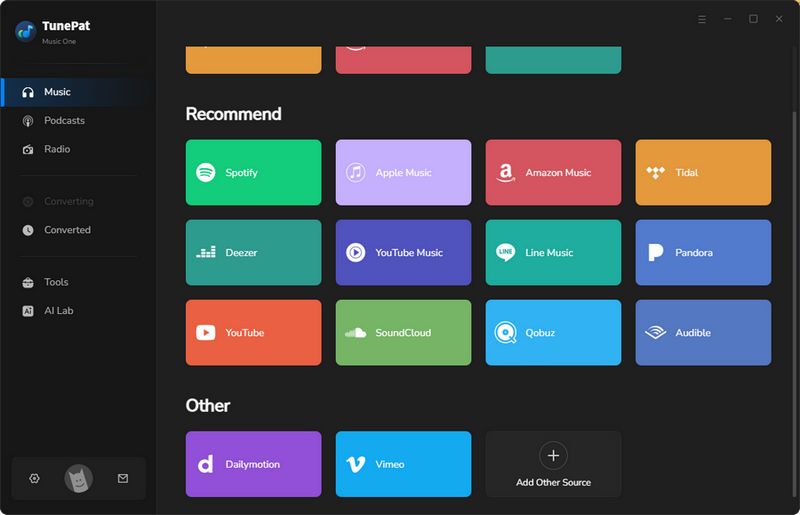
Step 1 Download and install TunePat Music One, then select a music platform.
After launching TunePat Music One, choose the music platform you want to download from, such as Amazon Music, Spotify, or YouTube Music.
Step 2 Add songs, albums, or playlists to TunePat Music One.
Open the music track, album, or playlist you want to save and click the "+" button. TunePat Music One will analyze the selected content and prepare it for conversion.
Step 3 Adjust output settings and start conversion.
Click "Add" to add the songs to the conversion list. If needed, adjust output settings such as format (MP3, M4A, FLAC, etc.) in the "Settings" module. Then click "Convert" to start downloading the music files.
FAQs About Free MP3 Music Downloaders for Android
Q1: What is the best free MP3 music downloader for Android?
A: The best choice depends on your needs. If you want Spotify music saved as MP3 files, TuneCable Spotify Downloader for Android is a good option. For users who prefer free open-source tools, Seal and NewPipe are alternatives. Online downloaders are convenient but usually have more limitations.
Q2: Can I download MP3 music directly to my Android phone?
A: Yes. Android users can download music through dedicated apps or online MP3 downloaders. However, some apps only provide offline playback inside the app, while others save actual audio files that can be moved or played elsewhere.
Q3: Are free MP3 music downloaders safe to use?
A: Free online tools may contain ads or redirects. Always check download buttons carefully and avoid installing unknown APK files. Open-source apps and reputable software are generally safer choices.
Q4: Can Android MP3 downloaders download songs in 320kbps?
A: Some tools claim to support 320kbps, but actual audio quality can vary. During our testing, several online tools labeled files as 320kbps but showed lower-quality audio characteristics.
Conclusion
The best free MP3 music downloader for Android depends on what you need from your downloads. Some users prefer a simple app for offline listening, while others need actual MP3 files, better audio quality, or batch downloads. Android apps are convenient for users who want to save music directly on their phones, while online MP3 downloaders are useful for quick downloads without installing additional software. However, free solutions may come with limitations in audio quality, batch downloads, metadata support, or overall reliability.
For occasional downloads, free apps and online tools can still be practical choices. If you need higher-quality output, batch conversion, and a more stable music downloading experience, dedicated tools such as TuneCable Spotify Downloader for Android and TunePat Music One offer more advanced features for different devices and music sources.

Olivia Anderson
Senior Writer