YTMP3 Converter Review: Is It Safe & What Are the Best Alternatives?
 By Olivia Anderson
Music Tips
Updated on 8/25/2026
By Olivia Anderson
Music Tips
Updated on 8/25/2026
YouTube is full of great music and podcasts, but listening to them offline is not always easy. That is why many people use online tools like YTMP3 to get audio from video links. But is it really safe and reliable in 2026? In this YTMP3 Converter Review, we will explain how it works, its safety risks, and its main downsides. We will also share the best alternative tools to help you download YouTube videos to MP3 smoothly. Let us get started!
Part 1: What is YTMP3 Converter? (Pros, Cons & Safety)
🔗: https://ytmp3.cc/ (one of the earliest widely known versions, now redirects to https://yt2mp3.gs/); https://ytmp3.ec/ (currently redirects to OGMP3); https://yt2mp3.sc/, and other similar variants.
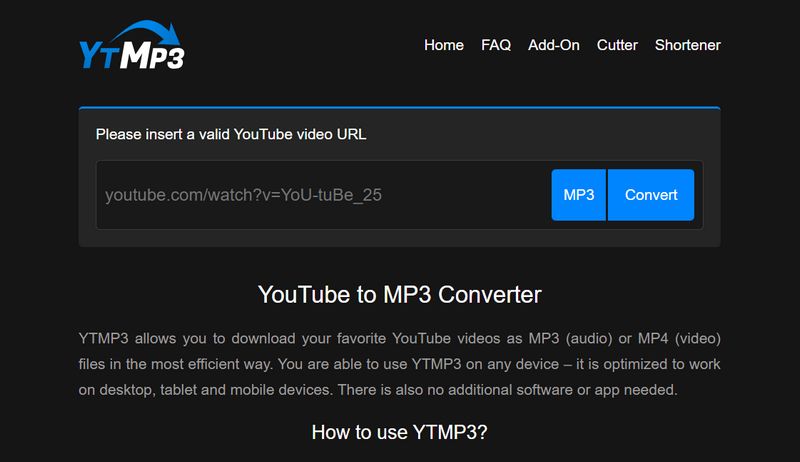
YTMP3 Converter is a free web-based tool designed to help users download audio from YouTube videos and save it as MP3 files. Since everything runs directly in your web browser, you do not need to install any extra software. It became popular because it offers a quick way to get audio for offline listening on phones, tablets, or computers.
However, using free online converters like YTMP3 comes with clear downsides and safety risks that you should know before pasting any link.
Pros
-
 Easy to Use — Paste a YouTube link, choose MP3, and you're ready to download.
-
No Account or Installation — It runs in the browser, so there's nothing to sign up for or install.
-
Free Downloads — No subscription or payment is needed to get the MP3 files.
Cons
-
 Pop-Ups and Redirects — Some clicks can trigger unwanted ads or take you to another page.
-
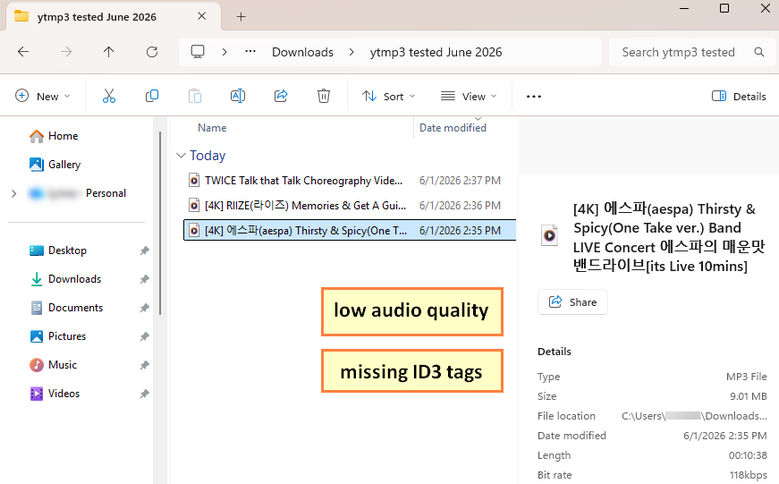
Lower Audio Quality — The MP3 output doesn't sound as good as the original, and ID3 tags aren't preserved.
-
No Batch Downloads — Each YouTube link has to be processed separately.
-
MP3 Only — You can't choose other formats such as M4A, WAV, or FLAC.
-
No YouTube Music Support — YouTube Music URLs can't be processed directly.
⚠️ Is YTMP3 Converter Safe to Use?
Based on our hands-on test, you should watch out for two main security problems:
- Domain Confusion: There is no single official YTMP3 website. Many copycat domains exist, and several old domains now automatically redirect to completely different sites. It is hard to verify which one is authentic and safe.
- Risky Redirects and Ads: When you click the "Convert" or "Download" buttons on these sites, they often trigger pop-up ads that redirect you to third-party pages. Be very careful not to download unknown files or click random prompts on those opened pages.
*Note: Want a safer way to batch convert YouTube playlists? Need original audio quality without annoying ads or fake download buttons? Try this trusted YTMP3 Converter alternative:
Part 2: Step-by-Step Guide to Using YTMP3 Converter
If you still want to try YTMP3 Converter to download YouTube audio to MP3, here is a quick step-by-step guide on how it works:
Step 1 Open YouTube, find the video or podcast you want to convert, and copy its full URL link from your browser address bar.
Step 2 Go to a working YTMP3 Converter website. Make sure the site looks clean and does not ask you to install browser extensions before pasting your URL into the text box.
Step 3 Select your output format (usually MP3) and click the "Convert" button to start processing the video link.
Step 4 Wait a few seconds for the conversion process to complete.
Step 5 Click the "Download" button to save the MP3 file to your computer or phone.
Safety Tip During Download
If clicking Download opens a new tab, close it right away. Never run unknown files or allow site permissions from pop-up pages.
Part 3: Top 4 Safe Alternatives to YTMP3 Converter
Before diving into the detailed reviews, here is a quick overview to help you compare the top 4 safe alternatives to YTMP3 Converter:
| Tool / Option | Type | Best For | Output Formats | Batch Download |
|---|---|---|---|---|
| TunePat Music One | Desktop Software (Win/Mac) | Batch downloads & multi-platform high-quality audio | MP3, FLAC, WAV, AAC, ALAC, AIFF | Yes |
| Addoncrop | Browser Extension | Quick one-click downloads directly on YouTube | MP3 | No |
| EzConv (Formerly EzMP3) | Online Converter | Quick YouTube audio downloads | MP3, M4A, WAV (paid) | No |
| YouTube Premium | Official Subscription | Ad-free mobile streaming & official offline play | App offline storage only | Yes (via Playlists) |
3.1 TunePat Music One: The Ultimate All-in-One Alternative
If you are fed up with YTMP3 Converter's frequent downtime, aggressive pop-up ads, or single-format limitations, TunePat Music One is the most comprehensive alternative available. Unlike web-based converters that only handle basic YouTube links, TunePat supports batch downloading from YouTube videos, YouTube Music playlists, albums, and podcasts while preserving original audio quality and full ID3 tags.
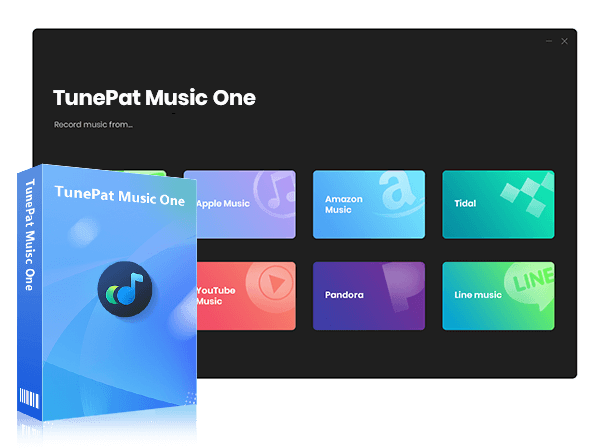
Beyond YouTube, TunePat acts as a universal audio converter for over 9 major platforms, including Spotify, Apple Music, Amazon Music, Tidal, and SoundCloud. It also breaks YTMP3's MP3-only barrier by offering multiple output formats like FLAC, WAV, AAC, M4A, ALAC, and AIFF.
TunePat Music One
An all-in-one desktop converter built for lossy and lossless music streaming platforms.
- Multi-Platform Support: Download music from YouTube, Spotify, Apple Music, Tidal, SoundCloud, etc.
- 10X Faster Speed: Convert full playlists and albums in batch with smart ad-filtering.
- Lossless Formats: Export to MP3, AAC, WAV, FLAC, AIFF, or ALAC.
- Metadata Preservation: Keep original sound quality, lyrics, and full ID3 tags.
- Built-in Audio Tools: Includes AI vocal separator, tag editor, and format converter.
How to Convert YouTube Videos to MP3/FLAC via TunePat
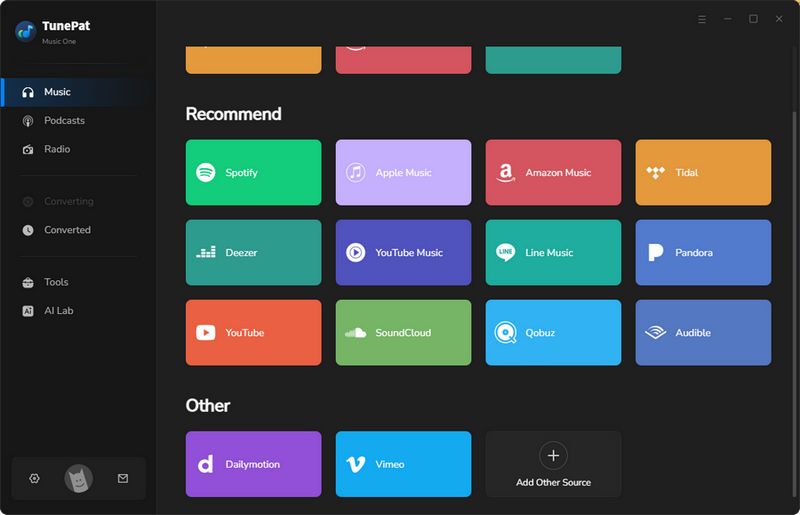
Step 1 Launch TunePat Music One, select YouTube (or YouTube Music) from the main screen, and customize your output parameters in Settings.
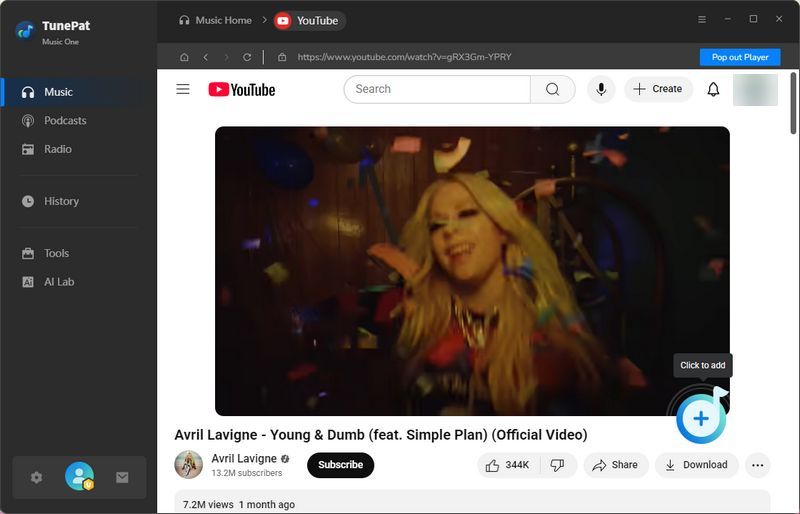
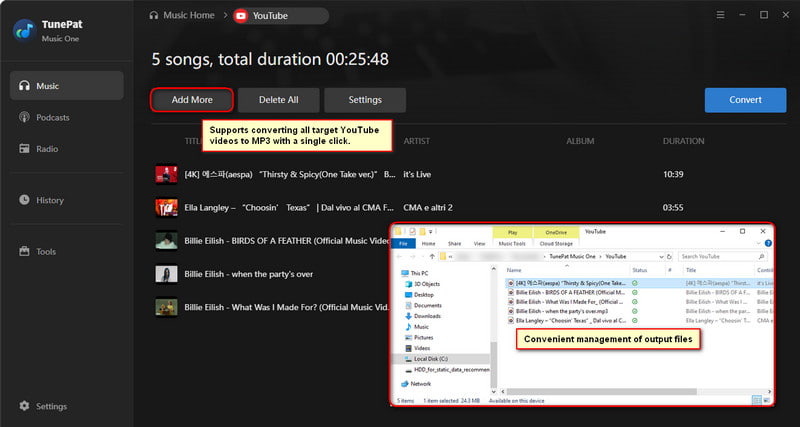
Step 2 Browse YouTube directly inside the built-in window, open your target content, click the "+" button to import songs, and use "Add More" if you want to convert multiple links in batch.
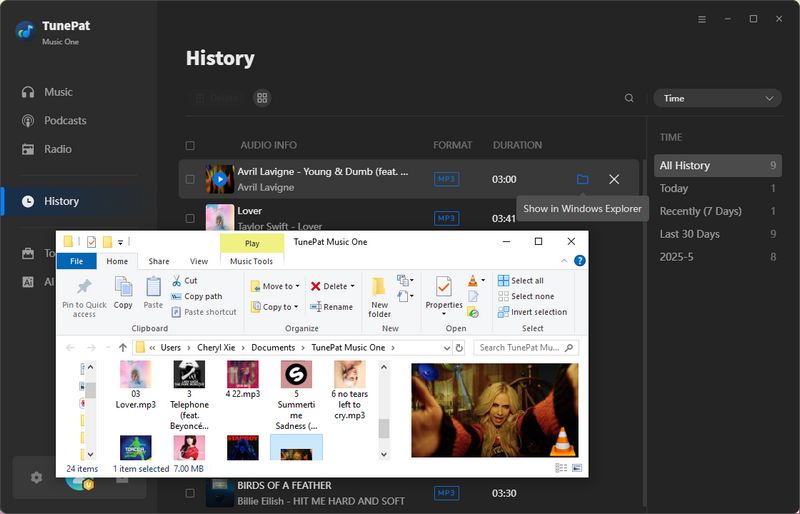
Step 3 Click the "Convert" button to start downloading, then find your saved MP3 or other files permanently stored under the "History" tab.
Pros
-
Clean and Safe — No pop-ups or suspicious redirects during use.
-
Multiple Platforms — Works with YouTube, Spotify, Apple Music, and more.
-
More Format Choices — MP3, FLAC, WAV, AAC, ALAC, and AIFF are all available.
-
Batch Downloads — Playlists and albums can be added together instead of one track at a time.
-
Tags Stay Intact — Track information and cover art are kept with the downloaded files.
-
Local Files — The converted tracks are saved as regular audio files you can keep and play elsewhere.
Cons
-
Desktop Only — There is no mobile version for downloading music on phones or tablets.
-
Free Trial Limits — You can try the software first, but full music conversion requires a paid license.
-
YouTube Music Quality — The best quality we got from YouTube Music was around 320 kbps, which is noticeably more limited than the lossless results we got from Apple Music, Spotify, and TIDAL.
3.2 Addoncrop YouTube Downloader: Best Extension for Quick Downloads
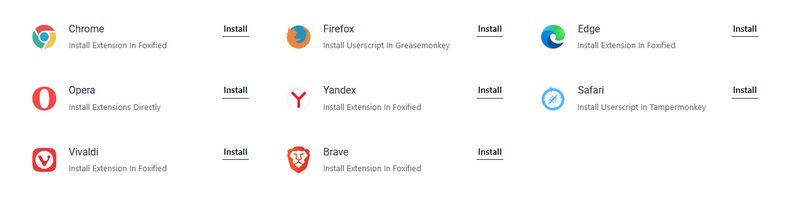
Addoncrop YouTube Downloader is a browser extension that integrates an MP3 download option directly into the YouTube interface. Since official Web Stores restrict YouTube downloading tools, Addoncrop installs via a companion extension helper (such as Foxified) to deliver a seamless, native downloading experience.
How to Download YouTube Audio via Addoncrop
Step 1 Visit the official Addoncrop website in your browser, click "Add to Chrome", and grant permissions to install the required helper extension (such as Foxified).
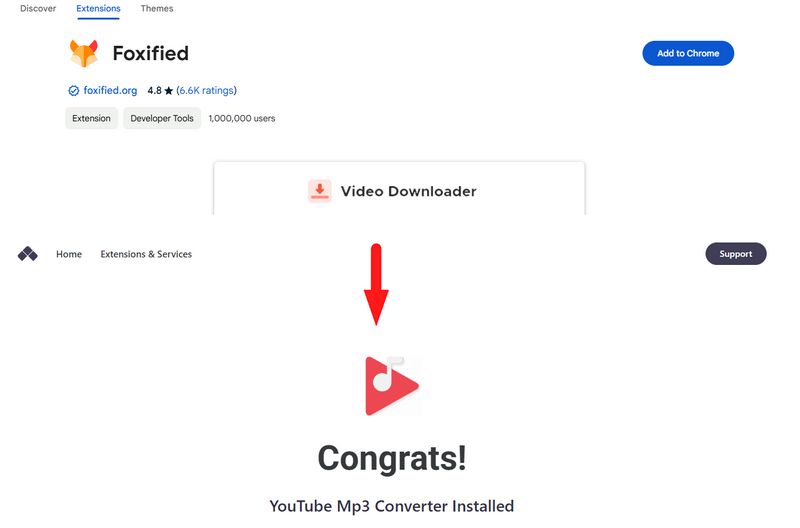
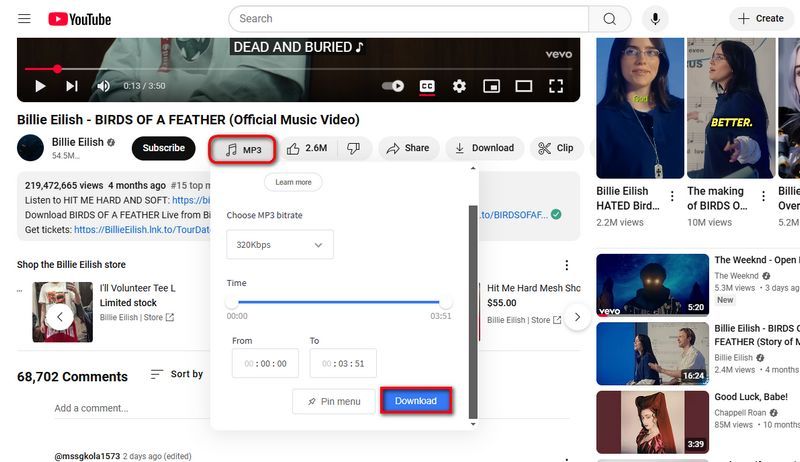
Step 2 Open any video on YouTube, locate the new MP3 icon placed next to the Like button, and click it.
Step 3 Select your preferred audio quality (from 64 kbps up to 320 kbps), trim the audio duration if needed, and click "Download" to save the file.
Pros
-
Direct Button — The MP3 button is right there on the YouTube page.
-
No Copy-Paste — Just click the button instead of copying links to another site.
-
Flexible Quality — Pick anything from 64 kbps to 320 kbps and trim the audio if needed.
-
Ad-Free — No annoying pop-ups or random redirects while downloading.
Cons
-
No Batch Downloads — You have to download videos one by one.
-
Extra Permissions — You need to give the helper extension a few extra permissions.
-
Sideloading Required — Setup takes a few more steps than a normal browser extension.
3.3 EzConv – Online YouTube to MP3 Download Site
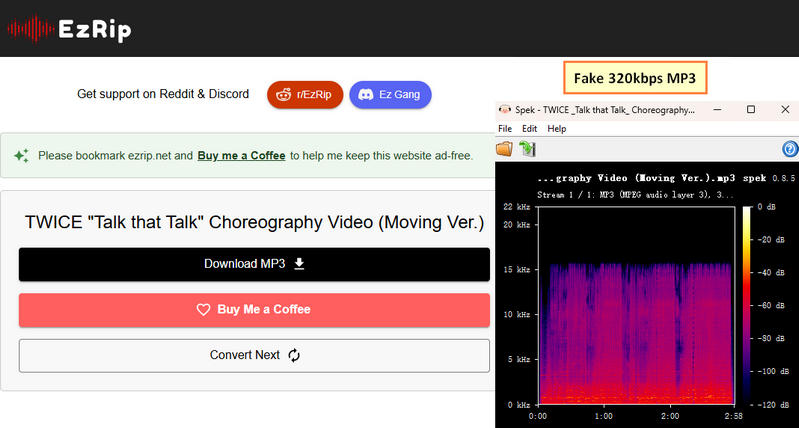
EzConv (Formerly EzMP3) is a YouTube converter that lets you download audio and video in several formats. The site has an ad-free interface with no pop-ups or intrusive ads. For audio, you can trim the track and choose a bitrate from 64 kbps to 320 kbps. It supports MP3, M4A, WAV, MP4, MKV, and other formats, although some options require a paid upgrade.
How to Download YouTube Audio via EzConv
Step 1 Copy the URL of the YouTube video you want to download, paste it into the input box on EzConv, select your preferred output format and quality, and click "Convert".
Step 2 Click "Download MP3" to save the YouTube video as an MP3 file.

Pros
-
No Ads — No pop-ups, spam, or annoying redirects to deal with.
-
Real 320 kbps — The MP3 files came out at 320 kbps when we selected the highest quality.
-
More Formats — You can also save videos as M4A, WAV, MP4, or MKV.
-
Quick Downloads — Three tracks took around 2 minutes to download.
-
Audio Trimming — You can cut out unwanted parts before downloading.
Cons
-
No Batch Downloads — Each video has to be converted separately.
-
WAV is Paid — You'll need to upgrade if you want the lossless WAV option.
-
Higher Video Quality Costs Extra — Video downloads above 1080p aren't included for free.
3.4 YouTube Premium: The Official Paid Option
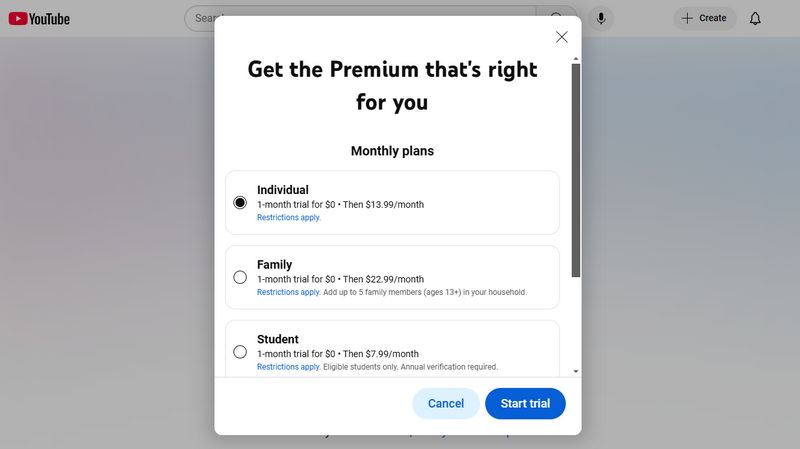
YouTube Premium is Google's official paid service. It is a safe and legal way to replace YTMP3 Converter. If you have the budget and do not want to use third-party tools, this option gives you a clean experience without any ads.
Pros
-
No Ads — YouTube and YouTube Music are much cleaner without the usual ad breaks.
-
Background Play — Keep listening after turning off your phone screen.
-
Offline Downloads — Save videos, songs, and playlists for offline use.
-
YouTube Music Included — The same subscription also covers YouTube Music Premium.
Cons
-
Monthly Fee — $15.99 per month after the free trial.
-
No Local Files — Downloads stay inside the YouTube app instead of becoming regular video or audio files.
-
Region Restrictions — Cheaper plans from other regions can be difficult to use reliably.
Part 4: FAQs About Using YTMP3 Converter
Q1: Is YTMP3 Converter Safe to Use?
A: No, most free YTMP3 sites are not completely safe. They often show pop-up ads, fake virus alerts, or malicious redirects that can download malware to your device. Using safe YTMP3 alternatives is a much better choice.
Q2: What is the Safest YouTube to MP3 Converter?
A: YouTube Premium is the safest official option. If you want to download MP3 files to your local drive without ads or security risks, clean desktop tools like TunePat Music One are the safest option.
Q3: What Audio Quality Does YTMP3 Offer?
A: Most YTMP3 converters offer audio quality ranging from 128 kbps to 320 kbps. However, standard YouTube videos max out at around 128 kbps. Read more about YouTube audio quality here.
Q4: Why Do YTMP3 Sites Keep Shutting Down?
A: YTMP3 sites shut down frequently because they violate YouTube's Terms of Service and copyright laws. Record labels regularly issue legal takedowns, forcing these sites to close or switch domains. Installing reliable desktop tools or browser extensions is usually much more stable.
Q5: Can I Download an Entire YouTube Playlist with YTMP3?
A: No, most web-based YTMP3 converters only support one link at a time and fail on whole playlists. If you need batch downloads, you will need a dedicated converter like TunePat.
Conclusion
YTMP3 Converter offers a quick way to turn YouTube videos into MP3 audio files. While it is fast and easy to use, its frequent ads, limited output formats, and safety risks lead many users to search for better options. Among all the top alternatives reviewed, TunePat Music One stands out as the best solution. It allows you to batch download audio from YouTube, YouTube Music, and other major platforms safely in high quality.
You can download the free trial below to see if it meets your needs:
Olivia Anderson
Senior Writer