
Are you tired of paying for expensive music streaming services? Enter MP3 Quack, the free music download platform making waves in the online audio world. In this comprehensive guide, we'll dive deep into MP3 Quack download, exploring how to use it, its benefits, potential drawbacks, and good alternatives. So read this article and get ready to get your music now!
Part 1: Introduction to MP3 Quack Download
MP3 Quack (🔗https://mp3quack.io/) is a widely known online platform that offers free MP3 downloads for songs across all genres, from current chart hits to obscure independent tracks. Its extensive library contains millions of songs, which explains why the site gained rapid popularity, particularly in regions where premium streaming services are either cost-prohibitive or inaccessible. The platform's clean interface and large music collection make it an appealing alternative to paid services such as Spotify, Apple Music, and Amazon Music.
However, free platforms often attract a fair amount of controversy regarding their legality, safety, and actual performance. In the following sections, we will conduct a detailed review of MP3 Quack, covering its download quality, user experience, and potential risks, to help you decide whether it truly lives up to its reputation.
*Note: Want a green and safe MP3 music downloader without ads or redirects? Want to get high-quality music? Click below to download this converter, which supports batch acquisition of original songs from multiple popular streaming platforms such as Spotify, Amazon Music, Apple Music, Tidal, YouTube Music, and more: 👇
Part 2: How MP3 Quack Works (Step-by-Step + Real Experience)
Now that we know what MP3 Quack is, let's look under the hood at MP3 Quack Download.
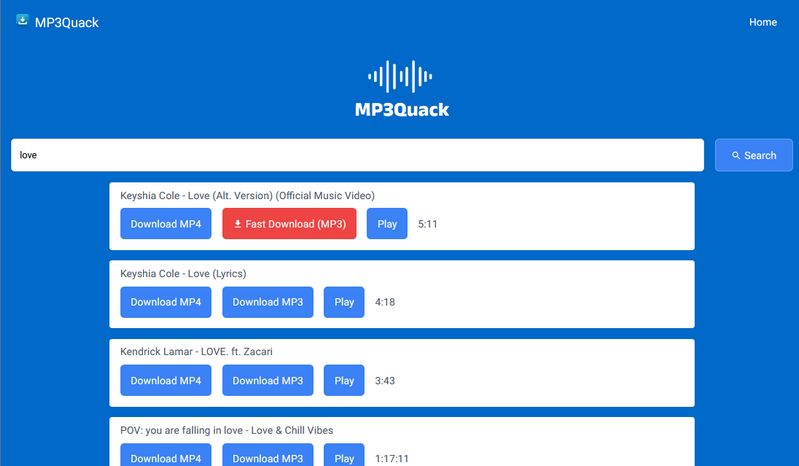
Step 1 Type in the name of the song, artist, or album you're looking for.
Step 2 MP3 Quack will display a list of matching results, often including multiple versions of the same song. Choose the version you want to download. They may be versions of different lengths.
Step 3 Click the "Download MP3" button, and then choose the "Fast Download (MP3)" option! The MP3 file starts downloading to your device.
Editor's Real Test (June 2026) | Rating: ★★☆☆☆
Pros
-
 MP3 Quack returned results for mainstream songs, obscure tracks, live performances, remixes, and international music, making it easy to discover different types of music.
-
In our testing, downloaded MP3 files were saved locally and could be played without an internet connection, making them convenient for offline listening.
-
During our testing, we were able to use MP3 Quack without creating an account or signing in. Its search and download features were accessible directly through the browser, and no payment was required to use the basic functionality.
Cons
-
 Redirects occur on nearly every click. This significantly increases the risk of downloading malware, which could expose personal data. Be especially cautious with any executable (.exe) files. Consider using a more secure MP3 downloader instead.
-
The quality of the downloaded files can vary greatly. You may end up with low-quality recordings, incomplete tracks, or even files that don't match the hype.
-
It is unstable and may be interrupted during peak hours. In our testing, after clicking "Download MP3", the button would often spin indefinitely, and no file would ever download.
Part 3: Top 5 Best Alternatives to MP3 Quack
We've curated 5 alternatives to MP3 Quack Download, each with its own strengths that make up for the drawbacks of the original.
3.1 TunePat Music One
The champion of MP3 Quack download alternatives is undoubtedly TunePat Music One. Its outstanding performance perfectly addresses the shortcomings of MP3 Quack. First, this software is ad-free, regularly maintained and updated, and ensures user privacy protection, eliminating concerns about potential security risks. Moreover, a major flaw of MP3 Quack lies in its uncertain music sources, often resulting in low-quality MP3 files with bitrates around 128 kbps. TunePat Music One excels in both reliable music sources and audio quality preservation.
As a powerful all-in-one audio converter, TunePat Music One supports popular streaming platforms including Spotify, Amazon Music, Apple Music, YouTube Music, YouTube, SoundCloud, TIDAL, Deezer, etc. When converting songs from these sources to MP3 format, it preserves 320 kbps audio quality. For audiophiles seeking higher fidelity, TunePat also supports lossless formats like FLAC, WAV, and ALAC. Crucially, unlike MP3 Quack or other online converters and download sites we'll mention later, TunePat enables batch conversions with ease, which is a capability that solidifies its top position. Below, we'll detail the step-by-step process for downloading MP3s using TunePat.
TunePat Music One
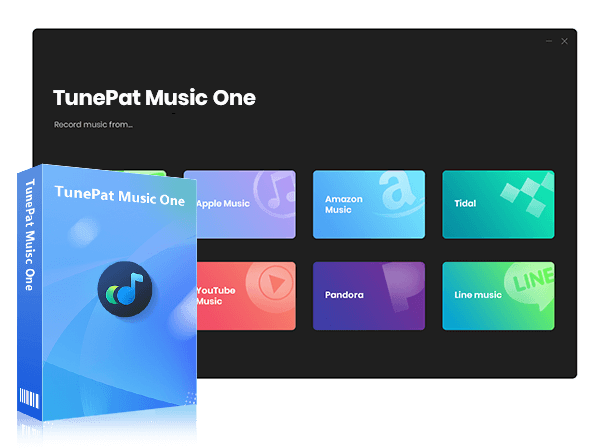
TunePat Music One is an all-in-one converter that can support any music streaming platform.
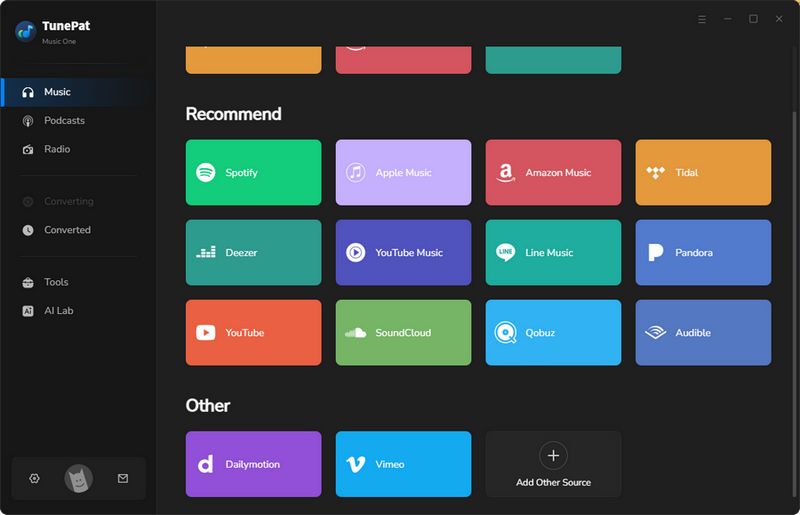
Step 1Open TunePat Music One. The home screen lists all supported streaming services. For this demonstration, select Spotify and click its tab. Choose whether to source songs from the Spotify app or the web player using the corresponding toggle. Then authenticate your account by following the on-screen login prompts.
*Note: TunePat Music One can support logging in with a free account to access the library, and then convert ad-free local audio files. For example, Spotify, YouTube Music, YouTube, Pandora, etc.
Step 2 Navigate to the "Settings" menu before starting conversions. Adjust parameters such as file format, bit rate, sample rate, output folder, output file name, and others. Set the format to "MP3" and optimize audio quality by selecting "Very High (320 kbps)".
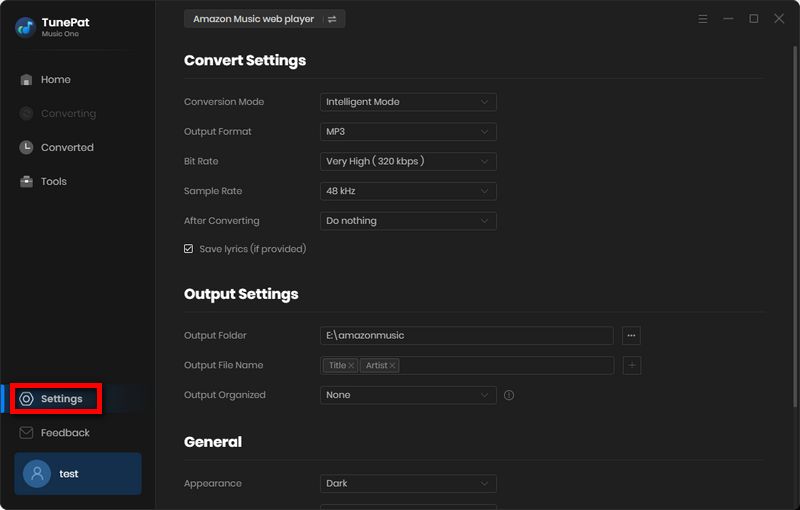
Step 3 Within the Spotify library, locate your desired track. Click "+" to analyze the file. After processing completes, confirm your selection by clicking "Add" in the prompt. Return to Spotify library, repeat the parsing and adding process for additional tracks. Review your list of selected files, then initiate bulk processing by clicking "Convert". Upon completion, the output folder launches automatically. Archived conversions can also be reviewed under the "History" section. Your downloaded Spotify MP3 files are now ready for offline playback across all devices.
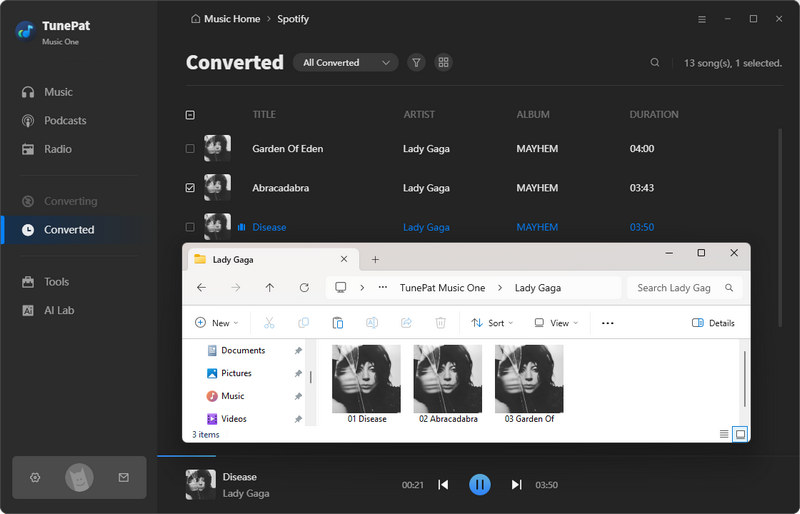
Editor's Real Test (June 2026)
Pros
-
Supports YouTube, Spotify, Apple Music, Amazon Music, SoundCloud, Tidal, Qobuz, and many others.
-
Supports a wide range of audio types, including music, podcasts, audiobooks, radio, etc.
-
Export tracks as MP3, FLAC, WAV, ALAC, AIFF, or AAC without losing quality. Perfect for all devices.
-
Change multiple songs to your desired format in one go.
-
Convert music up to 10x faster, great for large collections.
-
Automatically saves track info like title, artist, album art, release year, etc.
Cons
-
Available for Windows and macOS only.
3.2 Free Online Spotify Downloaders
As a giant in the streaming industry, Spotify boasts a massive user base and offers an ad-supported free tier, providing flexibility for users. However, its streaming limitations, such as the inability to retain ad-free, offline downloads after a subscription expires, frustrate many users. This has led to the rise of Spotify online downloaders, with people seeking tools to download Spotify tracks as MP3s. Some of these tools preserve songs at 320 kbps quality without ads, serving as alternatives to MP3 Quack download. Below, we'll explain the steps using a representative tool like Spowload:
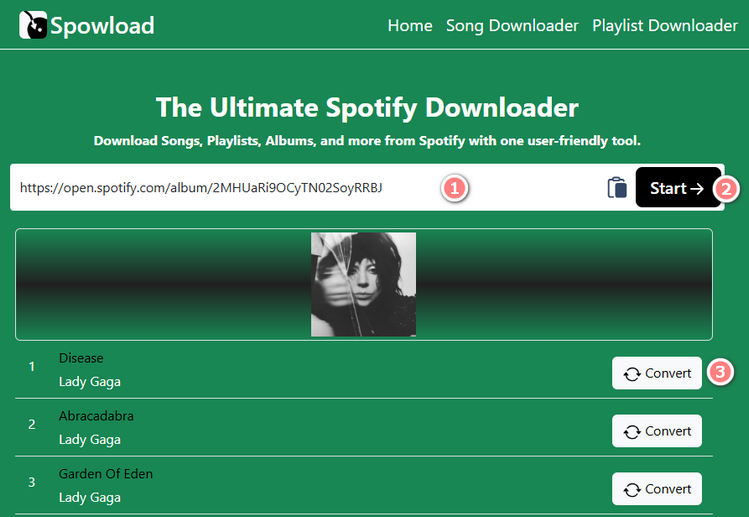
Step 1 Open Spowload (🔗 https://spowload.cc/en2). Copy the URL of the desired Spotify track or playlist from the Spotify app, paste it into the website's input box, and click "Start".
Step 2 The website will process the request and display results. Click "Convert", then select "Download".
📕 You might also be interested in: Full SpotDownloader Review
Editor's Real Test (June 2026)
Pros
-
Free and easy access.
-
Preserves MP3 quality up to 320 kbps.
-
Some websites support downloading full playlists or albums.
Cons
-
Cannot download Spotify podcasts or audiobooks.
-
Batch download is not supported.
-
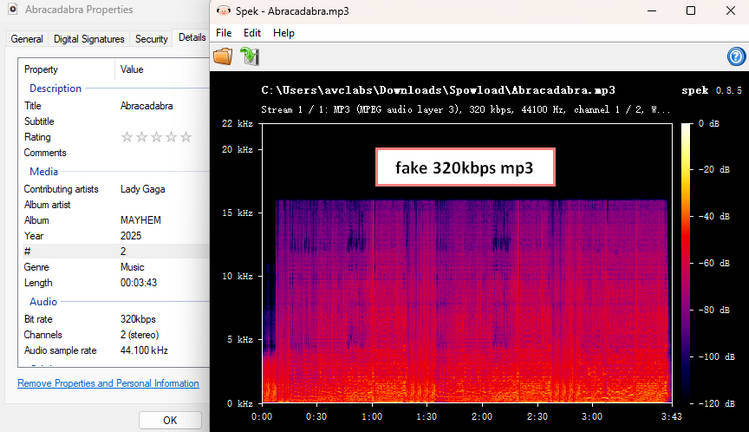
Verified audio quality does not reach 320kbps.
-
Downloading a 14-song playlist takes about 7 minutes, slower than many online Spotify downloaders.
3.3 YouTube to MP3 Download Sites
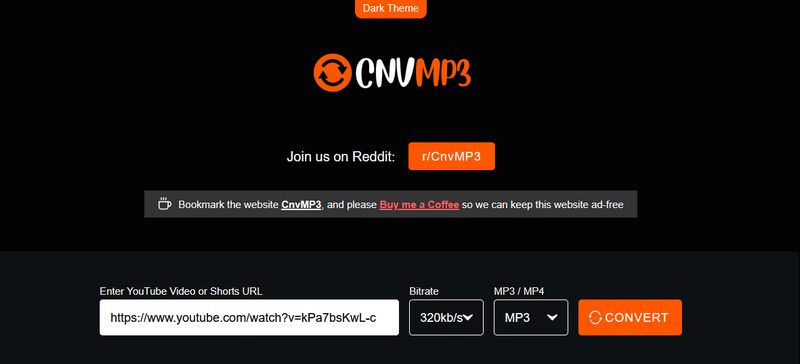
Beyond Spotify, YouTube is another popular platform for streaming videos and music. YouTube Music offers a vast library of videos, covers, remixes, live performances, and more, though its maximum audio quality for paid users is limited to 256 kbps AAC. However, compared to low-quality options like MP3 Quack download, YouTube-to-MP3 converter websites serve as viable alternatives. These platforms share one key feature: the ability to download YouTube videos as MP3 files. When selecting a tool, it's crucial to choose secure and reliable websites. Below, we'll demonstrate the process using CnvMP3:
Step 1 Visit CnvMP3(🔗 https://cnvmp3.com/v54), copy your YouTube video URL, and paste it into the website's input box.
Step 2 Click the Bitrate and MP3/MP4 options. From the dropdown menus, select 320kbps and MP3 as your desired format.
Step 3 Click "Convert" to quickly generate the YouTube MP3 file.
📕 You might also be interested in: CnvMP3 Review: The Ultimate YouTube to MP3 Converter?
Editor's Real Test (June 2026)
Pros
-
The interface is intuitive and completely free of ads.
-
The tool supports a wide range of platforms.
-
You can use the service without the need to create an account.
Cons
-
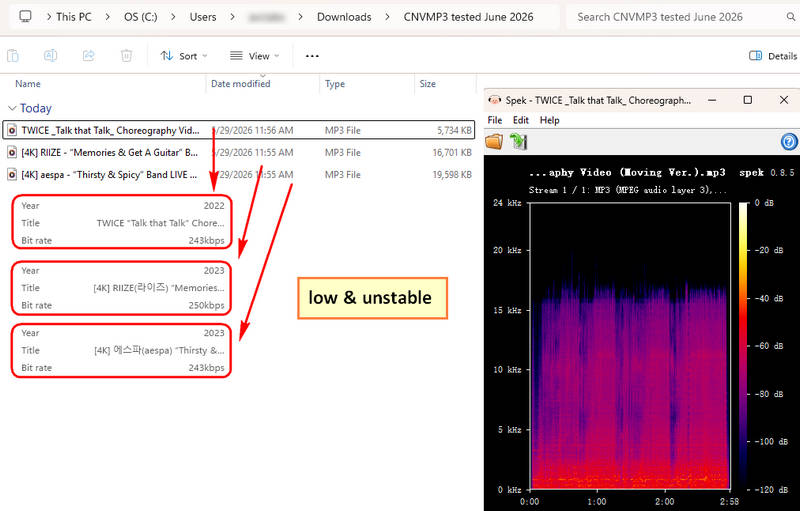
No batch processing for multiple YouTube links, making the workflow time-consuming.
-
Based on our testing, the sound quality falls short of the advertised 320kbps.
-
Limited to 3-hour video length.
3.4 Online SoundCloud to MP3 Converters
Unlike Spotify, which primarily features officially released music, or YouTube, which is centered around video content, SoundCloud hosts a vast library that includes niche categories such as underground music, unsigned artists, remixes, bootlegs, and demos. If you are interested in these types of sounds and wish to transfer and save them to your device, there are several online SoundCloud playlist converters you can consider as alternatives to the MP3 Quack download.
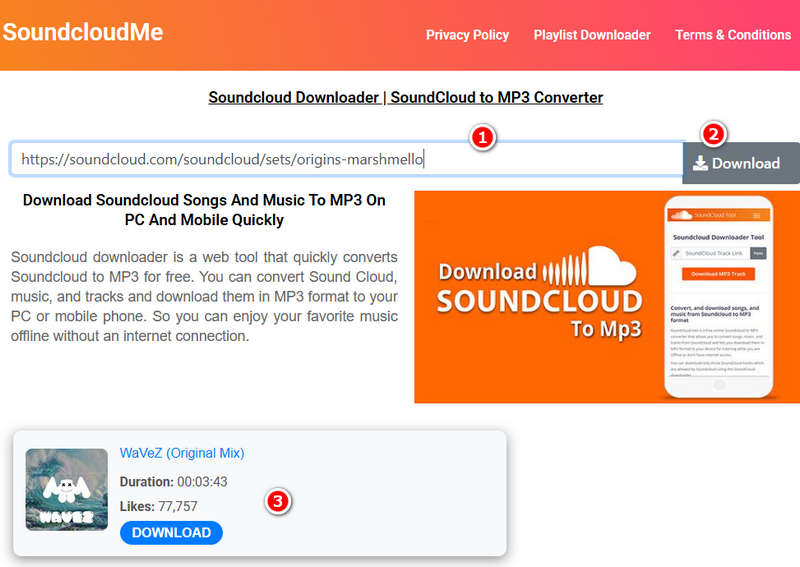
These converters are quite simple to use. Paste a link, and the platform automatically retrieves the audio file for you. What you get, however, depends on the site. The sound quality, the saved song details, and the option to download playlists all come down to your choice of website. For a clear example, we'll use ScloudMe to guide you through the steps.
Step 1 Copy the URL of the SoundCloud playlist you wish to download. Open the ScloudMe website (🔗 https://www.scloudme.com/en9K/) paste the link into the search box on the homepage, and click the Download button.
Step 2 After the playlist is processed, its tracks are displayed individually. Since ScloudMe does not yet offer a batch download feature, each song must be downloaded separately.
Editor's Real Test (June 2026)
Pros
-
The interface is clean and straightforward, making the tool simple to operate.
-
The service is offered at no cost and does not require users to register an account.
Cons
-
There are no advanced functionalities, such as the ability to download multiple items in a single batch.
-
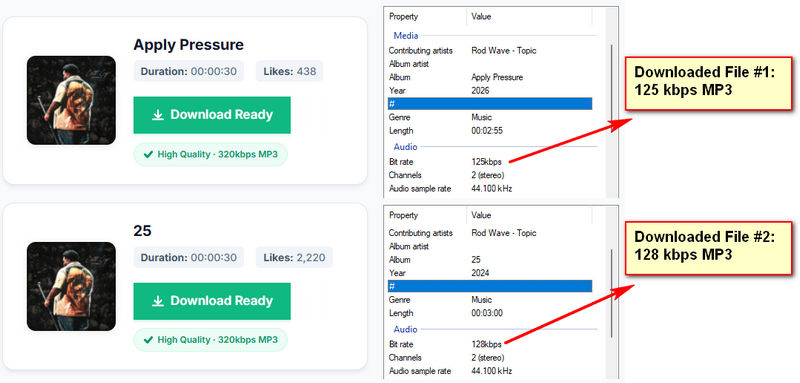
The only output option is MP3, and our testing indicates that the actual bitrate does not exceed 320kbps.
-
The platform relies on third-party advertisements, which often result in pop-ups and frequent redirects.
Top 10 Best SoundCloud to MP3 Converters
Want offline access to SoundCloud's music? Explore our picks of the top 10 SoundCloud to MP3 converters. This guide makes it easy to download and keep your favorite songs. Learn More >>
3.5 Jamendo (Or Other Unblocked Music Sites)
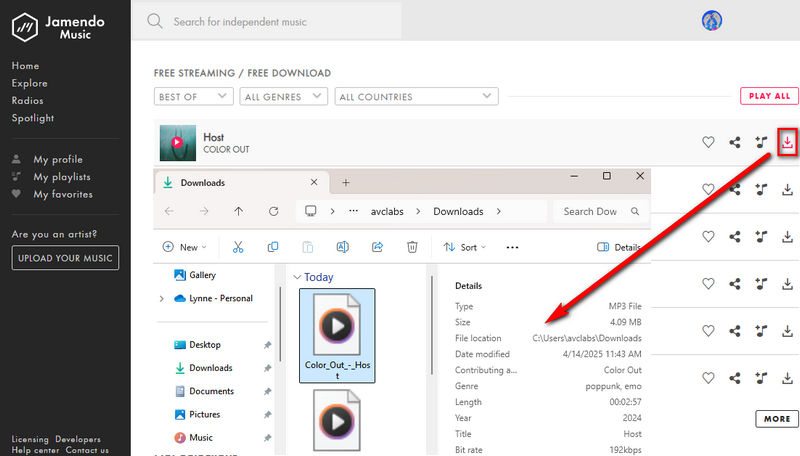
In addition to converting and downloading songs from streaming platforms to MP3, an alternative to MP3 Quack download is to look for some groundbreaking music platforms. For example, Jamendo. Founded in 2005, Jamendo provides a large number of free tracks covering electronic, rock, classical, and world music. Here are the specific steps to download MP3 using Jamendo:
Step 1 Visit the Jamendo website (🔗 https://www.jamendo.com/) and browse or search for music using keywords, genres, or curated playlists. Jamendo hosts thousands of tracks.
Step 2 Not all tracks on Jamendo are free to download. Look for tracks labeled with a "Free Download" button or a Creative Commons license (e.g., CC BY, CC BY-NC). These licenses allow personal use, often requiring attribution to the artist.
Step 3 Click the "FREE DOWNLOAD FOR PERSONAL USE MP3 QUALITY" button on the track page. You may need to create a free Jamendo account or provide attribution to the artist as specified by the license.
Editor's Real Test (June 2026)
Pros
-
A massive music library with a curated selection of niche genres and over 600,000 tracks from over 40,000 independent artists.
-
Thousands of Creative Commons (CC) licensed tracks are available for free download, perfect for personal projects, podcasts, or videos.
-
Avoid copyright strikes and be safer than pirated music sources.
Cons
-
Focuses on independent artists, but doesn't offer hits or tracks from major labels.
-
Free downloads require attribution.
-
Audio quality is lower for free users (e.g., 128 kbps MP3, while paid plans offer higher quality.).
-
Some tracks lack proper ID3 tags (e.g., missing album art, incorrect genre tags).
Conclusion
The keyword search feature of MP3 Quack offers convenience to users. Its straightforward operation makes it user-friendly for all types of users. However, its drawbacks cannot be ignored, particularly frequent ads posing data security risks and poor audio quality. This article thoughtfully compiles several alternatives to MP3 Quack. You can choose from options like Spotify downloader tools, YouTube to MP3 converters, or websites offering free MP3 downloads. Among these, TunePat Music One stands out as the superior replacement due to its distinct advantages.
As a powerful music converter, this tool enables users to quickly, accurately, and batch download high-quality music. Its diverse music sources and flexible output formats cater to various usage scenarios. It also supports converting podcasts, radio content, and more into MP3 files effortlessly. Don't hesitate! Click the "Download" button below to unlock this perfect solution and start enjoying your favorite tracks today!
Olivia Anderson
Senior Writer