SpotiFLAC Review 2026: Is It Still Working, Safe, and Worth Using?
 By Olivia Anderson
Spotify Tips
Updated on 11/06/2026
SpotiFLAC was a popular free tool for downloading FLAC music using Spotify links. But in October 2026, its original GitHub repositories were removed, leaving many users wondering whether the software still works and where to get it safely.
The original SpotiFLAC Desktop is no longer maintained. For mobile users, the developer has released Mornye Mobile as its replacement. A separate Mornye Desktop application is also available, offering music browsing, extension-based downloads, and local library management. However, its desktop version is still relatively new and has some usability issues.
We installed Mornye Desktop on Windows and tested its download features, including the actual quality of a FLAC file obtained through Amazon Music. In this review, we'll explain what happened to SpotiFLAC, how it works, whether it's safe, and what to use if you want music from Spotify rather than another service.
- SpotiFLAC at a Glance: Is It Still Working in 2026?
- What Is SpotiFLAC and How Does It Work?
- Is SpotiFLAC Safe and Legal?
- How to Use SpotiFLAC in 2026: Mornye Desktop
- Does SpotiFLAC Download Real Lossless FLAC?
- SpotiFLAC Not Working in 2026? Common Problems and Fixes
- Best SpotiFLAC Alternatives in 2026
- FAQs About SpotiFLAC
SpotiFLAC at a Glance: Is It Still Working in 2026?
The original SpotiFLAC Desktop is discontinued, although existing installations may still work. SpotiFLAC Next and Mornye continue as separate projects.
On October 20, 2026, the developer announced that the public GitHub repositories for SpotiFLAC and SpotiFLAC Next had been removed following a legal notice from Spotify's representatives. The developer later clarified that the original desktop app would no longer receive updates, while SpotiFLAC Next would continue to be maintained without its former public GitHub repository.
Meanwhile, SpotiFLAC Mobile has been replaced by Mornye, which now offers separate mobile and desktop applications with a wider range of music management and download features.
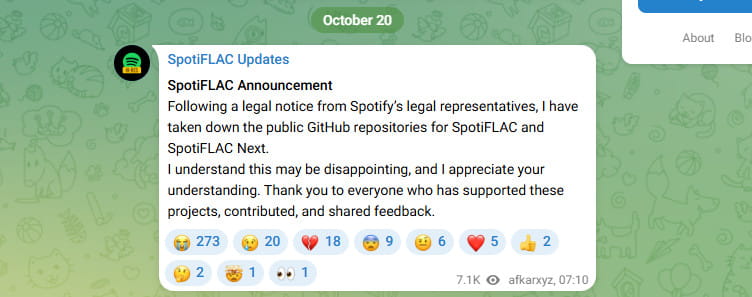
SpotiFLAC Versions and Current Status:
| Version | Platforms | Status (November 2026) |
|---|---|---|
| SpotiFLAC Desktop | Windows, macOS, Linux | Discontinued Existing installations may still work |
| SpotiFLAC Next | Desktop | Repository Removed Maintained separately |
| SpotiFLAC Mobile | Android, iOS | Replaced Succeeded by Mornye |
| Mornye Mobile | Android, iOS | Active Extension-based downloads |
| Mornye Desktop | Windows, macOS, Linux | Available Music browsing, downloads, and library features |
| Mornye Python | Python / CLI | Successor to the earlier Python module |
You can read the developer's original statements on the SpotiFLAC Updates channel. The announcements don't provide a new publicly verifiable download channel for the original SpotiFLAC Desktop or SpotiFLAC Next.
SpotiFLAC Pros and Cons
SpotiFLAC has its appeal, especially for users who want FLAC downloads without paying for another tool. But its reliance on external music services and the end of updates for the original desktop app are worth considering.
Pros
- Free, with open-source versions available
- No Spotify Premium needed for the original song-matching process
- Can download FLAC files when a matching lossless source is available
Cons
- The original desktop app no longer receives updates
- Downloads depend on external music services and their availability
- Downloaded recordings may differ from the versions on Spotify
If you already have SpotiFLAC installed, it may still be useful. For a new installation, Mornye is a more current project to look at, though it isn't exactly the same application.
Want an easier way to download Spotify music? TunePat Spotify Converter lets you access your Spotify library and batch-convert songs, albums, and playlists to MP3 or FLAC while preserving ID3 tags. Android users can try TuneCable Spotify Downloader.
What Is SpotiFLAC and How Does It Work?
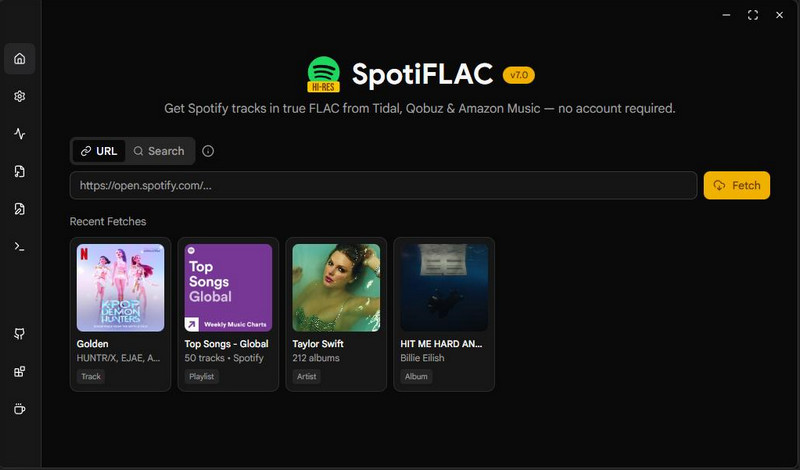
SpotiFLAC is a free tool that uses Spotify links to find matching songs on other music services. Instead of downloading audio directly from Spotify, it reads track details such as the title, artist, album, and ISRC, then searches providers like Amazon Music, Tidal, or Qobuz for the corresponding recording.
Although the original SpotiFLAC Desktop is no longer maintained, its successor Mornye uses a similar approach with a newer extension system. In our Windows test, Spotify Web handled music browsing, while Amazon Music and YouTube Music were available as download providers.
The key difference is that SpotiFLAC uses Spotify to identify songs, but gets the audio from other music services. This means the downloaded track may not always match the exact version on Spotify, and some songs may not be available from the selected provider.
Is SpotiFLAC Safe and Legal?
SpotiFLAC isn't necessarily unsafe, but you need to be careful about where you download it. The original project was open-source, which allowed users to inspect its code. However, its official GitHub repository was removed in October 2026, and some third-party websites still offer installers under the SpotiFLAC name. There's no guarantee these files are identical to the original releases.
Since the original repository is no longer available, we couldn't verify a current SpotiFLAC installer against an official release. We also haven't included a VirusTotal scan of third-party installers, as the results wouldn't confirm whether a file came from the original developer. During our Mornye Desktop test, Windows SmartScreen displayed a "Windows protected your PC" warning. We checked the download source before continuing, and the app installed successfully. Still, a SmartScreen warning alone doesn't prove that software is harmful or safe.
Which SpotiFLAC Download Sources Are Official?
| Source | What You Should Know |
|---|---|
| Mornye Website | Developer-linked website for Mornye |
| Mornye GitHub | Public repositories and releases for Mornye |
| spotiflac.com | Offers SpotiFLAC downloads, but its connection to the original developer hasn't been confirmed |
| spotiflac.app | SpotiFLAC-branded website; official affiliation hasn't been confirmed |
| Third-party mirrors | May contain outdated or modified installers |
The original developer has also warned that third-party forks using the SpotiFLAC name aren't necessarily official or maintained by the original team. If you want to try Mornye, it's safer to start with its developer-linked website or GitHub releases rather than downloading an old SpotiFLAC installer from an unknown source.
As for legality, downloading copyrighted music without permission may violate copyright laws or music service terms, depending on your location and how the files are used. Spotify's User Guidelines restrict unauthorized copying, ripping, recording, and transferring of its content. Getting audio from another service doesn't automatically make a download legal. If you want an authorized option, consider purchasing downloadable music or using Spotify's built-in offline listening.
How to Use SpotiFLAC in 2026: Mornye Desktop
We installed Mornye Desktop on Windows to see how its download features work in practice. The app supports music browsing, local playback, and downloads through extensions, but getting everything set up took some trial and error.
How to Set Up Mornye Desktop
Step 1 Install Mornye Desktop and Add Extensions
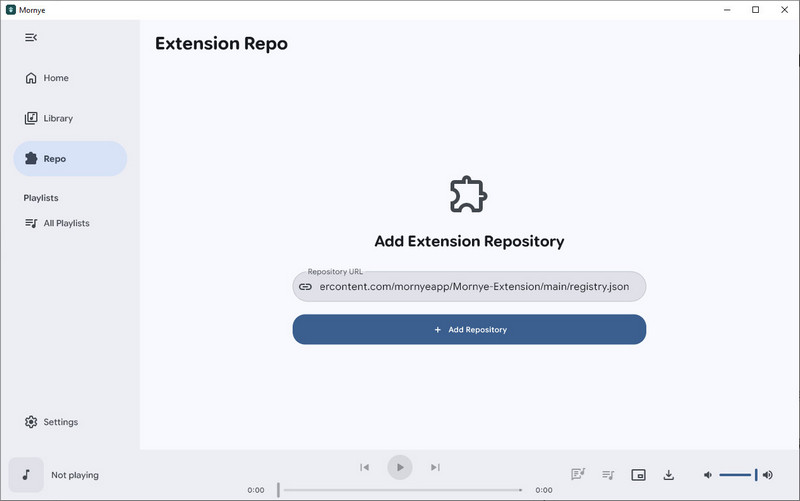
Download Mornye from its official GitHub releases and complete the setup. During our test, Windows SmartScreen displayed a security warning. After checking the source, we continued with installation. Once the app opened, we added the extension repository under Repo and installed Spotify Web for music browsing, along with Amazon Music for downloads.
Step 2 Browse Music and Choose a Download Source
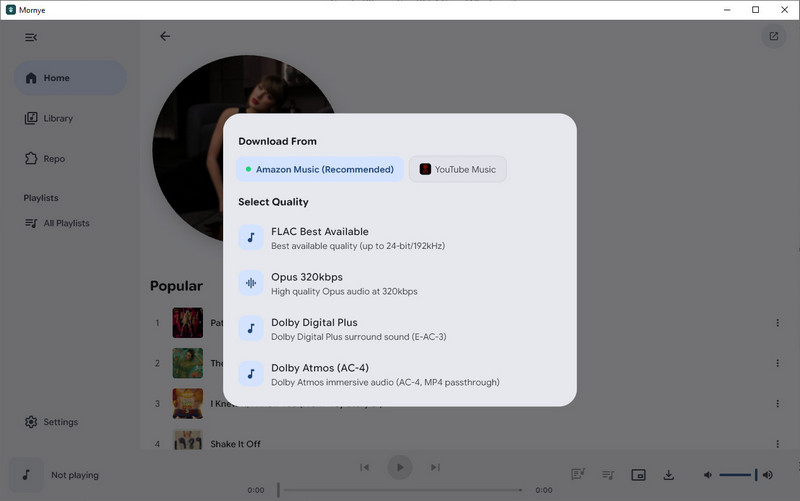
After restarting Mornye, we could browse featured artists, playlists, and albums. Open the artist or playlist you want to download, then click the Download button. From the menu, choose Download All, Album Only, or another available option.
Step 3 Check Download Progress and Saved Files
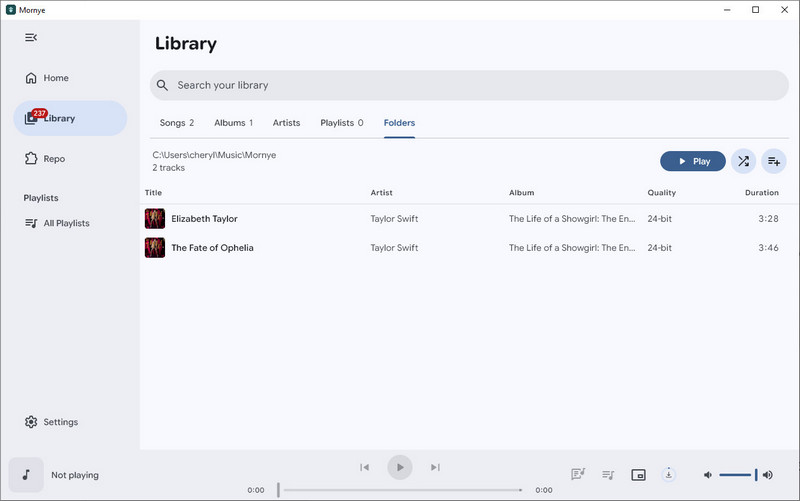
Once the download starts, open Library and check the Downloading section to see how many tracks are in the queue. You can pause downloads when needed, while completed tracks appear under Folders. In our test, downloading a song lasting around 3.5 to 4 minutes took roughly 1 minute per track, although speeds may vary depending on the provider and network connection. We also checked one downloaded FLAC file using MediaInfo and Spek, with the results covered in the next section.
Our Windows Test: Does Mornye Desktop Actually Work?
Our first experience with Mornye Desktop wasn't smooth. Even after installing Spotify Web v1.10.6, searching for songs like "Shape of You" returned a "Failed to load content from this link" error. Pasting a Spotify track URL also triggered "This link is not supported," while some attempts kept loading before returning to the Home page. We installed additional music extensions, but the search issues continued during our initial test.
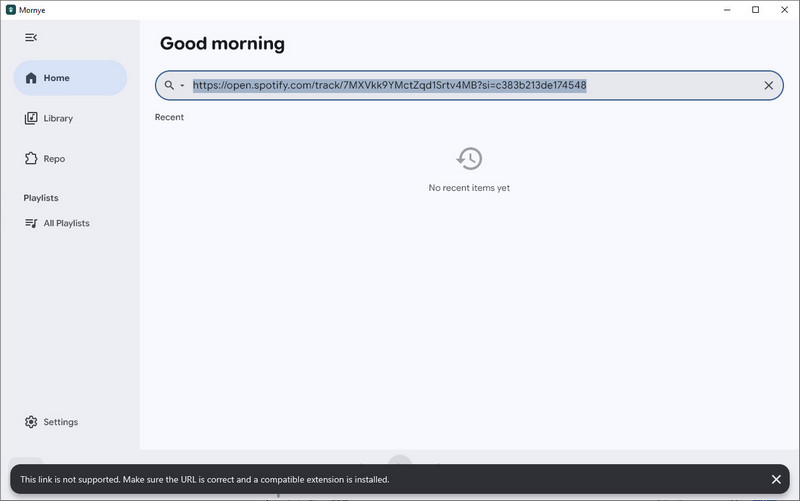
Although restarting the app helped with music browsing, direct Spotify URL importing remained unreliable. Mornye eventually worked well enough for us to download music, but its search and link handling still need improvement. We also didn't test enough tracks to judge how reliably it handles large download queues.
What about Mornye Mobile? Mornye Mobile is the direct successor to SpotiFLAC Mobile and is available for Android and iOS. Android users can install the APK, while the iOS version requires sideloading through tools such as AltStore or Sideloadly. You can find the available packages on the official Mornye Mobile releases page.
Does SpotiFLAC Download Real Lossless FLAC?
A FLAC file isn't automatically proof of lossless source quality. Audio that was previously compressed can also be saved as FLAC, so it's worth checking the actual file rather than relying on its extension or the quality option selected in the app. We looked at both user reports about the original SpotiFLAC and the results of a file downloaded during our Mornye Desktop test.
What Do Real SpotiFLAC Users Say About FLAC Quality?
Reports from SpotiFLAC users are mixed. In a Reddit discussion, one user shared an audio spectrogram, and other commenters thought it looked consistent with lossless audio, without an obvious cutoff typical of some lossy encodings.
However, another user reported getting 16-bit/44.1 kHz FLAC after selecting a Hi-Res option. That doesn't mean the file was fake lossless, since CD-quality FLAC can still be genuinely lossless, but it didn't match the requested Hi-Res setting. Some users have also questioned whether certain Hi-Res downloads were truly high-resolution. These reports don't represent every download, but they show why it's worth checking the actual files.
Our Test: Is Mornye Desktop's FLAC Truly Lossless?
For our Windows test, we selected Amazon Music as the download provider and used the FLAC Best Available option to download Taylor Swift's "The Fate of Ophelia." We then checked the saved file using MediaInfo and Spek.
MediaInfo confirmed that the downloaded file was encoded in 24-bit/48 kHz FLAC, with two audio channels, an average bitrate of approximately 1,760 kbps, and a duration of 3:46. The Spek spectrogram also showed high-frequency content extending beyond 20 kHz, without an obvious fixed cutoff commonly associated with some lossy audio sources.
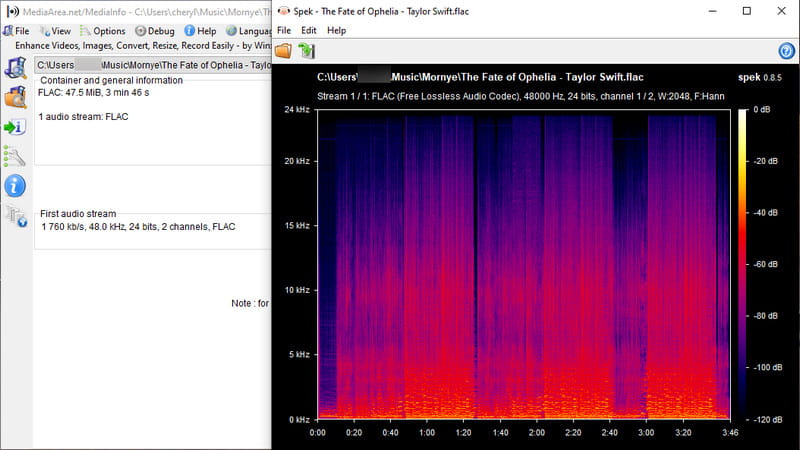
These results suggest that Mornye Desktop can deliver high-quality FLAC files through Amazon Music. However, while the file uses lossless FLAC encoding and its spectrum looks consistent with a lossless source, this doesn't conclusively prove that the original recording was never compressed. Also, since the audio comes from Amazon Music rather than Spotify, the saved track may not always match the exact version in your Spotify playlist.
If you only want to listen to lossless music on Spotify, Spotify Premium supports up to 24-bit/44.1 kHz FLAC on compatible devices. You can also download Spotify music in lossless quality for offline listening within the app, but those downloads aren't standalone FLAC files you can freely transfer or manage elsewhere.
SpotiFLAC Not Working? Common Issues and Fixes in 2026
The original SpotiFLAC Desktop is no longer maintained, although previously installed copies may still work. Mornye Desktop and Mornye Mobile are newer options, but they can also run into problems with extensions, download providers, and app compatibility.
We've included issues reported by users, along with errors encountered during our Windows test. Find the problem that matches your situation below.
| Problem | Applies To | What to Try |
|---|---|---|
| Spotify Web extension errors | Mornye Desktop | Check the extension, restart the app, or browse manually. |
| Downloads fail or songs aren't found | SpotiFLAC / Mornye | Check provider availability, update extensions, or try another source. |
| Slow downloads or frozen queue | Mornye | Pause the queue and retry after checking the connection and verification status. |
| 429 Too Many Requests | Mornye Extensions | Pause downloads and retry after the provider's rate limit clears. |
| App crashes or closes unexpectedly | Mornye Desktop (Windows) | Update the app and check GitHub for developer updates. |
| File-saving or storage errors | Mornye Mobile (Android) | Check storage permissions, available space, and the save folder. |
| iOS installation fails | Mornye Mobile (iOS) | Check the official IPA and sideloading requirements. |
| Wrong track or unexpected FLAC quality | SpotiFLAC / Mornye | Verify the source and inspect the downloaded file. |
During our Windows test, restarting Mornye helped restore music browsing, but Spotify URL importing remained unreliable. If you're still having trouble, check the Mornye GitHub issues for updates and similar reports. Some provider-related problems may be outside the app's control.
If your old SpotiFLAC installation no longer works, avoid downloading replacement installers from unverified websites. When troubleshooting doesn't help, a maintained SpotiFLAC alternative may be a better option.
Best SpotiFLAC Alternatives in 2026
If SpotiFLAC is no longer working for you, the right replacement depends on how you listen to music. The table below compares SpotiFLAC with five alternatives, covering desktop converters, Android downloads, free open-source tools, and official lossless music options.
| Tool | Platform | Source / Formats | Best For |
|---|---|---|---|
| SpotiFLAC | Windows / Mac / Linux | External providers; FLAC, MP3, M4A, WAV, Opus | Free downloads |
| TunePat Spotify Converter Top Pick | Windows / Mac | Direct Spotify; MP3, FLAC, WAV, AAC, ALAC, AIFF | Fast batch downloads & ID3 tags |
| TuneCable Spotify Downloader | Android | Direct Spotify; MP3, AAC, WAV, FLAC | Mobile downloads |
| spotDL | Windows / Mac / Linux | YouTube; MP3, M4A, Opus | Free, open-source downloads |
| Spotify Premium | Desktop / Mobile | Spotify Lossless FLAC | Official lossless listening |
| Qobuz Download Store | Web / Computer | Purchased music; FLAC, WAV, ALAC, MP3, etc. | Buying lossless music |
1. TunePat Spotify Converter — Best for Windows & Mac Users
TunePat Spotify Converter is an easy-to-use SpotiFLAC alternative for Windows and Mac. Instead of searching for matching songs on other music services, it lets you access your Spotify library directly and convert songs, albums, and playlists in just a few clicks. You can save music as MP3 files at up to 320 kbps or FLAC files, with batch conversion and ID3 tags such as artist, album, and track title preserved.
For listeners who want to use Spotify as the actual audio source, TunePat also offers a Spotify App recording mode. According to TunePat's instructions, you need a Premium account with Lossless enabled, select the Spotify App as the source, choose Recording Mode, and set the output format to AUTO. This helps preserve Spotify's original lossless audio rather than switching to an external source. It's a convenient option for users who want to save Spotify music as local files without relying on third-party music providers.

2. TuneCable Spotify Downloader — Best for Android Users
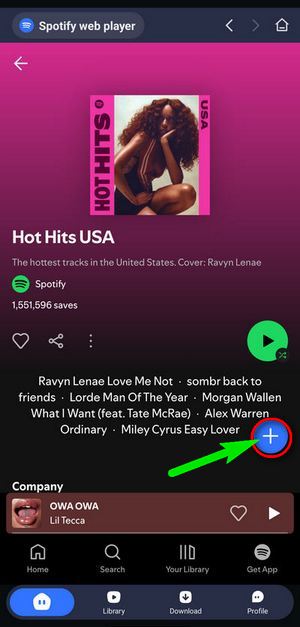
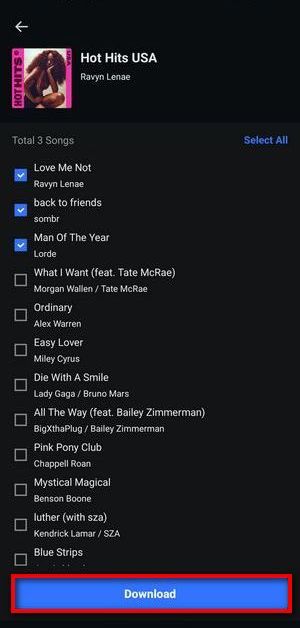
For Android users who want to download Spotify music without using a computer, TuneCable Spotify Downloader is another option. Its Android app supports downloading songs, albums, playlists, and podcasts, with MP3, AAC, WAV, and FLAC output. Users can choose tracks in batches and find completed downloads in the app's Library.
Unlike Mornye Mobile's extension-based approach, TuneCable provides an integrated Spotify browsing and download interface without requiring users to install separate extensions. It's a convenient choice for Android users who prefer a simpler way to download and manage Spotify music directly on their phones.
3. spotDL — Best Free and Open-Source Alternative
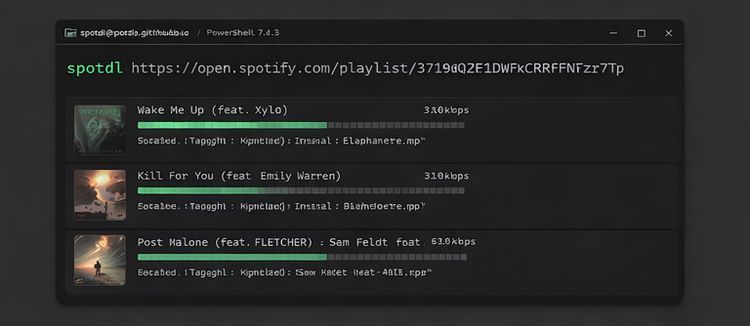
If you prefer a free tool and are comfortable using command-line software, spotDL is worth considering. It uses Spotify metadata to find matching audio from YouTube, supporting individual tracks, albums, and playlists. It also preserves useful song information when saving files.
The main trade-off is audio quality. As explained in our spotDL review, the tool normally downloads compressed audio from YouTube, so it isn't a reliable choice for genuine lossless FLAC, even if you convert the output to FLAC afterward. It's better suited to users who prioritize free downloads over lossless quality.
4. Spotify Premium and Qobuz — Best for Official Lossless Music
If standalone audio files aren't important, Spotify Premium is the simplest official option. It supports lossless listening up to 24-bit/44.1 kHz FLAC on compatible devices and allows offline playback within the Spotify app. However, downloaded songs remain tied to Spotify and can't be exported as ordinary FLAC files.
If you specifically want genuine lossless files that you can keep, Qobuz Download Store offers DRM-free music purchases in CD-quality and Hi-Res FLAC. You pay for individual tracks or albums rather than downloading your Spotify playlists, but the purchased files can be stored and played on compatible devices independently of a streaming subscription.
For more options focused on downloadable audio files, you can compare other FLAC music downloaders, including tools that aren't limited to Spotify.

FAQs About SpotiFLAC
Q1. Is SpotiFLAC still working in 2026?
A: The original SpotiFLAC Desktop has been discontinued, but previously installed versions may still work. Mornye Mobile is the developer's replacement for the original mobile app, while Mornye Desktop is a separate, newer application that is still evolving.
Q2. Is SpotiFLAC safe to download and use?
A: SpotiFLAC was an open-source project, but its original GitHub repository is no longer publicly available. Files from unofficial download sites cannot be assumed safe. If you're looking for the developer's newer software, use the official Mornye GitHub account instead of unknown mirrors.
Q3. Do I need Spotify Premium to use SpotiFLAC?
A: No. SpotiFLAC uses Spotify song information to find audio from other music services, so Spotify Premium isn't required. Mornye also supports downloads without a Premium subscription.
Q4. Is SpotiFLAC available for Android and iOS?
A: The original SpotiFLAC Mobile has been succeeded by Mornye Mobile, which offers Android and iOS releases. Installation methods and available features vary by platform, so check the official releases for the latest packages and instructions.
Q5. Does SpotiFLAC download real lossless FLAC?
A: SpotiFLAC can download FLAC files, but the actual audio quality depends on the source provider. In our Mornye Desktop test, we downloaded a 24-bit/48 kHz FLAC file through Amazon Music. MediaInfo and Spek results were consistent with a lossless source, although they couldn't conclusively verify the original recording's full encoding history.
Final Verdict: Is SpotiFLAC Worth Using in 2026?
SpotiFLAC was a useful free FLAC downloader, but its original desktop version is no longer maintained. Mornye is the developer's newer project. In our test, Mornye Desktop successfully downloaded a 24-bit/48 kHz FLAC file through Amazon Music. However, it doesn't download audio directly from Spotify, so tracks may differ from your Spotify versions or be unavailable. Search and Spotify link importing also remained unreliable.
Mornye is worth trying if you're comfortable downloading music from external providers. If you want to save Spotify tracks as local MP3 or FLAC files using Spotify as the audio source, TunePat Spotify Converter offers a simpler desktop workflow with batch conversion and ID3 tag preservation. For Android, TuneCable Spotify Downloader is another option for downloading music directly on your phone.
Olivia Anderson
Senior Writer