Alexa Music Stations: How They Work, Best Stations, and Limitations
 By Olivia Anderson
Amazon Music Tips
Updated on 6/26/2026
By Olivia Anderson
Amazon Music Tips
Updated on 6/26/2026
Tired of constantly searching for the right playlist? Whether you’re making breakfast, unwinding after work, or need focus music, Alexa Music Stations deliver the perfect soundtrack. Use a voice command, and Alexa will instantly play continuous music based on your favorite artist, genre, or even your mood. In this guide, we’ll explain exactly how Alexa Music Stations work, explore popular station types, outline their limitations, and show you how to enjoy Alexa Music Stations even without an internet connection.

Part 1: What Are Alexa Music Stations and How They Work?
Alexa Music Stations are a smart radio feature based on Amazon Music. Users can make a voice request to Alexa for a specific artist, music genre, or mood, and the system will automatically generate a continuous playlist without requiring manual song selection.
This feature relies on an internet connection and continuously optimizes its recommendations based on your playback history. Unlike manually playing individual songs or fixed playlists, Alexa Music Stations emphasize a "passive listening" experience. With a simple command like "Play pop music" or "Play relaxing music," Alexa will continuously stream relevant content, making it ideal for daily use at home, during work, or while resting.
While Alexa Music offers a convenient music listening experience, it is entirely dependent on an internet connection. If you want to enjoy Amazon Music offline or permanently save your favorite tracks, TunePat Amazon Music Converter is a reliable option. 👇
Part 2: Best Alexa Music Stations
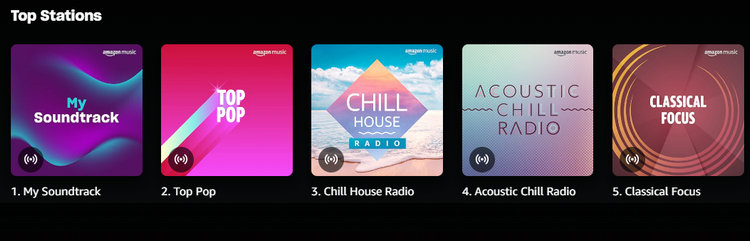
1. My Soundtrack
My Soundtrack plays a mix of your favorite songs and new recommendations based entirely on your unique listening preferences. This station is especially popular for its effortless, hands-free experience.
- Best for: Everyday listening, hands-free background music
- Ideal scenarios: Cooking, cleaning, working from home, relaxing
2. Top Pop
Top Pop is a station focused on current and classic pop hits across mainstream charts. You’ll hear trending pop songs from major artists.
- Best for: Fans of mainstream pop music
- Ideal scenarios: Commuting, casual listening, social gatherings
3. Chill House Radio
Chill House Radio delivers exactly what its name promises: a curated stream of relaxed house music characterized by mellow beats and smooth electronic textures.
- Best for: Light electronic and house music lovers
- Ideal scenarios: Evening relaxation, late-night work, background listening
4. Acoustic Chill Radio
Acoustic Chill Radio features stripped-down versions of pop and folk tracks, intimate unplugged performances, and vocals with a softer, calming quality.
- Best for: Fans of acoustic, vocal-focused music
- Ideal scenarios: Reading, winding down, quiet evenings
5. Classical Focus
Classical Focus is a carefully curated station of instrumental classical music, designed to support concentration and cultivate a peaceful atmosphere. It provides an auditory environment that minimizes distractions, making it an ideal companion for deep work, study, or mindful relaxation.
- Best for: Studying, deep work, concentration
- Ideal scenarios: Office work, studying, meditation
Part 3: Limitations of Alexa Music Stations You Should Know
Limited song selection control: Users cannot pick specific tracks or change their order. Once a station begins, Alexa controls the sequence based on its algorithm.
Requires stable internet: The feature depends entirely on an internet connection. Unstable or lost connectivity will interrupt playback or prevent stations from starting.
Recommendations may feel repetitive or inaccurate: You may hear repeated songs or tracks that don’t fully align with your requested mood or style.
Part 4: How to Enjoy Alexa Music Stations Offline
If you wish to overcome the limitations mentioned above, we recommend downloading music from Alexa Music Stations for local playback, which solves the issue once and for all. For this purpose, the professional tool TunePat Amazon Music Converter is the ideal choice.
TunePat can directly download songs, albums, and playlists from Amazon Music to your computer, saving them in MP3, AAC, WAV, FLAC, AIFF, or ALAC format, so you can keep your music files forever. Additionally, TunePat supports batch conversion at up to 10× speed, enabling quick downloads of large collections while fully preserving original audio quality and ID3 tags.

TunePat Amazon Music Converter
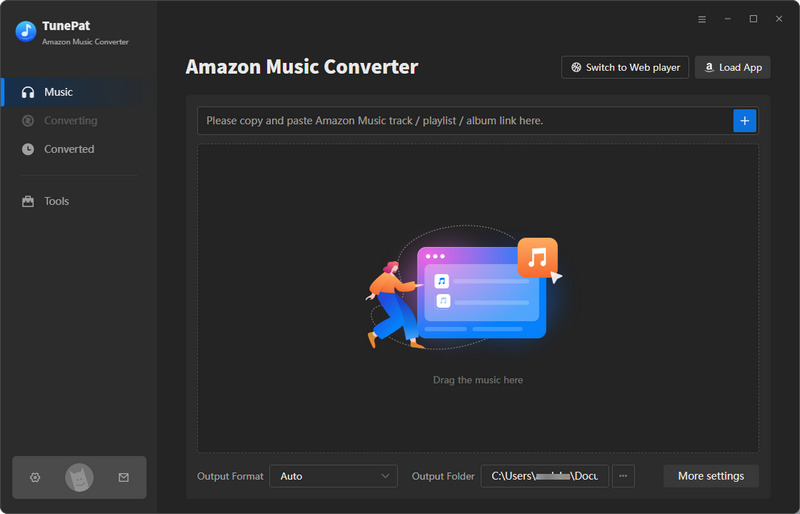
Step 1 Launch TunePat Amazon Music Converter on your computer. You will see the interface shown below. You can click to switch to the Amazon Music app or web player.
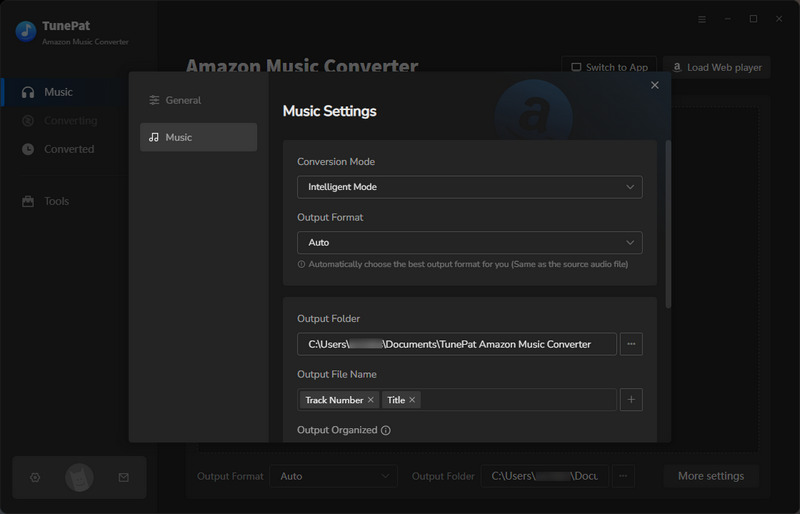
Step 2 Open the settings window. Here you can customize some basic settings, such as conversion mode, output format, bit rate, sample rate, output folder, etc.
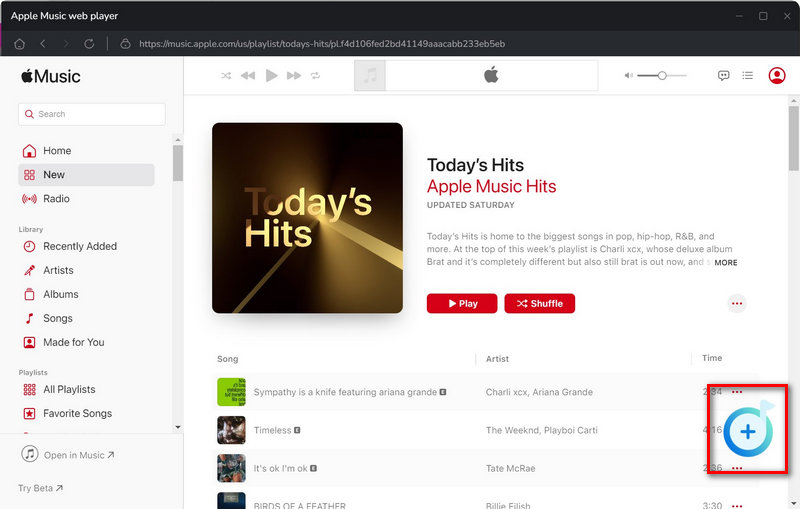
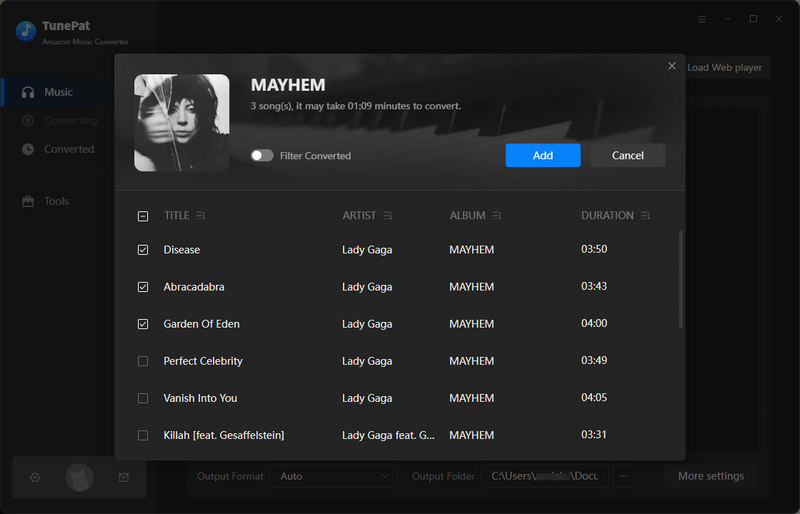
Step 3 Return to Amazon Music and sign in to your Amazon Music account. Browse for the music you want to download. Then click the "+" button. TunePat will load these songs. Select the songs you want to keep and click the "Add" button to add them to TunePat.
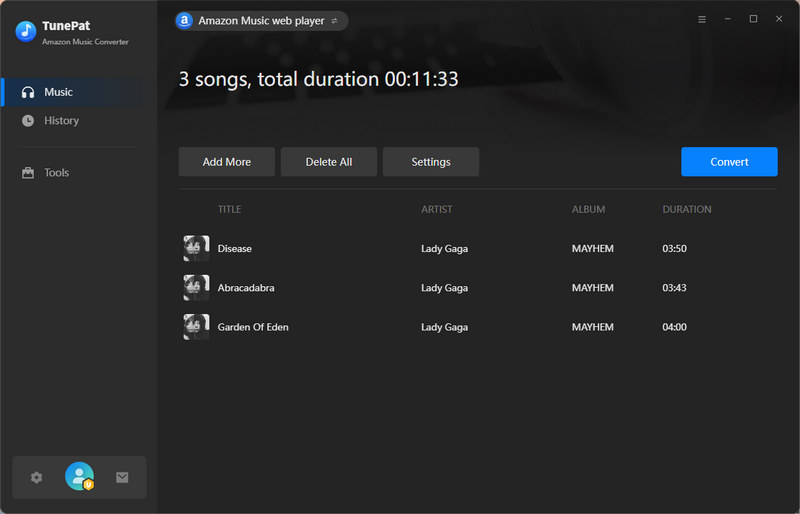
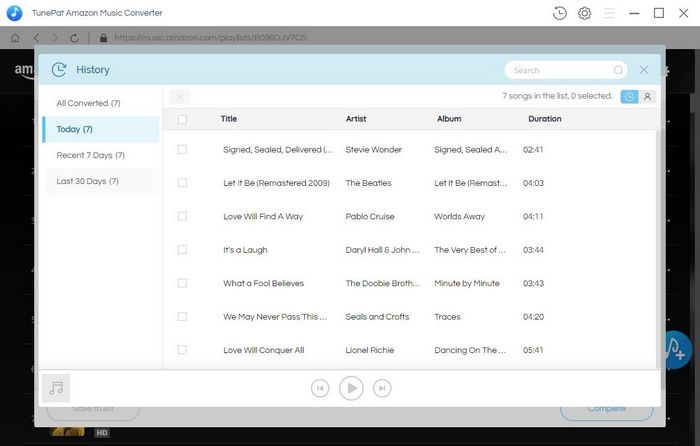
Step 4 Click "Convert" to start conversion. TunePat will begin converting the songs. Wait a moment, and TunePat will download the songs. A folder containing the downloaded music files will automatically pop up. Alternatively, you can click the "History" module to view these downloaded songs.
Conclusion
Alexa Music Station lets you enjoy music effortlessly without lifting a finger. While it's perfect for easily streaming music at home or on the go, there are still some limitations. If you want more control and offline playback, downloading Amazon Music in advance is a practical way to enhance the experience. Tools like TunePat Amazon Music Converter can perfectly achieve your goals. If you're interested, download and try it!





Olivia Anderson
Senior Writer